Whop-MCP: The AI Revolution in Store Management and the Signalyze VIP Story
How we bridged the Whop.com ecosystem with AI assistants (Claude, Cursor, Gemini) using Whop-MCP. A deep dive into specialized technical challenges and the autonomous optimization of Signalyze VIP.
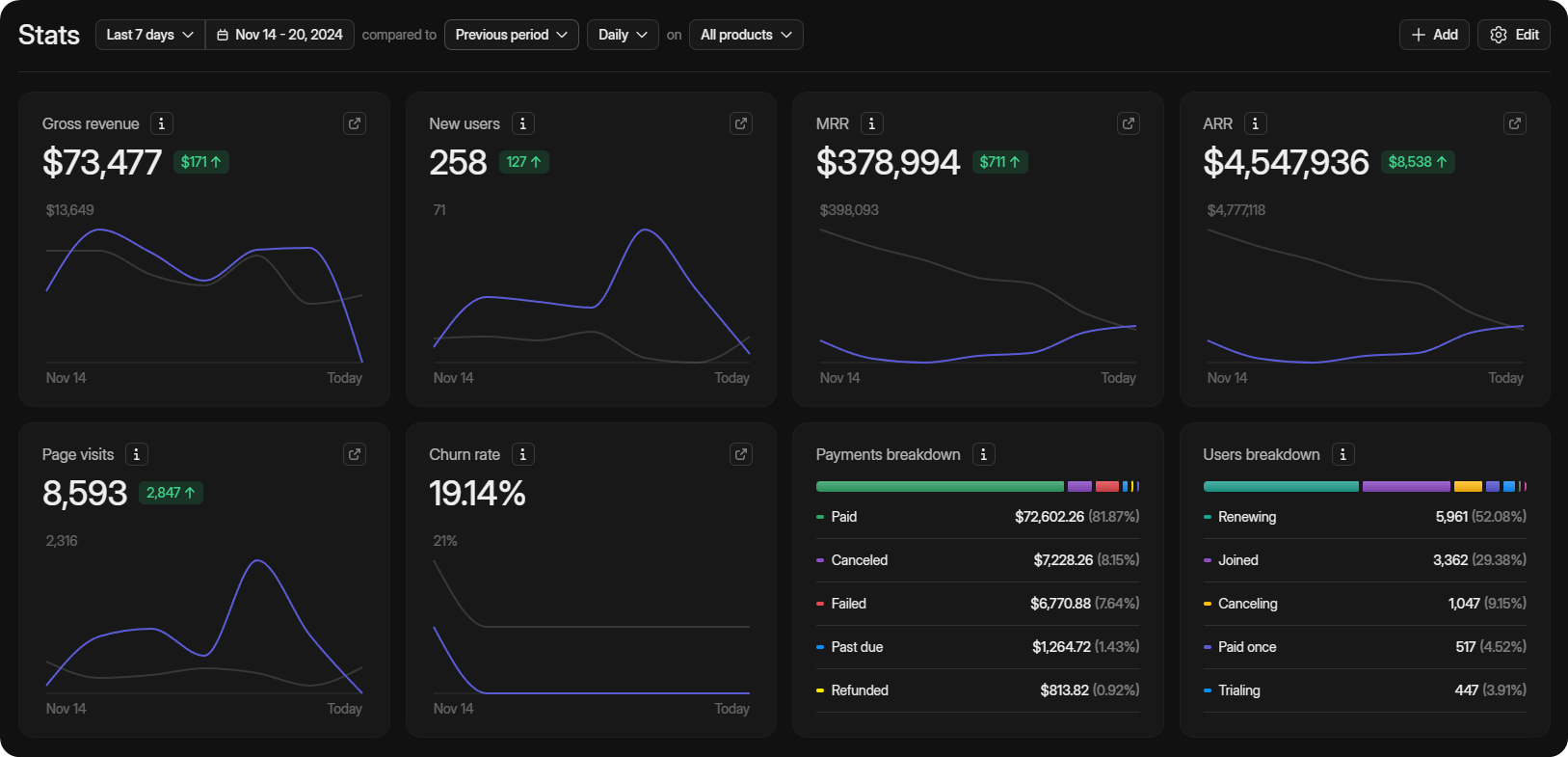
Imagine you have a digital product. It could be a Telegram signal group, a SaaS application, or even a high-value Excel sheet… When you decide to sell it to the world, the biggest hurdle isn’t usually writing the code—it’s the operations. Payments, memberships, invoices, customer reviews… before you know it, you’re doing more “shopkeeping” than actual developing.
This is where Whop.com shines. Whop is like “Shopify on Steroids” for digital creators. But today, our main topic isn’t just Whop itself, but how we made it “smarter.”
Today, I’ll share how we handed over the “keys” of your Whop store to AI assistants (Claude, Cursor, or Gemini), the technical storms we weathered, and how we autonomously built and optimized the Signalyze VIP store.
 Whop: The new fortress of the digital economy.
What is Whop? (A Friendly Overview)
If you haven’t heard of Whop, let me summarize: In the past, to sell something digital, you had to set up a POS, build a membership system, write Discord bots, and handle a mountain of tasks. Whop centralizes all of this under a single, powerful “Dashboard.”
Picture waking up with a brilliant trading strategy you want to share with the world. Whop gives you:
- Instant Start: Create an “Access Pass” in seconds.
- Global Payments: Accept payments worldwide (including crypto!).
- Community Management: Deliver content via Discord, Telegram, or a dedicated web portal.
- Data Insights: Track who bought what, when they cancelled, and which region is most profitable.
In short, Whop is the sanctuary for those who want to focus on their craft while someone else handles the selling. But every successful sanctuary has a cost: Management overhead. As products and campaigns grow, you can get lost in the dashboard. That’s where AI comes to the rescue.
Enter MCP: The Magic Bridge
In my previous posts (e.g., DevTo-MCP, OmniWire-MCP), I discussed the Model Context Protocol (MCP). MCP is the magic bridge between AI models and the outside world.
In the modern era, AI assistants like Claude are incredibly smart but essentially “blind and deaf.” They can only talk about their training data. We need to give them a window to the real world. Think of MCP as a “USB Drive” or a “Universal Adapter” for AI models.
What are the Benefits of Adding MCP to Whop?
How does it make life easier for the average store owner? Let’s look at real scenarios:
- Instant Analysis: Ask Claude, “Analyze which package performed best last week.”
- Automation: Tell Cursor, “Create a new promo code and announce it to all VIP members.”
- Content SEO: Have your AI assistant fill in empty product descriptions with SEO-optimized copy.
We did exactly that. With the Whop-MCP server, we turned Whop’s massive API ecosystem into a set of “Tools” that AI can understand. Now, AI doesn’t just write code; it reads your business data and takes action on your behalf.
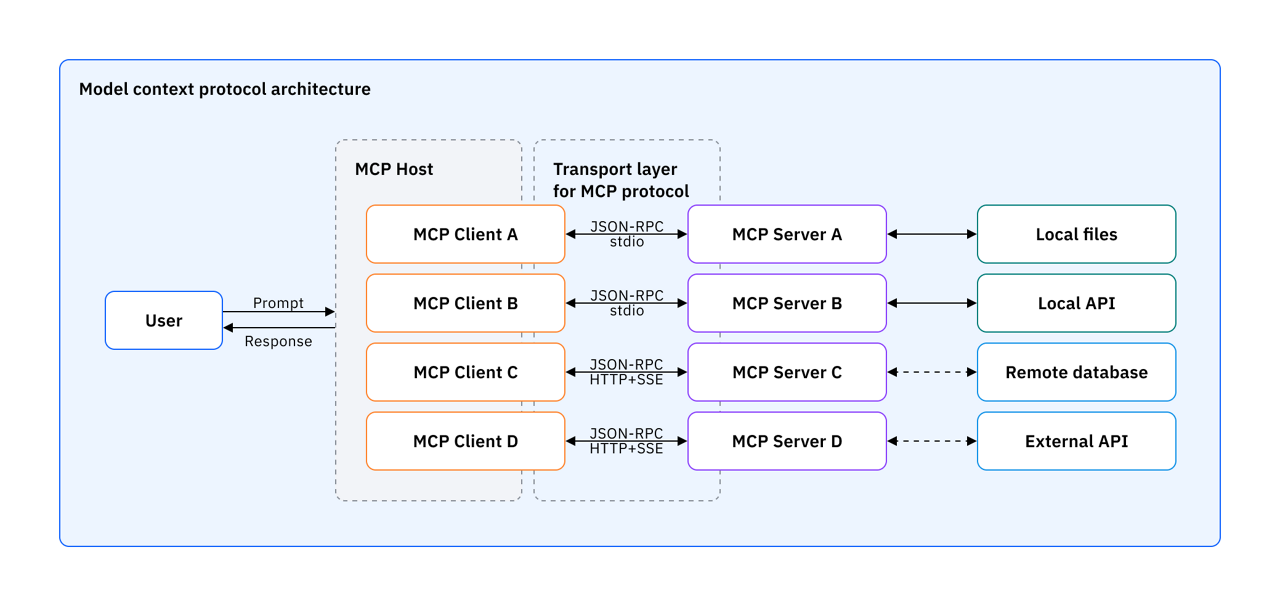 The bridge between AI and Whop: Model Context Protocol.
Technical Deep Dive: Why TypeScript and Whop API v2?
When it comes to software, we couldn’t leave anything to chance. An AI managing your financial data has zero room for error. That’s why TypeScript and strong typing were non-negotiable.
1. Racing with the V2 API: Detailed Analysis
Whop’s API is currently in version 2 and is highly dynamic. While it’s faster and more comprehensive than V1, it holds some “surprises” for developers. Some critical differences we noted during development:
- Data Consistency: Some endpoints return an
empty listinstead ofnullwhen no data exists. The AI must handle this correctly. - Price Data: Prices that were numbers in V1 sometimes arrive as strings in V2.
- Expansion Logic: When requesting related plans, the API might only return a list of IDs. We overcame these hurdles using Zod schemas to validate every step. Every piece of data entering our code passed through a Zod “customs check.”
2. The “Invalid Date” Nightmare (safeDate fix)
One of the most frustrating errors we encountered was date formatting in JSON data. Whop sometimes returns Unix Timestamps (seconds), sometimes Milliseconds, and sometimes null. If an AI assistant puts this into new Date(), the whole system crashes with an “Invalid time value” error.
To solve this, we placed a safeDate utility function at the heart of the project:
1
2
3
4
5
6
7
export function safeDate(input: any): string {
    if (!input) return "N/A";
    // If input is in seconds, multiply by 1000; otherwise, leave as is
    const d = new Date(typeof input === 'number' && input < 2000000000 ? input * 1000 : input);
    // If an invalid date object is formed or it's 0, use fallback
    return isNaN(d.getTime()) || d.getTime() === 0 ? "N/A" : d.toISOString();
}
This small but vital piece of code kept our project 100% stable. Our system now possesses “unbreakable” date processing capabilities.
Development Notes: Lessons Learned
Every project is a school. While building Whop-MCP, we learned these “life lessons”:
1. “Never Trust the AI Assistant, Supervise It”
AI can sometimes misinterpret API documentation and try to send non-existent parameters. Therefore, we validated all tool inputs with Zod down to the second. By applying the “fail-fast” principle, we prevented the AI from making incorrect calls to the API.
2. “The Power of Error Codes”
When Whop API returns a 401, it’s not enough for the AI to say “Token wrong.” we taught the AI to say, “Please check the WHOP_API_KEY environment variable.” This allows the end user to understand the issue instantly. These small touches elevate the Developer Experience (DX).
Modular Tool Structure
Whop-MCP isn’t just a server; it’s a “Swiss Army Knife.” We developed separate modules for each business domain:
- Products Module: List products, fetch details, and (most importantly) update them.
- Payments Module: Track sales and manage refunds.
- Memberships Module: Who’s membership is expiring? AI understands this for you.
- Promo Codes Module: Generate thousands of codes in seconds during campaign periods.
- Users & Reviews Module: AI summarizes customer feedback. “They generally find it expensive,” it might say.
- Affiliate Module: Track the performance of your sales partners.
This modularity ensures the project is both organized and easily integrated with future API features. Each module has its own independent type definitions and test sets.
A Real Case Study: Signalyze VIP Optimization
It wasn’t enough to just write the code; we needed to test it in the real world. The Signalyze VIP store was the perfect candidate.
Initially, the store was technically set up but felt a bit “spiritually” empty. Product names were basic, descriptions lacked SEO, and the “Premium” feel was missing.
We put Whop-MCP in the driver’s seat and gave it these instructions:
- Scan all products in the store and identify gaps.
- Scan the Signalyze corporate site (signalyze.arcehub.com) and understand its “Multi-AI Council” technology.
- Update product descriptions with persuasive English text, emphasizing character personas like Guardian (Risk Expert), Maverick (Opportunity Hunter), and Arbiter (Wisdom Master).
The results were incredible. In seconds, without opening any browser windows, the store was completely transformed. Tables, bullet points, and SEO tags were all professionally placed by the AI.
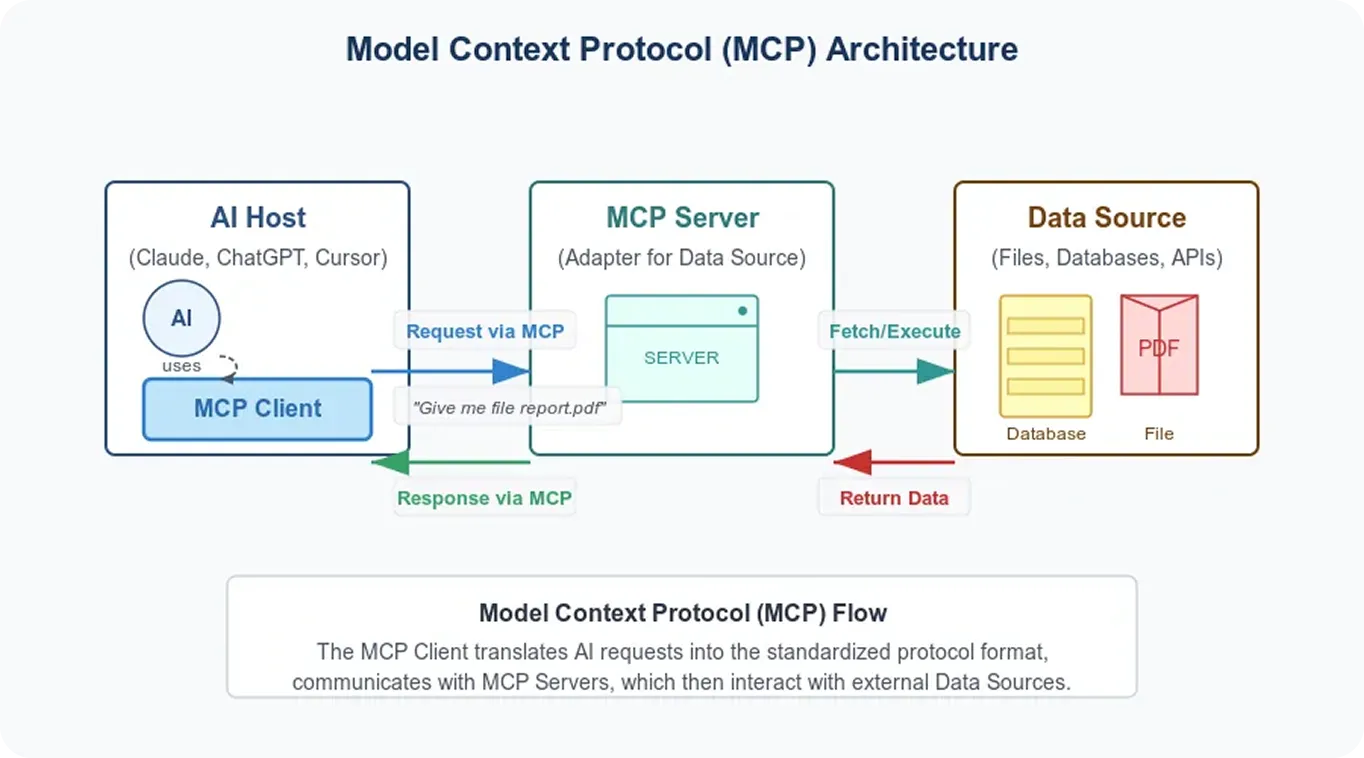 AI assistants no longer just write code; they manage a business from top to bottom.
Why Open Source?
We could have used this project behind closed doors. However, we believe in the Open Source philosophy because:
- Trust: You have the right to see the code that handles your store’s API keys. Transparency is everything in financial tools.
- Community Strength: One person might spot a bug another missed. The MCP ecosystem is a global collaboration.
- Ecosystem: We wanted to provide a “starting point” for thousands of developers using Whop.
We are faster together, stronger together. Every star on this GitHub repo is a signature on the AI revolution.
Why This Project is Critical for the Community?
Beyond being just a technical repo, this work holds 5 major significance for the community:
- Standard Setting: We established a “Gold Standard” for how massive platforms like Whop should talk to AI.
- Accessibility: We enabled shop owners who don’t know how to code to manage their shops via assistants.
- Security: We documented “Safe Handling” practices for API keys and financial data.
- Speed: We reduced the time it takes for developers to write their first tool with Whop API from 1 week to 5 minutes.
- Future Readiness: we provided an entry ticket to the future world of autonomous commerce.
Future Vision: AI-Centric Retailing
Whop-MCP isn’t just a “fix,” it’s a vision shift. In the future, store owners won’t spend their evenings looking at numbers on boards. Instead, they’ll get this summary from their AI assistant:
- “I noticed a spike in traffic from Brazil last night, so I immediately defined a 10% discount coupon for users there.”
- “I noticed a typo in your product description, fixed it, and optimized meta tags for Google searches.”
- “The churn rate increased by 2%; I’ve already sent a special farewell offer to those 5 individuals.”
This vision is the purest form of Human-AI Collaboration. We didn’t just build a tool; we laid a small brick in this massive transformation.
Technical Guide: How to Set It Up for Yourself
If you’re a developer and want to automate your own Whop store, the process is quite simple.
Step 1: Clone the Project
1
2
3
git clone https://github.com/furkankoykiran/whop-mcp.git
cd whop-mcp
npm install
Step 2: Get Your API Key
Obtain a Company API Key from the Whop Dashboard -> Developer section. Remember, this is your “golden key”; do not share it with anyone.
Step 3: Build and Test
1
2
3
npm run build
export WHOP_API_KEY=your_key_here
node dist/index.js test-ping
Acting Like a Professional Contributor
The development process of this project wasn’t just about writing technical code. Since it’s a “community project,” every step had to be handled professionally, as if an external team member were joining.
In the software world, we call this “Maintainer Discipline.” In this project, we applied:
- Modular Branching: Work was done via
feat/orfix/branches, not directly on main. - Conventional Commits: Each commit was written so its purpose could be understood in seconds.
- PR Lifecycle: A Pull Request was opened on GitHub and merged after a “squash” to maintain a clean history.
- Versioning: The project was released as
v1.1.1and everything was tagged.
This approach guarantees the project’s scalability and reliability. At every step, we asked, “Would someone else reading this code understand it?”
Final Words: Take Action!
AI assistants are no longer just smart parrots generating text. When we give them “managerial powers” with tools like Whop-MCP, they can complete hours of manual work flawlessly in seconds.
Whop-MCP is live, open source, and free for anyone who wants to grow their digital store without being crushed under operational load. Remember, in the future, businesses won’t be grown by people, but by AI managed by people. Are you ready to be part of this transformation?
Don’t waste time—introduce the Whop world to AI. Our journey doesn’t end here; we will continue with new modules and features.
If you want to give your assistant the keys to your store, I’ll see you at the repo:
👉 GitHub: furkankoykiran/whop-mcp
Stay with the code and the context.
Announcement: This entire post, its images, and the multi-platform publishing process (including GitHub operations and Dev.to distribution) were autonomously managed by an AI assistant leveraging both the Whop-MCP and DevTo-MCP servers. There’s nothing more exciting than an assistant telling its own birth story!
See Also:
- DevTo-MCP: Bridging AI with the DEV Community API
- The Story of Telegram Wallet P2P MCP SDK
- GitHub Actions CI/CD Pipeline
 Furkan Köykıran - Senior Software Engineer