Gönderi

Uptime Kuma ile Servis İzleme

Self-hosted uptime monitoring aracı Uptime Kuma. Docker kurulumu, HTTP/TCP/Ping monitoring, 90+ bildirim kanalı ve public status page oluşturma.

Uptime Kuma ile Servis İzleme

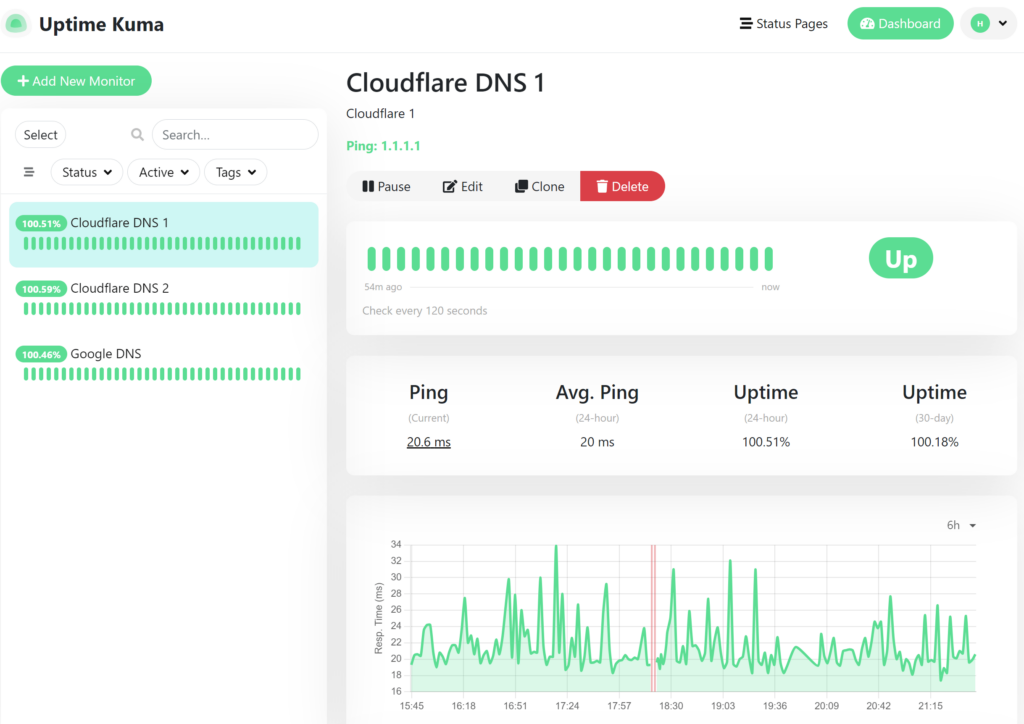
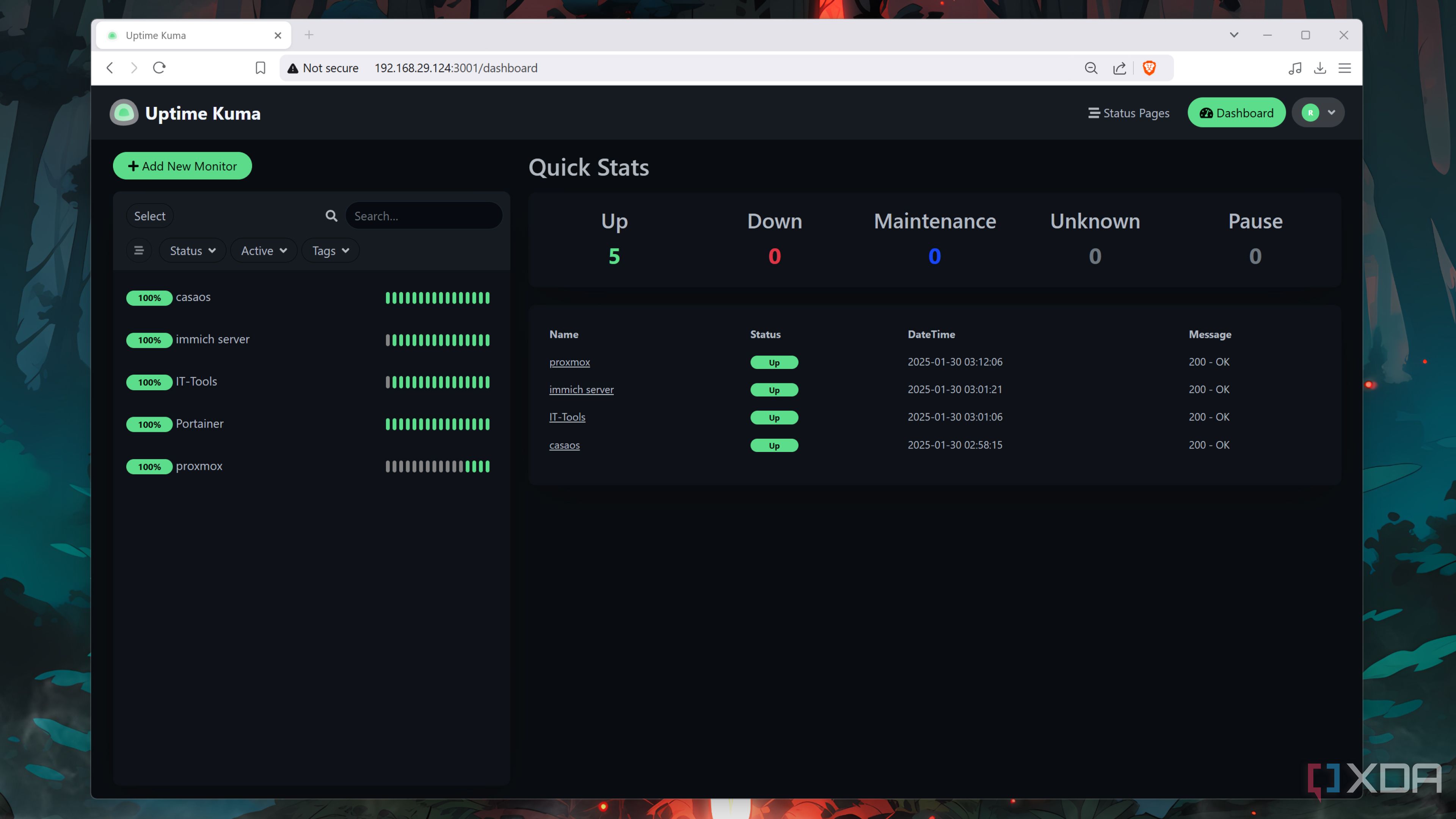
Modern uygulama ve servis yönetiminde uptime monitoring kritik bir gerekliliktir. Servislerinizin ne zaman offline olduğunu, ne kadar süre çalıştığını ve performans metriklerini takip etmek proaktif sistem yönetimi için şarttır. Uptime Kuma, self-hosted, açık kaynaklı, kullanıcı dostu bir monitoring çözümüdür.

Bu yazıda Uptime Kuma’yı Docker ile kurup, HTTP/TCP/Ping monitoring ayarlayıp, çoklu bildirim kanalları yapılandıracağız ve public status page oluşturacağız.

Uptime Kuma Nedir?

Uptime Kuma, JavaScript (Node.js + Vue.js) ile yazılmış, self-hosted bir uptime monitoring aracıdır. 2021’de Louis Lam tarafından başlatılan proje, hızla popüler oldu ve 50.000+ GitHub yıldızı aldı.

Öne Çıkan Özellikler

  • Çoklu Monitoring Tipleri: HTTP(S), TCP, HTTP(S) Keyword, Ping, DNS, Docker Container, ve daha fazlası
  • Güzel Arayüz: Modern, responsive dashboard
  • 90+ Bildirim Kanalı: Telegram, Discord, Slack, Email, Webhook, PagerDuty, ve daha fazlası
  • Status Page: Public veya private status page oluşturma
  • Multi-language: 40+ dil desteği (Türkçe dahil)
  • Certificate Expiry Monitoring: SSL sertifika takibi
  • Docker Support: Tek container ile çalışır
  • Free & Open Source: Tamamen ücretsiz

Uptime Kuma Docker Setup Docker ile Uptime Kuma kurulumu

Docker ile Kurulum

Docker Compose ile Hızlı Kurulum

1
2
3
4
5
6
7
8
9
10
11
12
13
14
15
16
17
18
19
20
21
22
23
24
25
# docker-compose.yml
version: '3.8'

services:
  uptime-kuma:
    image: louislam/uptime-kuma:1
    container_name: uptime-kuma
    volumes:
      # Data persistence
      - ./uptime-kuma-data:/app/data
    ports:
      - "3001:3001"
    restart: unless-stopped
    security_opt:
      - no-new-privileges:true
    environment:
      # Timezone (Türkiye için)
      - TZ=Europe/Istanbul
    labels:
      # Traefik labels (opsiyonel)
      - "traefik.enable=true"
      - "traefik.http.routers.uptime-kuma.rule=Host(`uptime.example.com`)"
      - "traefik.http.routers.uptime-kuma.entrypoints=websecure"
      - "traefik.http.routers.uptime-kuma.tls.certresolver=letsencrypt"
      - "traefik.http.services.uptime-kuma.loadbalancer.server.port=3001"

Kurulum:

1
2
3
4
5
6
7
8
9
10
11
# docker-compose.yml oluştur
nano docker-compose.yml

# Container'ı başlat
docker-compose up -d

# Logları kontrol et
docker-compose logs -f uptime-kuma

# Container durumunu kontrol et
docker-compose ps

İlk erişim:

1
http://localhost:3001

İlk girişte admin kullanıcısı oluşturmanız istenecek.

Standalone Docker Komutu

Docker Compose kullanmıyorsanız:

1
2
3
4
5
6
7
docker run -d \
  --name uptime-kuma \
  -p 3001:3001 \
  -v uptime-kuma-data:/app/data \
  --restart unless-stopped \
  -e TZ=Europe/Istanbul \
  louislam/uptime-kuma:1

Nginx Reverse Proxy ile SSL

Production ortamında SSL ile erişim için Nginx reverse proxy:

1
2
3
4
5
6
7
8
9
10
11
12
13
14
15
16
17
18
19
20
21
22
23
24
25
26
27
28
29
30
31
32
33
34
35
36
37
38
39
40
41
42
43
44
45
46
47
48
49
50
51
# /etc/nginx/sites-available/uptime-kuma
server {
    listen 80;
    server_name uptime.example.com;
    
    # Let's Encrypt için
    location /.well-known/acme-challenge/ {
        root /var/www/html;
    }
    
    # HTTPS'e yönlendir
    location / {
        return 301 https://$server_name$request_uri;
    }
}

server {
    listen 443 ssl http2;
    server_name uptime.example.com;
    
    # SSL Certificates
    ssl_certificate /etc/letsencrypt/live/uptime.example.com/fullchain.pem;
    ssl_certificate_key /etc/letsencrypt/live/uptime.example.com/privkey.pem;
    
    # SSL Configuration
    ssl_protocols TLSv1.2 TLSv1.3;
    ssl_ciphers HIGH:!aNULL:!MD5;
    ssl_prefer_server_ciphers on;
    
    # Security Headers
    add_header Strict-Transport-Security "max-age=31536000; includeSubDomains" always;
    add_header X-Frame-Options "SAMEORIGIN" always;
    add_header X-Content-Type-Options "nosniff" always;
    
    # WebSocket support (Uptime Kuma için gerekli)
    location / {
        proxy_pass http://localhost:3001;
        proxy_http_version 1.1;
        proxy_set_header Upgrade $http_upgrade;
        proxy_set_header Connection "upgrade";
        proxy_set_header Host $host;
        proxy_set_header X-Real-IP $remote_addr;
        proxy_set_header X-Forwarded-For $proxy_add_x_forwarded_for;
        proxy_set_header X-Forwarded-Proto $scheme;
        
        # Timeout ayarları
        proxy_connect_timeout 60s;
        proxy_send_timeout 60s;
        proxy_read_timeout 60s;
    }
}

Let’s Encrypt ile SSL:

1
2
3
4
5
6
7
8
9
10
11
# Certbot kurulumu
sudo apt install certbot python3-certbot-nginx

# SSL sertifikası al
sudo certbot --nginx -d uptime.example.com

# Auto-renewal test
sudo certbot renew --dry-run

# Nginx'i yeniden yükle
sudo systemctl reload nginx

Monitor Oluşturma

HTTP(S) Monitoring

Web sitelerini ve API’leri izlemek için:

1
2
3
4
5
6
7
8
9
10
11
12
13
14
15
16
17
18
# Uptime Kuma Dashboard'dan:
# 1. "Add New Monitor" butonuna tıkla
# 2. Monitor tipini seç: "HTTP(s)"

# Örnek konfigürasyon:
{
    "type": "http",
    "name": "Blog Website",
    "url": "https://blog.example.com",
    "method": "GET",
    "interval": 60,  # Her 60 saniyede kontrol
    "retryInterval": 60,
    "maxretries": 3,
    "expectedStatusCode": "200",
    "ignoreTls": false,
    "upsideDown": false,
    "accepted_statuscodes": ["200-299"]
}

Advanced HTTP Options:

1
2
3
4
5
6
7
8
9
10
11
12
13
14
15
16
17
18
# HTTP Headers
headers:
  Authorization: "Bearer YOUR_TOKEN"
  User-Agent: "Uptime-Kuma/1.0"
  Content-Type: "application/json"

# Body (POST/PUT için)
body: |
  {
    "check": "health"
  }

# Keyword monitoring
keyword: "success"  # Response'da bu kelime aranır

# Certificate expiry
certificateExpiryNotification: true
certificateExpiryDays: 14  # 14 gün kala uyar

TCP Port Monitoring

Veritabanı, Redis, servisler için:

1
2
3
4
5
6
7
8
9
10
11
12
13
14
15
16
17
18
19
20
21
22
23
24
25
26
# TCP Monitor örneği
{
    "type": "port",
    "name": "PostgreSQL Database",
    "hostname": "db.example.com",
    "port": 5432,
    "interval": 60
}

# Redis
{
    "type": "port",
    "name": "Redis Cache",
    "hostname": "localhost",
    "port": 6379,
    "interval": 30
}

# SSH
{
    "type": "port",
    "name": "SSH Server",
    "hostname": "server.example.com",
    "port": 22,
    "interval": 120
}

Ping Monitoring

Server’ların network erişilebilirliği için:

1
2
3
4
5
6
7
{
    "type": "ping",
    "name": "Production Server",
    "hostname": "prod-server-01.example.com",
    "interval": 30,
    "packetSize": 56  # ICMP packet size
}

Docker Container Monitoring

Docker container’larını izlemek için:

1
2
3
4
5
6
7
# Docker Socket bağlantısı gerekli
{
    "type": "docker",
    "name": "Web App Container",
    "docker_container": "webapp",
    "docker_host": "unix:///var/run/docker.sock"
}

Docker socket erişimi için:

1
2
3
# docker-compose.yml içine ekle
volumes:
  - /var/run/docker.sock:/var/run/docker.sock:ro

DNS Monitoring

DNS çözümlemesini kontrol etmek için:

1
2
3
4
5
6
7
8
{
    "type": "dns",
    "name": "DNS Check",
    "hostname": "example.com",
    "dns_resolve_server": "1.1.1.1",  # Cloudflare DNS
    "dns_resolve_type": "A",  # A, AAAA, CNAME, MX, TXT
    "port": 53
}

Keyword Monitoring

Web sayfasında belirli bir keyword aramak için:

1
2
3
4
5
6
7
{
    "type": "keyword",
    "name": "Homepage Check",
    "url": "https://example.com",
    "keyword": "Welcome",  # Bu kelime olmalı
    "invertKeyword": false  # true ise kelime olmamalı
}

Uptime Kuma Notifications Çoklu bildirim kanalları konfigürasyonu

Bildirim Kanalları (Notifications)

Uptime Kuma 90+ bildirim kanalını destekler. En popüler olanlar:

Telegram Bildirimleri

Setup:

  1. Telegram’da @BotFather ile bot oluştur
  2. Bot token’ı al
  3. Chat ID’yi al (@userinfobot)
1
2
3
4
5
6
7
8
# Uptime Kuma > Settings > Notifications > Telegram

{
    "bot_token": "123456789:ABCdefGHIjklMNOpqrsTUVwxyz",
    "chat_id": "987654321",
    "silent": false,
    "protectContent": false
}

Test mesajı gönder:

1
2
3
curl -X POST "https://api.telegram.org/bot123456789:ABCdefGHIjklMNOpqrsTUVwxyz/sendMessage" \
  -d "chat_id=987654321" \
  -d "text=Test from Uptime Kuma"

Discord Webhook

Setup:

  1. Discord server settings > Integrations > Webhooks
  2. “New Webhook” oluştur
  3. Webhook URL’yi kopyala
1
2
3
4
5
6
7
# Uptime Kuma > Notifications > Discord

{
    "webhookUrl": "https://discord.com/api/webhooks/123456789/ABCDEFGHIJK",
    "username": "Uptime Kuma",
    "avatarUrl": "https://uptime.kuma.pet/img/icon.png"
}

Slack Webhook

1
2
3
4
5
6
7
8
# Slack > Apps > Incoming Webhooks

{
    "webhookUrl": "https://hooks.slack.com/services/T00000000/B00000000/XXXXXXXXXXXX",
    "channel": "#monitoring",
    "username": "Uptime Kuma",
    "iconEmoji": ":chart_with_upwards_trend:"
}

Email (SMTP)

1
2
3
4
5
6
7
8
9
10
11
12
13
{
    "type": "smtp",
    "host": "smtp.gmail.com",
    "port": 587,
    "secure": "tls",
    "ignoreTLS": false,
    "username": "[email protected]",
    "password": "your-app-password",
    "from": "[email protected]",
    "to": "[email protected]",
    "cc": "",
    "bcc": ""
}

Gmail için App Password:

  1. Google Account > Security
  2. 2-Step Verification aktif olmalı
  3. App passwords > Generate

Webhook (Custom)

Kendi endpoint’inize bildirim göndermek için:

1
2
3
4
5
6
7
8
9
10
11
12
13
14
15
{
    "type": "webhook",
    "url": "https://your-api.com/webhook",
    "method": "POST",
    "contentType": "application/json",
    "headers": {
        "Authorization": "Bearer YOUR_TOKEN"
    },
    "body": {
        "monitor": "{{MONITOR_NAME}}",
        "status": "{{STATUS}}",
        "message": "{{MESSAGE}}",
        "time": "{{TIME}}"
    }
}

Custom webhook handler örneği:

1
2
3
4
5
6
7
8
9
10
11
12
13
14
15
16
17
18
19
20
21
22
23
24
25
26
27
28
from fastapi import FastAPI, Request
import asyncio

app = FastAPI()

@app.post("/webhook/uptime-kuma")
async def uptime_kuma_webhook(request: Request):
    """
    Uptime Kuma webhook handler
    """
    payload = await request.json()
    
    monitor_name = payload.get("monitor")
    status = payload.get("status")  # "up" or "down"
    message = payload.get("message")
    
    print(f"[{monitor_name}] Status: {status} - {message}")
    
    # Custom logic
    if status == "down":
        await send_critical_alert(monitor_name, message)
    
    return {"status": "received"}

async def send_critical_alert(monitor: str, message: str):
    """Critical alert için ek bildirimler"""
    # PagerDuty, SMS, Phone call, vb.
    pass

PagerDuty Integration

1
2
3
4
5
6
{
    "type": "PagerDuty",
    "integrationKey": "R1234567890ABCDEF",
    "pagerdutyAutoResolve": true,
    "pagerdutyPriority": "high"
}

Microsoft Teams

1
2
3
4
{
    "type": "teams",
    "webhookUrl": "https://outlook.office.com/webhook/..."
}

Pushover (Mobile Push)

1
2
3
4
5
6
7
{
    "type": "pushover",
    "userKey": "YOUR_USER_KEY",
    "appToken": "YOUR_APP_TOKEN",
    "priority": 0,  # -2 to 2
    "sound": "pushover"
}

Monitor Grupları ve Tags

Büyük sistemlerde organizasyon için:

1
2
3
4
5
6
7
8
9
10
11
12
13
14
15
16
17
18
19
20
21
22
23
# Monitor grupları oluştur
groups = [
    {
        "name": "Production Services",
        "monitors": ["Web App", "API", "Database"]
    },
    {
        "name": "Infrastructure",
        "monitors": ["Server 1", "Server 2", "Load Balancer"]
    },
    {
        "name": "Third-party APIs",
        "monitors": ["Payment Gateway", "Email Service"]
    }
]

# Tags ile kategorize et
tags = {
    "critical": "#FF0000",  # Kırmızı
    "production": "#FFA500",  # Turuncu
    "staging": "#00FF00",  # Yeşil
    "development": "#0000FF"  # Mavi
}

Uptime Kuma Status Page Public status page örneği

Status Page Oluşturma

Public veya private status page oluşturarak kullanıcılarınızı bilgilendirin.

Public Status Page

1
2
3
4
5
6
7
8
9
10
11
12
13
# Uptime Kuma > Status Pages > New Status Page

{
    "slug": "status",  # URL: /status/status
    "title": "Service Status",
    "description": "Real-time status of all services",
    "theme": "auto",  # light, dark, auto
    "published": true,
    "showTags": true,
    "domainNameList": [],  # Custom domain (opsiyonel)
    "googleAnalyticsId": "",  # Opsiyonel
    "showPoweredBy": true
}

Custom domain ile:

1
2
3
4
5
6
7
8
9
10
11
12
13
14
15
16
# Nginx subdomain config
server {
    listen 443 ssl http2;
    server_name status.example.com;
    
    ssl_certificate /etc/letsencrypt/live/status.example.com/fullchain.pem;
    ssl_certificate_key /etc/letsencrypt/live/status.example.com/privkey.pem;
    
    location / {
        proxy_pass http://localhost:3001/status/status;
        proxy_http_version 1.1;
        proxy_set_header Upgrade $http_upgrade;
        proxy_set_header Connection "upgrade";
        proxy_set_header Host $host;
    }
}

Status Page Widget’ları

Status page’e monitor’ları eklemek için:

1
2
3
4
5
6
7
8
9
10
11
12
13
# Monitor ekle
monitors_on_page = [
    {
        "id": 1,
        "name": "Website",
        "sendUrl": false  # URL'i public'e gösterme
    },
    {
        "id": 2,
        "name": "API",
        "sendUrl": false
    }
]

Incident Messages

Planlı bakım veya sorun durumlarında mesaj ekle:

1
2
3
4
5
6
7
incident = {
    "title": "Scheduled Maintenance",
    "content": "We will be performing server maintenance from 02:00 to 04:00 UTC.",
    "style": "warning",  # info, warning, danger, primary
    "created": "2025-02-01T00:00:00Z",
    "lastUpdated": "2025-02-01T00:00:00Z"
}

API Kullanımı

Uptime Kuma API ile programatik erişim:

Authentication

1
2
3
4
5
6
7
8
9
10
11
12
13
14
15
16
17
18
19
20
import requests
import json

# Login
login_response = requests.post(
    "http://localhost:3001/api/login",
    json={
        "username": "admin",
        "password": "your_password",
        "token": ""
    }
)

token = login_response.json()["token"]

# Headers
headers = {
    "Authorization": f"Bearer {token}",
    "Content-Type": "application/json"
}

Monitor Oluşturma

1
2
3
4
5
6
7
8
9
10
11
12
13
14
15
16
17
18
19
# Yeni monitor ekle
new_monitor = {
    "type": "http",
    "name": "New API Endpoint",
    "url": "https://api.example.com/health",
    "method": "GET",
    "interval": 60,
    "maxretries": 3,
    "active": True
}

response = requests.post(
    "http://localhost:3001/api/monitor",
    headers=headers,
    json=new_monitor
)

monitor_id = response.json()["monitorID"]
print(f"Monitor created: {monitor_id}")

Monitor Listesi

1
2
3
4
5
6
7
8
9
# Tüm monitor'ları getir
monitors_response = requests.get(
    "http://localhost:3001/api/monitor",
    headers=headers
)

monitors = monitors_response.json()
for monitor in monitors:
    print(f"{monitor['name']}: {monitor['status']}")

Monitor Silme

1
2
3
4
5
# Monitor sil
requests.delete(
    f"http://localhost:3001/api/monitor/{monitor_id}",
    headers=headers
)

Uptime Kuma Python SDK

Daha kolay kullanım için Python wrapper:

1
2
3
4
5
6
7
8
9
10
11
12
13
14
15
16
17
18
19
20
21
22
23
24
25
26
27
28
29
30
31
32
33
34
35
36
37
38
39
40
41
42
43
44
45
46
47
48
49
50
51
52
53
54
55
56
57
58
59
60
61
62
63
64
65
66
67
68
69
70
71
72
73
74
75
76
77
78
79
80
81
82
83
84
85
86
87
88
89
90
91
92
93
94
95
96
97
98
99
100
101
102
103
104
105
106
107
108
109
110
111
112
113
114
115
116
117
118
119
120
121
122
123
124
125
126
127
128
129
130
131
132
133
134
135
# uptime_kuma_sdk.py
import requests
from typing import Dict, List, Optional
from datetime import datetime

class UptimeKumaAPI:
    """
    Uptime Kuma API Client
    """
    def __init__(self, base_url: str, username: str, password: str):
        self.base_url = base_url.rstrip('/')
        self.username = username
        self.password = password
        self.token: Optional[str] = None
        self.session = requests.Session()
        
        # Login
        self._login()
    
    def _login(self):
        """Login ve token al"""
        response = self.session.post(
            f"{self.base_url}/api/login",
            json={
                "username": self.username,
                "password": self.password,
                "token": ""
            }
        )
        response.raise_for_status()
        self.token = response.json()["token"]
        self.session.headers.update({
            "Authorization": f"Bearer {self.token}"
        })
    
    def get_monitors(self) -> List[Dict]:
        """Tüm monitor'ları getir"""
        response = self.session.get(f"{self.base_url}/api/monitor")
        response.raise_for_status()
        return response.json()
    
    def get_monitor(self, monitor_id: int) -> Dict:
        """Belirli bir monitor'ı getir"""
        response = self.session.get(
            f"{self.base_url}/api/monitor/{monitor_id}"
        )
        response.raise_for_status()
        return response.json()
    
    def create_http_monitor(
        self,
        name: str,
        url: str,
        interval: int = 60,
        **kwargs
    ) -> int:
        """HTTP monitor oluştur"""
        monitor_data = {
            "type": "http",
            "name": name,
            "url": url,
            "method": kwargs.get("method", "GET"),
            "interval": interval,
            "maxretries": kwargs.get("maxretries", 3),
            "active": kwargs.get("active", True),
            **kwargs
        }
        
        response = self.session.post(
            f"{self.base_url}/api/monitor",
            json=monitor_data
        )
        response.raise_for_status()
        return response.json()["monitorID"]
    
    def pause_monitor(self, monitor_id: int):
        """Monitor'ı duraklat"""
        response = self.session.post(
            f"{self.base_url}/api/monitor/{monitor_id}/pause"
        )
        response.raise_for_status()
    
    def resume_monitor(self, monitor_id: int):
        """Monitor'ı devam ettir"""
        response = self.session.post(
            f"{self.base_url}/api/monitor/{monitor_id}/resume"
        )
        response.raise_for_status()
    
    def delete_monitor(self, monitor_id: int):
        """Monitor'ı sil"""
        response = self.session.delete(
            f"{self.base_url}/api/monitor/{monitor_id}"
        )
        response.raise_for_status()
    
    def get_heartbeats(
        self,
        monitor_id: int,
        hours: int = 24
    ) -> List[Dict]:
        """Monitor'ın heartbeat'lerini getir"""
        response = self.session.get(
            f"{self.base_url}/api/monitor/{monitor_id}/heartbeats",
            params={"hours": hours}
        )
        response.raise_for_status()
        return response.json()

# Kullanım
if __name__ == "__main__":
    # API client oluştur
    kuma = UptimeKumaAPI(
        base_url="http://localhost:3001",
        username="admin",
        password="your_password"
    )
    
    # Monitor oluştur
    monitor_id = kuma.create_http_monitor(
        name="Production API",
        url="https://api.example.com/health",
        interval=60,
        maxretries=3
    )
    print(f"Monitor created: {monitor_id}")
    
    # Tüm monitor'ları listele
    monitors = kuma.get_monitors()
    for monitor in monitors:
        print(f"{monitor['name']}: {monitor['status']}")
    
    # Heartbeat'leri getir
    heartbeats = kuma.get_heartbeats(monitor_id, hours=24)
    print(f"Last 24h heartbeats: {len(heartbeats)}")

Monitoring Best Practices

1. Interval Seçimi

1
2
3
4
5
6
7
8
9
10
11
12
13
14
15
16
17
18
19
20
# Kritik servisler: Daha sık kontrol
critical_services = {
    "interval": 30,  # 30 saniye
    "retryInterval": 30,
    "maxretries": 5
}

# Normal servisler: Standart
normal_services = {
    "interval": 60,  # 1 dakika
    "retryInterval": 60,
    "maxretries": 3
}

# Düşük öncelik: Daha az sık
low_priority = {
    "interval": 300,  # 5 dakika
    "retryInterval": 300,
    "maxretries": 2
}

2. Maintenance Window

Planlı bakım sırasında false alarm’ı önlemek için:

1
2
3
4
5
6
7
8
# Monitor'ı pause et
kuma.pause_monitor(monitor_id)

# Bakım yap
perform_maintenance()

# Monitor'ı resume et
kuma.resume_monitor(monitor_id)

3. Escalation Policy

1
2
3
4
5
6
7
8
9
10
11
12
13
14
15
16
17
18
19
# Çoklu bildirim kanalı
notifications = [
    {
        "name": "Telegram - Instant",
        "delay": 0  # Hemen
    },
    {
        "name": "Email - Team",
        "delay": 0
    },
    {
        "name": "PagerDuty - On-call",
        "delay": 300  # 5 dakika sonra
    },
    {
        "name": "Phone Call",
        "delay": 600  # 10 dakika sonra
    }
]

4. Status Page Transparency

1
2
3
4
5
6
7
8
# Public status page'de şeffaf olun
status_messages = {
    "operational": "All systems operational",
    "degraded": "Some systems experiencing issues",
    "partial_outage": "Partial service outage",
    "major_outage": "Major service outage",
    "maintenance": "Scheduled maintenance"
}

Backup ve Restore

Backup

1
2
3
4
5
6
7
8
9
10
# Volume backup
docker run --rm \
  -v uptime-kuma-data:/data \
  -v $(pwd):/backup \
  alpine tar czf /backup/uptime-kuma-backup-$(date +%Y%m%d).tar.gz /data

# Veya docker-compose ile
docker-compose down
tar czf uptime-kuma-backup.tar.gz ./uptime-kuma-data
docker-compose up -d

Restore

1
2
3
4
5
# Backup'ı geri yükle
docker-compose down
rm -rf ./uptime-kuma-data/*
tar xzf uptime-kuma-backup.tar.gz -C ./
docker-compose up -d

Automated Backup Script

1
2
3
4
5
6
7
8
9
10
11
12
13
14
15
16
17
18
19
#!/bin/bash
# uptime-kuma-backup.sh

BACKUP_DIR="/backups/uptime-kuma"
RETENTION_DAYS=30

# Timestamp
DATE=$(date +%Y%m%d_%H%M%S)

# Backup oluştur
docker run --rm \
  -v uptime-kuma-data:/data \
  -v $BACKUP_DIR:/backup \
  alpine tar czf /backup/backup-$DATE.tar.gz /data

# Eski backup'ları sil
find $BACKUP_DIR -name "backup-*.tar.gz" -mtime +$RETENTION_DAYS -delete

echo "Backup completed: backup-$DATE.tar.gz"

Cron job ekle:

1
2
# Günlük 3:00'te backup
0 3 * * * /usr/local/bin/uptime-kuma-backup.sh

Performance Tuning

Database Optimization

1
2
3
4
5
6
7
8
9
10
11
# SQLite database'i optimize et (Uptime Kuma container içinde)
docker exec -it uptime-kuma sh

# Database size kontrol
du -h /app/data/kuma.db

# VACUUM ile optimize
sqlite3 /app/data/kuma.db "VACUUM;"

# Eski heartbeat'leri temizle (90 günden eski)
sqlite3 /app/data/kuma.db "DELETE FROM heartbeat WHERE time < datetime('now', '-90 days');"

Resource Limits

1
2
3
4
5
6
7
8
9
10
11
12
# docker-compose.yml
services:
  uptime-kuma:
    # ... existing config
    deploy:
      resources:
        limits:
          cpus: '1.0'
          memory: 512M
        reservations:
          cpus: '0.5'
          memory: 256M

Monitoring Uptime Kuma Itself

Uptime Kuma’yı izlemek için:

1
2
3
4
5
6
7
8
9
10
11
12
13
14
15
16
# Healthcheck endpoint
health_monitor = {
    "type": "http",
    "name": "Uptime Kuma Health",
    "url": "http://localhost:3001/api/status-page/heartbeat/health",
    "interval": 60
}

# Docker healthcheck
# docker-compose.yml'ye ekle:
healthcheck:
  test: ["CMD", "node", "extra/healthcheck.js"]
  interval: 30s
  timeout: 10s
  retries: 3
  start_period: 60s

Troubleshooting

Common Issues

1. WebSocket Connection Failed:

1
2
3
4
# Nginx config'e ekle
proxy_http_version 1.1;
proxy_set_header Upgrade $http_upgrade;
proxy_set_header Connection "upgrade";

2. Database Locked:

1
2
# Container'ı restart et
docker-compose restart uptime-kuma

3. High Memory Usage:

1
2
3
4
5
# Eski data'yı temizle
docker exec -it uptime-kuma sqlite3 /app/data/kuma.db "DELETE FROM heartbeat WHERE time < datetime('now', '-30 days');"

# Container'ı restart et
docker-compose restart uptime-kuma

4. Notification Not Sending:

1
2
3
4
5
# Logları kontrol et
docker-compose logs uptime-kuma | grep -i notification

# Test notification gönder
# Dashboard'dan "Test" butonunu kullan

Sonuç

Uptime Kuma ile:

  1. Self-hosted Monitoring: Kendi sunucunuzda çalışır, data’nız sizde
  2. Çoklu Monitor Tipi: HTTP, TCP, Ping, DNS, Docker ve daha fazlası
  3. 90+ Bildirim Kanalı: Telegram, Discord, Slack, Email, PagerDuty
  4. Status Page: Public/private status page ile transparency
  5. Easy Setup: Docker ile 5 dakikada kurulum
  6. Free & Open Source: Tamamen ücretsiz, community-driven

Uptime Kuma, commercial monitoring çözümlerine (Pingdom, StatusPage.io, UptimeRobot) mükemmel bir self-hosted alternatiftir. Production sistemlerinizi izlemek, downtime’ları hızlıca tespit etmek ve kullanıcılarınızı bilgilendirmek için ideal bir araçtır.

Kaynaklar:

Bu gönderi CC BY 4.0 lisansı altındadır.