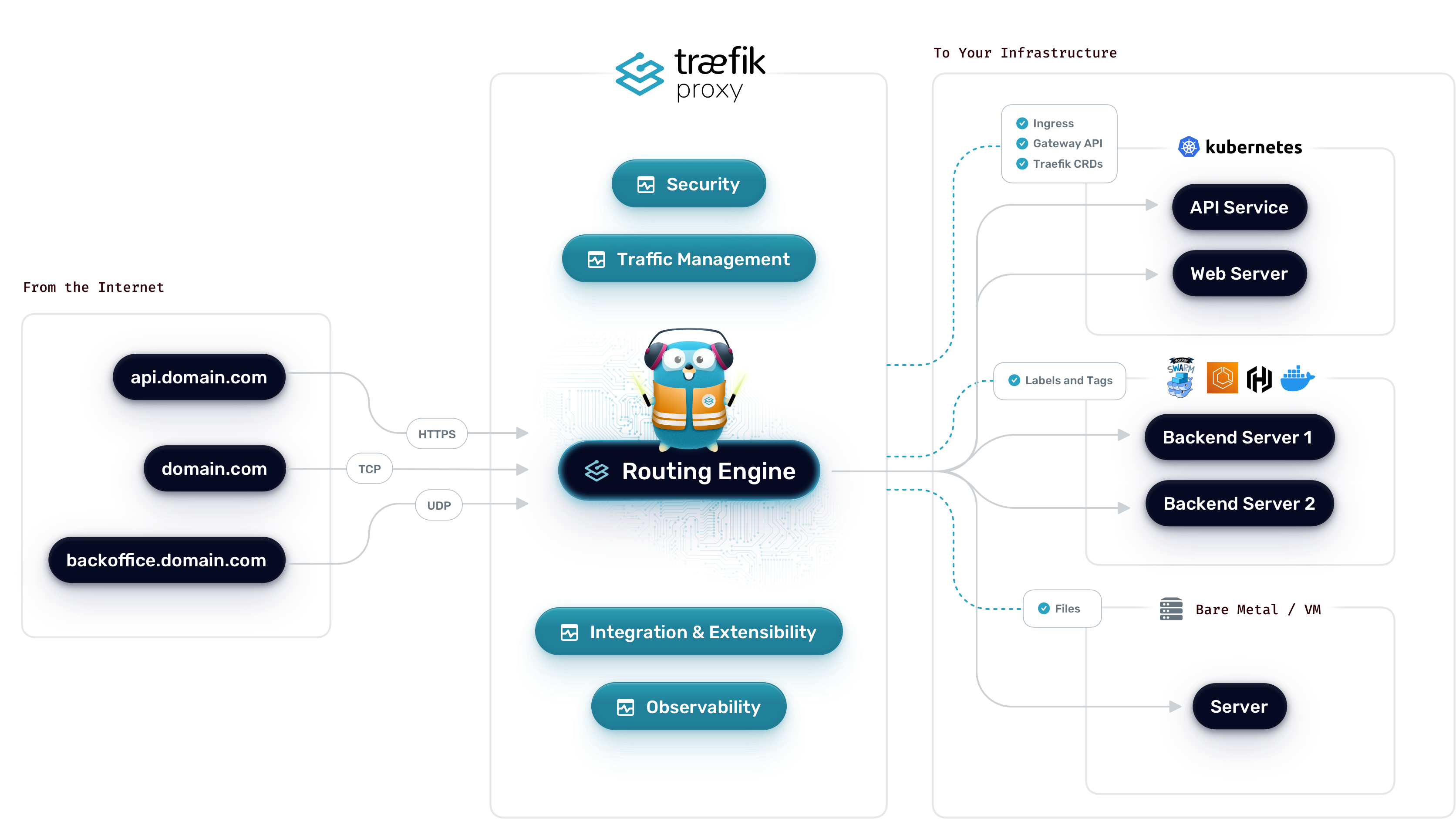
Traefik, modern cloud-native uygulamalar için tasarlanmış güçlü bir reverse proxy ve load balancer’dır. Docker, Kubernetes ve diğer orchestration platformlarıyla yerel entegrasyonu, otomatik SSL sertifika yönetimi ve dinamik yapılandırma yetenekleri ile öne çıkar. Bu yazıda Traefik’i sıfırdan production-ready bir şekilde kurup yapılandıracağız.
Traefik Nedir ve Neden Kullanmalıyız?
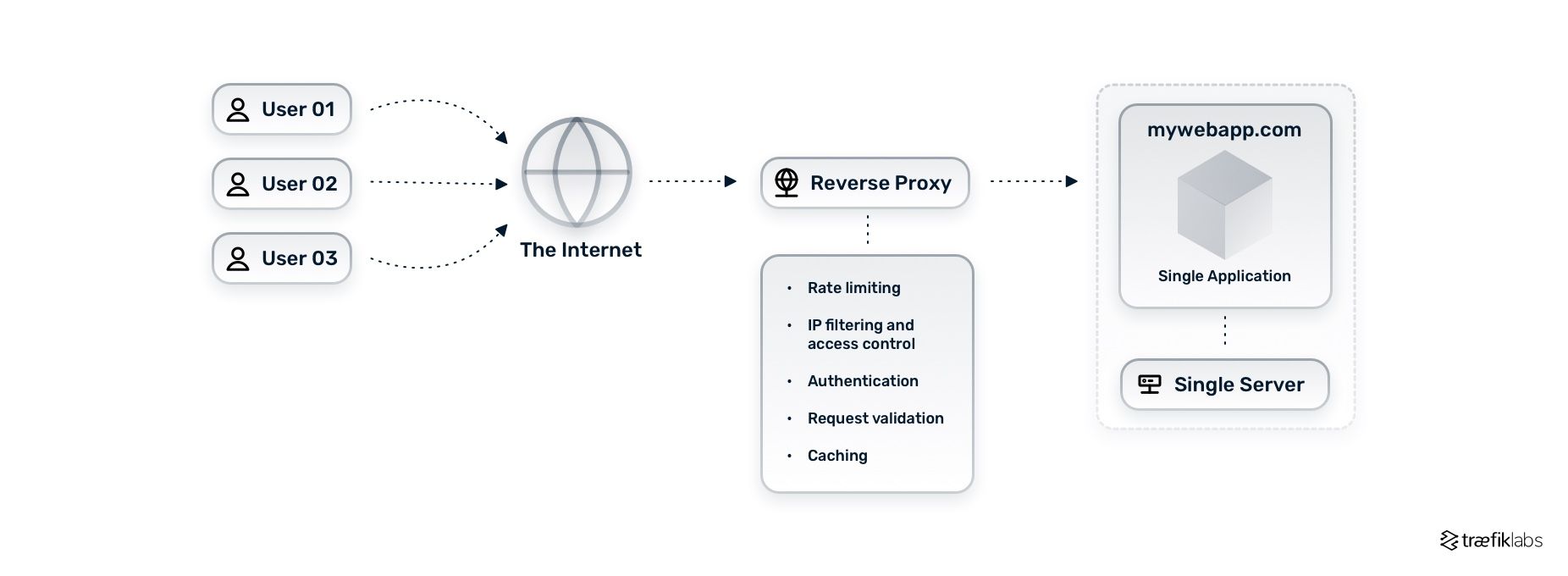
Traefik, HTTP trafiğini yönetmek için tasarlanmış modern bir edge router’dır. Geleneksel reverse proxy’lerden (Nginx, Apache) farklı olarak dynamic configuration desteği sunar.
Traefik’in Avantajları
- Dynamic Configuration: Container’lar başlatılıp durdurulunca otomatik güncellenir
- Let’s Encrypt Entegrasyonu: Otomatik SSL sertifika alımı ve yenileme
- Service Discovery: Docker, Kubernetes, Consul gibi platformlarla yerel entegrasyon
- Load Balancing: Round-robin, weighted, sticky sessions desteği
- Middleware System: Authentication, rate limiting, redirects gibi özellikler
- Web Dashboard: Real-time monitoring ve yönetim arayüzü
- Zero Downtime: Hot reload, graceful shutdown
Kullanım Senaryoları
- Mikroservis mimarilerinde API gateway
- Multi-domain hosting ile birden fazla uygulama
- Otomatik SSL yönetimi gereken projeler
- Containerized uygulamaların reverse proxy’si
- Load balancing ve high availability setup’ları
Temel Kavramlar
Entrypoints
Traefik’in dışarıya açtığı portlar:
1
2
3
4
5
6
7
| entryPoints:
web:
address: ":80" # HTTP
websecure:
address: ":443" # HTTPS
metrics:
address: ":8082" # Prometheus metrics
|
Routers
Gelen istekleri service’lere yönlendiren kurallar:
1
2
3
4
5
6
7
8
9
| http:
routers:
my-router:
rule: "Host(`example.com`)"
service: my-service
entryPoints:
- websecure
tls:
certResolver: letsencrypt
|
Services
Backend uygulamaların tanımlandığı yerler:
1
2
3
4
5
6
7
| http:
services:
my-service:
loadBalancer:
servers:
- url: "http://192.168.1.10:8000"
- url: "http://192.168.1.11:8000"
|
Middlewares
İsteklere uygulanacak ara işlemler:
1
2
3
4
5
6
7
8
9
10
11
| http:
middlewares:
auth:
basicAuth:
users:
- "admin:$apr1$..."
rate-limit:
rateLimit:
average: 100
burst: 50
|
Reverse Proxy ile Request Routing
Docker ile Traefik Kurulumu
Proje Yapısı
1
2
3
4
5
6
7
8
| traefik-setup/
├── docker-compose.yml
├── traefik/
│ ├── traefik.yml # Static configuration
│ ├── dynamic/
│ │ └── config.yml # Dynamic configuration
│ └── acme.json # Let's Encrypt certificates
└── .env
|
Static Configuration (traefik.yml)
1
2
3
4
5
6
7
8
9
10
11
12
13
14
15
16
17
18
19
20
21
22
23
24
25
26
27
28
29
30
31
32
33
34
35
36
37
38
39
40
41
42
43
44
45
46
47
48
49
50
51
52
53
54
55
56
57
58
59
60
61
62
63
64
65
66
67
68
69
70
71
| # traefik/traefik.yml
api:
dashboard: true
insecure: false # Dashboard sadece HTTPS üzerinden erişilebilir
# Entry points tanımları
entryPoints:
web:
address: ":80"
http:
redirections:
entryPoint:
to: websecure
scheme: https
permanent: true
websecure:
address: ":443"
http:
tls:
certResolver: letsencrypt
# Provider'lar
providers:
docker:
endpoint: "unix:///var/run/docker.sock"
exposedByDefault: false # Manuel label eklemeyi zorunlu kıl
network: traefik-public
file:
directory: "/etc/traefik/dynamic"
watch: true
# Certificate Resolver (Let's Encrypt)
certificatesResolvers:
letsencrypt:
acme:
email: [email protected]
storage: /letsencrypt/acme.json
httpChallenge:
entryPoint: web
# DNS Challenge (Cloudflare example)
# dnsChallenge:
# provider: cloudflare
# delayBeforeCheck: 0
# Logging
log:
level: INFO
filePath: "/var/log/traefik/traefik.log"
format: json
accessLog:
filePath: "/var/log/traefik/access.log"
format: json
filters:
statusCodes:
- "400-499"
- "500-599"
# Metrics (Prometheus)
metrics:
prometheus:
entryPoint: metrics
addEntryPointsLabels: true
addServicesLabels: true
# Global options
global:
checkNewVersion: true
sendAnonymousUsage: false
|
Docker Compose Setup
1
2
3
4
5
6
7
8
9
10
11
12
13
14
15
16
17
18
19
20
21
22
23
24
25
26
27
28
29
30
31
32
33
34
35
36
37
38
39
40
41
42
| # docker-compose.yml
version: '3.8'
services:
traefik:
image: traefik:v3.0
container_name: traefik
restart: unless-stopped
security_opt:
- no-new-privileges:true
ports:
- "80:80"
- "443:443"
- "8080:8080" # Dashboard (production'da kapalı olmalı)
environment:
- TZ=Europe/Istanbul
# Cloudflare API (DNS Challenge için)
# - CF_API_EMAIL=${CF_API_EMAIL}
# - CF_DNS_API_TOKEN=${CF_DNS_API_TOKEN}
volumes:
- /var/run/docker.sock:/var/run/docker.sock:ro
- ./traefik/traefik.yml:/etc/traefik/traefik.yml:ro
- ./traefik/dynamic:/etc/traefik/dynamic:ro
- ./traefik/acme.json:/letsencrypt/acme.json
- ./logs:/var/log/traefik
networks:
- traefik-public
labels:
# Dashboard router
- "traefik.enable=true"
- "traefik.http.routers.dashboard.rule=Host(`traefik.example.com`)"
- "traefik.http.routers.dashboard.service=api@internal"
- "traefik.http.routers.dashboard.entrypoints=websecure"
- "traefik.http.routers.dashboard.tls.certresolver=letsencrypt"
# Dashboard authentication middleware
- "traefik.http.routers.dashboard.middlewares=dashboard-auth"
- "traefik.http.middlewares.dashboard-auth.basicauth.users=admin:$$apr1$$H6uskkkW$$IgXLP6ewTrSuBkTrqE8wj/" # admin:admin
networks:
traefik-public:
external: true
|
Network Oluşturma ve Permissions
1
2
3
4
5
6
7
8
9
10
11
12
13
14
15
| # Traefik network oluştur
docker network create traefik-public
# ACME dosyası için doğru permission'ları ayarla (önemli!)
touch traefik/acme.json
chmod 600 traefik/acme.json
# Log dizini oluştur
mkdir -p logs
# Traefik'i başlat
docker compose up -d
# Logları kontrol et
docker compose logs -f traefik
|
Application Container’larını Traefik ile Bağlama
Example 1: Simple Web Application
1
2
3
4
5
6
7
8
9
10
11
12
13
14
15
16
17
18
19
20
21
22
| services:
webapp:
image: nginx:alpine
container_name: webapp
restart: unless-stopped
networks:
- traefik-public
labels:
# Traefik'i etkinleştir
- "traefik.enable=true"
# Router tanımları
- "traefik.http.routers.webapp.rule=Host(`example.com`)"
- "traefik.http.routers.webapp.entrypoints=websecure"
- "traefik.http.routers.webapp.tls.certresolver=letsencrypt"
# Service tanımı
- "traefik.http.services.webapp.loadbalancer.server.port=80"
networks:
traefik-public:
external: true
|
Example 2: FastAPI Application with Middleware
1
2
3
4
5
6
7
8
9
10
11
12
13
14
15
16
17
18
19
20
21
22
23
24
25
26
27
28
29
30
31
32
33
34
35
36
37
38
| services:
api:
build: ./api
container_name: fastapi-app
restart: unless-stopped
networks:
- traefik-public
labels:
- "traefik.enable=true"
# Router
- "traefik.http.routers.api.rule=Host(`api.example.com`)"
- "traefik.http.routers.api.entrypoints=websecure"
- "traefik.http.routers.api.tls.certresolver=letsencrypt"
# Middleware'ler
- "traefik.http.routers.api.middlewares=api-ratelimit,api-compress,api-headers"
# Rate limiting
- "traefik.http.middlewares.api-ratelimit.ratelimit.average=100"
- "traefik.http.middlewares.api-ratelimit.ratelimit.burst=50"
- "traefik.http.middlewares.api-ratelimit.ratelimit.period=1m"
# Compression
- "traefik.http.middlewares.api-compress.compress=true"
# Security headers
- "traefik.http.middlewares.api-headers.headers.stsSeconds=31536000"
- "traefik.http.middlewares.api-headers.headers.stsIncludeSubdomains=true"
- "traefik.http.middlewares.api-headers.headers.customResponseHeaders.X-Robots-Tag=noindex,nofollow"
- "traefik.http.middlewares.api-headers.headers.customResponseHeaders.Server="
# Service
- "traefik.http.services.api.loadbalancer.server.port=8000"
networks:
traefik-public:
external: true
|
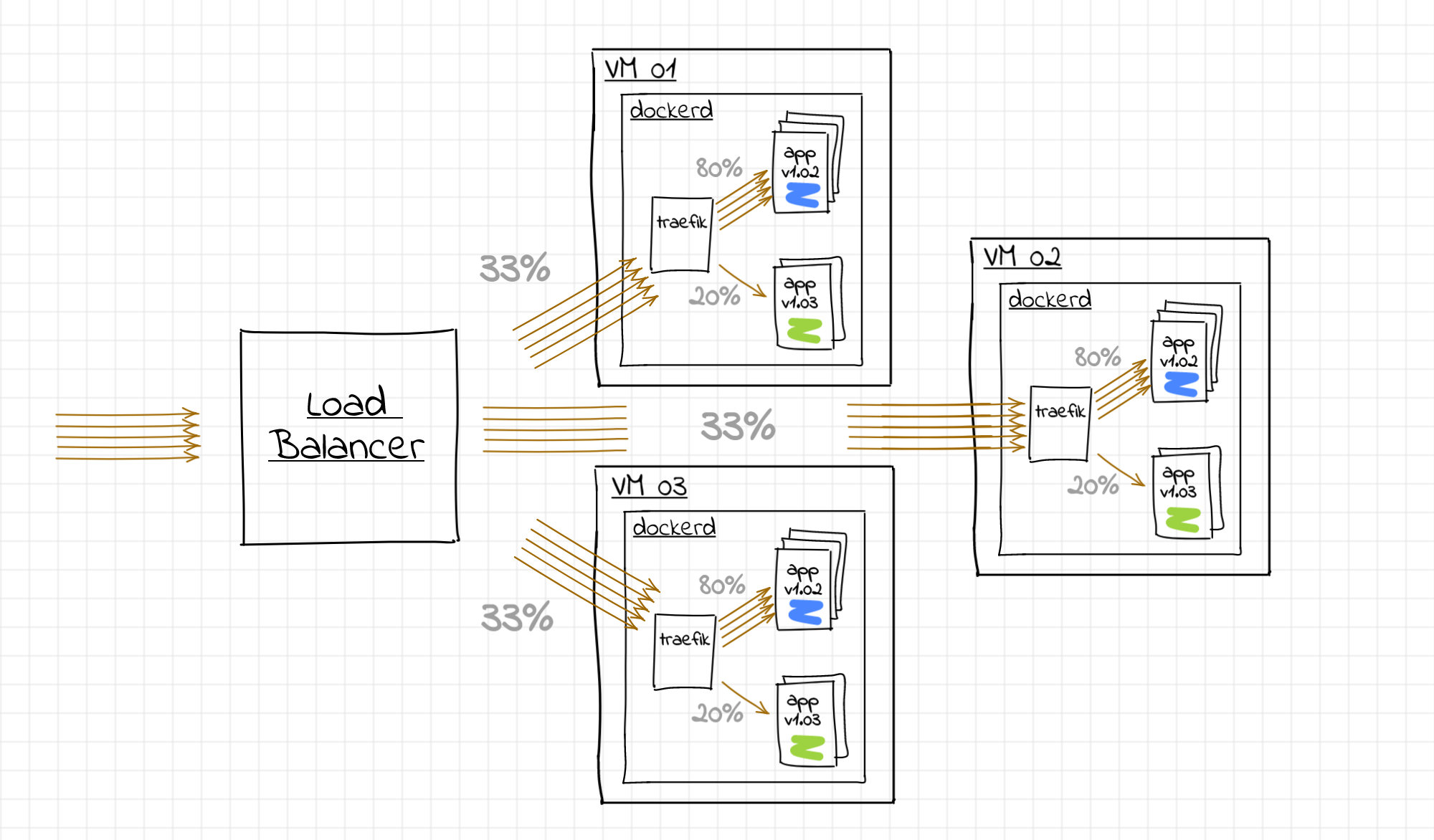
Traefik ile Load Balancing ve Canary Deployment
Example 3: Multi-Instance Load Balancing
1
2
3
4
5
6
7
8
9
10
11
12
13
14
15
16
17
18
19
20
21
22
23
24
25
26
27
28
29
30
31
32
33
34
35
36
37
38
39
40
41
42
| services:
web1:
image: myapp:latest
networks:
- traefik-public
labels:
- "traefik.enable=true"
- "traefik.http.routers.myapp.rule=Host(`app.example.com`)"
- "traefik.http.routers.myapp.entrypoints=websecure"
- "traefik.http.routers.myapp.tls.certresolver=letsencrypt"
- "traefik.http.services.myapp.loadbalancer.server.port=3000"
# Sticky sessions (aynı kullanıcı hep aynı instance'a gitsin)
- "traefik.http.services.myapp.loadbalancer.sticky.cookie=true"
- "traefik.http.services.myapp.loadbalancer.sticky.cookie.name=app_session"
- "traefik.http.services.myapp.loadbalancer.sticky.cookie.secure=true"
web2:
image: myapp:latest
networks:
- traefik-public
labels:
- "traefik.enable=true"
- "traefik.http.routers.myapp.rule=Host(`app.example.com`)"
- "traefik.http.routers.myapp.entrypoints=websecure"
- "traefik.http.routers.myapp.tls.certresolver=letsencrypt"
- "traefik.http.services.myapp.loadbalancer.server.port=3000"
web3:
image: myapp:latest
networks:
- traefik-public
labels:
- "traefik.enable=true"
- "traefik.http.routers.myapp.rule=Host(`app.example.com`)"
- "traefik.http.routers.myapp.entrypoints=websecure"
- "traefik.http.routers.myapp.tls.certresolver=letsencrypt"
- "traefik.http.services.myapp.loadbalancer.server.port=3000"
networks:
traefik-public:
external: true
|
Traefik ile Otomatik Let’s Encrypt SSL Sertifika Yönetimi
Advanced Middleware Kullanımı
Dynamic Configuration (traefik/dynamic/config.yml)
1
2
3
4
5
6
7
8
9
10
11
12
13
14
15
16
17
18
19
20
21
22
23
24
25
26
27
28
29
30
31
32
33
34
35
36
37
38
39
40
41
42
43
44
45
46
47
48
49
50
51
52
53
54
55
56
57
58
59
60
61
62
63
64
65
66
67
68
69
70
71
72
73
74
75
76
77
78
79
80
81
82
83
84
85
86
87
88
89
90
91
92
93
94
95
96
97
98
99
100
101
102
103
104
105
106
107
108
109
110
111
112
113
114
115
116
117
118
119
120
| http:
middlewares:
# Rate limiting
global-ratelimit:
rateLimit:
average: 100
period: 1m
burst: 200
# Basic authentication
secure-auth:
basicAuth:
users:
- "admin:$apr1$H6uskkkW$IgXLP6ewTrSuBkTrqE8wj/"
- "user:$apr1$8PvZx6h3$SB0.oULQCsHODKPY8i6P2."
# IP whitelist
ip-whitelist:
ipWhiteList:
sourceRange:
- "192.168.1.0/24"
- "10.0.0.0/8"
# Redirect to HTTPS
redirect-to-https:
redirectScheme:
scheme: https
permanent: true
# CORS headers
cors-headers:
headers:
accessControlAllowMethods:
- GET
- POST
- PUT
- DELETE
- OPTIONS
accessControlAllowOriginList:
- "https://example.com"
- "https://app.example.com"
accessControlAllowHeaders:
- "Content-Type"
- "Authorization"
accessControlMaxAge: 100
addVaryHeader: true
# Security headers
security-headers:
headers:
frameDeny: true
stsSeconds: 31536000
stsIncludeSubdomains: true
stsPreload: true
contentTypeNosniff: true
browserXssFilter: true
referrerPolicy: "strict-origin-when-cross-origin"
customResponseHeaders:
X-Robots-Tag: "noindex,nofollow"
Server: ""
# Compression
compress:
compress:
excludedContentTypes:
- "text/event-stream"
# Circuit breaker
circuit-breaker:
circuitBreaker:
expression: "NetworkErrorRatio() > 0.30"
# Retry
retry:
retry:
attempts: 4
initialInterval: 100ms
# Strip prefix
strip-api-prefix:
stripPrefix:
prefixes:
- "/api"
forceSlash: false
# Add prefix
add-api-prefix:
addPrefix:
prefix: "/api/v1"
# Replace path
replace-path:
replacePath:
path: "/health"
routers:
# Example router using multiple middlewares
secure-api:
rule: "Host(`secure-api.example.com`)"
entryPoints:
- websecure
middlewares:
- secure-auth
- ip-whitelist
- global-ratelimit
- security-headers
- compress
service: my-api-service
tls:
certResolver: letsencrypt
services:
my-api-service:
loadBalancer:
servers:
- url: "http://api:8000"
healthCheck:
path: /health
interval: "10s"
timeout: "3s"
|
Gelişmiş Senaryolar
1. Canary Deployment (Weighted Load Balancing)
1
2
3
4
5
6
7
8
9
10
11
12
13
14
15
16
17
18
19
20
21
22
23
24
25
26
27
28
29
30
31
32
33
34
35
36
| services:
app-stable:
image: myapp:v1.0
deploy:
replicas: 3
networks:
- traefik-public
labels:
- "traefik.enable=true"
- "traefik.http.services.app-stable.loadbalancer.server.port=8000"
app-canary:
image: myapp:v2.0
deploy:
replicas: 1
networks:
- traefik-public
labels:
- "traefik.enable=true"
- "traefik.http.services.app-canary.loadbalancer.server.port=8000"
traefik-router:
image: traefik:v3.0
labels:
- "traefik.http.routers.app.rule=Host(`app.example.com`)"
- "traefik.http.routers.app.service=app-weighted"
# Weighted load balancing: %75 stable, %25 canary
- "traefik.http.services.app-weighted.weighted.services.stable.name=app-stable"
- "traefik.http.services.app-weighted.weighted.services.stable.weight=75"
- "traefik.http.services.app-weighted.weighted.services.canary.name=app-canary"
- "traefik.http.services.app-weighted.weighted.services.canary.weight=25"
networks:
traefik-public:
external: true
|
2. Path-based Routing
1
2
3
4
5
6
7
8
9
10
11
12
13
14
15
16
17
18
19
20
21
22
23
24
25
26
27
28
29
30
31
32
33
34
35
36
| services:
frontend:
image: frontend:latest
networks:
- traefik-public
labels:
- "traefik.enable=true"
- "traefik.http.routers.frontend.rule=Host(`example.com`) && PathPrefix(`/`)"
- "traefik.http.routers.frontend.priority=1"
- "traefik.http.services.frontend.loadbalancer.server.port=3000"
api:
image: api:latest
networks:
- traefik-public
labels:
- "traefik.enable=true"
- "traefik.http.routers.api.rule=Host(`example.com`) && PathPrefix(`/api`)"
- "traefik.http.routers.api.priority=10"
- "traefik.http.routers.api.middlewares=strip-api-prefix"
- "traefik.http.services.api.loadbalancer.server.port=8000"
admin:
image: admin:latest
networks:
- traefik-public
labels:
- "traefik.enable=true"
- "traefik.http.routers.admin.rule=Host(`example.com`) && PathPrefix(`/admin`)"
- "traefik.http.routers.admin.priority=10"
- "traefik.http.routers.admin.middlewares=admin-auth"
- "traefik.http.services.admin.loadbalancer.server.port=5000"
networks:
traefik-public:
external: true
|
3. OAuth/OIDC Authentication (Authelia)
1
2
3
4
5
6
7
8
9
10
11
12
13
14
15
16
17
18
19
20
21
22
23
24
25
26
27
28
29
30
31
32
33
34
35
| services:
authelia:
image: authelia/authelia:latest
container_name: authelia
volumes:
- ./authelia:/config
networks:
- traefik-public
labels:
- "traefik.enable=true"
- "traefik.http.routers.authelia.rule=Host(`auth.example.com`)"
- "traefik.http.routers.authelia.entrypoints=websecure"
- "traefik.http.routers.authelia.tls.certresolver=letsencrypt"
- "traefik.http.services.authelia.loadbalancer.server.port=9091"
# Forward auth middleware
- "traefik.http.middlewares.authelia.forwardAuth.address=http://authelia:9091/api/verify?rd=https://auth.example.com"
- "traefik.http.middlewares.authelia.forwardAuth.trustForwardHeader=true"
- "traefik.http.middlewares.authelia.forwardAuth.authResponseHeaders=Remote-User,Remote-Groups,Remote-Name,Remote-Email"
protected-app:
image: myprotectedapp:latest
networks:
- traefik-public
labels:
- "traefik.enable=true"
- "traefik.http.routers.protected.rule=Host(`app.example.com`)"
- "traefik.http.routers.protected.entrypoints=websecure"
- "traefik.http.routers.protected.tls.certresolver=letsencrypt"
- "traefik.http.routers.protected.middlewares=authelia"
- "traefik.http.services.protected.loadbalancer.server.port=8080"
networks:
traefik-public:
external: true
|
Monitoring ve Debugging
Prometheus Metrics
1
2
3
4
5
| # prometheus.yml
scrape_configs:
- job_name: 'traefik'
static_configs:
- targets: ['traefik:8082']
|
Dashboard Access
1
2
3
4
5
| # Dashboard'a erişim (basic auth ile korumalı)
https://traefik.example.com
# Username: admin
# Password: admin (yukarıdaki hash'e karşılık gelir)
|
Health Check Endpoint
1
2
3
4
5
| # Traefik health check
curl http://localhost:8080/ping
# Service health checks
curl https://api.example.com/health
|
Debug Logging
1
2
3
4
5
6
7
8
9
10
11
| # traefik.yml içinde
log:
level: DEBUG # INFO, WARN, ERROR, FATAL, PANIC, DEBUG, TRACE
accessLog:
filePath: "/var/log/traefik/access.log"
format: json
fields:
defaultMode: keep
headers:
defaultMode: keep
|
Production Best Practices
1. Security Hardening
1
2
3
4
5
6
7
8
9
10
11
12
13
14
| # Traefik container'ı için security settings
services:
traefik:
# ...
security_opt:
- no-new-privileges:true
read_only: true
tmpfs:
- /tmp
cap_drop:
- ALL
cap_add:
- NET_BIND_SERVICE
user: "1000:1000" # Non-root user
|
2. Rate Limiting Strategy
1
2
3
4
5
6
7
8
9
10
11
12
13
14
15
16
17
18
| http:
middlewares:
# Global rate limit (tüm IP'ler için)
global-limit:
rateLimit:
average: 1000
period: 1s
burst: 2000
# Per-IP rate limit
per-ip-limit:
rateLimit:
average: 100
period: 1m
burst: 200
sourceCriterion:
ipStrategy:
depth: 1 # X-Forwarded-For header'daki depth
|
3. SSL/TLS Configuration
1
2
3
4
5
6
7
8
9
10
11
12
13
14
15
16
17
18
19
20
21
22
23
| # traefik.yml
# Modern TLS configuration (A+ SSL Labs score)
entryPoints:
websecure:
address: ":443"
http:
tls:
options: modern
certResolver: letsencrypt
# TLS options
tls:
options:
modern:
minVersion: VersionTLS13
cipherSuites:
- TLS_CHACHA20_POLY1305_SHA256
- TLS_AES_256_GCM_SHA384
- TLS_AES_128_GCM_SHA256
curvePreferences:
- CurveP521
- CurveP384
sniStrict: true
|
4. Backup Strategy
1
2
3
4
5
6
7
8
9
10
11
12
13
14
| #!/bin/bash
# backup-traefik.sh
# ACME certificates backup
cp traefik/acme.json "backup/acme-$(date +%Y%m%d).json"
# Config backup
tar czf "backup/traefik-config-$(date +%Y%m%d).tar.gz" \
traefik/traefik.yml \
traefik/dynamic/
# Keep last 7 days
find backup/ -name "*.json" -mtime +7 -delete
find backup/ -name "*.tar.gz" -mtime +7 -delete
|
5. High Availability Setup
1
2
3
4
5
6
7
8
9
10
11
12
13
14
15
16
17
18
19
20
21
22
23
24
| # Docker Swarm or Kubernetes için
services:
traefik:
image: traefik:v3.0
deploy:
replicas: 3
placement:
max_replicas_per_node: 1
update_config:
parallelism: 1
delay: 10s
restart_policy:
condition: on-failure
# Shared storage for ACME certificates
volumes:
- acme-certs:/letsencrypt
volumes:
acme-certs:
driver: local
driver_opts:
type: nfs
o: addr=nfs-server.local,rw
device: ":/traefik/certs"
|
Troubleshooting
Common Issues
1
2
3
4
5
6
7
8
9
10
11
12
13
14
15
16
17
18
19
20
21
| # 1. ACME challenge başarısız
# - DNS A record'u doğru mu kontrol et
# - Port 80'in açık olduğundan emin ol
# - acme.json permissions: chmod 600
# 2. Container'a ulaşamıyor
# - Docker network'ü kontrol et
docker network inspect traefik-public
# - Container'ın traefik-public network'üne bağlı olduğunu doğrula
docker inspect container_name | grep Networks
# 3. SSL certificate alınamıyor
# - Let's Encrypt rate limit kontrolü
# - Email adresinin doğru olduğunu kontrol et
# - acme.json'da hata var mı kontrol et
docker compose logs traefik | grep acme
# 4. Middleware çalışmıyor
# - Label'ların doğru yazıldığını kontrol et
# - Middleware isminin doğru referans edildiğini kontrol et
|
Sonuç
Traefik, modern cloud-native uygulamalar için ideal bir reverse proxy çözümüdür. Dynamic configuration, otomatik SSL yönetimi ve güçlü middleware sistemi ile production-ready bir infrastructure oluşturmanızı sağlar.
Bu yazıda öğrendikleriniz:
- Traefik temel kavramları ve mimari
- Docker ile production-ready setup
- Let’s Encrypt ile otomatik SSL yönetimi
- Advanced routing ve load balancing stratejileri
- Middleware’ler ile authentication, rate limiting, CORS
- Canary deployment ve path-based routing
- Monitoring, security ve high availability
Önerilen Kaynaklar
Production’da güvenli ve ölçeklenebilir bir infrastructure için Traefik’i mutlaka değerlendirin!