Gönderi

Systemd ile Python Servis Yönetimi

Python uygulamalarını systemd ile production servis haline getirme rehberi. Unit file yapılandırması, journald logging, watchdog, socket activation ve deployment.

Systemd ile Python Servis Yönetimi

Modern Linux sistemlerinde, Python uygulamalarınızı production ortamında çalıştırabilir durumdaki servisler olarak yönetmek için systemd, en güvenilir ve güçlü çözümdür. Bu yazıda, Python uygulamalarınızı systemd servisi olarak yapılandırmayı, yönetmeyi ve izlemeyi öğreneceğiz.

Systemd Nedir?

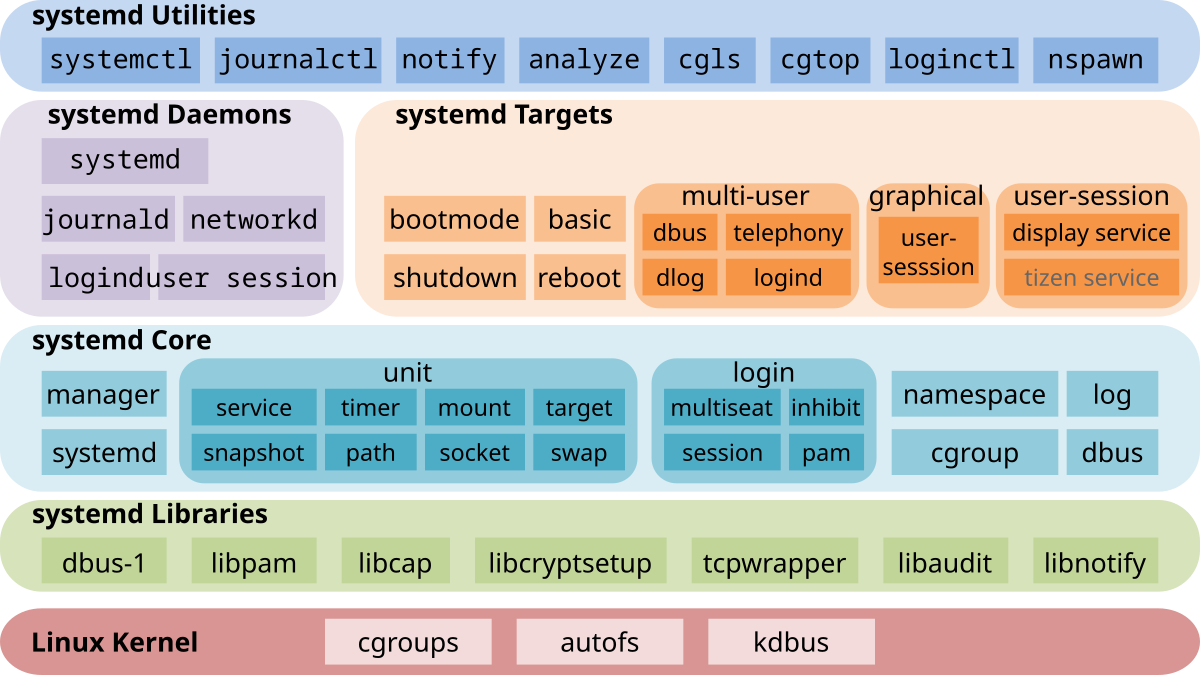
Systemd, modern Linux dağıtımlarında (Ubuntu 16.04+, CentOS 7+, Debian 8+) varsayılan init sistemi ve servis yöneticisidir. Geleneksel SysVinit’in yerini almış, paralel servis başlatma, on-demand başlatma ve kapsamlı log yönetimi gibi özellikleriyle çok daha güçlü bir sistem sunar.

Systemd’nin Avantajları

  • Paralel Başlatma: Bağımlılıkları olan servisleri paralel olarak başlatır
  • On-Demand Activation: Socket ve D-Bus aktivasyonu ile gerektiğinde başlatma
  • Watchdog Support: Çöken servisleri otomatik yeniden başlatma
  • Resource Control: cgroups ile CPU, memory limitleri
  • Unified Logging: journald ile merkezi log yönetimi
  • Dependencies: Servisler arası bağımlılık yönetimi

Unit File Yapısı

Systemd Unit File Structure Systemd unit file sections and structure

Temel Unit File Anatomisi

1
2
3
4
5
6
7
8
9
10
11
12
13
14
15
16
17
18
19
20
21
22
[Unit]
Description=My Python Application
Documentation=https://myapp.example.com/docs
After=network.target
Wants=redis.service
Requires=postgresql.service

[Service]
Type=simple
User=appuser
Group=appuser
WorkingDirectory=/opt/myapp
Environment="PYTHONUNBUFFERED=1"
EnvironmentFile=/etc/myapp/config
ExecStart=/opt/myapp/venv/bin/python /opt/myapp/app.py
Restart=always
RestartSec=10
StandardOutput=journal
StandardError=journal

[Install]
WantedBy=multi-user.target

Section Açıklamaları

[Unit] Section

1
2
3
4
5
6
7
8
9
10
11
12
13
14
15
16
17
18
19
20
21
[Unit]
# Servis açıklaması (systemctl status'ta görünür)
Description=FastAPI Web Application

# Dokümantasyon URL'i
Documentation=https://docs.example.com

# Bu servisten ÖNCE başlaması gerekenler
After=network.target postgresql.service

# Bu servis başarısız olursa bunlar da durdurulsun
BindsTo=postgresql.service

# Tercihen birlikte çalışması gerekenler (zorunlu değil)
Wants=redis.service

# Kesinlikle gerekli servisler
Requires=postgresql.service

# Bu servis başlamadan önce bunlar hazır olmalı
Before=nginx.service

[Service] Section

1
2
3
4
5
6
7
8
9
10
11
12
13
14
15
16
17
18
19
20
21
22
23
24
25
26
27
28
29
30
31
32
33
34
35
36
37
38
39
40
41
42
43
44
45
46
47
48
49
50
51
52
53
54
55
56
57
58
[Service]
# Servis tipi
# simple: ExecStart işlemi main process (varsayılan)
# forking: Process fork edip arka plana geçer
# oneshot: Tek seferlik işlem
# notify: Uygulama systemd'ye hazır olduğunu bildirir
# dbus: D-Bus üzerinden aktivasyon
Type=simple

# Hangi kullanıcı/grup ile çalışacak
User=webapp
Group=webapp

# Çalışma dizini
WorkingDirectory=/opt/myapp

# Environment variables
Environment="PYTHON_ENV=production"
Environment="LOG_LEVEL=INFO"

# Environment dosyası
EnvironmentFile=/etc/myapp/env

# Ana komut
ExecStart=/opt/myapp/venv/bin/python -m uvicorn main:app --host 0.0.0.0 --port 8000

# Başlatma öncesi komut
ExecStartPre=/opt/myapp/scripts/check-dependencies.sh

# Durdurma sonrası komut
ExecStopPost=/opt/myapp/scripts/cleanup.sh

# Restart policy
# no: Hiç restart etme
# always: Her zaman restart et
# on-success: Sadece başarılı çıkışta restart et
# on-failure: Sadece hata durumunda restart et
# on-abnormal: Signal veya timeout'ta restart et
Restart=on-failure

# Restart arasındaki bekleme süresi
RestartSec=5

# Başarısız başlatma denemesi limiti
StartLimitBurst=5
StartLimitInterval=60

# Timeout ayarları
TimeoutStartSec=30
TimeoutStopSec=30

# Standard output/error yönlendirme
StandardOutput=journal
StandardError=journal

# Process limitleri
LimitNOFILE=65536
LimitNPROC=4096

[Install] Section

1
2
3
4
5
6
7
8
[Install]
# Hangi target altında aktif olacak
# multi-user.target: Normal sistem başlatma (runlevel 3)
# graphical.target: GUI ile başlatma (runlevel 5)
WantedBy=multi-user.target

# Bu servis enable edildiğinde aşağıdakiler de istenir
Also=myapp-worker.service

Python Daemon Oluşturma

Python Daemon with Systemd Python application running as systemd service

Basit Web Server Servisi

1
2
3
4
5
6
7
8
9
10
11
12
13
14
15
16
17
18
19
20
21
22
23
24
25
26
27
28
29
30
31
32
33
34
35
36
37
38
39
40
41
42
43
44
45
46
47
48
49
50
51
52
53
54
55
56
57
58
59
60
61
62
63
64
65
66
67
68
69
70
71
72
73
74
75
# /opt/webserver/app.py
from http.server import HTTPServer, BaseHTTPRequestHandler
import signal
import sys
import os
import logging

# Logging setup
logging.basicConfig(
    level=logging.INFO,
    format='%(asctime)s - %(name)s - %(levelname)s - %(message)s',
    handlers=[logging.StreamHandler(sys.stdout)]
)
logger = logging.getLogger(__name__)

class SimpleHandler(BaseHTTPRequestHandler):
    def do_GET(self):
        self.send_response(200)
        self.send_header('Content-type', 'text/html')
        self.end_headers()
        self.wfile.write(b"Hello from Python Systemd Service!")
    
    def log_message(self, format, *args):
        # HTTP isteklerini logger'a yönlendir
        logger.info("%s - - [%s] %s" % 
                   (self.client_address[0],
                    self.log_date_time_string(),
                    format % args))

class DaemonServer:
    def __init__(self, port=8080):
        self.port = port
        self.server = None
        self.running = False
        
    def signal_handler(self, signum, frame):
        """Graceful shutdown için signal handler"""
        logger.info(f"Received signal {signum}, shutting down...")
        self.stop()
        sys.exit(0)
    
    def start(self):
        """Server'ı başlat"""
        # Signal handlers kaydet
        signal.signal(signal.SIGTERM, self.signal_handler)
        signal.signal(signal.SIGINT, self.signal_handler)
        
        try:
            self.server = HTTPServer(('0.0.0.0', self.port), SimpleHandler)
            self.running = True
            logger.info(f"Server started on port {self.port}")
            
            # systemd'ye hazır olduğumuzu bildir (Type=notify için)
            if os.environ.get('NOTIFY_SOCKET'):
                import systemd.daemon
                systemd.daemon.notify('READY=1')
            
            self.server.serve_forever()
            
        except Exception as e:
            logger.error(f"Server error: {e}")
            raise
    
    def stop(self):
        """Server'ı durdur"""
        if self.server and self.running:
            logger.info("Stopping server...")
            self.server.shutdown()
            self.running = False
            logger.info("Server stopped")

if __name__ == '__main__':
    port = int(os.environ.get('PORT', 8080))
    daemon = DaemonServer(port=port)
    daemon.start()

Unit File

1
2
3
4
5
6
7
8
9
10
11
12
13
14
15
16
17
18
19
20
21
22
23
24
25
26
27
28
29
30
31
32
33
34
35
36
37
38
39
# /etc/systemd/system/python-webserver.service
[Unit]
Description=Python Simple Web Server
Documentation=https://example.com/docs
After=network.target

[Service]
Type=simple
User=www-data
Group=www-data
WorkingDirectory=/opt/webserver

# Environment
Environment="PORT=8080"
Environment="PYTHONUNBUFFERED=1"

# Virtual environment Python kullan
ExecStart=/opt/webserver/venv/bin/python /opt/webserver/app.py

# Restart policy
Restart=always
RestartSec=5
StartLimitBurst=5
StartLimitInterval=60

# Logging
StandardOutput=journal
StandardError=journal
SyslogIdentifier=python-webserver

# Security
PrivateTmp=true
NoNewPrivileges=true
ProtectSystem=strict
ProtectHome=true
ReadWritePaths=/var/log/webserver

[Install]
WantedBy=multi-user.target

Kurulum ve Başlatma

Her systemd servisi için ayrı bir sistem kullanıcısı oluşturun. Root yetkisiyle servis çalıştırmak güvenlik riski oluşturur.

1
2
3
4
5
6
7
8
9
10
11
12
13
14
15
16
17
18
19
20
21
22
23
24
25
26
27
28
29
30
# Kullanıcı oluştur
sudo useradd -r -s /bin/false www-data

# Uygulama dizini hazırla
sudo mkdir -p /opt/webserver
sudo chown www-data:www-data /opt/webserver

# Kodu kopyala
sudo cp app.py /opt/webserver/

# Virtual environment oluştur
cd /opt/webserver
python3 -m venv venv
source venv/bin/activate
pip install systemd-python  # notify desteği için

# Unit file kopyala
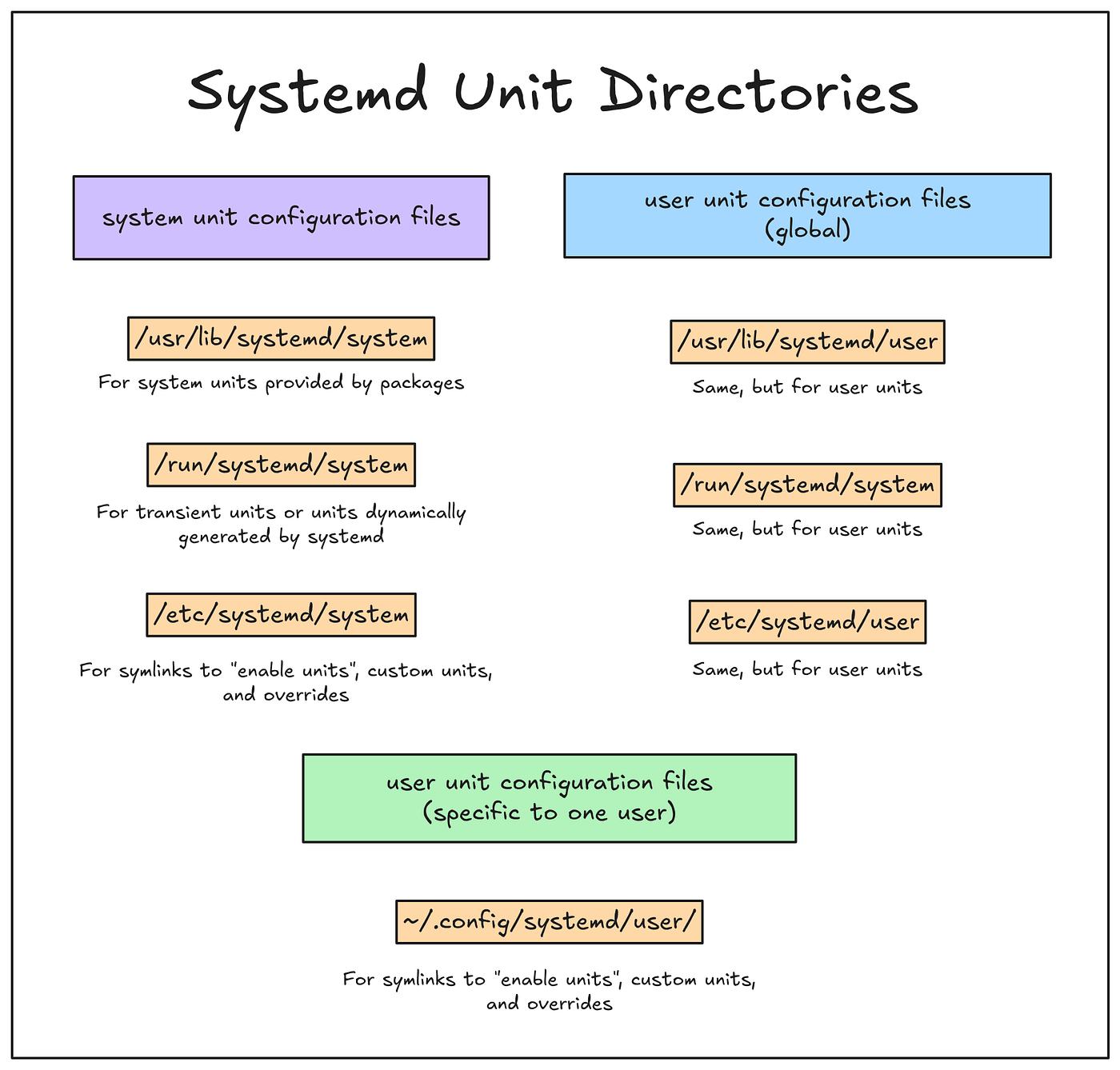
sudo cp python-webserver.service /etc/systemd/system/

# Systemd'yi reload et
sudo systemctl daemon-reload

# Servisi enable et (boot'ta başlasın)
sudo systemctl enable python-webserver.service

# Servisi başlat
sudo systemctl start python-webserver.service

# Durum kontrol
sudo systemctl status python-webserver.service

FastAPI Production Setup

FastAPI Uygulaması

1
2
3
4
5
6
7
8
9
10
11
12
13
14
15
16
17
18
19
20
21
22
23
24
25
26
27
28
29
30
31
32
33
34
35
36
37
38
39
40
41
42
43
44
45
46
47
48
49
50
51
52
53
54
55
56
57
58
59
60
61
62
63
64
65
# /opt/fastapi-app/main.py
from fastapi import FastAPI, Request
from contextlib import asynccontextmanager
import uvicorn
import signal
import sys
import logging
import os

# Logging
logging.basicConfig(
    level=logging.INFO,
    format='%(asctime)s - %(name)s - %(levelname)s - %(message)s'
)
logger = logging.getLogger(__name__)

@asynccontextmanager
async def lifespan(app: FastAPI):
    """Startup ve shutdown events"""
    # Startup
    logger.info("FastAPI application starting...")
    
    # Database bağlantıları, cache initialization vs.
    logger.info("Initializing database connections...")
    
    # systemd notify
    if os.environ.get('NOTIFY_SOCKET'):
        import systemd.daemon
        systemd.daemon.notify('READY=1')
        logger.info("Notified systemd that service is ready")
    
    yield
    
    # Shutdown
    logger.info("FastAPI application shutting down...")
    logger.info("Closing database connections...")

app = FastAPI(
    title="My API",
    lifespan=lifespan
)

@app.get("/")
async def root():
    return {"message": "Hello World"}

@app.get("/health")
async def health():
    """Health check endpoint"""
    return {"status": "healthy"}

@app.middleware("http")
async def log_requests(request: Request, call_next):
    """Request logging middleware"""
    logger.info(f"{request.method} {request.url.path}")
    response = await call_next(request)
    return response

if __name__ == "__main__":
    uvicorn.run(
        "main:app",
        host="0.0.0.0",
        port=int(os.environ.get("PORT", 8000)),
        log_config=None  # Use our logging config
    )

FastAPI Unit File

1
2
3
4
5
6
7
8
9
10
11
12
13
14
15
16
17
18
19
20
21
22
23
24
25
26
27
28
29
30
31
32
33
34
35
36
37
38
39
40
41
42
43
44
45
46
47
48
49
50
51
52
53
54
55
56
# /etc/systemd/system/fastapi-app.service
[Unit]
Description=FastAPI Application
Documentation=https://api.example.com/docs
After=network.target postgresql.service redis.service
Wants=redis.service
Requires=postgresql.service

[Service]
Type=notify
User=fastapi
Group=fastapi
WorkingDirectory=/opt/fastapi-app

# Environment
Environment="PYTHONUNBUFFERED=1"
Environment="PORT=8000"
EnvironmentFile=/etc/fastapi-app/production.env

# Multiple workers için
ExecStart=/opt/fastapi-app/venv/bin/gunicorn main:app \
    --workers 4 \
    --worker-class uvicorn.workers.UvicornWorker \
    --bind 0.0.0.0:8000 \
    --access-logfile - \
    --error-logfile - \
    --log-level info

# Graceful reload
ExecReload=/bin/kill -s HUP $MAINPID

# Restart
Restart=on-failure
RestartSec=5s
TimeoutStopSec=20s

# Resource limits
LimitNOFILE=65536
MemoryLimit=1G
CPUQuota=200%

# Security
PrivateTmp=true
ProtectSystem=strict
ProtectHome=true
NoNewPrivileges=true
ReadWritePaths=/var/log/fastapi-app
CapabilityBoundingSet=CAP_NET_BIND_SERVICE

# Logging
StandardOutput=journal
StandardError=journal
SyslogIdentifier=fastapi-app

[Install]
WantedBy=multi-user.target

Celery Worker Servisi

Celery Worker Unit File

1
2
3
4
5
6
7
8
9
10
11
12
13
14
15
16
17
18
19
20
21
22
23
24
25
26
27
28
29
30
31
32
33
34
35
36
37
38
39
40
41
42
# /etc/systemd/system/celery-worker.service
[Unit]
Description=Celery Worker for MyApp
After=network.target redis.service
Wants=redis.service

[Service]
Type=forking
User=celery
Group=celery
WorkingDirectory=/opt/myapp

EnvironmentFile=/etc/myapp/celery.conf
Environment="CELERY_BIN=/opt/myapp/venv/bin/celery"
Environment="CELERY_APP=myapp"

ExecStart=/bin/sh -c '${CELERY_BIN} -A ${CELERY_APP} worker \
    --loglevel=INFO \
    --concurrency=4 \
    --pidfile=/var/run/celery/worker.pid \
    --logfile=/var/log/celery/worker.log'

ExecStop=/bin/sh -c '${CELERY_BIN} -A ${CELERY_APP} control shutdown'

ExecReload=/bin/kill -s HUP $MAINPID

# PID file
PIDFile=/var/run/celery/worker.pid

# Directories
RuntimeDirectory=celery
LogsDirectory=celery

Restart=always
RestartSec=10s

# Resource limits
LimitNOFILE=65536
MemoryLimit=2G

[Install]
WantedBy=multi-user.target

Celery Beat (Scheduler) Unit File

1
2
3
4
5
6
7
8
9
10
11
12
13
14
15
16
17
18
19
20
21
22
23
24
25
26
27
28
29
30
# /etc/systemd/system/celery-beat.service
[Unit]
Description=Celery Beat Scheduler for MyApp
After=network.target redis.service celery-worker.service
Requires=celery-worker.service

[Service]
Type=simple
User=celery
Group=celery
WorkingDirectory=/opt/myapp

EnvironmentFile=/etc/myapp/celery.conf

ExecStart=/opt/myapp/venv/bin/celery -A myapp beat \
    --loglevel=INFO \
    --pidfile=/var/run/celery/beat.pid \
    --schedule=/var/lib/celery/beat-schedule \
    --logfile=/var/log/celery/beat.log

PIDFile=/var/run/celery/beat.pid
RuntimeDirectory=celery
LogsDirectory=celery
StateDirectory=celery

Restart=always
RestartSec=10s

[Install]
WantedBy=multi-user.target

Journald ile Log Yönetimi

Journald Logging Architecture Systemd journald logging system architecture

Journalctl Komutları

journalctl ile logları filter ederken –since ve –until parametrelerini kullanarak disk I/O’yu azaltın. Structured logging ile custom field’lara göre arama yapabilirsiniz.

1
2
3
4
5
6
7
8
9
10
11
12
13
14
15
16
17
18
19
20
21
22
23
24
25
26
27
28
29
30
31
32
33
34
# Bir servisin loglarını göster
sudo journalctl -u python-webserver.service

# Son 100 satır
sudo journalctl -u python-webserver.service -n 100

# Real-time takip (tail -f gibi)
sudo journalctl -u python-webserver.service -f

# Belirli bir tarih aralığı
sudo journalctl -u python-webserver.service --since "2024-01-01" --until "2024-01-31"

# Bugün
sudo journalctl -u python-webserver.service --since today

# Son 1 saat
sudo journalctl -u python-webserver.service --since "1 hour ago"

# Priority filtreleme
# 0: emerg, 1: alert, 2: crit, 3: err, 4: warning, 5: notice, 6: info, 7: debug
sudo journalctl -u python-webserver.service -p err

# JSON formatında
sudo journalctl -u python-webserver.service -o json

# Disk kullanımı
sudo journalctl --disk-usage

# Log rotation
sudo journalctl --vacuum-time=7d  # 7 günden eski logları sil
sudo journalctl --vacuum-size=500M  # 500MB'dan fazlasını sil

# Birden fazla servis
sudo journalctl -u fastapi-app.service -u celery-worker.service

Python’dan Journald’ye Log Gönderme

1
2
3
4
5
6
7
8
9
10
11
12
13
14
15
16
17
18
19
20
21
22
# systemd.journal kullanımı
from systemd import journal
import logging

# Handler oluştur
journal_handler = journal.JournaldLogHandler()

# Logger yapılandır
logger = logging.getLogger('myapp')
logger.addHandler(journal_handler)
logger.setLevel(logging.INFO)

# Structured logging
logger.info("User logged in", extra={
    'USER_ID': 12345,
    'IP_ADDRESS': '192.168.1.100',
    'ACTION': 'login'
})

# Journalctl ile sorgulama:
# journalctl USER_ID=12345
# journalctl ACTION=login
1
2
3
4
5
6
7
8
9
10
# Alternatif: systemd.journal.send
from systemd.journal import send

send(
    "User authentication successful",
    PRIORITY=6,  # info
    USER_ID="12345",
    IP_ADDRESS="192.168.1.100",
    SYSLOG_IDENTIFIER="myapp"
)

Systemctl Komutları

Temel İşlemler

Unit file değiştirdikten sonra mutlaka daemon-reload çalıştırın. Aksi halde değişiklikler aktif olmaz.

1
2
3
4
5
6
7
8
9
10
11
12
13
14
15
16
17
18
19
20
21
22
23
24
25
26
27
28
29
30
# Servisi başlat
sudo systemctl start myapp.service

# Servisi durdur
sudo systemctl stop myapp.service

# Servisi yeniden başlat
sudo systemctl restart myapp.service

# Configuration reload (graceful)
sudo systemctl reload myapp.service

# Restart or reload
sudo systemctl reload-or-restart myapp.service

# Durum kontrol
sudo systemctl status myapp.service

# Boot'ta başlasın
sudo systemctl enable myapp.service

# Boot'tan kaldır
sudo systemctl disable myapp.service

# Servisi mask et (başlatılamaz hale getir)
sudo systemctl mask myapp.service
sudo systemctl unmask myapp.service

# Daemon reload (unit files değiştiğinde)
sudo systemctl daemon-reload

Bilgi ve İzleme

1
2
3
4
5
6
7
8
9
10
11
12
13
14
15
16
17
18
19
20
21
22
23
24
25
# Tüm servisleri listele
systemctl list-units --type=service

# Sadece çalışanlar
systemctl list-units --type=service --state=running

# Sadece başarısız olanlar
systemctl list-units --type=service --state=failed

# Servis bağımlılıklarını göster
systemctl list-dependencies myapp.service

# Unit file içeriğini göster
systemctl cat myapp.service

# Override dosyası oluştur
sudo systemctl edit myapp.service

# Property'leri göster
systemctl show myapp.service

# Boot süresini analiz et
systemd-analyze
systemd-analyze blame
systemd-analyze critical-chain

Gelişmiş Özellikler

Watchdog (Healthcheck)

Watchdog kullanarak servisinizin donup donmadığını kontrol edin. WatchdogSec süresinde WATCHDOG=1 notify gönderilmezse systemd servisi restart eder.

1
2
3
4
5
6
7
8
9
10
11
12
13
14
15
16
17
18
19
20
21
22
23
24
25
26
27
28
29
30
31
32
33
34
35
36
37
# app_with_watchdog.py
import time
import os
from systemd import daemon

def main():
    # Watchdog interval (microseconds)
    watchdog_usec = int(os.environ.get('WATCHDOG_USEC', 0))
    
    if watchdog_usec > 0:
        # Watchdog enabled
        watchdog_sec = watchdog_usec / 1_000_000
        ping_interval = watchdog_sec / 2  # Yarısında ping at
        
        print(f"Watchdog enabled: {watchdog_sec}s interval")
        daemon.notify('READY=1')
        
        while True:
            # İş yap
            do_work()
            
            # Systemd'ye "hala yaşıyorum" mesajı gönder
            daemon.notify('WATCHDOG=1')
            time.sleep(ping_interval)
    else:
        # Normal mod
        daemon.notify('READY=1')
        while True:
            do_work()
            time.sleep(1)

def do_work():
    """Actual application logic"""
    print("Working...")

if __name__ == '__main__':
    main()
1
2
3
4
5
6
7
8
9
10
11
12
13
14
15
16
17
18
19
20
21
22
# myapp-watchdog.service
[Unit]
Description=App with Watchdog

[Service]
Type=notify
ExecStart=/opt/myapp/venv/bin/python /opt/myapp/app_with_watchdog.py

# Watchdog: 30 saniyede bir ping bekle
WatchdogSec=30

# Watchdog timeout olursa action
# abort: Core dump al
# reboot: Sistem yeniden başlat
# reboot-force: Hemen yeniden başlat
# reboot-immediate: Kernel yeniden başlatma
FailureAction=restart

Restart=always

[Install]
WantedBy=multi-user.target

Socket Activation

Socket activation ile servisi sadece ilk bağlantı geldiğinde başlatabilirsiniz. Kaynak kullanımını optimize eder.

1
2
3
4
5
6
7
8
9
10
11
12
13
14
15
16
17
18
19
20
21
22
23
24
25
26
27
28
29
30
31
# socket_activated_app.py
import socket
import systemd.daemon

def main():
    # systemd'den socket'leri al
    sockets = systemd.daemon.listen_fds()
    
    if sockets == 0:
        # Normal başlatma
        sock = socket.socket(socket.AF_INET, socket.SOCK_STREAM)
        sock.bind(('0.0.0.0', 8080))
        sock.listen(5)
    else:
        # Socket activation
        # İlk socket'i kullan (SD_LISTEN_FDS_START = 3)
        sock = socket.fromfd(
            3,  # SD_LISTEN_FDS_START
            socket.AF_INET,
            socket.SOCK_STREAM
        )
    
    systemd.daemon.notify('READY=1')
    
    while True:
        conn, addr = sock.accept()
        conn.sendall(b"Hello from socket-activated service!")
        conn.close()

if __name__ == '__main__':
    main()
1
2
3
4
5
6
7
8
9
10
# myapp.socket
[Unit]
Description=MyApp Socket

[Socket]
ListenStream=8080
Accept=no

[Install]
WantedBy=sockets.target
1
2
3
4
5
6
7
8
9
10
11
12
# myapp.service
[Unit]
Description=MyApp Service
Requires=myapp.socket

[Service]
Type=notify
ExecStart=/opt/myapp/venv/bin/python /opt/myapp/socket_activated_app.py
StandardInput=socket

[Install]
# Socket tarafından başlatılacağı için enable etmeye gerek yok
1
2
3
4
5
6
# Socket'i enable et
sudo systemctl enable myapp.socket
sudo systemctl start myapp.socket

# İlk bağlantıda servis otomatik başlayacak
curl http://localhost:8080

Timer (Cron Alternative)

1
2
3
4
5
6
7
8
9
# backup.service
[Unit]
Description=Database Backup

[Service]
Type=oneshot
ExecStart=/opt/scripts/backup.py
User=backup
StandardOutput=journal
1
2
3
4
5
6
7
8
9
10
11
12
13
14
15
16
17
18
19
20
21
# backup.timer
[Unit]
Description=Daily Database Backup
Requires=backup.service

[Timer]
# Her gün saat 02:00'da
OnCalendar=daily
OnCalendar=02:00

# Boot'tan 10 dakika sonra bir kez çalıştır (ilk backup)
OnBootSec=10min

# Servis başarısız olursa 1 saat sonra tekrar dene
OnUnitActiveSec=1h

# Missedse çalıştır
Persistent=true

[Install]
WantedBy=timers.target
1
2
3
4
5
6
7
8
9
# Timer'ı aktifleştir
sudo systemctl enable backup.timer
sudo systemctl start backup.timer

# Timer'ları listele
systemctl list-timers

# Son çalışma zamanı
systemctl status backup.timer

Deployment Workflow

Deployment Script

Deployment sırasında mutlaka health check yapın. Yeni version başarısız olursa otomatik rollback mekanizması ekleyin.

1
2
3
4
5
6
7
8
9
10
11
12
13
14
15
16
17
18
19
20
21
22
23
24
25
26
27
28
29
30
31
32
33
34
35
36
37
38
39
40
41
42
43
44
45
46
47
48
49
50
51
52
53
54
#!/bin/bash
# deploy.sh

set -e

APP_NAME="myapp"
APP_DIR="/opt/${APP_NAME}"
SERVICE_NAME="${APP_NAME}.service"

echo "==> Deploying ${APP_NAME}..."

# Code güncelle
echo "Pulling latest code..."
cd $APP_DIR
git pull origin main

# Dependencies
echo "Installing dependencies..."
source venv/bin/activate
pip install -r requirements.txt

# Database migrations
echo "Running migrations..."
python manage.py migrate

# Static files
echo "Collecting static files..."
python manage.py collectstatic --noinput

# Unit file değişikliği varsa
if [ -f "${APP_DIR}/deploy/${SERVICE_NAME}" ]; then
    echo "Updating service file..."
    sudo cp "${APP_DIR}/deploy/${SERVICE_NAME}" "/etc/systemd/system/"
    sudo systemctl daemon-reload
fi

# Servis konfigürasyonu değiştiğinde
echo "Restarting service..."
sudo systemctl restart $SERVICE_NAME

# Health check
echo "Waiting for service to start..."
sleep 5

if systemctl is-active --quiet $SERVICE_NAME; then
    echo "✅ Deployment successful!"
    echo "Service status:"
    systemctl status $SERVICE_NAME --no-pager
else
    echo "❌ Deployment failed!"
    echo "Checking logs..."
    journalctl -u $SERVICE_NAME -n 50
    exit 1
fi

Blue-Green Deployment

1
2
3
4
5
6
7
8
9
10
11
12
13
14
15
16
17
18
19
20
21
22
23
24
25
26
27
28
# blue-green-deploy.sh
#!/bin/bash

CURRENT=$(systemctl is-active myapp-blue.service &>/dev/null && echo "blue" || echo "green")
NEW=$([ "$CURRENT" = "blue" ] && echo "green" || echo "blue")

echo "Current: $CURRENT, Deploying to: $NEW"

# New version'ı deploy et
sudo systemctl stop myapp-$NEW.service
# ... kod güncelleme ...
sudo systemctl start myapp-$NEW.service

# Health check
sleep 5
if ! systemctl is-active --quiet myapp-$NEW.service; then
    echo "New version failed to start!"
    exit 1
fi

# Traffic'i yeni versiona yönlendir (nginx/haproxy)
sudo systemctl reload nginx

# Eski versiyonu durdur
sleep 10
sudo systemctl stop myapp-$CURRENT.service

echo "Deployment complete!"

Troubleshooting

Servis sorunlarını debug ederken önce journalctl loglarına bakın. SELinux/AppArmor aktifse audit loglarını kontrol edin.

Common Issues

1
2
3
4
5
6
7
8
9
10
11
12
13
14
15
16
17
18
19
20
21
22
23
24
25
26
27
28
29
30
31
32
33
34
35
36
37
# 1. Servis başlamıyor
# Log kontrol
sudo journalctl -u myapp.service -n 100

# Son hata
sudo journalctl -u myapp.service -p err --since today

# 2. Permission denied
# SELinux kontrol
sudo getenforce
sudo ausearch -m avc -ts recent

# File permissions kontrol
sudo -u myapp-user ls -la /opt/myapp

# 3. Servis timeout
# Unit file'da timeout artır
[Service]
TimeoutStartSec=120

# 4. Çok sık restart oluyor
# Restart policy ayarla
[Service]
Restart=on-failure
StartLimitBurst=3
StartLimitInterval=300

# 5. Memory leak
# Resource limitleri ekle
[Service]
MemoryLimit=1G
MemoryMax=1.5G

# 6. Port already in use
# Başka process dinliyor mu?
sudo lsof -i :8000
sudo netstat -tulpn | grep 8000

Best Practices

1. Security Hardening

Production ortamında mutlaka security hardening uygulayın. ProtectSystem, NoNewPrivileges ve CapabilityBoundingSet ile saldırı yüzeyini minimize edin.

1
2
3
4
5
6
7
8
9
10
11
12
13
14
15
16
17
18
19
20
21
22
23
24
25
26
[Service]
# Sistem koruması
ProtectSystem=strict
ProtectHome=true
ReadOnlyPaths=/
ReadWritePaths=/var/log/myapp /var/lib/myapp

# Privilege escalation engelle
NoNewPrivileges=true

# Private /tmp
PrivateTmp=true

# Namespace isolation
PrivateDevices=true
ProtectKernelTunables=true
ProtectKernelModules=true
ProtectControlGroups=true

# Capabilities
CapabilityBoundingSet=CAP_NET_BIND_SERVICE
AmbientCapabilities=CAP_NET_BIND_SERVICE

# System calls filtrele
SystemCallFilter=@system-service
SystemCallFilter=~@privileged

2. Resource Management

Resource limits ile bir servisin tüm sistem kaynaklarını tüketmesini engelleyin. Memory ve CPU quotaları production’da kritik öneme sahiptir.

1
2
3
4
5
6
7
8
9
10
11
12
13
14
15
16
17
18
19
[Service]
# CPU limiti (%200 = 2 core)
CPUQuota=200%

# Memory limitleri
MemoryLimit=1G
MemoryMax=1.5G  # Hard limit

# File descriptor limit
LimitNOFILE=65536

# Process sayısı
LimitNPROC=4096

# IO weight (100-10000, default 100)
IOWeight=500

# Disk quota
TasksMax=1024

3. Monitoring Integration

1
2
3
4
5
6
7
8
9
10
11
12
13
14
15
16
17
18
19
20
21
22
23
24
25
26
27
# healthcheck endpoint
from fastapi import FastAPI, Response
import psutil
import os

app = FastAPI()

@app.get("/health")
async def health():
    """Systemd watchdog için health check"""
    checks = {
        "status": "healthy",
        "cpu_percent": psutil.cpu_percent(),
        "memory_percent": psutil.virtual_memory().percent,
        "disk_percent": psutil.disk_usage('/').percent
    }
    
    # Systemd notify
    if os.environ.get('WATCHDOG_USEC'):
        from systemd import daemon
        daemon.notify('WATCHDOG=1')
    
    # Kritik durumlar
    if checks["memory_percent"] > 90:
        return Response(status_code=503, content="High memory usage")
    
    return checks

Sonuç

Systemd ile Python uygulamalarınızı production-ready servisler olarak çalıştırmak artık çok kolay. Bu yazıda öğrendiklerimiz:

  • Unit Files: Systemd servis yapılandırması
  • Service Types: simple, forking, notify, oneshot
  • Logging: journald ile merkezi log yönetimi
  • Watchdog: Otomatik health checking ve recovery
  • Socket Activation: On-demand servis başlatma
  • Resource Control: CPU, memory, IO limitleri
  • Security: Sandboxing ve privilege isolation

Önemli Noktalar

  1. Type=notify kullanarak systemd’ye hazır olduğunuzu bildirin
  2. Watchdog ile otomatik health checking ekleyin
  3. Resource limits ile sistem kaynaklarını kontrol edin
  4. journald ile structured logging yapın
  5. Security hardening ile sistemi koruyun

Kaynaklar

Bir sonraki yazımızda Python ile Hız Sınırlama ve API Throttling konusunu işleyeceğiz!

Bu gönderi CC BY 4.0 lisansı altındadır.