Solana Program Development with Rust
Complete guide to Solana program development using Rust and Anchor framework. Learn account model, PDAs, token programs, testing, and deployment strategies.
Introduction
Solana has emerged as one of the fastest and most scalable blockchain platforms, capable of processing over 65,000 transactions per second with sub-second finality. Unlike Ethereum’s account-based model, Solana uses a unique account model and programs written in Rust. The Anchor framework has revolutionized Solana development by providing a robust, developer-friendly environment that abstracts away much of the complexity involved in writing native Solana programs.
In this comprehensive guide, we’ll explore Solana program development using Rust and the Anchor framework. You’ll learn about Solana’s account model, program structure, how to use Anchor to build secure and efficient programs, and deploy them to the Solana blockchain. Whether you’re coming from Ethereum smart contract development or starting fresh with blockchain programming, this tutorial will provide you with a solid foundation for building on Solana.
Complete Solana development stack with Rust and Anchor
Why Solana and Rust?
Solana’s Unique Advantages
Solana’s architecture offers several key benefits that make it attractive for developers:
High Throughput: Solana can process 65,000+ transactions per second, making it suitable for high-frequency applications like DeFi protocols and gaming.
Low Transaction Costs: Average transaction fees are fractions of a cent, enabling micro-transactions and new use cases.
Proof of History (PoH): A unique consensus mechanism that timestamps transactions, allowing validators to process blocks without constant communication.
Parallel Transaction Processing: Solana’s Sealevel runtime can execute transactions in parallel, maximizing efficiency.
Solana’s parallel processing and PoH consensus enable significantly higher throughput than traditional blockchains.
Why Rust?
Rust is the primary language for Solana program development for several compelling reasons:
- Memory Safety: Rust’s ownership system prevents common bugs like null pointer dereferences and buffer overflows without requiring a garbage collector.
- Performance: Rust compiles to native code and provides zero-cost abstractions, making it as fast as C/C++.
- Concurrent Programming: Rust’s type system prevents data races at compile time, crucial for blockchain development.
- Growing Ecosystem: Excellent tooling, package manager (Cargo), and a thriving community.
Understanding Solana’s Account Model
Before diving into code, it’s crucial to understand Solana’s account model, which differs significantly from Ethereum’s.
Key Concepts
Accounts: Everything on Solana is an account - from programs to data storage. Each account has:
- A unique address (public key)
- A lamport balance (Solana’s smallest unit, 1 SOL = 1 billion lamports)
- Data (arbitrary bytes)
- An owner (a program that can modify the account)
- Executable flag (whether it contains program code)
Programs: Smart contracts on Solana are called “programs.” They are stateless and immutable once deployed. Programs process instructions and interact with accounts.
Instructions: The smallest unit of execution on Solana. Each instruction specifies:
- Program ID to invoke
- Accounts the instruction reads/writes
- Instruction data (function arguments)
Transactions: A bundle of one or more instructions executed atomically. If any instruction fails, the entire transaction is rolled back.
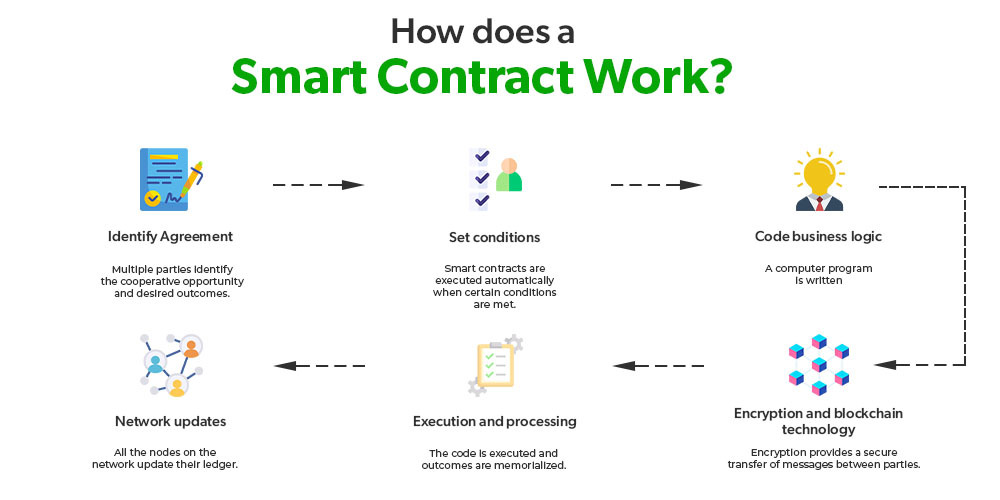
Figure 2: General smart contract structure and execution flow
The Account Model in Practice
Here’s a key difference from Ethereum:
Ethereum: Smart contracts have their own storage. When you call a function, the contract modifies its internal state.
Solana: Programs are stateless. They operate on accounts passed to them. Data storage is separated from program logic.
1
2
3
4
5
6
7
// Example: Account structure in Solana
pub struct UserProfile {
pub owner: Pubkey, // 32 bytes
pub username: String, // Variable length
pub reputation: u64, // 8 bytes
pub created_at: i64, // 8 bytes
}
Setting Up Your Development Environment
Prerequisites
Before starting Solana development, ensure you have the following installed:
1
2
3
4
5
6
7
8
9
10
11
12
13
14
15
16
17
18
19
20
21
22
23
24
# Install Rust
curl --proto '=https' --tlsv1.2 -sSf https://sh.rustup.rs | sh
source $HOME/.cargo/env
# Verify installation
rustc --version
cargo --version
# Install Solana CLI tools
sh -c "$(curl -sSfL https://release.solana.com/stable/install)"
# Add Solana to PATH
export PATH="$HOME/.local/share/solana/install/active_release/bin:$PATH"
# Verify Solana installation
solana --version
# Install Anchor CLI
cargo install --git https://github.com/coral-xyz/anchor avm --locked --force
avm install latest
avm use latest
# Verify Anchor installation
anchor --version
Anchor significantly simplifies Solana development. Make sure to install the latest version for the best features and security patches.
Configuring Solana CLI
1
2
3
4
5
6
7
8
9
10
11
12
13
14
# Set cluster to devnet for development
solana config set --url devnet
# Create a new keypair (wallet)
solana-keygen new --outfile ~/.config/solana/id.json
# Check your public key
solana address
# Airdrop some SOL for testing (devnet only)
solana airdrop 2
# Check balance
solana balance
Use devnet for development and testing. Never store mainnet private keys in plaintext files.
Introduction to Anchor Framework
Anchor is a framework for Solana program development that provides:
- Simplified Development: High-level abstractions that reduce boilerplate code
- Security: Built-in security checks and common vulnerabilities prevention
- IDL Generation: Automatic Interface Definition Language generation for client integration
- Testing Framework: Integrated testing environment with TypeScript/JavaScript support
- Error Handling: Structured error handling system
Anchor framework overview and benefits
Creating Your First Anchor Project
1
2
3
4
5
6
7
8
9
10
11
12
13
14
15
16
# Create a new Anchor workspace
anchor init counter_program
cd counter_program
# Project structure
# counter_program/
# ├── Anchor.toml # Anchor configuration
# ├── Cargo.toml # Rust dependencies
# ├── programs/ # Your programs
# │ └── counter_program/
# │ ├── Cargo.toml
# │ └── src/
# │ └── lib.rs # Main program code
# ├── tests/ # Integration tests
# │ └── counter_program.ts
# └── migrations/ # Deployment scripts
Anchor.toml Configuration
1
2
3
4
5
6
7
8
9
10
11
12
13
14
15
16
[features]
seeds = false
skip-lint = false
[programs.devnet]
counter_program = "YourProgramIDHere"
[registry]
url = "https://api.apr.dev"
[provider]
cluster = "devnet"
wallet = "~/.config/solana/id.json"
[scripts]
test = "yarn run ts-mocha -p ./tsconfig.json -t 1000000 tests/**/*.ts"
Building a Counter Program
Let’s build a simple counter program to understand Anchor’s structure. This program will allow users to create a counter, increment it, and read its value.
Program Structure
1
2
3
4
5
6
7
8
9
10
11
12
13
14
15
16
17
18
19
20
21
22
23
24
25
26
27
28
29
30
31
32
33
34
35
36
37
38
39
40
41
42
43
44
45
46
47
48
49
50
51
52
53
54
55
56
57
58
59
60
61
62
63
64
65
66
67
68
69
70
71
72
73
74
75
76
77
78
79
80
81
82
83
84
85
86
87
88
89
90
91
92
93
94
95
96
97
98
99
100
101
102
103
use anchor_lang::prelude::*;
// Program ID - will be generated when you build
declare_id!("YourProgramIDWillGoHere");
#[program]
pub mod counter_program {
use super::*;
// Initialize a new counter
pub fn initialize(ctx: Context<Initialize>) -> Result<()> {
let counter = &mut ctx.accounts.counter;
counter.authority = ctx.accounts.authority.key();
counter.count = 0;
msg!("Counter initialized with value: {}", counter.count);
Ok(())
}
// Increment the counter
pub fn increment(ctx: Context<Increment>) -> Result<()> {
let counter = &mut ctx.accounts.counter;
counter.count = counter.count.checked_add(1).unwrap();
msg!("Counter incremented to: {}", counter.count);
Ok(())
}
// Decrement the counter
pub fn decrement(ctx: Context<Decrement>) -> Result<()> {
let counter = &mut ctx.accounts.counter;
require!(counter.count > 0, ErrorCode::CounterUnderflow);
counter.count = counter.count.checked_sub(1).unwrap();
msg!("Counter decremented to: {}", counter.count);
Ok(())
}
// Reset the counter
pub fn reset(ctx: Context<Reset>) -> Result<()> {
let counter = &mut ctx.accounts.counter;
counter.count = 0;
msg!("Counter reset to: {}", counter.count);
Ok(())
}
}
// Context structs define the accounts required for each instruction
#[derive(Accounts)]
pub struct Initialize<'info> {
#[account(
init,
payer = authority,
space = 8 + Counter::INIT_SPACE
)]
pub counter: Account<'info, Counter>,
#[account(mut)]
pub authority: Signer<'info>,
pub system_program: Program<'info, System>,
}
#[derive(Accounts)]
pub struct Increment<'info> {
#[account(mut)]
pub counter: Account<'info, Counter>,
}
#[derive(Accounts)]
pub struct Decrement<'info> {
#[account(
mut,
has_one = authority
)]
pub counter: Account<'info, Counter>,
pub authority: Signer<'info>,
}
#[derive(Accounts)]
pub struct Reset<'info> {
#[account(
mut,
has_one = authority
)]
pub counter: Account<'info, Counter>,
pub authority: Signer<'info>,
}
// Account data structure
#[account]
#[derive(InitSpace)]
pub struct Counter {
pub authority: Pubkey, // 32 bytes
pub count: u64, // 8 bytes
}
// Custom errors
#[error_code]
pub enum ErrorCode {
#[msg("Counter cannot be decremented below zero")]
CounterUnderflow,
}
Always use checked arithmetic operations (checked_add, checked_sub) to prevent integer overflow/underflow vulnerabilities.
Understanding the Code
1. Program Module (#[program])
- Contains all instruction handlers
- Each function corresponds to a program instruction
- Functions take a
Contextand returnResult<()>
2. Context Structs (#[derive(Accounts)])
- Define which accounts an instruction needs
- Include constraints and validation rules
- Anchor validates these automatically
3. Account Constraints
init: Creates a new accountmut: Account will be modifiedhas_one: Verifies account relationshippayer: Who pays for account creation
4. Account Structure (#[account])
- Defines the data stored in an account
- Must implement serialization traits
- Uses
InitSpacefor automatic size calculation
Detailed breakdown of Anchor framework components
Building and Deploying
Build the Program
1
2
3
4
5
6
7
8
9
10
# Build the program
anchor build
# The build generates:
# 1. target/deploy/counter_program.so - The compiled program
# 2. target/idl/counter_program.json - Interface Definition Language
# 3. target/types/counter_program.ts - TypeScript types
# Get the program ID
solana address -k target/deploy/counter_program-keypair.json
Update Program ID
After building, update the program ID in two places:
1
2
// In programs/counter_program/src/lib.rs
declare_id!("YOUR_PROGRAM_ID_HERE");
1
2
3
# In Anchor.toml
[programs.devnet]
counter_program = "YOUR_PROGRAM_ID_HERE"
Rebuild after updating:
1
anchor build
Always update the program ID in both lib.rs and Anchor.toml after the first build, then rebuild before deployment.
Deploy to Devnet
1
2
3
4
5
6
7
8
# Deploy the program
anchor deploy
# Verify deployment
solana program show YOUR_PROGRAM_ID
# Check program size and upgrade authority
solana program show YOUR_PROGRAM_ID --programs
Writing Tests
Anchor provides an excellent testing framework using TypeScript. Tests run against a local validator or devnet.
Test File Structure
1
2
3
4
5
6
7
8
9
10
11
12
13
14
15
16
17
18
19
20
21
22
23
24
25
26
27
28
29
30
31
32
33
34
35
36
37
38
39
40
41
42
43
44
45
46
47
48
49
50
51
52
53
54
55
56
57
58
59
60
61
62
63
64
65
66
67
68
69
70
71
72
73
74
75
76
77
78
79
80
81
82
83
84
85
86
87
88
89
90
91
92
93
94
95
96
97
98
99
100
101
102
103
104
105
106
107
108
109
110
111
112
113
114
115
116
117
118
119
120
121
122
123
124
125
126
127
128
129
130
131
132
133
134
135
136
137
138
139
140
141
142
143
144
145
146
147
148
149
150
151
152
// tests/counter_program.ts
import * as anchor from "@coral-xyz/anchor";
import { Program } from "@coral-xyz/anchor";
import { CounterProgram } from "../target/types/counter_program";
import { expect } from "chai";
describe("counter_program", () => {
// Configure the client to use the local cluster
const provider = anchor.AnchorProvider.env();
anchor.setProvider(provider);
const program = anchor.workspace.CounterProgram as Program<CounterProgram>;
// Generate a new keypair for the counter account
const counter = anchor.web3.Keypair.generate();
it("Initializes the counter", async () => {
// Call the initialize instruction
const tx = await program.methods
.initialize()
.accounts({
counter: counter.publicKey,
authority: provider.wallet.publicKey,
systemProgram: anchor.web3.SystemProgram.programId,
})
.signers([counter])
.rpc();
console.log("Initialize transaction signature:", tx);
// Fetch the counter account
const counterAccount = await program.account.counter.fetch(
counter.publicKey
);
// Verify the counter was initialized correctly
expect(counterAccount.count.toNumber()).to.equal(0);
expect(counterAccount.authority.toString()).to.equal(
provider.wallet.publicKey.toString()
);
});
it("Increments the counter", async () => {
// Increment the counter
await program.methods
.increment()
.accounts({
counter: counter.publicKey,
})
.rpc();
// Fetch and verify
const counterAccount = await program.account.counter.fetch(
counter.publicKey
);
expect(counterAccount.count.toNumber()).to.equal(1);
});
it("Increments the counter multiple times", async () => {
// Increment 5 times
for (let i = 0; i < 5; i++) {
await program.methods
.increment()
.accounts({
counter: counter.publicKey,
})
.rpc();
}
// Verify final count
const counterAccount = await program.account.counter.fetch(
counter.publicKey
);
expect(counterAccount.count.toNumber()).to.equal(6);
});
it("Decrements the counter", async () => {
// Decrement with authority
await program.methods
.decrement()
.accounts({
counter: counter.publicKey,
authority: provider.wallet.publicKey,
})
.rpc();
// Verify
const counterAccount = await program.account.counter.fetch(
counter.publicKey
);
expect(counterAccount.count.toNumber()).to.equal(5);
});
it("Resets the counter", async () => {
// Reset with authority
await program.methods
.reset()
.accounts({
counter: counter.publicKey,
authority: provider.wallet.publicKey,
})
.rpc();
// Verify
const counterAccount = await program.account.counter.fetch(
counter.publicKey
);
expect(counterAccount.count.toNumber()).to.equal(0);
});
it("Fails to decrement below zero", async () => {
try {
await program.methods
.decrement()
.accounts({
counter: counter.publicKey,
authority: provider.wallet.publicKey,
})
.rpc();
// Should not reach here
expect.fail("Expected error was not thrown");
} catch (error) {
// Verify the error is our custom error
expect(error.error.errorCode.code).to.equal("CounterUnderflow");
expect(error.error.errorMessage).to.include(
"Counter cannot be decremented below zero"
);
}
});
it("Fails when non-authority tries to reset", async () => {
// Create a different wallet
const unauthorizedWallet = anchor.web3.Keypair.generate();
try {
await program.methods
.reset()
.accounts({
counter: counter.publicKey,
authority: unauthorizedWallet.publicKey,
})
.signers([unauthorizedWallet])
.rpc();
expect.fail("Expected error was not thrown");
} catch (error) {
// Should fail constraint check
expect(error.error.errorCode.code).to.equal("ConstraintHasOne");
}
});
});
Comprehensive testing is crucial in Solana development. Test both success and failure cases, including unauthorized access attempts.
Running Tests
1
2
3
4
5
6
7
8
9
10
11
# Install dependencies
npm install
# Run tests with local validator
anchor test
# Run tests against devnet
anchor test --provider.cluster devnet
# Run tests with console logs
anchor test -- --nocapture
Advanced Anchor Features
Program Derived Addresses (PDAs)
PDAs are addresses derived from a program ID and seeds. They’re deterministic and don’t have private keys, making them perfect for program-controlled accounts.
1
2
3
4
5
6
7
8
9
10
11
12
13
14
15
16
17
18
19
20
21
22
23
24
25
26
27
28
29
30
31
32
33
34
35
36
37
38
39
40
41
42
43
44
45
46
47
48
49
50
51
52
53
54
55
56
57
58
59
60
61
62
63
64
65
66
67
68
use anchor_lang::prelude::*;
#[program]
pub mod user_profile {
use super::*;
pub fn create_profile(
ctx: Context<CreateProfile>,
username: String,
) -> Result<()> {
let profile = &mut ctx.accounts.profile;
profile.authority = ctx.accounts.authority.key();
profile.username = username;
profile.reputation = 0;
profile.created_at = Clock::get()?.unix_timestamp;
Ok(())
}
pub fn update_reputation(
ctx: Context<UpdateReputation>,
new_reputation: u64,
) -> Result<()> {
let profile = &mut ctx.accounts.profile;
profile.reputation = new_reputation;
Ok(())
}
}
#[derive(Accounts)]
#[instruction(username: String)]
pub struct CreateProfile<'info> {
#[account(
init,
payer = authority,
space = 8 + UserProfile::INIT_SPACE,
seeds = [b"profile", authority.key().as_ref()],
bump
)]
pub profile: Account<'info, UserProfile>,
#[account(mut)]
pub authority: Signer<'info>,
pub system_program: Program<'info, System>,
}
#[derive(Accounts)]
pub struct UpdateReputation<'info> {
#[account(
mut,
seeds = [b"profile", authority.key().as_ref()],
bump,
has_one = authority
)]
pub profile: Account<'info, UserProfile>,
pub authority: Signer<'info>,
}
#[account]
#[derive(InitSpace)]
pub struct UserProfile {
pub authority: Pubkey,
#[max_len(50)]
pub username: String,
pub reputation: u64,
pub created_at: i64,
}
Benefits of PDAs:
- Deterministic addresses (same seeds = same address)
- No private key management
- Program can sign transactions on behalf of PDAs
- Perfect for user-specific accounts
Cross-Program Invocations (CPI)
Call other programs from your program:
1
2
3
4
5
6
7
8
9
10
11
12
13
14
15
16
17
18
19
20
21
22
23
24
25
26
27
28
29
30
31
32
33
34
35
36
37
38
39
40
41
use anchor_lang::prelude::*;
use anchor_spl::token::{self, Token, Transfer, TokenAccount};
#[program]
pub mod escrow {
use super::*;
pub fn deposit_tokens(
ctx: Context<DepositTokens>,
amount: u64,
) -> Result<()> {
// Transfer tokens from user to escrow
let cpi_accounts = Transfer {
from: ctx.accounts.user_token_account.to_account_info(),
to: ctx.accounts.escrow_token_account.to_account_info(),
authority: ctx.accounts.authority.to_account_info(),
};
let cpi_program = ctx.accounts.token_program.to_account_info();
let cpi_ctx = CpiContext::new(cpi_program, cpi_accounts);
// Execute the transfer
token::transfer(cpi_ctx, amount)?;
msg!("Deposited {} tokens to escrow", amount);
Ok(())
}
}
#[derive(Accounts)]
pub struct DepositTokens<'info> {
#[account(mut)]
pub user_token_account: Account<'info, TokenAccount>,
#[account(mut)]
pub escrow_token_account: Account<'info, TokenAccount>,
pub authority: Signer<'info>,
pub token_program: Program<'info, Token>,
}
Events and Logging
Emit events for off-chain applications to listen to:
1
2
3
4
5
6
7
8
9
10
11
12
13
14
15
16
17
18
19
20
21
22
23
24
25
26
27
28
29
30
31
32
33
34
35
36
37
38
39
40
41
42
43
44
45
46
47
48
49
50
use anchor_lang::prelude::*;
#[program]
pub mod event_example {
use super::*;
pub fn create_user(ctx: Context<CreateUser>, name: String) -> Result<()> {
let user = &mut ctx.accounts.user;
user.authority = ctx.accounts.authority.key();
user.name = name.clone();
// Emit an event
emit!(UserCreated {
user: user.key(),
authority: user.authority,
name: name,
timestamp: Clock::get()?.unix_timestamp,
});
Ok(())
}
}
#[derive(Accounts)]
pub struct CreateUser<'info> {
#[account(init, payer = authority, space = 8 + User::INIT_SPACE)]
pub user: Account<'info, User>,
#[account(mut)]
pub authority: Signer<'info>,
pub system_program: Program<'info, System>,
}
#[account]
#[derive(InitSpace)]
pub struct User {
pub authority: Pubkey,
#[max_len(50)]
pub name: String,
}
// Define the event
#[event]
pub struct UserCreated {
pub user: Pubkey,
pub authority: Pubkey,
pub name: String,
pub timestamp: i64,
}
Security Best Practices
Security is paramount in Solana development! Always validate accounts, use checked arithmetic, and implement proper access control.
1. Account Validation
Always validate accounts to prevent unauthorized access:
1
2
3
4
5
6
7
8
9
10
11
12
13
#[derive(Accounts)]
pub struct SecureOperation<'info> {
// Verify the account has the correct owner
#[account(
mut,
has_one = authority @ ErrorCode::Unauthorized,
constraint = data.is_initialized @ ErrorCode::NotInitialized
)]
pub data: Account<'info, DataAccount>,
// Ensure signer is who they claim to be
pub authority: Signer<'info>,
}
2. Integer Overflow Protection
Use checked arithmetic operations:
1
2
3
4
5
6
7
8
9
10
11
12
13
14
pub fn safe_add(ctx: Context<SafeMath>, amount: u64) -> Result<()> {
let account = &mut ctx.accounts.account;
// Bad: Can overflow
// account.balance = account.balance + amount;
// Good: Checked operation
account.balance = account
.balance
.checked_add(amount)
.ok_or(ErrorCode::Overflow)?;
Ok(())
}
3. Reentrancy Protection
Solana’s account model naturally prevents many reentrancy attacks, but be cautious with CPIs:
1
2
3
4
5
6
7
8
9
10
11
12
13
14
pub fn safe_withdrawal(ctx: Context<Withdraw>, amount: u64) -> Result<()> {
let account = &mut ctx.accounts.user_account;
// Check balance first
require!(account.balance >= amount, ErrorCode::InsufficientFunds);
// Update state BEFORE external call
account.balance = account.balance.checked_sub(amount).unwrap();
// Then transfer
// ... transfer logic
Ok(())
}
4. Access Control
Implement proper access control patterns:
1
2
3
4
5
6
7
8
9
10
11
12
13
14
15
16
#[account]
pub struct AdminControlled {
pub admin: Pubkey,
pub data: u64,
}
#[derive(Accounts)]
pub struct AdminOnly<'info> {
#[account(
mut,
constraint = account.admin == admin.key() @ ErrorCode::NotAdmin
)]
pub account: Account<'info, AdminControlled>,
pub admin: Signer<'info>,
}
5. Proper Error Handling
Define clear, specific errors:
1
2
3
4
5
6
7
8
9
10
11
12
13
14
15
16
17
#[error_code]
pub enum ErrorCode {
#[msg("You are not authorized to perform this action")]
Unauthorized,
#[msg("Account is not initialized")]
NotInitialized,
#[msg("Arithmetic overflow occurred")]
Overflow,
#[msg("Insufficient funds for this operation")]
InsufficientFunds,
#[msg("Invalid input parameter")]
InvalidInput,
}
Common Pitfalls and How to Avoid Them
1. Account Size Miscalculation
Problem: Not allocating enough space for accounts leads to runtime errors.
Solution: Use InitSpace derive macro and calculate carefully:
1
2
3
4
5
6
7
8
9
10
11
12
13
14
15
16
#[account]
#[derive(InitSpace)]
pub struct MyAccount {
pub owner: Pubkey, // 32 bytes
#[max_len(100)]
pub name: String, // 4 + 100 bytes (length prefix + content)
pub balance: u64, // 8 bytes
pub items: Vec<u64>, // Avoid dynamic vectors!
}
// In the accounts struct:
#[account(
init,
payer = payer,
space = 8 + MyAccount::INIT_SPACE // 8 bytes for discriminator
)]
2. Forgetting Account Constraints
Problem: Missing validation allows unauthorized access.
Solution: Always use appropriate constraints:
1
2
3
4
5
6
7
8
9
10
11
#[derive(Accounts)]
pub struct UpdateData<'info> {
#[account(
mut,
has_one = owner, // Verify owner relationship
constraint = data.is_active, // Custom validation
)]
pub data: Account<'info, DataAccount>,
pub owner: Signer<'info>, // Must be signer
}
3. Not Using PDAs Correctly
Problem: Hardcoding addresses or managing private keys for program accounts.
Solution: Use PDAs with proper seeds:
1
2
3
4
5
6
7
8
9
// Always use deterministic seeds
#[account(
init,
payer = authority,
space = 8 + ProfileAccount::INIT_SPACE,
seeds = [b"profile", authority.key().as_ref()],
bump
)]
pub profile: Account<'info, ProfileAccount>,
Client Integration
Using Anchor Client (TypeScript)
1
2
3
4
5
6
7
8
9
10
11
12
13
14
15
16
17
18
19
20
21
22
23
24
25
26
27
28
29
30
31
32
33
34
35
36
37
38
39
40
41
42
43
44
45
46
47
48
49
50
51
52
53
54
55
56
57
58
59
60
61
62
63
64
65
66
67
68
69
70
71
72
73
74
75
76
77
import * as anchor from "@coral-xyz/anchor";
import { Program, AnchorProvider, web3 } from "@coral-xyz/anchor";
import { CounterProgram } from "./target/types/counter_program";
// Setup connection and wallet
const connection = new web3.Connection(
"https://api.devnet.solana.com",
"confirmed"
);
const wallet = anchor.Wallet.local();
const provider = new AnchorProvider(connection, wallet, {
commitment: "confirmed",
});
// Load the program
const program = new Program<CounterProgram>(
IDL,
programId,
provider
);
// Initialize counter
async function initializeCounter() {
const counter = web3.Keypair.generate();
const tx = await program.methods
.initialize()
.accounts({
counter: counter.publicKey,
authority: provider.wallet.publicKey,
systemProgram: web3.SystemProgram.programId,
})
.signers([counter])
.rpc();
console.log("Counter initialized:", counter.publicKey.toString());
return counter.publicKey;
}
// Increment counter
async function incrementCounter(counterAddress: web3.PublicKey) {
const tx = await program.methods
.increment()
.accounts({
counter: counterAddress,
})
.rpc();
console.log("Transaction signature:", tx);
}
// Read counter value
async function readCounter(counterAddress: web3.PublicKey) {
const counterAccount = await program.account.counter.fetch(
counterAddress
);
console.log("Counter value:", counterAccount.count.toString());
console.log("Authority:", counterAccount.authority.toString());
return counterAccount;
}
// Subscribe to account changes
function subscribeToCounter(counterAddress: web3.PublicKey) {
const subscriptionId = program.account.counter.subscribe(
counterAddress,
"confirmed"
);
subscriptionId.on("change", (account) => {
console.log("Counter updated:", account.count.toString());
});
return subscriptionId;
}
Using with React
1
2
3
4
5
6
7
8
9
10
11
12
13
14
15
16
17
18
19
20
21
22
23
24
25
26
27
28
29
30
31
32
33
34
35
36
37
38
39
40
41
42
43
44
45
46
47
48
49
import { useConnection, useWallet } from "@solana/wallet-adapter-react";
import { Program, AnchorProvider } from "@coral-xyz/anchor";
import { useState, useEffect } from "react";
function CounterApp() {
const { connection } = useConnection();
const wallet = useWallet();
const [counter, setCounter] = useState<number>(0);
const [program, setProgram] = useState<Program | null>(null);
useEffect(() => {
if (wallet.connected) {
const provider = new AnchorProvider(
connection,
wallet as any,
{ commitment: "confirmed" }
);
const program = new Program(IDL, programId, provider);
setProgram(program);
}
}, [wallet.connected]);
const incrementCounter = async () => {
if (!program) return;
try {
await program.methods
.increment()
.accounts({
counter: counterAddress,
})
.rpc();
// Refresh counter value
const account = await program.account.counter.fetch(counterAddress);
setCounter(account.count.toNumber());
} catch (error) {
console.error("Error incrementing counter:", error);
}
};
return (
<div>
<h1>Counter: {counter}</h1>
<button onClick={incrementCounter}>Increment</button>
</div>
);
}
Deployment Strategies
Mainnet Deployment Checklist
Before deploying to mainnet:
- Thorough Testing ```bash
Run all tests
anchor test
Test on devnet extensively
anchor deploy –provider.cluster devnet
Perform security audit
1
2
3
4
5
6
7
8
2. **Optimize Program Size**
```bash
# Build with release profile
anchor build --release
# Check program size
ls -lh target/deploy/*.so
- Set Upgrade Authority ```bash
Deploy with specific upgrade authority
solana program deploy
target/deploy/my_program.so
–upgrade-authority
Or make program immutable (careful!)
solana program set-upgrade-authority
1
2
3
4
5
6
7
8
9
10
11
4. **Monitor Deployment**
```bash
# Deploy to mainnet
anchor deploy --provider.cluster mainnet
# Verify program
solana program show <PROGRAM_ID>
# Check program logs
solana logs <PROGRAM_ID>
Upgrading Programs
Solana programs can be upgraded if you maintain upgrade authority:
1
2
3
4
5
6
7
8
9
10
# Build new version
anchor build
# Upgrade on mainnet
anchor upgrade target/deploy/my_program.so \
--program-id <PROGRAM_ID> \
--provider.cluster mainnet
# Verify new version
solana program dump <PROGRAM_ID> upgraded_program.so
Performance Optimization
1. Account Packing
Minimize account size to reduce rent costs:
1
2
3
4
5
6
7
8
#[account]
pub struct OptimizedAccount {
// Pack data efficiently
pub flags: u8, // Use bit flags instead of multiple bools
pub count: u32, // Use smallest sufficient integer type
pub owner: Pubkey,
// Align fields for better memory access
}
2. Compute Unit Optimization
1
2
3
4
5
6
7
8
// Request specific compute units
pub fn optimized_function(ctx: Context<MyContext>) -> Result<()> {
// Minimize loops
// Avoid redundant calculations
// Use references instead of clones
Ok(())
}
3. Transaction Size
Keep transactions small to avoid failures:
1
2
3
4
5
6
7
// Batch operations efficiently
const tx = new Transaction()
.add(instruction1)
.add(instruction2)
.add(instruction3); // Don't exceed transaction size limit
// For many operations, send multiple transactions
Conclusion
Solana program development with Rust and Anchor opens up a world of possibilities for building high-performance blockchain applications. The combination of Solana’s incredible speed and Rust’s safety makes it an excellent platform for DeFi protocols, NFT marketplaces, gaming applications, and more.
Key takeaways from this guide:
Understand the Account Model: Solana’s account model is fundamentally different from Ethereum. Programs are stateless and operate on accounts passed to them.
Leverage Anchor: The Anchor framework significantly simplifies development with its high-level abstractions, built-in security checks, and excellent tooling.
Security First: Always validate accounts, use checked arithmetic, implement proper access control, and follow security best practices.
Test Thoroughly: Use Anchor’s testing framework extensively before deploying to mainnet. Write comprehensive test cases covering normal operations and edge cases.
Optimize for Performance: Be mindful of account sizes, compute units, and transaction sizes to build efficient programs.
As you continue your Solana development journey, remember that the ecosystem is rapidly evolving. Stay updated with the latest Anchor releases, security best practices, and emerging patterns in the community.
Resources
Official Documentation
Development Tools
- Solana Playground - Browser-based Solana IDE
- Anchor by Example
- Solana Explorer
Learning Resources
Community
Start building, experiment with different patterns, and join the vibrant Solana developer community. The future of high-performance blockchain applications is here, and now you have the tools to be part of it!