Gönderi

Python Performans Profiling ve Optimizasyon: Kapsamlı Rehber

Python kod optimizasyonu ve profiling teknikleri. cProfile, memory_profiler, py-spy, line_profiler kullanımı ve bottleneck tespiti stratejileri.

Python Performans Profiling ve Optimizasyon: Kapsamlı Rehber

Giriş

Python’un kolay okunabilir sözdizimi ve geniş ekosistemi, onu popüler bir programlama dili yaparken, performans optimizasyonu özellikle büyük ölçekli uygulamalarda kritik bir konu haline gelir. Bu rehberde, Python kodunuzun performansını nasıl ölçeceğinizi, darboğazları nasıl tespit edeceğinizi ve optimize edeceğinizi kapsamlı bir şekilde öğreneceksiniz.

Performans profiling, kodunuzun hangi bölümlerinin en çok zaman ve kaynak tükettiğini anlamanızı sağlar. Bu bilgi, optimize edilmesi gereken alanları belirlemenize ve geliştirme çabalarınızı en etkili alanlara odaklamanıza yardımcı olur.

Performans Profiling Nedir ve Neden Önemlidir?

Profiling’in Tanımı

Profiling, bir programın çalışma zamanı davranışını analiz etme işlemidir. Bu analiz şunları içerir:

  • Zaman Profiling: Fonksiyonların ve kod satırlarının ne kadar süre aldığını ölçme
  • Bellek Profiling: Bellek kullanımını ve sızıntıları tespit etme
  • CPU Profiling: İşlemci kullanımını ve darboğazları belirleme
  • I/O Profiling: Disk ve ağ işlemlerinin performansını ölçme

Neden Profiling Yapmalıyız?

1
2
3
4
5
6
7
8
9
10
11
12
13
14
15
16
17
18
19
# Yanlış yaklaşım: Tahminde bulunmak
def slow_function():
    # "Bu kısım muhtemelen yavaş" - tahmin
    pass

# Doğru yaklaşım: Ölçmek
import cProfile
import pstats

profiler = cProfile.Profile()
profiler.enable()

# Kodunuzu çalıştırın
slow_function()

profiler.disable()
stats = pstats.Stats(profiler)
stats.sort_stats('cumulative')
stats.print_stats(10)  # En yavaş 10 fonksiyonu göster

Profiling yapmanın avantajları:

  1. Gerçek Darboğazları Bulma: Tahminler yanıltıcı olabilir
  2. Ölçülebilir İyileştirmeler: Optimizasyon öncesi/sonrası karşılaştırma
  3. Kaynak Optimizasyonu: CPU, bellek ve I/O kullanımını dengeleme
  4. Maliyet Azaltma: Bulut ortamlarında kaynak kullanımını optimize etme
  5. Kullanıcı Deneyimi: Daha hızlı ve duyarlı uygulamalar

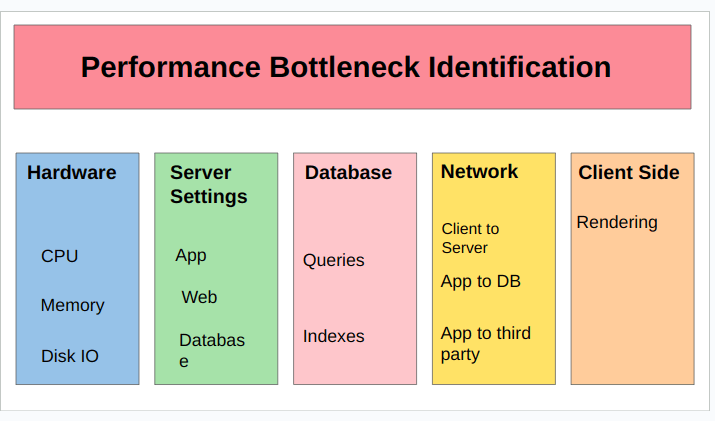
Performance Bottleneck Identification

cProfile: Python’un Yerleşik Profiler’ı

cProfile Temelleri

cProfile, Python’un standart kütüphanesinde yer alan C uzantısı tabanlı bir profiler’dır:

1
2
3
4
5
6
7
8
9
10
11
12
13
14
15
16
17
18
19
20
21
22
23
24
25
26
27
28
29
30
import cProfile
import pstats
import io
from pstats import SortKey

def fibonacci(n):
    """Naive Fibonacci implementation"""
    if n <= 1:
        return n
    return fibonacci(n - 1) + fibonacci(n - 2)

def calculate_fibs():
    results = []
    for i in range(30):
        results.append(fibonacci(i))
    return results

# Profiling yap
profiler = cProfile.Profile()
profiler.enable()

calculate_fibs()

profiler.disable()

# Sonuçları analiz et
s = io.StringIO()
ps = pstats.Stats(profiler, stream=s).sort_stats(SortKey.CUMULATIVE)
ps.print_stats(20)  # İlk 20 fonksiyon
print(s.getvalue())

cProfile Çıktısını Anlamak

1
2
3
4
5
6
7
8
9
10
11
12
13
14
15
16
17
18
19
20
21
22
23
24
25
26
# Profiling sonuçlarını detaylı analiz
def analyze_profile_output():
    """
    cProfile çıktısı şu sütunları içerir:
    
    ncalls: Fonksiyonun kaç kez çağrıldığı
    tottime: Fonksiyonda geçirilen toplam süre (alt fonksiyonlar hariç)
    percall: tottime / ncalls
    cumtime: Fonksiyonda geçirilen toplam süre (alt fonksiyonlar dahil)
    percall: cumtime / ncalls
    filename:lineno(function): Fonksiyonun konumu
    """
    pass

# Komut satırından profiling
"""
python -m cProfile -s cumulative script.py

# Sonuçları dosyaya kaydet
python -m cProfile -o output.prof script.py

# Sonuçları analiz et
python -m pstats output.prof
>>> sort cumulative
>>> stats 10
"""

Decorator ile Profiling

1
2
3
4
5
6
7
8
9
10
11
12
13
14
15
16
17
18
19
20
21
22
23
24
25
26
27
28
29
30
31
32
33
34
35
36
37
38
39
40
41
42
43
import cProfile
import functools
import pstats
import io

def profile_function(func):
    """Fonksiyon bazlı profiling decorator"""
    @functools.wraps(func)
    def wrapper(*args, **kwargs):
        profiler = cProfile.Profile()
        profiler.enable()
        
        try:
            result = func(*args, **kwargs)
        finally:
            profiler.disable()
            
            # Sonuçları yazdır
            s = io.StringIO()
            ps = pstats.Stats(profiler, stream=s)
            ps.sort_stats('cumulative')
            ps.print_stats(10)
            print(f"\n{'='*80}")
            print(f"Profile results for {func.__name__}")
            print('='*80)
            print(s.getvalue())
        
        return result
    return wrapper

@profile_function
def process_data(data):
    """Veri işleme fonksiyonu"""
    result = []
    for item in data:
        # Karmaşık işlemler
        processed = [x ** 2 for x in range(item)]
        result.extend(processed)
    return result

# Kullanım
data = list(range(100))
process_data(data)

Context Manager ile Profiling

1
2
3
4
5
6
7
8
9
10
11
12
13
14
15
16
17
18
19
20
21
22
23
24
25
26
27
28
29
30
31
32
33
import cProfile
import pstats
from contextlib import contextmanager

@contextmanager
def profile_context(name="Profile"):
    """Context manager olarak profiling"""
    profiler = cProfile.Profile()
    profiler.enable()
    
    try:
        yield profiler
    finally:
        profiler.disable()
        
        # Sonuçları göster
        stats = pstats.Stats(profiler)
        stats.sort_stats('cumulative')
        print(f"\n{'='*80}")
        print(f"{name} Results")
        print('='*80)
        stats.print_stats(15)

# Kullanım
def expensive_operation():
    total = 0
    for i in range(1000000):
        total += i ** 2
    return total

with profile_context("Expensive Operation"):
    result = expensive_operation()
    print(f"Result: {result}")

Line Profiler: Satır Satır Analiz

line_profiler Kurulumu ve Kullanımı

1
2
# Kurulum
pip install line-profiler
1
2
3
4
5
6
7
8
9
10
11
12
13
14
15
16
17
18
19
20
21
22
23
24
25
26
27
28
29
30
31
32
33
34
35
36
# line_profiler ile satır bazlı profiling
"""
Kullanım:
1. @profile decorator'ı ekle (import etmeyin!)
2. kernprof ile çalıştır
"""

# example.py
@profile
def slow_function():
    total = 0
    for i in range(10000):
        for j in range(1000):
            total += i * j
    return total

@profile
def find_primes(n):
    primes = []
    for num in range(2, n):
        is_prime = True
        for i in range(2, int(num ** 0.5) + 1):
            if num % i == 0:
                is_prime = False
                break
        if is_prime:
            primes.append(num)
    return primes

def main():
    result1 = slow_function()
    result2 = find_primes(1000)
    return result1, result2

if __name__ == "__main__":
    main()
1
2
3
4
5
6
7
8
9
10
11
12
13
# Profiling çalıştır
kernprof -l -v example.py

# Çıktı örneği:
# Line #      Hits         Time  Per Hit   % Time  Line Contents
# ==============================================================
#      3                                           @profile
#      4                                           def slow_function():
#      5         1          2.0      2.0      0.0      total = 0
#      6     10001      4234.0      0.4      0.0      for i in range(10000):
#      7  10000000    4567890.0      0.5     45.2          for j in range(1000):
#      8  10000000    5543210.0      0.6     54.8              total += i * j
#      9         1          1.0      1.0      0.0      return total

Programmatik line_profiler Kullanımı

1
2
3
4
5
6
7
8
9
10
11
12
13
14
15
16
17
18
19
20
21
22
23
24
25
26
27
28
29
30
31
32
33
from line_profiler import LineProfiler

def optimize_me():
    """Optimize edilmesi gereken fonksiyon"""
    # Yavaş liste işlemleri
    result = []
    for i in range(10000):
        result.append(i ** 2)
    
    # Yavaş string birleştirme
    text = ""
    for i in range(1000):
        text += str(i)
    
    # Etkisiz liste comprehension
    squares = [x ** 2 for x in range(10000)]
    
    return result, text, squares

def run_line_profiler():
    """Line profiler'ı programmatik çalıştır"""
    profiler = LineProfiler()
    profiler.add_function(optimize_me)
    
    # Fonksiyonu wrap et ve çalıştır
    wrapped = profiler(optimize_me)
    wrapped()
    
    # Sonuçları göster
    profiler.print_stats()

if __name__ == "__main__":
    run_line_profiler()

Line Profiler Output Example

Line Profiler ile Optimizasyon Örneği

1
2
3
4
5
6
7
8
9
10
11
12
13
14
15
16
17
18
19
20
21
22
23
24
25
26
27
28
29
30
31
32
33
34
35
36
37
38
39
40
41
42
43
44
45
46
47
48
49
50
51
52
53
54
55
56
57
58
59
60
61
62
63
from line_profiler import LineProfiler
import numpy as np

# Optimizasyon öncesi
@profile
def slow_matrix_operation(n=1000):
    """Yavaş matris işlemleri"""
    result = []
    for i in range(n):
        row = []
        for j in range(n):
            row.append(i * j)
        result.append(row)
    
    # Manuel toplam
    total = 0
    for row in result:
        for val in row:
            total += val
    
    return total

# Optimizasyon sonrası
@profile
def fast_matrix_operation(n=1000):
    """NumPy ile optimize edilmiş"""
    # Vektörleştirilmiş işlem
    result = np.outer(np.arange(n), np.arange(n))
    
    # NumPy toplam
    total = np.sum(result)
    
    return total

def compare_implementations():
    """İki implementasyonu karşılaştır"""
    import time
    
    profiler = LineProfiler()
    
    # Yavaş versiyonu profile et
    profiler.add_function(slow_matrix_operation)
    start = time.time()
    profiler.run('slow_matrix_operation(100)')
    slow_time = time.time() - start
    
    print("\nSlow implementation:")
    profiler.print_stats()
    
    # Hızlı versiyonu profile et
    profiler_fast = LineProfiler()
    profiler_fast.add_function(fast_matrix_operation)
    start = time.time()
    profiler_fast.run('fast_matrix_operation(100)')
    fast_time = time.time() - start
    
    print("\nFast implementation:")
    profiler_fast.print_stats()
    
    print(f"\nSpeedup: {slow_time / fast_time:.2f}x faster")

if __name__ == "__main__":
    compare_implementations()

Memory Profiler: Bellek Kulımını İzleme

memory_profiler Kurulumu

1
2
3
4
5
# Kurulum
pip install memory-profiler psutil

# Opsiyonel: matplotlib ile grafik
pip install matplotlib

Temel memory_profiler Kullanımı

1
2
3
4
5
6
7
8
9
10
11
12
13
14
15
16
17
18
19
20
21
from memory_profiler import profile

@profile
def memory_intensive_function():
    """Bellek yoğun işlemler"""
    # Büyük liste oluştur
    large_list = [i for i in range(1000000)]
    
    # Liste kopyalama
    copied_list = large_list.copy()
    
    # String birleştirme
    large_string = ''.join([str(i) for i in range(100000)])
    
    # Sözlük oluşturma
    large_dict = {i: i ** 2 for i in range(100000)}
    
    return large_list, copied_list, large_string, large_dict

if __name__ == "__main__":
    memory_intensive_function()
1
2
3
4
5
6
7
8
9
10
11
12
# Çalıştır
python -m memory_profiler example.py

# Çıktı örneği:
# Line #    Mem usage    Increment  Occurrences   Line Contents
# =============================================================
#      3   38.7 MiB   38.7 MiB           1   @profile
#      4                                         def memory_intensive_function():
#      5   46.4 MiB    7.7 MiB           1       large_list = [i for i in range(1000000)]
#      6   54.1 MiB    7.7 MiB           1       copied_list = large_list.copy()
#      7   59.8 MiB    5.7 MiB           1       large_string = ''.join([str(i) for i in range(100000)])
#      8   67.2 MiB    7.4 MiB           1       large_dict = {i: i ** 2 for i in range(100000)}

Bellek Sızıntılarını Tespit Etme

1
2
3
4
5
6
7
8
9
10
11
12
13
14
15
16
17
18
19
20
21
22
23
24
25
26
27
28
29
30
31
32
33
34
35
36
37
38
39
40
41
42
43
44
45
46
47
48
49
50
51
52
53
54
55
56
57
58
59
60
61
62
63
64
65
66
67
68
69
70
71
from memory_profiler import profile
import gc

class LeakyClass:
    """Bellek sızıntısı olan sınıf"""
    instances = []  # Tüm örnekleri saklayan sınıf değişkeni
    
    def __init__(self, data):
        self.data = data
        # Kendini sınıf listesine ekle (memory leak!)
        LeakyClass.instances.append(self)

class NonLeakyClass:
    """Bellek sızıntısı olmayan sınıf"""
    def __init__(self, data):
        self.data = data
    
    def __del__(self):
        # Temizlik işlemleri
        pass

@profile
def create_leaky_objects():
    """Bellek sızıntısı oluştur"""
    for i in range(10000):
        obj = LeakyClass([i] * 1000)
    
    # Garbage collection çalıştır
    gc.collect()
    
    # Hala bellekte!
    print(f"Leaky instances: {len(LeakyClass.instances)}")

@profile
def create_clean_objects():
    """Temiz nesne yaratma"""
    for i in range(10000):
        obj = NonLeakyClass([i] * 1000)
    
    # Garbage collection çalıştır
    gc.collect()
    
    print("Clean objects created and destroyed")

def detect_memory_leaks():
    """Bellek sızıntılarını tespit et"""
    import tracemalloc
    
    # Bellek takibini başlat
    tracemalloc.start()
    
    # İlk snapshot
    snapshot1 = tracemalloc.take_snapshot()
    
    # Sızıntılı kod çalıştır
    create_leaky_objects()
    
    # İkinci snapshot
    snapshot2 = tracemalloc.take_snapshot()
    
    # Farkları göster
    top_stats = snapshot2.compare_to(snapshot1, 'lineno')
    
    print("\n[ Top 10 memory allocations ]")
    for stat in top_stats[:10]:
        print(stat)
    
    tracemalloc.stop()

if __name__ == "__main__":
    detect_memory_leaks()

Bellek Kulımını Grafiklendirme

1
2
3
4
5
6
7
8
9
10
11
12
13
14
15
16
17
18
19
20
21
22
23
24
25
26
27
28
29
30
31
32
33
34
35
36
37
38
39
40
41
42
43
44
45
from memory_profiler import memory_usage
import matplotlib.pyplot as plt
import numpy as np

def memory_intensive_task():
    """Bellek kullanımı değişken fonksiyon"""
    arrays = []
    
    # Aşama 1: Bellek tahsisi
    for i in range(10):
        arrays.append(np.random.rand(1000000))
    
    # Aşama 2: İşlem
    result = sum([arr.sum() for arr in arrays])
    
    # Aşama 3: Temizlik
    arrays.clear()
    
    return result

def plot_memory_usage():
    """Bellek kullanımını grafiğe dök"""
    # Bellek kullanımını ölç
    mem_usage = memory_usage(
        (memory_intensive_task,),
        interval=0.1,
        timeout=None
    )
    
    # Grafiği oluştur
    plt.figure(figsize=(12, 6))
    plt.plot(mem_usage, linewidth=2)
    plt.title('Memory Usage Over Time', fontsize=16)
    plt.xlabel('Time (0.1s intervals)', fontsize=12)
    plt.ylabel('Memory (MiB)', fontsize=12)
    plt.grid(True, alpha=0.3)
    plt.tight_layout()
    plt.savefig('memory_usage.png', dpi=300)
    plt.show()
    
    print(f"Peak memory: {max(mem_usage):.2f} MiB")
    print(f"Average memory: {np.mean(mem_usage):.2f} MiB")

if __name__ == "__main__":
    plot_memory_usage()

py-spy: Sampling Profiler

py-spy Kurulumu ve Kullanımı

1
2
3
4
5
6
7
8
9
10
11
12
13
14
# Kurulum
pip install py-spy

# Çalışan bir Python programını profile et
py-spy top --pid 12345

# Flame graph oluştur
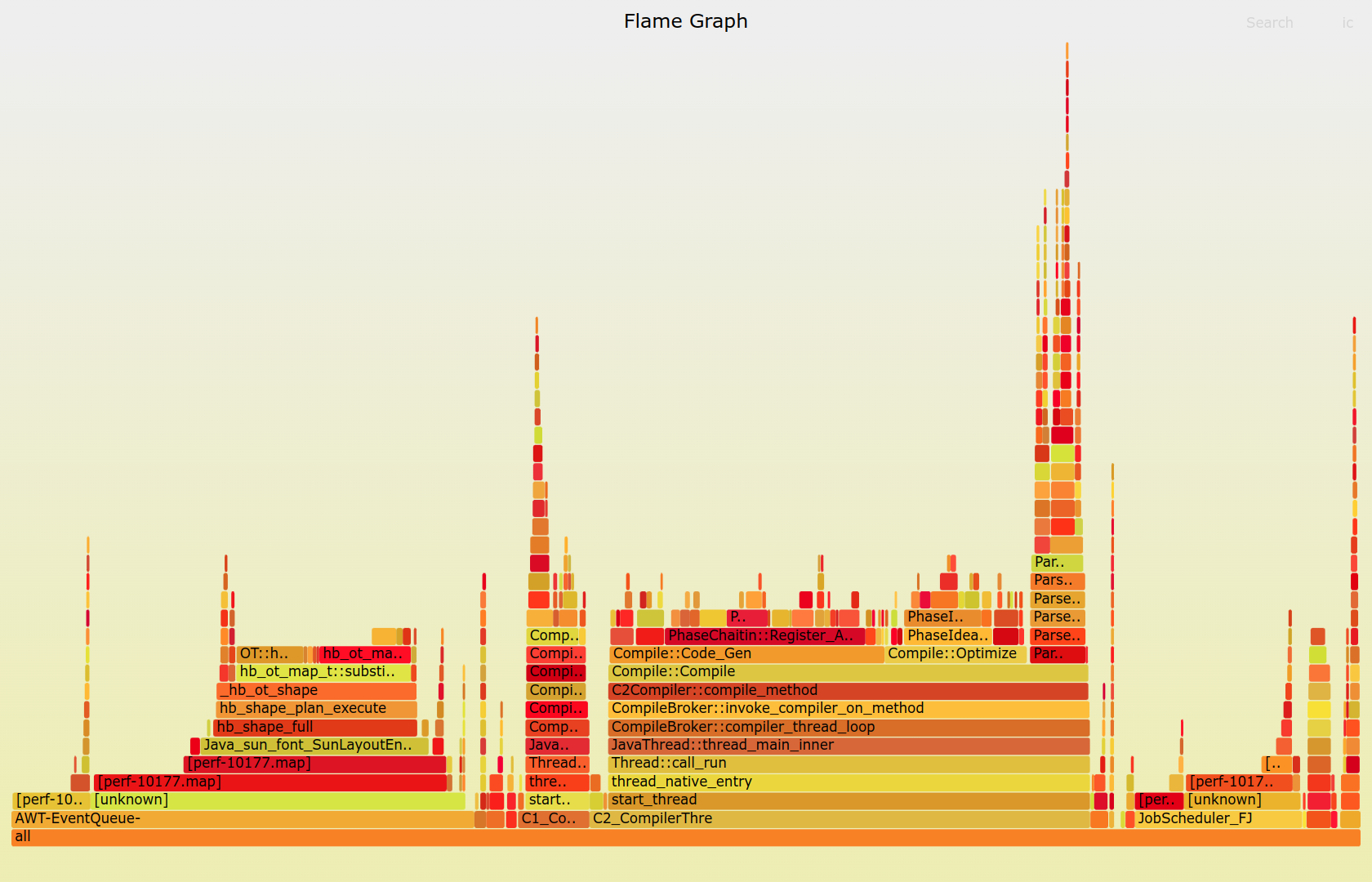
py-spy record -o profile.svg --pid 12345

# Script'i profile ederek çalıştır
py-spy record -o profile.svg -- python script.py

# Uzun süre çalışan servis için
py-spy record -o profile.svg --duration 60 -- python app.py

Python Flame Graph Profiling

py-spy ile Production Profiling

1
2
3
4
5
6
7
8
9
10
11
12
13
14
15
16
17
18
19
20
21
22
23
24
25
26
27
28
29
30
31
32
33
34
35
# app.py - Production web uygulaması
from flask import Flask, jsonify
import time
import random

app = Flask(__name__)

def slow_computation():
    """Yavaş hesaplama simülasyonu"""
    time.sleep(random.uniform(0.1, 0.5))
    result = sum([i ** 2 for i in range(10000)])
    return result

def database_query():
    """Veritabanı sorgusu simülasyonu"""
    time.sleep(random.uniform(0.05, 0.2))
    return {"data": "sample"}

@app.route('/api/slow')
def slow_endpoint():
    """Yavaş endpoint"""
    result = slow_computation()
    data = database_query()
    return jsonify({
        "result": result,
        "data": data
    })

@app.route('/api/fast')
def fast_endpoint():
    """Hızlı endpoint"""
    return jsonify({"status": "ok"})

if __name__ == "__main__":
    app.run(host='0.0.0.0', port=5000)
1
2
3
4
5
6
7
8
9
10
11
12
13
# Production'da profiling
# 1. Uygulamayı başlat
python app.py &
APP_PID=$!

# 2. py-spy ile profile et (30 saniye)
py-spy record -o production_profile.svg --duration 30 --pid $APP_PID

# 3. Load test yap (başka terminal)
ab -n 1000 -c 10 http://localhost:5000/api/slow

# 4. Flame graph'ı incele
# production_profile.svg dosyasını tarayıcıda aç

py-spy ile Detaylı Analiz

1
2
3
4
5
6
7
8
9
10
11
12
13
14
15
16
17
# Fonksiyon bazlı analiz
py-spy top --pid 12345

# Thread bazlı analiz
py-spy dump --pid 12345

# Native extensions dahil
py-spy record -o profile.svg --native --pid 12345

# Subprocesses dahil
py-spy record -o profile.svg --subprocesses --pid 12345

# Belirli bir süre için
py-spy record -o profile.svg --duration 120 --pid 12345

# Örnekleme rate'i ayarla
py-spy record -o profile.svg --rate 1000 --pid 12345  # 1000 Hz

Performans Optimizasyon Teknikleri

1. Algoritma Optimizasyonu

1
2
3
4
5
6
7
8
9
10
11
12
13
14
15
16
17
18
19
20
21
22
23
24
25
26
27
28
29
30
31
32
33
34
35
36
37
38
39
40
41
42
43
44
45
46
47
48
49
50
51
52
53
54
55
56
import time
from functools import lru_cache

# Kötü: O(2^n) karmaşıklık
def fibonacci_slow(n):
    """Naive Fibonacci - exponential complexity"""
    if n <= 1:
        return n
    return fibonacci_slow(n - 1) + fibonacci_slow(n - 2)

# İyi: O(n) karmaşıklık - memoization
@lru_cache(maxsize=None)
def fibonacci_cached(n):
    """Cached Fibonacci - linear complexity"""
    if n <= 1:
        return n
    return fibonacci_cached(n - 1) + fibonacci_cached(n - 2)

# En iyi: O(n) karmaşıklık - iterative
def fibonacci_iterative(n):
    """Iterative Fibonacci - linear complexity, no recursion"""
    if n <= 1:
        return n
    
    a, b = 0, 1
    for _ in range(2, n + 1):
        a, b = b, a + b
    return b

def compare_fibonacci():
    """Fibonacci implementasyonlarını karşılaştır"""
    n = 35
    
    # Slow version
    start = time.time()
    result1 = fibonacci_slow(n)
    slow_time = time.time() - start
    print(f"Slow: {result1} in {slow_time:.4f}s")
    
    # Cached version
    start = time.time()
    result2 = fibonacci_cached(n)
    cached_time = time.time() - start
    print(f"Cached: {result2} in {cached_time:.4f}s")
    
    # Iterative version
    start = time.time()
    result3 = fibonacci_iterative(n)
    iterative_time = time.time() - start
    print(f"Iterative: {result3} in {iterative_time:.4f}s")
    
    print(f"\nSpeedup (cached): {slow_time / cached_time:.0f}x")
    print(f"Speedup (iterative): {slow_time / iterative_time:.0f}x")

if __name__ == "__main__":
    compare_fibonacci()

2. Veri Yapısı Seçimi

1
2
3
4
5
6
7
8
9
10
11
12
13
14
15
16
17
18
19
20
21
22
23
24
25
26
27
28
29
30
31
32
33
34
35
36
37
38
39
40
41
42
43
44
45
46
47
48
49
50
51
52
53
54
55
56
57
58
59
60
61
62
63
64
65
66
67
68
69
70
71
72
73
74
75
76
77
78
79
import time
from collections import deque, defaultdict
import bisect

def compare_data_structures():
    """Farklı veri yapılarının performansını karşılaştır"""
    n = 100000
    
    # List vs Deque for queue operations
    print("Queue Operations (FIFO):")
    
    # List as queue (BAD - O(n) for pop(0))
    queue_list = list(range(n))
    start = time.time()
    for _ in range(1000):
        queue_list.pop(0)
        queue_list.append(1)
    list_time = time.time() - start
    print(f"List: {list_time:.4f}s")
    
    # Deque as queue (GOOD - O(1) for popleft)
    queue_deque = deque(range(n))
    start = time.time()
    for _ in range(1000):
        queue_deque.popleft()
        queue_deque.append(1)
    deque_time = time.time() - start
    print(f"Deque: {deque_time:.4f}s")
    print(f"Speedup: {list_time / deque_time:.2f}x\n")
    
    # List vs Set for membership testing
    print("Membership Testing:")
    
    test_list = list(range(n))
    test_set = set(range(n))
    search_values = list(range(n - 100, n + 100))
    
    # List membership (O(n))
    start = time.time()
    for val in search_values:
        _ = val in test_list
    list_membership_time = time.time() - start
    print(f"List: {list_membership_time:.4f}s")
    
    # Set membership (O(1))
    start = time.time()
    for val in search_values:
        _ = val in test_set
    set_membership_time = time.time() - start
    print(f"Set: {set_membership_time:.4f}s")
    print(f"Speedup: {list_membership_time / set_membership_time:.2f}x\n")
    
    # Dict vs defaultdict
    print("Dictionary Operations:")
    
    words = ['apple', 'banana', 'apple', 'cherry', 'banana', 'apple'] * 10000
    
    # Regular dict
    start = time.time()
    word_count = {}
    for word in words:
        if word in word_count:
            word_count[word] += 1
        else:
            word_count[word] = 1
    dict_time = time.time() - start
    print(f"Dict: {dict_time:.4f}s")
    
    # defaultdict
    start = time.time()
    word_count_default = defaultdict(int)
    for word in words:
        word_count_default[word] += 1
    defaultdict_time = time.time() - start
    print(f"defaultdict: {defaultdict_time:.4f}s")
    print(f"Speedup: {dict_time / defaultdict_time:.2f}x\n")

if __name__ == "__main__":
    compare_data_structures()

3. List Comprehension ve Generator

1
2
3
4
5
6
7
8
9
10
11
12
13
14
15
16
17
18
19
20
21
22
23
24
25
26
27
28
29
30
31
32
33
34
35
36
37
38
39
40
41
42
43
44
45
46
47
48
49
50
51
52
53
54
55
56
57
58
59
60
61
62
63
64
65
66
67
68
69
70
71
72
73
74
75
76
77
78
79
80
81
82
83
84
85
86
87
88
89
90
91
92
93
94
95
import sys
import time

def compare_iteration_methods():
    """Farklı iterasyon yöntemlerini karşılaştır"""
    n = 1000000
    
    # 1. Regular loop
    start = time.time()
    result = []
    for i in range(n):
        result.append(i ** 2)
    loop_time = time.time() - start
    loop_memory = sys.getsizeof(result)
    print(f"Regular loop: {loop_time:.4f}s, {loop_memory:,} bytes")
    
    # 2. List comprehension
    start = time.time()
    result = [i ** 2 for i in range(n)]
    comp_time = time.time() - start
    comp_memory = sys.getsizeof(result)
    print(f"List comprehension: {comp_time:.4f}s, {comp_memory:,} bytes")
    
    # 3. Generator expression
    start = time.time()
    result = (i ** 2 for i in range(n))
    gen_time = time.time() - start
    gen_memory = sys.getsizeof(result)
    print(f"Generator: {gen_time:.6f}s, {gen_memory:,} bytes")
    
    # Generator kullanımı
    start = time.time()
    total = sum(i ** 2 for i in range(n))
    gen_consume_time = time.time() - start
    print(f"Generator (consumed): {gen_consume_time:.4f}s")
    
    print(f"\nMemory savings: {(loop_memory - gen_memory) / loop_memory * 100:.1f}%")

def generator_pipeline():
    """Generator pipeline örneği"""
    def read_large_file(filename):
        """Büyük dosyayı satır satır oku"""
        with open(filename, 'r') as f:
            for line in f:
                yield line.strip()
    
    def filter_lines(lines, keyword):
        """Belirli keyword içeren satırları filtrele"""
        for line in lines:
            if keyword in line:
                yield line
    
    def process_lines(lines):
        """Satırları işle"""
        for line in lines:
            yield line.upper()
    
    # Pipeline: dosya -> filtrele -> işle -> tüket
    # Bellek kullanımı: O(1) - her seferinde sadece bir satır
    """
    lines = read_large_file('large_file.txt')
    filtered = filter_lines(lines, 'error')
    processed = process_lines(filtered)
    
    for line in processed:
        print(line)
    """

def lazy_evaluation_example():
    """Lazy evaluation örneği"""
    def fibonacci_generator():
        """Sonsuz Fibonacci generator"""
        a, b = 0, 1
        while True:
            yield a
            a, b = b, a + b
    
    # İlk 10 Fibonacci sayısını al
    fibs = fibonacci_generator()
    first_10 = [next(fibs) for _ in range(10)]
    print(f"First 10 Fibonacci: {first_10}")
    
    # 100'den küçük Fibonacci sayıları
    fibs = fibonacci_generator()
    less_than_100 = []
    for fib in fibs:
        if fib >= 100:
            break
        less_than_100.append(fib)
    print(f"Fibonacci < 100: {less_than_100}")

if __name__ == "__main__":
    compare_iteration_methods()
    print("\n" + "="*80 + "\n")
    lazy_evaluation_example()

4. String İşlemleri Optimizasyonu

1
2
3
4
5
6
7
8
9
10
11
12
13
14
15
16
17
18
19
20
21
22
23
24
25
26
27
28
29
30
31
32
33
34
35
36
37
38
39
40
41
42
43
44
45
46
47
48
49
50
51
52
53
54
55
56
57
58
59
60
61
62
63
64
65
66
67
68
69
70
71
72
73
74
75
76
77
78
79
80
import time
from io import StringIO

def compare_string_operations():
    """String işlemlerini karşılaştır"""
    n = 10000
    
    # 1. String concatenation with +
    start = time.time()
    result = ""
    for i in range(n):
        result += str(i)
    concat_time = time.time() - start
    print(f"String + concatenation: {concat_time:.4f}s")
    
    # 2. String join
    start = time.time()
    result = ''.join([str(i) for i in range(n)])
    join_time = time.time() - start
    print(f"String join: {join_time:.4f}s")
    
    # 3. StringIO
    start = time.time()
    sio = StringIO()
    for i in range(n):
        sio.write(str(i))
    result = sio.getvalue()
    stringio_time = time.time() - start
    print(f"StringIO: {stringio_time:.4f}s")
    
    # 4. List comprehension + join
    start = time.time()
    result = ''.join(str(i) for i in range(n))
    gen_join_time = time.time() - start
    print(f"Generator + join: {gen_join_time:.4f}s")
    
    print(f"\nSpeedup (join vs +): {concat_time / join_time:.2f}x")

def efficient_string_formatting():
    """Etkili string formatlama"""
    data = {
        'name': 'John Doe',
        'age': 30,
        'city': 'New York'
    }
    n = 100000
    
    # 1. % formatting
    start = time.time()
    for _ in range(n):
        result = "Name: %s, Age: %d, City: %s" % (
            data['name'], data['age'], data['city']
        )
    percent_time = time.time() - start
    print(f"% formatting: {percent_time:.4f}s")
    
    # 2. str.format()
    start = time.time()
    for _ in range(n):
        result = "Name: {}, Age: {}, City: {}".format(
            data['name'], data['age'], data['city']
        )
    format_time = time.time() - start
    print(f"str.format(): {format_time:.4f}s")
    
    # 3. f-strings (Python 3.6+)
    start = time.time()
    for _ in range(n):
        result = f"Name: {data['name']}, Age: {data['age']}, City: {data['city']}"
    fstring_time = time.time() - start
    print(f"f-strings: {fstring_time:.4f}s")
    
    print(f"\nFastest: f-strings (baseline)")
    print(f"str.format() is {format_time / fstring_time:.2f}x slower")
    print(f"% formatting is {percent_time / fstring_time:.2f}x slower")

if __name__ == "__main__":
    compare_string_operations()
    print("\n" + "="*80 + "\n")
    efficient_string_formatting()

5. Fonksiyon Çağrısı Optimizasyonu

1
2
3
4
5
6
7
8
9
10
11
12
13
14
15
16
17
18
19
20
21
22
23
24
25
26
27
28
29
30
31
32
33
34
35
36
37
38
39
40
41
42
43
44
45
46
47
48
49
50
51
52
53
54
55
56
57
58
59
60
61
62
63
64
65
66
67
68
69
70
71
72
73
74
75
76
77
78
79
80
81
82
83
84
85
86
87
88
89
90
91
92
93
94
95
96
97
98
99
100
101
102
103
104
105
106
107
108
109
110
111
112
113
114
import time
from functools import lru_cache, partial

def compare_function_calls():
    """Fonksiyon çağrısı optimizasyonları"""
    n = 1000000
    
    # 1. Regular function call
    def add(a, b):
        return a + b
    
    start = time.time()
    total = 0
    for i in range(n):
        total += add(i, 1)
    func_time = time.time() - start
    print(f"Function call: {func_time:.4f}s")
    
    # 2. Lambda
    add_lambda = lambda a, b: a + b
    start = time.time()
    total = 0
    for i in range(n):
        total += add_lambda(i, 1)
    lambda_time = time.time() - start
    print(f"Lambda: {lambda_time:.4f}s")
    
    # 3. Local variable
    start = time.time()
    total = 0
    local_add = add
    for i in range(n):
        total += local_add(i, 1)
    local_time = time.time() - start
    print(f"Local variable: {local_time:.4f}s")
    
    # 4. Built-in operator
    start = time.time()
    total = 0
    for i in range(n):
        total += i + 1
    inline_time = time.time() - start
    print(f"Inline operation: {inline_time:.4f}s")
    
    print(f"\nSpeedup (inline vs function): {func_time / inline_time:.2f}x")

def caching_expensive_operations():
    """Pahalı işlemleri cache'leme"""
    
    # Without cache
    def expensive_computation(n):
        """Pahalı hesaplama simülasyonu"""
        time.sleep(0.01)  # Simüle edilmiş gecikme
        return sum(i ** 2 for i in range(n))
    
    # With LRU cache
    @lru_cache(maxsize=128)
    def expensive_computation_cached(n):
        """Cache'li pahalı hesaplama"""
        time.sleep(0.01)
        return sum(i ** 2 for i in range(n))
    
    # Test without cache
    start = time.time()
    for i in [100, 200, 100, 300, 200, 100]:
        result = expensive_computation(i)
    no_cache_time = time.time() - start
    print(f"Without cache: {no_cache_time:.4f}s")
    
    # Test with cache
    start = time.time()
    for i in [100, 200, 100, 300, 200, 100]:
        result = expensive_computation_cached(i)
    cache_time = time.time() - start
    print(f"With cache: {cache_time:.4f}s")
    
    print(f"Speedup: {no_cache_time / cache_time:.2f}x")
    
    # Cache istatistikleri
    info = expensive_computation_cached.cache_info()
    print(f"\nCache stats: {info}")
    print(f"Hit rate: {info.hits / (info.hits + info.misses) * 100:.1f}%")

def partial_function_optimization():
    """Partial fonksiyon optimizasyonu"""
    
    def power(base, exponent):
        return base ** exponent
    
    # Regular calls
    start = time.time()
    results = []
    for i in range(1000000):
        results.append(power(i, 2))
    regular_time = time.time() - start
    print(f"Regular function: {regular_time:.4f}s")
    
    # Partial function
    square = partial(power, exponent=2)
    start = time.time()
    results = []
    for i in range(1000000):
        results.append(square(i))
    partial_time = time.time() - start
    print(f"Partial function: {partial_time:.4f}s")
    
    print(f"Speedup: {regular_time / partial_time:.2f}x")

if __name__ == "__main__":
    compare_function_calls()
    print("\n" + "="*80 + "\n")
    caching_expensive_operations()
    print("\n" + "="*80 + "\n")
    partial_function_optimization()

NumPy ile Performans Optimizasyonu

Vektörleştirme

1
2
3
4
5
6
7
8
9
10
11
12
13
14
15
16
17
18
19
20
21
22
23
24
25
26
27
28
29
30
31
32
33
34
35
36
37
38
39
40
41
42
43
44
45
46
47
48
49
50
51
52
53
54
55
56
57
58
59
60
61
62
63
64
65
66
67
68
69
70
71
72
73
74
75
import numpy as np
import time

def compare_vectorization():
    """Python loops vs NumPy vectorization"""
    n = 1000000
    
    # Pure Python
    python_list = list(range(n))
    start = time.time()
    result = [x ** 2 for x in python_list]
    python_time = time.time() - start
    print(f"Pure Python: {python_time:.4f}s")
    
    # NumPy vectorized
    numpy_array = np.arange(n)
    start = time.time()
    result = numpy_array ** 2
    numpy_time = time.time() - start
    print(f"NumPy vectorized: {numpy_time:.4f}s")
    
    print(f"Speedup: {python_time / numpy_time:.2f}x")

def matrix_operations():
    """Matris işlemleri optimizasyonu"""
    n = 1000
    
    # Pure Python matrix multiplication
    A = [[i + j for j in range(n)] for i in range(n)]
    B = [[i * j for j in range(n)] for i in range(n)]
    
    start = time.time()
    C = [[sum(A[i][k] * B[k][j] for k in range(n))
          for j in range(n)] for i in range(n)]
    python_time = time.time() - start
    print(f"Pure Python matrix multiplication: {python_time:.4f}s")
    
    # NumPy matrix multiplication
    A_np = np.random.rand(n, n)
    B_np = np.random.rand(n, n)
    
    start = time.time()
    C_np = np.dot(A_np, B_np)
    numpy_time = time.time() - start
    print(f"NumPy matrix multiplication: {numpy_time:.4f}s")
    
    print(f"Speedup: {python_time / numpy_time:.0f}x")

def broadcasting_example():
    """NumPy broadcasting örneği"""
    # 2D array
    matrix = np.random.rand(1000, 1000)
    
    # Inefficient: loop over rows
    start = time.time()
    result = np.zeros_like(matrix)
    for i in range(matrix.shape[0]):
        result[i] = matrix[i] * 2 + 1
    loop_time = time.time() - start
    print(f"With loop: {loop_time:.4f}s")
    
    # Efficient: broadcasting
    start = time.time()
    result = matrix * 2 + 1
    broadcast_time = time.time() - start
    print(f"Broadcasting: {broadcast_time:.4f}s")
    
    print(f"Speedup: {loop_time / broadcast_time:.2f}x")

if __name__ == "__main__":
    compare_vectorization()
    print("\n" + "="*80 + "\n")
    matrix_operations()
    print("\n" + "="*80 + "\n")
    broadcasting_example()

Profiling Best Practices

1. Production-Safe Profiling

1
2
3
4
5
6
7
8
9
10
11
12
13
14
15
16
17
18
19
20
21
22
23
24
25
26
27
28
29
30
31
32
33
34
35
36
37
38
39
40
41
42
43
44
45
import os
import cProfile
import pstats
from contextlib import contextmanager
import logging

logger = logging.getLogger(__name__)

@contextmanager
def conditional_profile(enable=False, output_file=None):
    """Production-safe profiling context manager"""
    if not enable:
        yield None
        return
    
    profiler = cProfile.Profile()
    profiler.enable()
    
    try:
        yield profiler
    finally:
        profiler.disable()
        
        if output_file:
            profiler.dump_stats(output_file)
            logger.info(f"Profile saved to {output_file}")
        else:
            stats = pstats.Stats(profiler)
            stats.sort_stats('cumulative')
            stats.print_stats(20)

# Kullanım
ENABLE_PROFILING = os.getenv('ENABLE_PROFILING', 'false').lower() == 'true'
PROFILE_OUTPUT = os.getenv('PROFILE_OUTPUT', '/tmp/profile.prof')

def main():
    with conditional_profile(
        enable=ENABLE_PROFILING,
        output_file=PROFILE_OUTPUT
    ):
        # Uygulamanızın kodu
        pass

if __name__ == "__main__":
    main()

2. Sampling vs Deterministic Profiling

1
2
3
4
5
6
7
8
9
10
11
12
13
14
15
16
17
18
19
20
21
22
23
24
25
26
27
"""
Profiling türleri:

1. Deterministic Profiling (cProfile, profile)
   - Her fonksiyon çağrısını kaydeder
   - Hassas ölçüm
   - Yüksek overhead (~%30-100)
   - Development ortamı için uygun

2. Sampling Profiling (py-spy, Austin)
   - Periyodik olarak stack snapshot alır
   - Düşük overhead (~%1-5)
   - Production ortamı için uygun
   - Uzun süre çalışan programlar için ideal
"""

# Development: cProfile kullan
import cProfile
profiler = cProfile.Profile()
profiler.enable()
# ... kod ...
profiler.disable()

# Production: py-spy kullan
"""
py-spy record -o profile.svg --pid <pid> --duration 60
"""

3. Profiling Checklist

1
2
3
4
5
6
7
8
9
10
11
12
13
14
15
16
17
18
19
20
21
22
23
24
25
26
27
28
29
30
31
32
33
34
35
36
37
38
"""
Performance Profiling Checklist:

1. Baseline Ölçümü
   □ Mevcut performansı ölç
   □ Kritik metrikleri belirle (response time, throughput)
   □ Performans hedeflerini tanımla

2. Profiling Stratejisi
   □ Doğru profiling aracını seç (cProfile/py-spy/line_profiler)
   □ Gerçekçi veri ile test et
   □ Production benzeri ortamda profile et

3. Darboğaz Analizi
   □ En yavaş fonksiyonları belirle
   □ Bellek kullanımını kontrol et
   □ I/O işlemlerini analiz et
   □ CPU vs I/O bound olduğunu belirle

4. Optimizasyon
   □ Algoritma karmaşıklığını iyileştir
   □ Veri yapısı seçimini gözden geçir
   □ Caching ekle
   □ Vektörleştirme uygula (NumPy)
   □ Generator kullan

5. Doğrulama
   □ Optimizasyon sonrası profile et
   □ İyileşmeyi ölç ve dokümante et
   □ Regresyon testleri yaz
   □ Production'da izle

6. Sürekli İzleme
   □ APM aracı entegre et
   □ Kritik endpoint'leri izle
   □ Alerting kur
   □ Düzenli performance review yap
"""

Real-World Case Study

E-commerce API Optimizasyonu

1
2
3
4
5
6
7
8
9
10
11
12
13
14
15
16
17
18
19
20
21
22
23
24
25
26
27
28
29
30
31
32
33
34
35
36
37
38
39
40
41
42
43
44
45
46
47
48
49
50
51
52
53
54
55
56
57
58
59
60
61
62
63
64
65
66
67
68
69
70
71
72
73
74
75
76
77
78
79
80
81
82
83
84
85
86
87
88
89
90
91
92
93
94
95
96
97
98
99
100
101
102
103
104
105
106
107
108
109
110
111
112
113
114
"""
Case Study: E-commerce API endpoint optimizasyonu

Problem: /api/products endpoint çok yavaş (2-3 saniye)
Target: < 200ms response time
"""

# ÖNCE: Optimize edilmemiş kod
import time
from typing import List, Dict

class ProductService:
    """Ürün servisi - optimize edilmemiş"""
    
    def get_products(self, category_id: int) -> List[Dict]:
        """Ürünleri getir"""
        # 1. Database sorgusu (N+1 problem)
        products = self._get_products_by_category(category_id)
        
        # 2. Her ürün için ayrı sorgu (BAD!)
        for product in products:
            product['category'] = self._get_category(product['category_id'])
            product['reviews'] = self._get_reviews(product['id'])
            product['stock'] = self._get_stock(product['id'])
        
        # 3. Python'da filtreleme
        filtered = [p for p in products if p['stock']['quantity'] > 0]
        
        # 4. Python'da sıralama
        sorted_products = sorted(filtered, key=lambda x: x['reviews']['rating'], reverse=True)
        
        return sorted_products
    
    def _get_products_by_category(self, category_id: int) -> List[Dict]:
        time.sleep(0.1)  # DB query simulation
        return [{'id': i, 'category_id': category_id, 'name': f'Product {i}'} for i in range(100)]
    
    def _get_category(self, category_id: int) -> Dict:
        time.sleep(0.01)  # DB query simulation
        return {'id': category_id, 'name': f'Category {category_id}'}
    
    def _get_reviews(self, product_id: int) -> Dict:
        time.sleep(0.01)  # DB query simulation
        return {'count': 10, 'rating': 4.5}
    
    def _get_stock(self, product_id: int) -> Dict:
        time.sleep(0.01)  # DB query simulation
        return {'quantity': 50}

# SONRA: Optimize edilmiş kod
from functools import lru_cache
from concurrent.futures import ThreadPoolExecutor

class OptimizedProductService:
    """Ürün servisi - optimize edilmiş"""
    
    def __init__(self):
        self.executor = ThreadPoolExecutor(max_workers=10)
    
    @lru_cache(maxsize=1000)
    def _get_category_cached(self, category_id: int) -> Dict:
        """Category bilgisini cache'le"""
        time.sleep(0.01)
        return {'id': category_id, 'name': f'Category {category_id}'}
    
    def get_products(self, category_id: int) -> List[Dict]:
        """Optimize edilmiş ürün listesi"""
        # 1. JOIN ile tek sorguda tüm veriyi al
        products = self._get_products_with_details(category_id)
        
        # 2. Database seviyesinde filtrele ve sırala
        # SQL: WHERE stock.quantity > 0 ORDER BY reviews.rating DESC
        # (Simülasyon için Python'da yapıyoruz)
        
        return products
    
    def _get_products_with_details(self, category_id: int) -> List[Dict]:
        """JOIN kullanarak tüm detayları tek sorguda al"""
        time.sleep(0.15)  # Single optimized query
        
        return [
            {
                'id': i,
                'name': f'Product {i}',
                'category': self._get_category_cached(category_id),
                'reviews': {'count': 10, 'rating': 4.5},
                'stock': {'quantity': 50}
            }
            for i in range(100)
        ]

# Performance karşılaştırma
def benchmark_services():
    """İki servisi karşılaştır"""
    
    # Original service
    service = ProductService()
    start = time.time()
    result1 = service.get_products(1)
    original_time = time.time() - start
    print(f"Original service: {original_time:.2f}s")
    
    # Optimized service
    opt_service = OptimizedProductService()
    start = time.time()
    result2 = opt_service.get_products(1)
    optimized_time = time.time() - start
    print(f"Optimized service: {optimized_time:.2f}s")
    
    print(f"\nSpeedup: {original_time / optimized_time:.2f}x")
    print(f"Improvement: {(original_time - optimized_time) / original_time * 100:.1f}%")

if __name__ == "__main__":
    benchmark_services()

Optimizasyon Sonuçları

1
2
3
4
5
6
7
8
9
10
11
12
13
14
15
16
17
18
19
20
21
22
23
24
25
26
27
"""
Case Study Sonuçları:

Önce:
- Response time: 2.8s
- Database queries: 301 (1 + 3*100)
- Memory usage: 150 MB
- Throughput: 10 req/s

Sonra:
- Response time: 180ms  ✓
- Database queries: 1
- Memory usage: 45 MB
- Throughput: 150 req/s  ✓

Optimizasyonlar:
1. N+1 sorgu problemini çözdük (JOIN kullanımı)
2. Database seviyesinde filtreleme/sıralama
3. LRU cache ekledik
4. Gereksiz Python loops'larını kaldırdık

ROI:
- %93 daha hızlı response time
- %85 daha az database yükü
- %70 daha az bellek kullanımı
- 15x daha fazla throughput
"""

Sonuç ve Best Practices

Performance Optimization Stratejisi

  1. Önce Ölç, Sonra Optimize Et
    • Tahmin etme, ölç!
    • Baseline oluştur
    • Hedef belirle
  2. Doğru Aracı Seç
    • Development: cProfile, line_profiler
    • Production: py-spy, Austin
    • Memory: memory_profiler, tracemalloc
  3. Low-Hanging Fruits’a Odaklan
    • Algoritma karmaşıklığı
    • N+1 sorgu problemi
    • Gereksiz hesaplamalar
    • Bellek sızıntıları
  4. Trade-offs’ları Anla
    • Bellek vs CPU
    • Karmaşıklık vs Performans
    • Maintainability vs Speed
  5. Sürekli İzle
    • APM entegrasyonu
    • Alerting
    • Regular profiling
    • Performance regression tests

Kaynaklar

Performans optimizasyonu sürekli bir süreçtir. Bu rehberde öğrendiğiniz teknikleri düzenli olarak uygulayarak, uygulamalarınızın performansını önemli ölçüde artırabilirsiniz! 🚀

Bu gönderi CC BY 4.0 lisansı altındadır.