Gönderi

Prometheus ve Grafana ile İzleme

Prometheus ve Grafana ile kapsamlı izleme sistemi kurulumu. Metrik toplama, PromQL sorguları, alert yönetimi, dashboard oluşturma ve Python entegrasyonu.

Prometheus ve Grafana ile İzleme

Modern yazılım sistemlerinde observability (gözlemlenebilirlik), sistemlerin sağlığını ve performansını anlamak için kritik öneme sahiptir. Prometheus ve Grafana kombinasyonu, metrik toplama, depolama ve görselleştirme için en yaygın kullanılan açık kaynak çözümlerden biridir. Bu yazıda, Prometheus ve Grafana’yı kullanarak kapsamlı bir izleme sistemi kurmayı öğreneceksiniz.

Prometheus Nedir?

Prometheus, SoundCloud tarafından 2012 yılında geliştirilmiş, Cloud Native Computing Foundation (CNCF) bünyesinde yer alan açık kaynak bir izleme ve uyarı sistemidir. Zaman serisi veritabanı olarak çalışır ve pull modeli ile metrik toplar.

Prometheus’un Temel Özellikleri

  • Çok boyutlu veri modeli: Metrikler, anahtar-değer çiftleri (label) ile tanımlanır
  • Pull-based mimari: Prometheus, hedeflerden aktif olarak metrik çeker
  • PromQL: Güçlü sorgu dili ile veri analizi
  • Servis keşfi: Kubernetes, Consul, Docker gibi sistemlerle otomatik entegrasyon
  • Uyarı sistemi: Alertmanager ile entegre uyarı yönetimi

Grafana Nedir?

Grafana, farklı veri kaynaklarından gelen verileri görselleştirmek için kullanılan açık kaynak bir platform olup, Prometheus ile mükemmel bir uyum sağlar. Zengin dashboard özellikleri ve esnek panel seçenekleri ile metriklerinizi anlamlı hale getirir.

Grafana’nın Temel Özellikleri

  • Çoklu veri kaynağı desteği: Prometheus, InfluxDB, MySQL, PostgreSQL ve daha fazlası
  • Zengin görselleştirme: Grafik, tablo, heatmap, gauge ve çok daha fazla panel tipi
  • Dashboard şablonları: Hazır dashboard’lar veya özel tasarımlar
  • Uyarı yönetimi: Dashboard’lardan doğrudan uyarı oluşturma
  • Kullanıcı yönetimi: Ekip bazlı erişim kontrolü

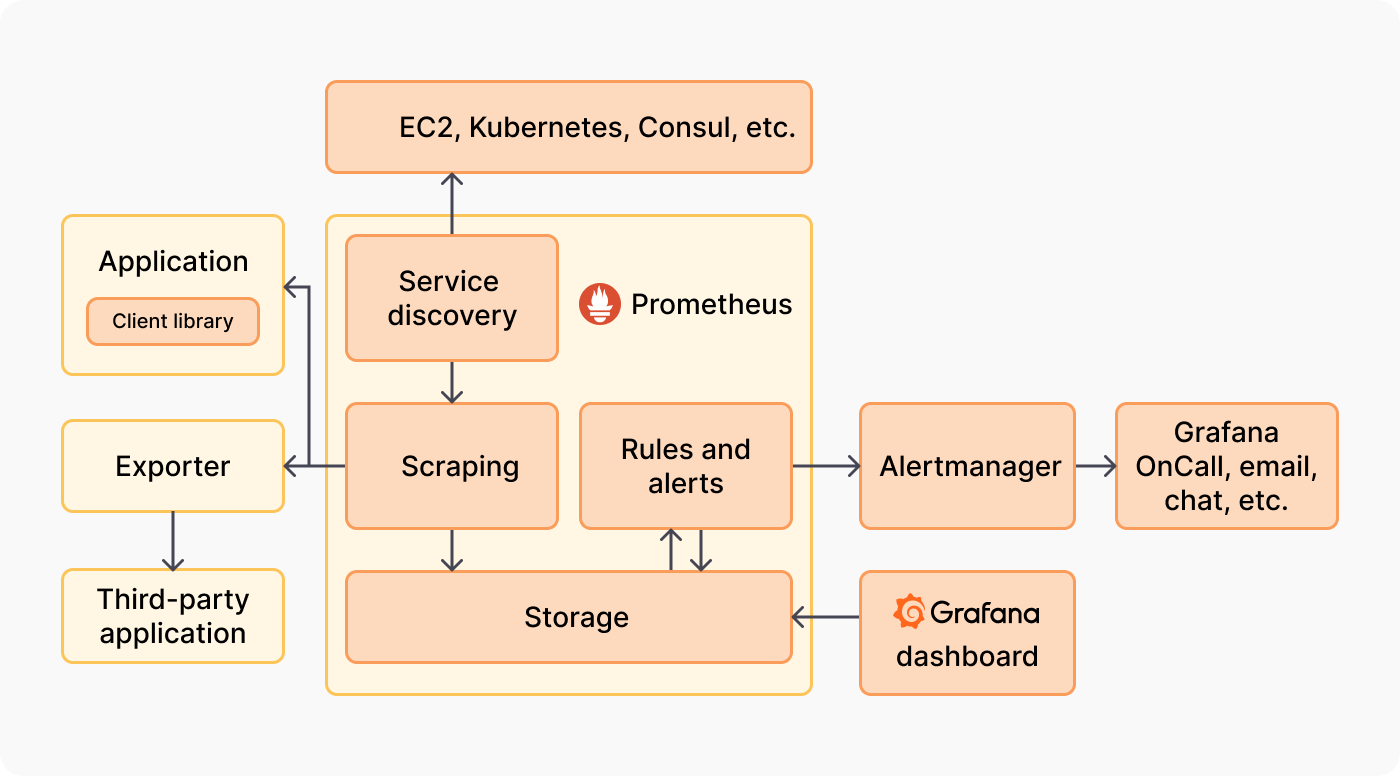
Prometheus ve Grafana Entegrasyonu Prometheus ve Grafana entegrasyon mimarisi

Prometheus Kurulumu

Docker ile Prometheus Kurulumu

Docker kullanarak Prometheus’u hızlıca çalıştırabilirsiniz:

1
2
3
4
5
6
# Prometheus yapılandırma dizini oluştur
mkdir -p /opt/prometheus/config
cd /opt/prometheus

# Temel prometheus.yml dosyası oluştur
cat > config/prometheus.yml <<EOF
1
2
3
4
5
6
7
8
9
10
11
12
13
14
15
16
17
18
19
20
21
22
23
24
25
26
27
28
29
30
31
32
33
34
35
36
37
38
39
40
41
42
global:
  scrape_interval: 15s  # Her 15 saniyede metrik topla
  evaluation_interval: 15s  # Kuralları her 15 saniyede değerlendir
  external_labels:
    cluster: 'production'
    region: 'eu-west-1'

# Alertmanager yapılandırması
alerting:
  alertmanagers:
    - static_configs:
        - targets:
          - alertmanager:9093

# Kural dosyaları
rule_files:
  - 'alerts/*.yml'

# Metrik toplama hedefleri
scrape_configs:
  # Prometheus'un kendi metriklerini topla
  - job_name: 'prometheus'
    static_configs:
      - targets: ['localhost:9090']
        labels:
          env: 'production'

  # Node Exporter - Sistem metrikleri
  - job_name: 'node'
    static_configs:
      - targets: ['node-exporter:9100']
        labels:
          role: 'monitoring'
          
  # Uygulama metrikleri
  - job_name: 'my-application'
    static_configs:
      - targets: ['app:8080']
        labels:
          app: 'backend'
          version: 'v1.0'
EOF
1
2
3
4
5
6
7
8
9
10
11
12
# Prometheus'u Docker ile çalıştır
docker run -d \
  --name prometheus \
  --restart unless-stopped \
  -p 9090:9090 \
  -v /opt/prometheus/config:/etc/prometheus \
  -v prometheus-data:/prometheus \
  prom/prometheus:latest \
  --config.file=/etc/prometheus/prometheus.yml \
  --storage.tsdb.path=/prometheus \
  --storage.tsdb.retention.time=30d \
  --web.enable-lifecycle

Docker Compose ile Tam Stack Kurulumu

Prometheus, Grafana ve Exporter’ları bir arada çalıştırmak için Docker Compose kullanın:

1
2
3
4
5
6
7
8
9
10
11
12
13
14
15
16
17
18
19
20
21
22
23
24
25
26
27
28
29
30
31
32
33
34
35
36
37
38
39
40
41
42
43
44
45
46
47
48
49
50
51
52
53
54
55
56
57
58
59
60
61
62
63
64
65
66
67
68
69
70
71
72
73
74
75
76
77
version: '3.8'

services:
  prometheus:
    image: prom/prometheus:latest
    container_name: prometheus
    restart: unless-stopped
    ports:
      - "9090:9090"
    volumes:
      - ./prometheus/config:/etc/prometheus
      - ./prometheus/data:/prometheus
    command:
      - '--config.file=/etc/prometheus/prometheus.yml'
      - '--storage.tsdb.path=/prometheus'
      - '--storage.tsdb.retention.time=30d'
      - '--web.enable-lifecycle'
    networks:
      - monitoring

  grafana:
    image: grafana/grafana:latest
    container_name: grafana
    restart: unless-stopped
    ports:
      - "3000:3000"
    environment:
      - GF_SECURITY_ADMIN_USER=admin
      - GF_SECURITY_ADMIN_PASSWORD=secure_password
      - GF_INSTALL_PLUGINS=grafana-clock-panel,grafana-piechart-panel
      - GF_SERVER_ROOT_URL=https://grafana.example.com
      - GF_ANALYTICS_REPORTING_ENABLED=false
    volumes:
      - grafana-data:/var/lib/grafana
      - ./grafana/provisioning:/etc/grafana/provisioning
    depends_on:
      - prometheus
    networks:
      - monitoring

  node-exporter:
    image: prom/node-exporter:latest
    container_name: node-exporter
    restart: unless-stopped
    ports:
      - "9100:9100"
    command:
      - '--path.rootfs=/host'
      - '--collector.filesystem.mount-points-exclude=^/(sys|proc|dev|host|etc)($$|/)'
    volumes:
      - /:/host:ro,rslave
    networks:
      - monitoring

  alertmanager:
    image: prom/alertmanager:latest
    container_name: alertmanager
    restart: unless-stopped
    ports:
      - "9093:9093"
    volumes:
      - ./alertmanager/config:/etc/alertmanager
      - alertmanager-data:/alertmanager
    command:
      - '--config.file=/etc/alertmanager/alertmanager.yml'
      - '--storage.path=/alertmanager'
    networks:
      - monitoring

volumes:
  prometheus-data:
  grafana-data:
  alertmanager-data:

networks:
  monitoring:
    driver: bridge
1
2
3
4
5
# Stack'i başlat
docker-compose up -d

# Logları kontrol et
docker-compose logs -f prometheus grafana

Python Uygulamasında Prometheus Entegrasyonu

Python uygulamalarınıza Prometheus metrikleri eklemek için prometheus_client kütüphanesini kullanın:

1
2
# Prometheus client kütüphanesini yükle
pip install prometheus-client

FastAPI ile Prometheus Metrikleri

1
2
3
4
5
6
7
8
9
10
11
12
13
14
15
16
17
18
19
20
21
22
23
24
25
26
27
28
29
30
31
32
33
34
35
36
37
38
39
40
41
42
43
44
45
46
47
48
49
50
51
52
53
54
55
56
57
58
59
60
61
62
63
64
65
66
67
68
69
70
71
72
73
74
75
76
77
78
79
80
81
82
83
84
85
86
87
88
89
90
91
92
93
94
95
96
97
98
99
100
101
102
103
104
105
106
107
108
109
110
111
112
113
from fastapi import FastAPI, Request
from prometheus_client import Counter, Histogram, Gauge, generate_latest, CONTENT_TYPE_LATEST
from fastapi.responses import Response
import time
import psutil

app = FastAPI(title="Monitored Application")

# Metrik tanımlamaları
# Counter: Sadece artan değerler (toplam istek sayısı gibi)
http_requests_total = Counter(
    'http_requests_total',
    'Toplam HTTP istek sayısı',
    ['method', 'endpoint', 'status']
)

# Histogram: Dağılım ölçümleri (yanıt süresi gibi)
http_request_duration_seconds = Histogram(
    'http_request_duration_seconds',
    'HTTP istek yanıt süresi',
    ['method', 'endpoint'],
    buckets=[0.01, 0.05, 0.1, 0.5, 1.0, 2.5, 5.0, 10.0]
)

# Gauge: Yukarı/aşağı gidebilen değerler (CPU kullanımı gibi)
cpu_usage_percent = Gauge(
    'cpu_usage_percent',
    'CPU kullanım yüzdesi'
)

memory_usage_bytes = Gauge(
    'memory_usage_bytes',
    'Bellek kullanımı (bytes)'
)

active_users = Gauge(
    'active_users',
    'Aktif kullanıcı sayısı'
)

# Middleware: Her istek için metrik topla
@app.middleware("http")
async def prometheus_middleware(request: Request, call_next):
    # İstek başlangıç zamanı
    start_time = time.time()
    
    # İsteği işle
    response = await call_next(request)
    
    # İstek süresi
    duration = time.time() - start_time
    
    # Metrikleri güncelle
    http_requests_total.labels(
        method=request.method,
        endpoint=request.url.path,
        status=response.status_code
    ).inc()
    
    http_request_duration_seconds.labels(
        method=request.method,
        endpoint=request.url.path
    ).observe(duration)
    
    return response

# Sistem metriklerini güncelle
@app.on_event("startup")
async def startup_event():
    import asyncio
    async def update_system_metrics():
        while True:
            # CPU kullanımını güncelle
            cpu_usage_percent.set(psutil.cpu_percent(interval=1))
            
            # Bellek kullanımını güncelle
            memory = psutil.virtual_memory()
            memory_usage_bytes.set(memory.used)
            
            await asyncio.sleep(10)  # Her 10 saniyede bir güncelle
    
    asyncio.create_task(update_system_metrics())

# Metrics endpoint
@app.get("/metrics")
async def metrics():
    """Prometheus metriklerini sun"""
    return Response(
        content=generate_latest(),
        media_type=CONTENT_TYPE_LATEST
    )

# Örnek endpoint'ler
@app.get("/")
async def root():
    return {"message": "Hello World"}

@app.get("/api/users/{user_id}")
async def get_user(user_id: int):
    # Simüle edilmiş gecikme
    import asyncio
    await asyncio.sleep(0.1)
    return {"user_id": user_id, "name": "John Doe"}

@app.post("/api/users")
async def create_user(name: str):
    active_users.inc()  # Aktif kullanıcı sayısını artır
    return {"user_id": 123, "name": name}

@app.delete("/api/users/{user_id}")
async def delete_user(user_id: int):
    active_users.dec()  # Aktif kullanıcı sayısını azalt
    return {"message": "User deleted"}

Özel Metrik Sınıfı

Daha organize metrik yönetimi için özel sınıf kullanın:

1
2
3
4
5
6
7
8
9
10
11
12
13
14
15
16
17
18
19
20
21
22
23
24
25
26
27
28
29
30
31
32
33
34
35
36
37
38
39
40
41
42
43
44
45
46
47
48
49
50
51
52
53
54
55
56
57
58
59
60
61
62
63
64
65
66
67
68
69
70
71
72
73
74
75
76
77
78
79
80
81
82
83
84
85
86
87
88
89
90
91
92
93
94
95
96
97
98
99
100
101
102
103
104
105
106
107
108
109
110
111
112
113
114
115
116
117
118
119
120
121
122
123
124
125
126
127
128
129
130
131
from prometheus_client import Counter, Histogram, Gauge, Info
from typing import Dict, Optional
import time
from functools import wraps

class ApplicationMetrics:
    """Uygulama metriklerini yöneten merkezi sınıf"""
    
    def __init__(self, app_name: str = "application"):
        self.app_name = app_name
        
        # HTTP metrikleri
        self.http_requests = Counter(
            f'{app_name}_http_requests_total',
            'Toplam HTTP istek sayısı',
            ['method', 'endpoint', 'status']
        )
        
        self.http_duration = Histogram(
            f'{app_name}_http_request_duration_seconds',
            'HTTP istek süresi',
            ['method', 'endpoint']
        )
        
        # İş mantığı metrikleri
        self.business_operations = Counter(
            f'{app_name}_business_operations_total',
            'İş operasyonu sayısı',
            ['operation', 'status']
        )
        
        self.operation_duration = Histogram(
            f'{app_name}_operation_duration_seconds',
            'İş operasyonu süresi',
            ['operation']
        )
        
        # Durum metrikleri
        self.active_connections = Gauge(
            f'{app_name}_active_connections',
            'Aktif bağlantı sayısı'
        )
        
        self.queue_size = Gauge(
            f'{app_name}_queue_size',
            'Kuyruk boyutu',
            ['queue_name']
        )
        
        # Uygulama bilgisi
        self.app_info = Info(
            f'{app_name}_info',
            'Uygulama bilgisi'
        )
    
    def track_http_request(self, method: str, endpoint: str, status: int):
        """HTTP isteğini kaydet"""
        self.http_requests.labels(
            method=method,
            endpoint=endpoint,
            status=status
        ).inc()
    
    def track_business_operation(self, operation: str, status: str = "success"):
        """İş operasyonunu kaydet"""
        self.business_operations.labels(
            operation=operation,
            status=status
        ).inc()
    
    def time_operation(self, operation_name: str):
        """Operasyon süresini ölç (decorator)"""
        def decorator(func):
            @wraps(func)
            async def async_wrapper(*args, **kwargs):
                start_time = time.time()
                try:
                    result = await func(*args, **kwargs)
                    status = "success"
                    return result
                except Exception as e:
                    status = "error"
                    raise
                finally:
                    duration = time.time() - start_time
                    self.operation_duration.labels(
                        operation=operation_name
                    ).observe(duration)
                    self.track_business_operation(operation_name, status)
            
            @wraps(func)
            def sync_wrapper(*args, **kwargs):
                start_time = time.time()
                try:
                    result = func(*args, **kwargs)
                    status = "success"
                    return result
                except Exception as e:
                    status = "error"
                    raise
                finally:
                    duration = time.time() - start_time
                    self.operation_duration.labels(
                        operation=operation_name
                    ).observe(duration)
                    self.track_business_operation(operation_name, status)
            
            # Async veya sync fonksiyon kontrolü
            import asyncio
            if asyncio.iscoroutinefunction(func):
                return async_wrapper
            return sync_wrapper
        
        return decorator

# Singleton instance
metrics = ApplicationMetrics("myapp")

# Kullanım örneği
@metrics.time_operation("user_creation")
async def create_user(username: str, email: str) -> Dict:
    """Kullanıcı oluştur - otomatik metrik kaydı"""
    # İş mantığı
    import asyncio
    await asyncio.sleep(0.1)  # Simüle edilmiş işlem
    
    return {
        "username": username,
        "email": email,
        "created": True
    }

PromQL Sorgu Örnekleri

PromQL (Prometheus Query Language), Prometheus’ta metrik sorgulamak için kullanılan güçlü bir dildir:

# Temel metrik sorgulama
http_requests_total

# Label filtreleme
http_requests_total{method="GET", status="200"}

# Zaman aralığında sorgu (son 5 dakika)
rate(http_requests_total[5m])

# Endpoint bazında istek oranı
sum(rate(http_requests_total[5m])) by (endpoint)

# Ortalama yanıt süresi
histogram_quantile(0.95, 
  rate(http_request_duration_seconds_bucket[5m])
)

# CPU kullanımı %80'in üzerinde
cpu_usage_percent > 80

# Hata oranı hesaplama
sum(rate(http_requests_total{status=~"5.."}[5m])) 
/ 
sum(rate(http_requests_total[5m]))

# Bellek kullanımı artış hızı
deriv(memory_usage_bytes[10m])

# Son 1 saatteki maksimum değer
max_over_time(cpu_usage_percent[1h])

# Birden fazla label ile toplama
sum(http_requests_total) by (method, endpoint)

# Alt sorgu örneği
avg_over_time(
  rate(http_requests_total[5m])[1h:1m]
)

Alertmanager Yapılandırması

Uyarıları yönetmek için Alertmanager yapılandırması:

1
2
3
4
5
6
7
8
9
10
11
12
13
14
15
16
17
18
19
20
21
22
23
24
25
26
27
28
29
30
31
32
33
34
35
36
37
38
39
40
41
42
43
44
45
46
47
48
49
50
51
52
53
54
55
56
57
58
59
60
61
62
63
64
65
66
67
68
69
70
71
72
73
74
75
76
77
78
global:
  # SMTP ayarları
  smtp_smarthost: 'smtp.gmail.com:587'
  smtp_from: '[email protected]'
  smtp_auth_username: '[email protected]'
  smtp_auth_password: 'your-app-password'

# Uyarı yönlendirme kuralları
route:
  # Varsayılan alıcı
  receiver: 'default-receiver'
  
  # Grup ayarları
  group_by: ['alertname', 'cluster', 'service']
  group_wait: 10s
  group_interval: 10s
  repeat_interval: 12h
  
  # Alt yönlendirmeler
  routes:
    # Kritik uyarılar
    - match:
        severity: critical
      receiver: 'critical-receiver'
      continue: true
    
    # Database uyarıları
    - match:
        service: database
      receiver: 'database-team'
      group_wait: 5s
    
    # Frontend uyarıları
    - match:
        component: frontend
      receiver: 'frontend-team'

# Alıcı tanımlamaları
receivers:
  - name: 'default-receiver'
    email_configs:
      - to: '[email protected]'
        headers:
          Subject: '[Prometheus] '
  
  - name: 'critical-receiver'
    # Email bildirimi
    email_configs:
      - to: '[email protected]'
        send_resolved: true
    
    # Slack bildirimi
    slack_configs:
      - api_url: 'https://hooks.slack.com/services/YOUR/WEBHOOK/URL'
        channel: '#alerts'
        title: 'Kritik Uyarı: '
        text: ''
    
    # Webhook bildirimi
    webhook_configs:
      - url: 'http://internal-service/alerts'
        send_resolved: true
  
  - name: 'database-team'
    email_configs:
      - to: '[email protected]'

  - name: 'frontend-team'
    email_configs:
      - to: '[email protected]'

# Engelleme kuralları (inhibit)
inhibit_rules:
  - source_match:
      severity: 'critical'
    target_match:
      severity: 'warning'
    equal: ['alertname', 'cluster', 'service']

Uyarı Kuralları Tanımlama

1
2
3
4
5
6
7
8
9
10
11
12
13
14
15
16
17
18
19
20
21
22
23
24
25
26
27
28
29
30
31
32
33
34
35
36
37
38
39
40
41
42
43
44
45
46
47
48
49
50
51
52
53
54
55
56
57
58
59
60
61
62
63
64
groups:
  - name: application_alerts
    interval: 30s
    rules:
      # Yüksek hata oranı
      - alert: HighErrorRate
        expr: |
          (
            sum(rate(http_requests_total{status=~"5.."}[5m])) by (service)
            /
            sum(rate(http_requests_total[5m])) by (service)
          ) > 0.05
        for: 5m
        labels:
          severity: critical
          component: backend
        annotations:
          summary: "Yüksek hata oranı: "
          description: " servisi % hata oranına sahip (son 5 dakika)"
      
      # Yavaş yanıt süresi
      - alert: SlowResponseTime
        expr: |
          histogram_quantile(0.95,
            sum(rate(http_request_duration_seconds_bucket[5m])) by (le, endpoint)
          ) > 1
        for: 10m
        labels:
          severity: warning
          component: backend
        annotations:
          summary: "Yavaş yanıt süresi: "
          description: " endpoint'i 95. percentile'da s yanıt süresi"
      
      # Yüksek CPU kullanımı
      - alert: HighCPUUsage
        expr: cpu_usage_percent > 80
        for: 5m
        labels:
          severity: warning
        annotations:
          summary: "Yüksek CPU kullanımı"
          description: "CPU kullanımı % (son 5 dakika)"
      
      # Yüksek bellek kullanımı
      - alert: HighMemoryUsage
        expr: |
          (memory_usage_bytes / 1024 / 1024 / 1024) > 14
        for: 5m
        labels:
          severity: critical
        annotations:
          summary: "Yüksek bellek kullanımı"
          description: "Bellek kullanımı GB"
      
      # Servis durumu
      - alert: ServiceDown
        expr: up == 0
        for: 1m
        labels:
          severity: critical
        annotations:
          summary: "Servis çalışmıyor: "
          description: " servisi 1 dakikadır erişilebilir değil"

Grafana Kurulumu ve Yapılandırması

Grafana Dashboard Grafana dashboard örneği

Grafana Provisioning

Grafana’yı kod ile yapılandırmak için provisioning kullanın:

1
2
3
4
5
6
7
8
9
10
11
12
13
apiVersion: 1

datasources:
  - name: Prometheus
    type: prometheus
    access: proxy
    url: http://prometheus:9090
    isDefault: true
    editable: false
    jsonData:
      timeInterval: "15s"
      queryTimeout: "60s"
      httpMethod: "POST"
1
2
3
4
5
6
7
8
9
10
11
12
apiVersion: 1

providers:
  - name: 'Default'
    orgId: 1
    folder: ''
    type: file
    disableDeletion: false
    updateIntervalSeconds: 10
    allowUiUpdates: true
    options:
      path: /etc/grafana/provisioning/dashboards

Python Script ile Dashboard Oluşturma

1
2
3
4
5
6
7
8
9
10
11
12
13
14
15
16
17
18
19
20
21
22
23
24
25
26
27
28
29
30
31
32
33
34
35
36
37
38
39
40
41
42
43
44
45
46
47
48
49
50
51
52
53
54
55
56
57
58
59
60
61
62
63
64
65
66
67
68
69
70
71
72
73
74
75
76
77
78
79
80
81
82
83
84
85
86
87
88
89
90
91
92
93
94
95
96
97
98
99
100
101
102
103
104
105
106
107
108
109
110
111
112
113
114
115
116
117
118
119
120
121
122
123
124
125
126
127
128
129
130
131
132
133
134
135
136
137
138
139
140
141
142
143
144
import json
import requests
from typing import Dict, List

class GrafanaDashboard:
    """Grafana dashboard oluşturucu"""
    
    def __init__(self, grafana_url: str, api_key: str):
        self.grafana_url = grafana_url.rstrip('/')
        self.api_key = api_key
        self.headers = {
            'Authorization': f'Bearer {api_key}',
            'Content-Type': 'application/json'
        }
    
    def create_dashboard(self, title: str, panels: List[Dict]) -> Dict:
        """Dashboard oluştur"""
        dashboard = {
            "dashboard": {
                "title": title,
                "tags": ["prometheus", "monitoring"],
                "timezone": "browser",
                "panels": panels,
                "schemaVersion": 16,
                "version": 0,
                "refresh": "10s"
            },
            "overwrite": True
        }
        
        response = requests.post(
            f'{self.grafana_url}/api/dashboards/db',
            headers=self.headers,
            json=dashboard
        )
        response.raise_for_status()
        return response.json()
    
    def create_graph_panel(
        self, 
        title: str, 
        targets: List[Dict],
        x: int = 0,
        y: int = 0,
        width: int = 12,
        height: int = 8
    ) -> Dict:
        """Grafik paneli oluştur"""
        return {
            "title": title,
            "type": "graph",
            "gridPos": {"x": x, "y": y, "w": width, "h": height},
            "targets": targets,
            "yaxes": [
                {"format": "short", "label": None},
                {"format": "short", "label": None}
            ],
            "lines": True,
            "fill": 1,
            "linewidth": 2,
            "nullPointMode": "null",
            "tooltip": {"shared": True, "sort": 0, "value_type": "individual"}
        }
    
    def create_stat_panel(
        self,
        title: str,
        query: str,
        x: int = 0,
        y: int = 0,
        width: int = 6,
        height: int = 4
    ) -> Dict:
        """İstatistik paneli oluştur"""
        return {
            "title": title,
            "type": "stat",
            "gridPos": {"x": x, "y": y, "w": width, "h": height},
            "targets": [{
                "expr": query,
                "refId": "A"
            }],
            "options": {
                "graphMode": "area",
                "colorMode": "value",
                "justifyMode": "auto",
                "textMode": "auto"
            },
            "fieldConfig": {
                "defaults": {
                    "thresholds": {
                        "mode": "absolute",
                        "steps": [
                            {"value": None, "color": "green"},
                            {"value": 80, "color": "yellow"},
                            {"value": 90, "color": "red"}
                        ]
                    }
                }
            }
        }

# Kullanım örneği
if __name__ == "__main__":
    grafana = GrafanaDashboard(
        grafana_url="http://localhost:3000",
        api_key="your-api-key-here"
    )
    
    # Panel tanımlamaları
    panels = [
        # İstek oranı grafiği
        grafana.create_graph_panel(
            title="HTTP İstek Oranı",
            targets=[{
                "expr": 'sum(rate(http_requests_total[5m])) by (endpoint)',
                "legendFormat": "",
                "refId": "A"
            }],
            x=0, y=0, width=12, height=8
        ),
        
        # Hata oranı
        grafana.create_stat_panel(
            title="Hata Oranı (%)",
            query='(sum(rate(http_requests_total{status=~"5.."}[5m])) / sum(rate(http_requests_total[5m]))) * 100',
            x=0, y=8, width=6, height=4
        ),
        
        # CPU kullanımı
        grafana.create_stat_panel(
            title="CPU Kullanımı (%)",
            query='cpu_usage_percent',
            x=6, y=8, width=6, height=4
        )
    ]
    
    # Dashboard'u oluştur
    result = grafana.create_dashboard(
        title="Application Monitoring",
        panels=panels
    )
    
    print("Dashboard oluşturuldu: {}".format(result))

Best Practices

1. Metrik İsimlendirme

1
2
3
4
5
6
7
8
9
# İyi örnekler
http_requests_total  # Açıklayıcı, snake_case
process_cpu_seconds_total  # Birim belirtilmiş
database_queries_duration_seconds  # Standart birim

# Kötü örnekler
httpReq  # Kısaltma, camelCase
requests  # Belirsiz
response_time  # Birim yok

2. Label Kullanımı

Yüksek kardinalite label’ları kullanmaktan kaçının! User ID, session ID gibi benzersiz değerleri label olarak eklemek Prometheus’un performansını ciddi şekilde düşürür.

1
2
3
4
5
6
# Doğru label kullanımı - Düşük kardinalite
http_requests_total{method="GET", endpoint="/api/users", status="200"}

# Yanlış label kullanımı - Yüksek kardinalite
# user_id gibi benzersiz değerleri label olarak kullanmayın
http_requests_total{user_id="12345"}  # YANLIŞ!

3. Metrik Toplama Sıklığı

Scrape interval’ı sisteminizin ihtiyaçlarına göre ayarlayın. Çok sık toplama (5s) fazla kaynak tüketir, çok seyrek toplama (60s+) önemli olayları kaçırabilir.

1
2
3
4
5
6
7
8
9
10
# Optimal scrape interval
scrape_configs:
  - job_name: 'production'
    scrape_interval: 15s  # Çoğu uygulama için yeterli
    
  - job_name: 'critical-service'
    scrape_interval: 5s  # Kritik servisler için daha sık
    
  - job_name: 'batch-jobs'
    scrape_interval: 60s  # Batch işler için daha seyrek

4. Veri Saklama

Prometheus yerel depolama için tasarlanmıştır. Uzun süreli saklama için Thanos, Cortex veya VictoriaMetrics gibi çözümler kullanın.

1
2
3
# Prometheus başlatırken retention policy belirle
--storage.tsdb.retention.time=30d  # 30 gün tut
--storage.tsdb.retention.size=50GB  # Maksimum 50GB

Sonuç

Prometheus ve Grafana kombinasyonu, modern yazılım sistemlerinde observability için güçlü ve esnek bir çözüm sunar. Bu yazıda öğrendiklerinizle:

  • Prometheus ve Grafana’yı Docker ile deploy edebilirsiniz
  • Python uygulamalarınıza metrik toplama ekleyebilirsiniz
  • PromQL ile gelişmiş sorgular yazabilirsiniz
  • Alertmanager ile uyarı sistemi kurabilirsiniz
  • Grafana dashboard’ları oluşturabilirsiniz

Başarılı bir izleme sisteminin anahtarı, doğru metrikleri toplamak ve anlamlı görselleştirmeler oluşturmaktır. Küçük başlayıp, ihtiyaçlarınıza göre genişletin.

Kaynaklar

Bu gönderi CC BY 4.0 lisansı altındadır.