Gönderi

NFT Minting on Ethereum: Complete Tutorial

Complete guide to minting NFTs on Ethereum. Learn ERC-721 standard, IPFS metadata storage, smart contract deployment with Hardhat, and OpenSea integration.

NFT Minting on Ethereum: Complete Tutorial

Introduction

Non-Fungible Tokens (NFTs) have revolutionized the digital ownership landscape, creating a multi-billion dollar ecosystem that spans art, gaming, collectibles, and real-world asset tokenization. Unlike cryptocurrencies such as Bitcoin or Ethereum, which are fungible and interchangeable, NFTs represent unique digital assets with distinct properties and ownership records stored immutably on the blockchain.

The process of creating and deploying an NFT collection on Ethereum involves several critical components: smart contract development using the ERC-721 standard, metadata storage on decentralized systems like IPFS, contract deployment to the Ethereum network, and integration with marketplaces like OpenSea. This comprehensive guide will walk you through the entire NFT minting process, from understanding the underlying technology to deploying your own collection.

Whether you’re an artist looking to tokenize your digital creations, a developer building the next NFT platform, or a blockchain enthusiast wanting to understand the technical implementation, this tutorial provides everything you need. We’ll cover the ERC-721 standard, implement a complete smart contract with minting functionality, store metadata on IPFS for decentralization, and deploy using both Remix IDE and Hardhat framework.

By the end of this tutorial, you’ll have a fully functional NFT collection deployed on Ethereum, understand the security considerations involved, and know how to list your NFTs on major marketplaces. Let’s dive into the fascinating world of NFT development.

Understanding NFTs and the ERC-721 Standard

What Are NFTs?

Non-Fungible Tokens are cryptographic assets on a blockchain with unique identification codes and metadata that distinguish them from each other. Unlike ERC-20 tokens where every token is identical and interchangeable (1 USDT = 1 USDT), each NFT has a unique token ID and can represent distinct value, ownership, and properties.

NFTs enable true digital ownership through blockchain technology. When you own an NFT, you possess a cryptographic proof of ownership that cannot be duplicated, forged, or taken away without your private key. This has profound implications for:

  • Digital Art: Artists can sell original digital works with provable authenticity
  • Gaming Assets: Players truly own in-game items that can be traded or used across games
  • Collectibles: Digital collectibles with verifiable rarity and provenance
  • Real Estate: Tokenized property ownership with fractional possibilities
  • Identity and Credentials: Verifiable certificates, diplomas, and credentials
  • Music and Media: Direct artist-to-fan relationships with royalty enforcement

The ERC-721 Standard Explained

ERC-721 is the Ethereum token standard for NFTs, introduced in 2018 by William Entriken, Dieter Shirley, Jacob Evans, and Nastassia Sachs. It defines a minimum interface that smart contracts must implement to enable unique tokens to be managed, owned, and traded.

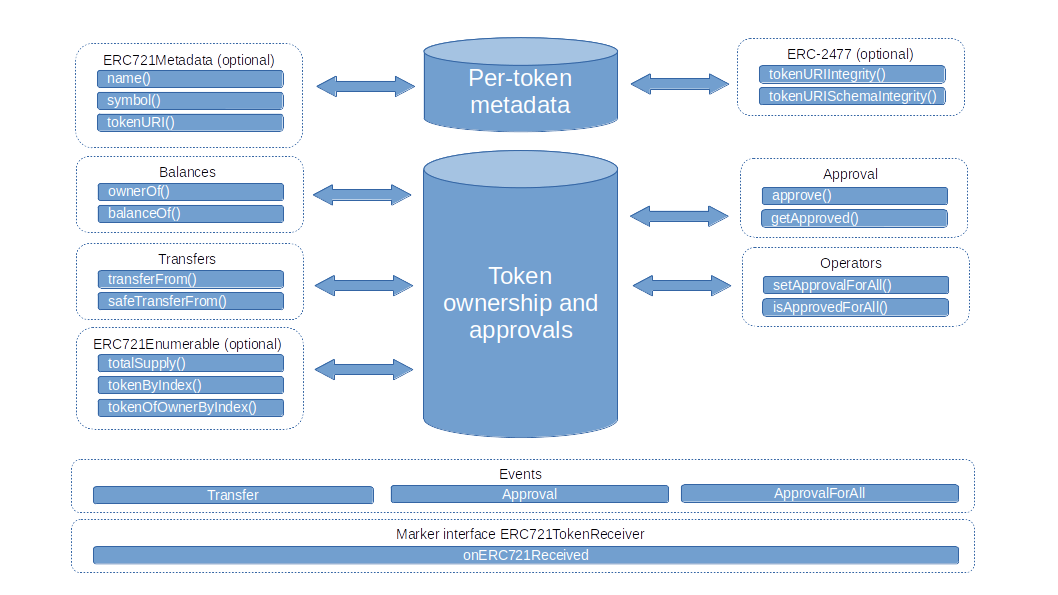
ERC-721 Standard Structure Figure 1: The ERC-721 standard interface showing required functions and events

Core Functions in ERC-721:

// Required functions
function balanceOf(address owner) external view returns (uint256 balance);
function ownerOf(uint256 tokenId) external view returns (address owner);
function safeTransferFrom(address from, address to, uint256 tokenId) external payable;
function transferFrom(address from, address to, uint256 tokenId) external payable;
function approve(address approved, uint256 tokenId) external payable;
function setApprovalForAll(address operator, bool approved) external;
function getApproved(uint256 tokenId) external view returns (address operator);
function isApprovedForAll(address owner, address operator) external view returns (bool);

// Required events
event Transfer(address indexed from, address indexed to, uint256 indexed tokenId);
event Approval(address indexed owner, address indexed approved, uint256 indexed tokenId);
event ApprovalForAll(address indexed owner, address indexed operator, bool approved);

Key Concepts:

  1. Token ID: Each NFT has a unique uint256 identifier within the contract
  2. Ownership: The contract tracks which address owns each token ID
  3. Transfer: Tokens can be moved between addresses with proper authorization
  4. Approval: Owners can authorize other addresses to transfer their tokens
  5. Metadata: Each token can have associated metadata (name, description, image)

NFT Metadata and Token URI

NFTs separate on-chain data (ownership, token ID) from off-chain data (images, attributes). The tokenURI function returns a URI pointing to a JSON metadata file following this standard:

1
2
3
4
5
6
7
8
9
10
11
12
13
14
15
{
  "name": "Awesome NFT #1",
  "description": "This is an amazing NFT from our collection",
  "image": "ipfs://QmXyZ.../image.png",
  "attributes": [
    {
      "trait_type": "Background",
      "value": "Blue"
    },
    {
      "trait_type": "Rarity",
      "value": "Legendary"
    }
  ]
}

This metadata structure is universally recognized by NFT marketplaces like OpenSea, Rarible, and LooksRare, ensuring your NFTs display correctly across platforms.

Prerequisites and Development Environment Setup

Required Knowledge

This tutorial assumes intermediate blockchain knowledge. If you’re new to Solidity, consider completing a basics course first.

Before diving into NFT development, you should have:

  • Solidity Basics: Understanding of contract structure, functions, modifiers, and events
  • JavaScript/TypeScript: For deployment scripts and testing
  • Blockchain Fundamentals: How transactions, gas, and wallets work
  • Command Line: Comfort with terminal operations

Installing Development Tools

1. Node.js and npm

1
2
3
4
5
6
7
# Check if Node.js is installed
node --version

# If not installed, download from nodejs.org or use nvm
curl -o- https://raw.githubusercontent.com/nvm-sh/nvm/v0.39.0/install.sh | bash
nvm install 18
nvm use 18

2. Hardhat Framework

Hardhat is a powerful development environment for Ethereum smart contracts:

1
2
3
4
5
6
7
8
9
10
11
12
13
# Create project directory
mkdir nft-collection
cd nft-collection

# Initialize npm project
npm init -y

# Install Hardhat
npm install --save-dev hardhat

# Initialize Hardhat project
npx hardhat
# Select "Create a JavaScript project"

3. OpenZeppelin Contracts

OpenZeppelin provides secure, audited implementations of ERC-721:

1
npm install @openzeppelin/contracts

4. Additional Dependencies

1
2
3
4
5
6
7
8
# For deployment and interaction
npm install --save-dev @nomiclabs/hardhat-ethers ethers

# For verification on Etherscan
npm install --save-dev @nomiclabs/hardhat-etherscan

# For environment variables
npm install dotenv

Setting Up MetaMask Wallet

MetaMask is essential for interacting with Ethereum networks:

  1. Install MetaMask browser extension from metamask.io
  2. Create a new wallet and securely save your seed phrase
  3. Add test networks (Sepolia, Goerli) for development

Never share your seed phrase or private key! Store it securely offline. Anyone with your seed phrase has complete access to your wallet.

  1. Get test ETH from faucets:
    • Sepolia: https://sepoliafaucet.com
    • Goerli: https://goerlifaucet.com

IPFS Setup

For decentralized metadata storage, we’ll use Pinata, a pinning service for IPFS:

  1. Create account at pinata.cloud
  2. Generate API keys (JWT token)
  3. Note your API Key and Secret for later use

Alternative IPFS Options:

  • NFT.Storage: Free storage specifically for NFTs
  • Local IPFS Node: Full control but requires maintenance
  • Infura IPFS: Integrated with Ethereum infrastructure

Project Structure

Your NFT project should follow this structure:

1
2
3
4
5
6
7
8
9
10
11
12
13
14
15
nft-collection/
├── contracts/
│   └── MyNFT.sol
├── scripts/
│   ├── deploy.js
│   └── mint.js
├── test/
│   └── MyNFT.test.js
├── metadata/
│   └── 1.json
├── images/
│   └── 1.png
├── hardhat.config.js
├── .env
└── package.json

Building Your First NFT Smart Contract

Basic ERC-721 Implementation

Let’s create a simple NFT contract using OpenZeppelin’s battle-tested implementation:

// SPDX-License-Identifier: MIT
pragma solidity ^0.8.20;

import "@openzeppelin/contracts/token/ERC721/ERC721.sol";
import "@openzeppelin/contracts/access/Ownable.sol";
import "@openzeppelin/contracts/utils/Counters.sol";

/**
 * @title MyNFT
 * @dev Simple NFT contract for learning purposes
 */
contract MyNFT is ERC721, Ownable {
    using Counters for Counters.Counter;
    
    // Token ID counter
    Counters.Counter private _tokenIdCounter;
    
    // Base URI for metadata
    string private _baseTokenURI;
    
    // Maximum supply
    uint256 public constant MAX_SUPPLY = 10000;
    
    // Minting price
    uint256 public mintPrice = 0.01 ether;
    
    /**
     * @dev Constructor sets collection name and symbol
     */
    constructor(string memory baseURI) ERC721("MyNFTCollection", "MNFT") {
        _baseTokenURI = baseURI;
    }
    
    /**
     * @dev Returns the base URI for metadata
     */
    function _baseURI() internal view virtual override returns (string memory) {
        return _baseTokenURI;
    }
    
    /**
     * @dev Updates the base URI (only owner)
     */
    function setBaseURI(string memory baseURI) external onlyOwner {
        _baseTokenURI = baseURI;
    }
    
    /**
     * @dev Updates minting price (only owner)
     */
    function setMintPrice(uint256 newPrice) external onlyOwner {
        mintPrice = newPrice;
    }
    
    /**
     * @dev Public minting function
     */
    function mint() external payable {
        require(_tokenIdCounter.current() < MAX_SUPPLY, "Max supply reached");
        require(msg.value >= mintPrice, "Insufficient payment");
        
        uint256 tokenId = _tokenIdCounter.current();
        _tokenIdCounter.increment();
        
        _safeMint(msg.sender, tokenId);
    }
    
    /**
     * @dev Owner can mint for free to specific address
     */
    function mintTo(address recipient) external onlyOwner {
        require(_tokenIdCounter.current() < MAX_SUPPLY, "Max supply reached");
        
        uint256 tokenId = _tokenIdCounter.current();
        _tokenIdCounter.increment();
        
        _safeMint(recipient, tokenId);
    }
    
    /**
     * @dev Returns current token count
     */
    function totalSupply() external view returns (uint256) {
        return _tokenIdCounter.current();
    }
    
    /**
     * @dev Owner can withdraw contract funds
     */
    function withdraw() external onlyOwner {
        uint256 balance = address(this).balance;
        require(balance > 0, "No funds to withdraw");
        
        (bool success, ) = payable(owner()).call{value: balance}("");
        require(success, "Withdrawal failed");
    }
}

Key Features Explained:

  1. Inheritance: We inherit from OpenZeppelin’s ERC721 and Ownable
  2. Counter: Tracks token IDs automatically and safely
  3. Base URI: Allows updating metadata location without redeploying
  4. Max Supply: Prevents unlimited minting
  5. Mint Price: Revenue generation from primary sales
  6. Owner Functions: Special privileges for contract owner

Advanced NFT Contract with Whitelist and Reveal

For more sophisticated projects, you might need phased minting and delayed reveal:

// SPDX-License-Identifier: MIT
pragma solidity ^0.8.20;

import "@openzeppelin/contracts/token/ERC721/ERC721.sol";
import "@openzeppelin/contracts/access/Ownable.sol";
import "@openzeppelin/contracts/security/ReentrancyGuard.sol";
import "@openzeppelin/contracts/utils/Counters.sol";
import "@openzeppelin/contracts/utils/cryptography/MerkleProof.sol";

/**
 * @title AdvancedNFT
 * @dev NFT with whitelist, reveal mechanism, and batch minting
 */
contract AdvancedNFT is ERC721, Ownable, ReentrancyGuard {
    using Counters for Counters.Counter;
    using Strings for uint256;
    
    Counters.Counter private _tokenIdCounter;
    
    // URIs
    string private _baseTokenURI;
    string private _unrevealedURI;
    bool public revealed = false;
    
    // Supply and pricing
    uint256 public constant MAX_SUPPLY = 10000;
    uint256 public constant RESERVED_SUPPLY = 100;
    uint256 public whitelistPrice = 0.05 ether;
    uint256 public publicPrice = 0.08 ether;
    
    // Minting limits
    uint256 public constant MAX_PER_WALLET = 5;
    mapping(address => uint256) public mintedPerWallet;
    
    // Minting phases
    enum MintPhase { CLOSED, WHITELIST, PUBLIC }
    MintPhase public currentPhase = MintPhase.CLOSED;
    
    // Whitelist
    bytes32 public merkleRoot;
    
    // Events
    event MintPhaseChanged(MintPhase newPhase);
    event Revealed(string baseURI);
    event WhitelistMint(address indexed minter, uint256 quantity);
    event PublicMint(address indexed minter, uint256 quantity);
    
    constructor(string memory unrevealedURI) ERC721("AdvancedNFT", "ANFT") {
        _unrevealedURI = unrevealedURI;
    }
    
    /**
     * @dev Modifier to check minting phase
     */
    modifier onlyDuringPhase(MintPhase phase) {
        require(currentPhase == phase, "Not in correct phase");
        _;
    }
    
    /**
     * @dev Returns token URI based on reveal status
     */
    function tokenURI(uint256 tokenId) 
        public 
        view 
        virtual 
        override 
        returns (string memory) 
    {
        require(_exists(tokenId), "Token does not exist");
        
        if (!revealed) {
            return _unrevealedURI;
        }
        
        return bytes(_baseTokenURI).length > 0
            ? string(abi.encodePacked(_baseTokenURI, tokenId.toString(), ".json"))
            : "";
    }
    
    /**
     * @dev Whitelist minting with Merkle proof
     */
    function whitelistMint(uint256 quantity, bytes32[] calldata proof) 
        external 
        payable 
        nonReentrant 
        onlyDuringPhase(MintPhase.WHITELIST) 
    {
        require(quantity > 0, "Must mint at least 1");
        require(
            _tokenIdCounter.current() + quantity <= MAX_SUPPLY - RESERVED_SUPPLY,
            "Exceeds available supply"
        );
        require(
            mintedPerWallet[msg.sender] + quantity <= MAX_PER_WALLET,
            "Exceeds per wallet limit"
        );
        require(msg.value >= whitelistPrice * quantity, "Insufficient payment");
        
        // Verify Merkle proof
        bytes32 leaf = keccak256(abi.encodePacked(msg.sender));
        require(
            MerkleProof.verify(proof, merkleRoot, leaf),
            "Invalid whitelist proof"
        );
        
        mintedPerWallet[msg.sender] += quantity;
        
        for (uint256 i = 0; i < quantity; i++) {
            uint256 tokenId = _tokenIdCounter.current();
            _tokenIdCounter.increment();
            _safeMint(msg.sender, tokenId);
        }
        
        emit WhitelistMint(msg.sender, quantity);
    }
    
    /**
     * @dev Public minting
     */
    function publicMint(uint256 quantity) 
        external 
        payable 
        nonReentrant 
        onlyDuringPhase(MintPhase.PUBLIC) 
    {
        require(quantity > 0, "Must mint at least 1");
        require(
            _tokenIdCounter.current() + quantity <= MAX_SUPPLY - RESERVED_SUPPLY,
            "Exceeds available supply"
        );
        require(
            mintedPerWallet[msg.sender] + quantity <= MAX_PER_WALLET,
            "Exceeds per wallet limit"
        );
        require(msg.value >= publicPrice * quantity, "Insufficient payment");
        
        mintedPerWallet[msg.sender] += quantity;
        
        for (uint256 i = 0; i < quantity; i++) {
            uint256 tokenId = _tokenIdCounter.current();
            _tokenIdCounter.increment();
            _safeMint(msg.sender, tokenId);
        }
        
        emit PublicMint(msg.sender, quantity);
    }
    
    /**
     * @dev Reserve minting for team/giveaways
     */
    function reserveMint(address[] calldata recipients) external onlyOwner {
        require(
            _tokenIdCounter.current() + recipients.length <= MAX_SUPPLY,
            "Exceeds max supply"
        );
        
        for (uint256 i = 0; i < recipients.length; i++) {
            uint256 tokenId = _tokenIdCounter.current();
            _tokenIdCounter.increment();
            _safeMint(recipients[i], tokenId);
        }
    }
    
    /**
     * @dev Set minting phase
     */
    function setMintPhase(MintPhase newPhase) external onlyOwner {
        currentPhase = newPhase;
        emit MintPhaseChanged(newPhase);
    }
    
    /**
     * @dev Set Merkle root for whitelist
     */
    function setMerkleRoot(bytes32 root) external onlyOwner {
        merkleRoot = root;
    }
    
    /**
     * @dev Reveal collection
     */
    function reveal(string memory baseURI) external onlyOwner {
        require(!revealed, "Already revealed");
        _baseTokenURI = baseURI;
        revealed = true;
        emit Revealed(baseURI);
    }
    
    /**
     * @dev Update pricing
     */
    function setPricing(uint256 wlPrice, uint256 pubPrice) external onlyOwner {
        whitelistPrice = wlPrice;
        publicPrice = pubPrice;
    }
    
    /**
     * @dev Get total supply
     */
    function totalSupply() external view returns (uint256) {
        return _tokenIdCounter.current();
    }
    
    /**
     * @dev Withdraw funds
     */
    function withdraw() external onlyOwner {
        uint256 balance = address(this).balance;
        require(balance > 0, "No funds");
        
        (bool success, ) = payable(owner()).call{value: balance}("");
        require(success, "Withdrawal failed");
    }
}

Advanced Features:

  1. Merkle Tree Whitelist: Gas-efficient whitelist verification
  2. Phased Minting: Controlled rollout (closed → whitelist → public)
  3. Reveal Mechanism: Hide metadata until reveal time
  4. Batch Minting: Mint multiple NFTs in one transaction
  5. ReentrancyGuard: Protection against reentrancy attacks
  6. Per-Wallet Limits: Prevent whale accumulation

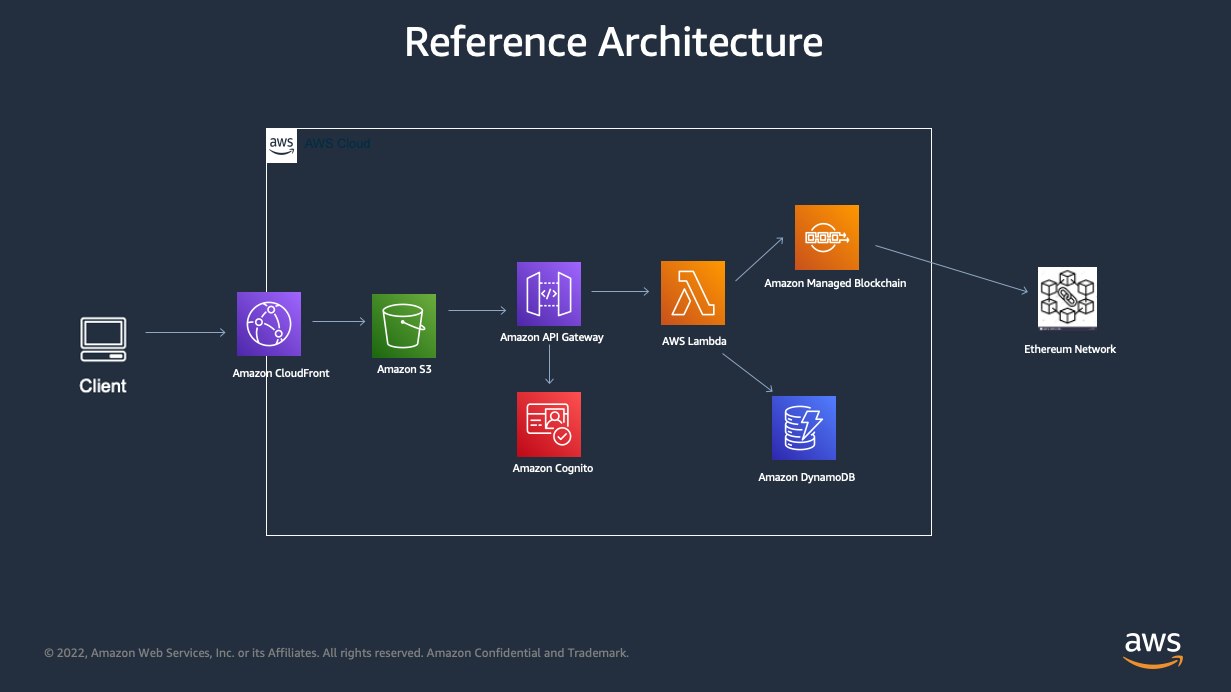
NFT Project Architecture Figure 2: Complete NFT project architecture showing smart contract, IPFS, and marketplace integration

Metadata Storage with IPFS

Understanding IPFS for NFTs

The InterPlanetary File System (IPFS) is a peer-to-peer protocol for storing and sharing data in a distributed file system. For NFTs, IPFS offers several critical advantages:

  1. Decentralization: Content isn’t hosted on a single server
  2. Content Addressing: Files identified by their hash, ensuring immutability
  3. Permanence: Content remains accessible as long as nodes pin it
  4. Censorship Resistance: No central authority can remove content

IPFS content remains available only as long as at least one node pins it. Always use pinning services like Pinata or NFT.Storage for production NFTs.

IPFS Storage Architecture Figure 3: How NFT metadata and images are stored on IPFS and referenced from blockchain

Creating NFT Metadata

Each NFT needs a JSON metadata file following the standard format:

1
2
3
4
5
6
7
8
9
10
11
12
13
14
15
16
17
18
19
20
21
22
23
24
25
26
27
28
29
30
31
32
33
34
35
36
37
38
39
40
41
42
43
44
45
46
47
48
49
50
51
52
53
54
55
// metadata-generator.js
const fs = require('fs');
const path = require('path');

/**
 * Generate metadata for an NFT collection
 */
function generateMetadata(totalSupply, baseImageCID) {
    const metadata = [];
    
    for (let i = 0; i < totalSupply; i++) {
        const tokenMetadata = {
            name: `My NFT Collection #${i}`,
            description: "This is an amazing NFT from our collection with unique properties and attributes.",
            image: `ipfs://${baseImageCID}/${i}.png`,
            external_url: `https://mynftproject.com/token/${i}`,
            attributes: [
                {
                    trait_type: "Background",
                    value: getRandomBackground()
                },
                {
                    trait_type: "Body",
                    value: getRandomBody()
                },
                {
                    trait_type: "Eyes",
                    value: getRandomEyes()
                },
                {
                    trait_type: "Accessory",
                    value: getRandomAccessory()
                },
                {
                    display_type: "number",
                    trait_type: "Generation",
                    value: 1
                },
                {
                    display_type: "boost_percentage",
                    trait_type: "Power",
                    value: Math.floor(Math.random() * 100)
                }
            ]
        };
        
        // Save metadata file
        const filepath = path.join(__dirname, 'metadata', `${i}.json`);
        fs.writeFileSync(filepath, JSON.stringify(tokenMetadata, null, 2));
        metadata.push(tokenMetadata);
    }
    
    console.log(`Generated ${totalSupply} metadata files`);
    return metadata;
}
1
2
3
4
5
6
7
8
9
10
11
12
13
14
15
16
17
18
19
20
21
22
23
24
// Helper functions for trait randomization
function getRandomBackground() {
    const backgrounds = ['Blue', 'Red', 'Green', 'Purple', 'Gold', 'Black'];
    return backgrounds[Math.floor(Math.random() * backgrounds.length)];
}

function getRandomBody() {
    const bodies = ['Robot', 'Alien', 'Human', 'Zombie', 'Ape'];
    return bodies[Math.floor(Math.random() * bodies.length)];
}

function getRandomEyes() {
    const eyes = ['Laser', 'Normal', 'Cyborg', 'Glowing', '3D'];
    return eyes[Math.floor(Math.random() * eyes.length)];
}

function getRandomAccessory() {
    const accessories = ['Crown', 'Hat', 'Sunglasses', 'Necklace', 'None'];
    return accessories[Math.floor(Math.random() * accessories.length)];
}

// Generate metadata for 100 NFTs
const IMAGE_CID = "QmYourImagesFolderCID"; // Replace with actual IPFS CID
generateMetadata(100, IMAGE_CID);

Uploading to IPFS via Pinata

Method 1: Using Pinata SDK

1
2
3
4
5
6
7
8
9
10
11
12
13
14
15
16
17
18
19
20
21
22
23
24
25
26
27
28
29
30
31
32
33
34
35
36
37
38
39
40
41
42
43
44
45
46
47
48
49
50
51
52
53
54
55
56
57
58
59
60
61
62
63
64
65
66
67
68
69
70
71
72
73
74
75
76
77
78
79
80
81
82
83
84
85
86
87
88
89
90
91
92
93
94
95
96
97
98
99
100
101
102
103
104
105
106
107
108
109
110
111
112
113
114
115
const pinataSDK = require('@pinata/sdk');
const fs = require('fs');
const path = require('path');
require('dotenv').config();

const pinata = new pinataSDK(
    process.env.PINATA_API_KEY,
    process.env.PINATA_SECRET_KEY
);

/**
 * Upload images folder to IPFS
 */
async function uploadImages() {
    const imagesPath = path.join(__dirname, 'images');
    
    try {
        // Test authentication
        await pinata.testAuthentication();
        console.log('Pinata authentication successful');
        
        // Upload folder
        const result = await pinata.pinFromFS(imagesPath, {
            pinataMetadata: {
                name: 'NFT-Collection-Images'
            },
            pinataOptions: {
                cidVersion: 0
            }
        });
        
        console.log('Images uploaded to IPFS');
        console.log('CID:', result.IpfsHash);
        console.log('URL:', `ipfs://${result.IpfsHash}`);
        
        return result.IpfsHash;
    } catch (error) {
        console.error('Error uploading images:', error);
        throw error;
    }
}

/**
 * Upload metadata folder to IPFS
 */
async function uploadMetadata(imageCID) {
    // Update metadata files with correct image CID
    updateMetadataImages(imageCID);
    
    const metadataPath = path.join(__dirname, 'metadata');
    
    try {
        const result = await pinata.pinFromFS(metadataPath, {
            pinataMetadata: {
                name: 'NFT-Collection-Metadata'
            },
            pinataOptions: {
                cidVersion: 0
            }
        });
        
        console.log('Metadata uploaded to IPFS');
        console.log('CID:', result.IpfsHash);
        console.log('Base URI:', `ipfs://${result.IpfsHash}/`);
        
        return result.IpfsHash;
    } catch (error) {
        console.error('Error uploading metadata:', error);
        throw error;
    }
}

/**
 * Update metadata files with correct image CID
 */
function updateMetadataImages(imageCID) {
    const metadataPath = path.join(__dirname, 'metadata');
    const files = fs.readdirSync(metadataPath);
    
    files.forEach(file => {
        if (path.extname(file) === '.json') {
            const filepath = path.join(metadataPath, file);
            const metadata = JSON.parse(fs.readFileSync(filepath, 'utf8'));
            
            // Update image URL
            const tokenId = path.basename(file, '.json');
            metadata.image = `ipfs://${imageCID}/${tokenId}.png`;
            
            fs.writeFileSync(filepath, JSON.stringify(metadata, null, 2));
        }
    });
    
    console.log('Updated metadata files with image CID');
}

/**
 * Main upload process
 */
async function main() {
    console.log('Starting IPFS upload process...\n');
    
    // Step 1: Upload images
    const imageCID = await uploadImages();
    
    // Step 2: Upload metadata
    const metadataCID = await uploadMetadata(imageCID);
    
    console.log('\nUpload complete!');
    console.log('Save these CIDs:');
    console.log('   Images CID:', imageCID);
    console.log('   Metadata CID:', metadataCID);
    console.log('   Base URI for contract:', `ipfs://${metadataCID}/`);
}

main().catch(console.error);

Method 2: Using NFT.Storage

NFT.Storage provides free, permanent storage specifically for NFTs:

1
2
3
4
5
6
7
8
9
10
11
12
13
14
15
16
17
18
19
20
21
22
23
24
25
26
27
28
29
30
31
32
33
34
35
36
37
38
39
40
41
42
43
44
45
46
47
48
49
50
51
52
53
54
55
56
57
58
59
60
61
62
63
64
65
66
67
68
69
const { NFTStorage, File } = require('nft.storage');
const fs = require('fs');
const path = require('path');
require('dotenv').config();

const client = new NFTStorage({ token: process.env.NFT_STORAGE_API_KEY });

/**
 * Upload NFT to NFT.Storage
 */
async function uploadNFT(imagePath, metadata) {
    try {
        const imageFile = await fileFromPath(imagePath);
        
        const nft = await client.store({
            name: metadata.name,
            description: metadata.description,
            image: imageFile,
            properties: {
                attributes: metadata.attributes
            }
        });
        
        console.log('NFT stored successfully');
        console.log('IPFS URL:', nft.url);
        console.log('Image URL:', nft.data.image.href);
        
        return nft;
    } catch (error) {
        console.error('Error uploading to NFT.Storage:', error);
        throw error;
    }
}

/**
 * Helper to read file
 */
async function fileFromPath(filepath) {
    const content = await fs.promises.readFile(filepath);
    const type = getFileType(filepath);
    return new File([content], path.basename(filepath), { type });
}

/**
 * Get MIME type
 */
function getFileType(filepath) {
    const ext = path.extname(filepath).toLowerCase();
    const types = {
        '.png': 'image/png',
        '.jpg': 'image/jpeg',
        '.jpeg': 'image/jpeg',
        '.gif': 'image/gif',
        '.svg': 'image/svg+xml'
    };
    return types[ext] || 'application/octet-stream';
}

// Example usage
const metadata = {
    name: "My Awesome NFT",
    description: "A unique digital collectible",
    attributes: [
        { trait_type: "Background", value: "Blue" },
        { trait_type: "Rarity", value: "Rare" }
    ]
};

uploadNFT('./images/1.png', metadata);

IPFS Best Practices

Always pin your IPFS content! Unpinned content may disappear if no nodes host it. Use reliable pinning services for production.

  1. Pin Your Content: Ensure your IPFS content remains available
    • Use pinning services (Pinata, NFT.Storage, Infura)
    • Run your own IPFS node for critical projects
  2. Use CID v1: More flexible and future-proof
    1
    
    pinataOptions: { cidVersion: 1 }
    
  3. Verify Uploads: Always check that content is accessible
    1
    2
    3
    4
    5
    
    async function verifyIPFS(cid) {
        const url = `https://ipfs.io/ipfs/${cid}`;
        const response = await fetch(url);
        return response.ok;
    }
    
  4. Backup Your CIDs: Store CIDs securely; they’re your content keys

  5. Consider Gateway Performance: Use multiple IPFS gateways
    • ipfs.io
    • gateway.pinata.cloud
    • cloudflare-ipfs.com

Deploying Your NFT Contract

Deployment with Hardhat

Step 1: Configure Hardhat

Create hardhat.config.js:

1
2
3
4
5
6
7
8
9
10
11
12
13
14
15
16
17
18
19
20
21
22
23
24
25
26
27
28
29
30
31
32
33
34
35
36
37
38
39
40
41
42
43
44
45
46
47
48
49
require("@nomiclabs/hardhat-waffle");
require("@nomiclabs/hardhat-etherscan");
require("dotenv").config();

module.exports = {
    solidity: {
        version: "0.8.20",
        settings: {
            optimizer: {
                enabled: true,
                runs: 200
            }
        }
    },
    networks: {
        // Local development network
        hardhat: {
            chainId: 31337
        },
        
        // Ethereum Sepolia testnet
        sepolia: {
            url: process.env.SEPOLIA_RPC_URL || "",
            accounts: process.env.PRIVATE_KEY ? [process.env.PRIVATE_KEY] : [],
            chainId: 11155111
        },
        
        // Ethereum mainnet
        mainnet: {
            url: process.env.MAINNET_RPC_URL || "",
            accounts: process.env.PRIVATE_KEY ? [process.env.PRIVATE_KEY] : [],
            chainId: 1
        },
        
        // Polygon Mumbai testnet
        mumbai: {
            url: process.env.MUMBAI_RPC_URL || "",
            accounts: process.env.PRIVATE_KEY ? [process.env.PRIVATE_KEY] : [],
            chainId: 80001
        }
    },
    etherscan: {
        apiKey: {
            sepolia: process.env.ETHERSCAN_API_KEY,
            mainnet: process.env.ETHERSCAN_API_KEY,
            polygonMumbai: process.env.POLYGONSCAN_API_KEY
        }
    }
};

Step 2: Create Deployment Script

Create scripts/deploy.js:

1
2
3
4
5
6
7
8
9
10
11
12
13
14
15
16
17
18
19
20
21
22
23
24
25
26
27
28
29
30
31
32
33
34
35
36
37
38
39
40
41
42
43
44
45
46
47
48
49
50
51
52
53
54
55
56
57
58
59
60
61
62
63
64
65
66
67
68
69
70
71
72
const hre = require("hardhat");

async function main() {
    console.log("Starting NFT deployment...\n");
    
    // Get deployer account
    const [deployer] = await hre.ethers.getSigners();
    console.log("Deploying with account:", deployer.address);
    
    // Check balance
    const balance = await deployer.getBalance();
    console.log("Account balance:", hre.ethers.utils.formatEther(balance), "ETH\n");
    
    // Deploy contract
    const baseURI = process.env.BASE_URI || "ipfs://YOUR_METADATA_CID/";
    
    console.log("Deploying MyNFT contract...");
    const MyNFT = await hre.ethers.getContractFactory("MyNFT");
    const nft = await MyNFT.deploy(baseURI);
    
    await nft.deployed();
    
    console.log("Contract deployed!");
    console.log("Contract address:", nft.address);
    console.log("Base URI:", baseURI);
    console.log("Gas used:", (await nft.deployTransaction.wait()).gasUsed.toString());
    
    // Wait for block confirmations
    console.log("\nWaiting for block confirmations...");
    await nft.deployTransaction.wait(5);
    
    console.log("Confirmed!\n");
    
    // Verify contract
    if (hre.network.name !== "hardhat" && hre.network.name !== "localhost") {
        console.log("Verifying contract on Etherscan...");
        try {
            await hre.run("verify:verify", {
                address: nft.address,
                constructorArguments: [baseURI]
            });
            console.log("Contract verified!");
        } catch (error) {
            console.log("Verification failed:", error.message);
        }
    }
    
    // Save deployment info
    const deployment = {
        network: hre.network.name,
        contractAddress: nft.address,
        deployer: deployer.address,
        baseURI: baseURI,
        timestamp: new Date().toISOString()
    };
    
    const fs = require('fs');
    fs.writeFileSync(
        'deployment.json',
        JSON.stringify(deployment, null, 2)
    );
    
    console.log("\nDeployment info saved to deployment.json");
    console.log("\nDeployment complete!");
}

main()
    .then(() => process.exit(0))
    .catch((error) => {
        console.error(error);
        process.exit(1);
    });

Step 3: Deploy to Testnet

Never commit your .env file to version control! Add it to .gitignore immediately. Your private key grants full access to your wallet.

1
2
3
4
5
6
7
8
# Set environment variables in .env file
SEPOLIA_RPC_URL=https://sepolia.infura.io/v3/YOUR_INFURA_KEY
PRIVATE_KEY=your_wallet_private_key
BASE_URI=ipfs://YOUR_METADATA_CID/
ETHERSCAN_API_KEY=your_etherscan_api_key

# Deploy to Sepolia
npx hardhat run scripts/deploy.js --network sepolia

Deployment with Remix IDE

For beginners, Remix provides a browser-based deployment experience:

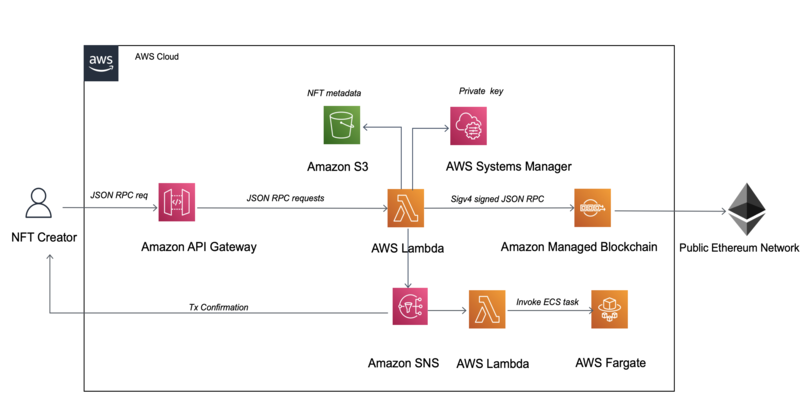
Smart Contract Deployment Figure 4: Smart contract deployment flow using Remix and Hardhat

Step-by-Step Remix Deployment:

  1. Open Remix: Navigate to remix.ethereum.org

  2. Create Contract File:
    • Create new file: MyNFT.sol
    • Paste your contract code
    • Import OpenZeppelin contracts
  3. Compile Contract:
    • Select Solidity Compiler (left sidebar)
    • Choose compiler version 0.8.20+
    • Click “Compile MyNFT.sol”
  4. Deploy:
    • Select “Deploy & Run Transactions”
    • Environment: “Injected Provider - MetaMask”
    • Contract: Select “MyNFT”
    • Constructor arguments: Enter base URI
    • Click “Deploy”
    • Confirm MetaMask transaction
  5. Interact: Use Remix interface to call contract functions

Gas Optimization Tips

Gas optimization can save thousands of dollars on popular NFT drops. Test gas costs thoroughly before mainnet deployment.

// ❌ Gas-inefficient
for (uint256 i = 0; i < recipients.length; i++) {
    _safeMint(recipients[i], tokenId);
    tokenId++;
}

// ✅ Gas-optimized
uint256 length = recipients.length;
uint256 currentId = tokenId;
for (uint256 i; i < length;) {
    _safeMint(recipients[i], currentId);
    unchecked { 
        ++currentId;
        ++i;
    }
}

Key Optimization Techniques:

  1. Use unchecked for safe incrementing: Saves ~30 gas per operation
  2. Cache array length: Avoid repeated SLOAD operations
  3. Use ++i instead of i++: Saves ~5 gas per loop
  4. Pack storage variables: Store multiple values in one slot
  5. Use events instead of storage: Much cheaper for off-chain data

Minting and Interacting with Your NFT

Writing a Minting Script

Create scripts/mint.js:

1
2
3
4
5
6
7
8
9
10
11
12
13
14
15
16
17
18
19
20
21
22
23
24
25
26
27
28
29
30
31
32
33
34
35
36
37
38
39
40
41
42
43
44
45
46
47
48
49
50
51
52
53
54
const hre = require("hardhat");
const deployment = require("../deployment.json");

async function main() {
    console.log("Starting NFT minting...\n");
    
    // Get signer
    const [minter] = await hre.ethers.getSigners();
    console.log("Minting with account:", minter.address);
    
    // Connect to deployed contract
    const MyNFT = await hre.ethers.getContractFactory("MyNFT");
    const nft = MyNFT.attach(deployment.contractAddress);
    
    // Check mint price
    const mintPrice = await nft.mintPrice();
    console.log("Mint price:", hre.ethers.utils.formatEther(mintPrice), "ETH");
    
    // Check current supply
    const currentSupply = await nft.totalSupply();
    console.log("Current supply:", currentSupply.toString());
    
    // Mint NFT
    console.log("\nMinting NFT...");
    const tx = await nft.mint({ value: mintPrice });
    console.log("Transaction hash:", tx.hash);
    
    // Wait for confirmation
    const receipt = await tx.wait();
    console.log("NFT minted successfully!");
    console.log("Gas used:", receipt.gasUsed.toString());
    
    // Get token ID from Transfer event
    const event = receipt.events.find(e => e.event === 'Transfer');
    const tokenId = event.args.tokenId.toString();
    console.log("Token ID:", tokenId);
    
    // Get token URI
    const tokenURI = await nft.tokenURI(tokenId);
    console.log("Token URI:", tokenURI);
    
    // Get new supply
    const newSupply = await nft.totalSupply();
    console.log("New supply:", newSupply.toString());
    
    console.log("\nMinting complete!");
}

main()
    .then(() => process.exit(0))
    .catch((error) => {
        console.error(error);
        process.exit(1);
    });

Run the script:

1
npx hardhat run scripts/mint.js --network sepolia

Batch Minting Script

For minting multiple NFTs efficiently:

1
2
3
4
5
6
7
8
9
10
11
12
13
14
15
16
17
18
19
20
21
22
23
24
25
26
27
28
29
30
31
const hre = require("hardhat");

async function batchMint(contractAddress, recipients) {
    const [owner] = await hre.ethers.getSigners();
    
    const MyNFT = await hre.ethers.getContractFactory("AdvancedNFT");
    const nft = MyNFT.attach(contractAddress);
    
    console.log(`Batch minting ${recipients.length} NFTs...\n`);
    
    // Use the reserveMint function for owner minting
    const tx = await nft.reserveMint(recipients);
    console.log("Transaction hash:", tx.hash);
    
    const receipt = await tx.wait();
    console.log("Batch mint successful!");
    console.log("Gas used:", receipt.gasUsed.toString());
    
    // Calculate average gas per mint
    const avgGas = receipt.gasUsed.div(recipients.length);
    console.log("Average gas per NFT:", avgGas.toString());
}

// Example: Mint 10 NFTs to different addresses
const recipients = [
    "0x1234...",
    "0x5678...",
    // ... add more addresses
];

batchMint("YOUR_CONTRACT_ADDRESS", recipients);

Web3 Frontend Integration

Create a simple minting interface with ethers.js:

1
2
3
4
5
6
7
8
9
10
11
12
13
14
15
16
17
18
19
20
21
22
23
24
25
26
27
28
29
30
31
32
33
34
35
36
37
38
39
40
41
42
43
44
45
46
47
48
49
50
51
52
53
54
55
56
57
58
59
60
61
62
63
64
65
66
67
68
69
70
71
72
73
74
75
76
77
78
79
80
81
82
83
84
85
86
87
88
89
90
91
92
93
94
95
96
97
98
99
100
101
102
103
104
105
106
107
108
109
110
111
import { ethers } from 'ethers';

const CONTRACT_ADDRESS = "YOUR_CONTRACT_ADDRESS";
const CONTRACT_ABI = [ /* Your contract ABI */ ];

/**
 * Connect wallet and mint NFT
 */
async function mintNFT() {
    try {
        // Check if MetaMask is installed
        if (typeof window.ethereum === 'undefined') {
            alert('Please install MetaMask!');
            return;
        }
        
        // Request account access
        await window.ethereum.request({ method: 'eth_requestAccounts' });
        
        // Create provider and signer
        const provider = new ethers.providers.Web3Provider(window.ethereum);
        const signer = provider.getSigner();
        const address = await signer.getAddress();
        
        console.log('Connected address:', address);
        
        // Connect to contract
        const contract = new ethers.Contract(
            CONTRACT_ADDRESS,
            CONTRACT_ABI,
            signer
        );
        
        // Get mint price
        const mintPrice = await contract.mintPrice();
        console.log('Mint price:', ethers.utils.formatEther(mintPrice), 'ETH');
        
        // Check current supply
        const supply = await contract.totalSupply();
        const maxSupply = await contract.MAX_SUPPLY();
        console.log(`Supply: ${supply}/${maxSupply}`);
        
        if (supply.gte(maxSupply)) {
            alert('Collection sold out!');
            return;
        }
        
        // Show loading state
        updateUI('minting');
        
        // Mint NFT
        const tx = await contract.mint({ value: mintPrice });
        console.log('Transaction sent:', tx.hash);
        
        // Wait for confirmation
        const receipt = await tx.wait();
        console.log('Transaction confirmed!', receipt);
        
        // Get token ID from event
        const event = receipt.events.find(e => e.event === 'Transfer');
        const tokenId = event.args.tokenId.toString();
        
        // Show success
        updateUI('success', tokenId);
        
    } catch (error) {
        console.error('Minting error:', error);
        
        // Handle specific errors
        if (error.code === 4001) {
            alert('Transaction rejected');
        } else if (error.message.includes('insufficient funds')) {
            alert('Insufficient funds for minting');
        } else {
            alert('Error minting NFT: ' + error.message);
        }
        
        updateUI('error');
    }
}

/**
 * Update UI based on state
 */
function updateUI(state, data) {
    const button = document.getElementById('mint-button');
    const status = document.getElementById('status');
    
    switch(state) {
        case 'minting':
            button.disabled = true;
            button.textContent = 'Minting...';
            status.textContent = 'Transaction pending...';
            break;
        case 'success':
            button.disabled = false;
            button.textContent = 'Mint NFT';
            status.textContent = `Success! Token ID: ${data}`;
            status.style.color = 'green';
            break;
        case 'error':
            button.disabled = false;
            button.textContent = 'Mint NFT';
            status.textContent = 'Minting failed';
            status.style.color = 'red';
            break;
    }
}

// Attach to button
document.getElementById('mint-button').addEventListener('click', mintNFT);

Corresponding HTML:

1
2
3
4
5
6
7
8
9
10
11
12
13
14
15
16
17
18
19
20
21
22
23
24
25
26
27
28
29
30
31
32
33
34
35
36
37
38
39
40
41
42
43
44
45
46
<!DOCTYPE html>
<html lang="en">
<head>
    <meta charset="UTF-8">
    <meta name="viewport" content="width=device-width, initial-scale=1.0">
    <title>NFT Minting dApp</title>
    <style>
        body {
            font-family: Arial, sans-serif;
            max-width: 600px;
            margin: 50px auto;
            text-align: center;
        }
        #mint-button {
            background: #3498db;
            color: white;
            border: none;
            padding: 15px 30px;
            font-size: 18px;
            border-radius: 5px;
            cursor: pointer;
        }
        #mint-button:hover {
            background: #2980b9;
        }
        #mint-button:disabled {
            background: #95a5a6;
            cursor: not-allowed;
        }
        #status {
            margin-top: 20px;
            font-size: 16px;
        }
    </style>
</head>
<body>
    <h1>Mint Your NFT</h1>
    <p>Join our exclusive collection!</p>
    
    <button id="mint-button">Mint NFT</button>
    <div id="status"></div>
    
    <script src="https://cdn.ethers.io/lib/ethers-5.2.umd.min.js"></script>
    <script src="mint.js"></script>
</body>
</html>

Security Best Practices and Common Pitfalls

Smart Contract Security

Security vulnerabilities in smart contracts can lead to permanent loss of funds. Always audit code and use established patterns.

1. Reentrancy Protection

Always use OpenZeppelin’s ReentrancyGuard for functions that transfer ETH:

import "@openzeppelin/contracts/security/ReentrancyGuard.sol";

contract SecureNFT is ERC721, ReentrancyGuard {
    function mint() external payable nonReentrant {
        // Minting logic
        _safeMint(msg.sender, tokenId);
        
        // Safe to transfer ETH after state changes
    }
    
    function withdraw() external onlyOwner nonReentrant {
        uint256 balance = address(this).balance;
        (bool success, ) = payable(owner()).call{value: balance}("");
        require(success, "Transfer failed");
    }
}

2. Integer Overflow/Underflow

Solidity 0.8+ has built-in overflow protection, but be careful with unchecked:

// ✅ Safe - will revert on overflow
uint256 total = price * quantity;

// ⚠️ Use unchecked only when you're certain no overflow can occur
unchecked {
    ++tokenId; // Safe if tokenId < MAX_UINT256
}

3. Access Control

Use proper access modifiers:

import "@openzeppelin/contracts/access/Ownable.sol";
import "@openzeppelin/contracts/access/AccessControl.sol";

contract NFTWithRoles is ERC721, AccessControl {
    bytes32 public constant MINTER_ROLE = keccak256("MINTER_ROLE");
    bytes32 public constant ADMIN_ROLE = keccak256("ADMIN_ROLE");
    
    constructor() {
        _grantRole(DEFAULT_ADMIN_ROLE, msg.sender);
        _grantRole(ADMIN_ROLE, msg.sender);
    }
    
    function mint(address to, uint256 tokenId) 
        external 
        onlyRole(MINTER_ROLE) 
    {
        _safeMint(to, tokenId);
    }
    
    function setBaseURI(string memory uri) 
        external 
        onlyRole(ADMIN_ROLE) 
    {
        _baseTokenURI = uri;
    }
}

4. Randomness

On-chain randomness using block data is exploitable by miners. Always use Chainlink VRF for fair, verifiable randomness.

Never use block.timestamp or blockhash for randomness:

// ❌ Insecure - miners can manipulate
uint256 random = uint256(keccak256(abi.encodePacked(block.timestamp))) % 100;

// ✅ Secure - use Chainlink VRF
import "@chainlink/contracts/src/v0.8/VRFConsumerBase.sol";

contract RandomNFT is ERC721, VRFConsumerBase {
    bytes32 internal keyHash;
    uint256 internal fee;
    
    function getRandomNumber() public returns (bytes32 requestId) {
        require(LINK.balanceOf(address(this)) >= fee, "Not enough LINK");
        return requestRandomness(keyHash, fee);
    }
    
    function fulfillRandomness(bytes32 requestId, uint256 randomness) 
        internal 
        override 
    {
        // Use randomness for trait generation
    }
}

5. Front-Running Protection

Implement commit-reveal for fair launches:

contract FairLaunchNFT is ERC721 {
    mapping(address => bytes32) public commitments;
    mapping(address => uint256) public commitBlock;
    
    function commit(bytes32 commitment) external {
        commitments[msg.sender] = commitment;
        commitBlock[msg.sender] = block.number;
    }
    
    function reveal(uint256 tokenId, bytes32 secret) external payable {
        require(block.number > commitBlock[msg.sender] + 1, "Too early");
        require(
            keccak256(abi.encodePacked(tokenId, secret)) == commitments[msg.sender],
            "Invalid reveal"
        );
        
        _safeMint(msg.sender, tokenId);
        delete commitments[msg.sender];
    }
}

Common Mistakes to Avoid

1. Not Testing on Testnets

Mainnet deployment is irreversible. Always test thoroughly on Sepolia or Goerli first, including all edge cases and failure scenarios.

Always deploy to testnets first (Sepolia, Goerli) before mainnet:

1
2
3
4
5
# Test deployment
npx hardhat run scripts/deploy.js --network sepolia

# Test all functions
npx hardhat test --network sepolia

2. Hardcoding Values

Use constructor parameters or setter functions:

// ❌ Bad - requires redeployment to change
uint256 public constant MINT_PRICE = 0.08 ether;

// ✅ Good - owner can update
uint256 public mintPrice = 0.08 ether;

function setMintPrice(uint256 newPrice) external onlyOwner {
    mintPrice = newPrice;
}

3. Not Implementing Pausable

Allow emergency stops:

import "@openzeppelin/contracts/security/Pausable.sol";

contract SafeNFT is ERC721, Pausable, Ownable {
    function mint() external payable whenNotPaused {
        // Minting logic
    }
    
    function pause() external onlyOwner {
        _pause();
    }
    
    function unpause() external onlyOwner {
        _unpause();
    }
}

4. Ignoring Gas Costs

Test gas consumption:

1
2
3
4
5
6
7
8
9
10
11
12
13
14
15
const { expect } = require("chai");

describe("Gas Tests", function() {
    it("Should measure mint gas", async function() {
        const [owner] = await ethers.getSigners();
        const NFT = await ethers.getContractFactory("MyNFT");
        const nft = await NFT.deploy("ipfs://base/");
        
        const tx = await nft.mint({ value: ethers.utils.parseEther("0.01") });
        const receipt = await tx.wait();
        
        console.log("Gas used for mint:", receipt.gasUsed.toString());
        expect(receipt.gasUsed).to.be.lt(100000); // Should be under 100k gas
    });
});

5. Insufficient Event Logging

Emit events for important actions:

event Minted(address indexed minter, uint256 indexed tokenId, uint256 timestamp);
event PriceUpdated(uint256 oldPrice, uint256 newPrice);
event BaseURIUpdated(string newURI);

function mint() external payable {
    uint256 tokenId = _tokenIdCounter.current();
    _safeMint(msg.sender, tokenId);
    
    emit Minted(msg.sender, tokenId, block.timestamp);
}

Listing on OpenSea and Marketplaces

OpenSea Integration

OpenSea automatically discovers and indexes ERC-721 contracts. Just deploy your contract and mint NFTs—they’ll appear in wallets within 24 hours.

OpenSea automatically indexes NFTs that follow the ERC-721 standard. No API integration required!

Automatic Discovery:

Once your contract is deployed and NFTs are minted, OpenSea will:

  1. Detect your contract through blockchain events
  2. Fetch metadata from your tokenURI
  3. Display NFTs in user wallets
  4. Enable trading functionality

Manual Collection Setup:

Visit OpenSea’s collection manager at opensea.io/collections (while connected with owner wallet):

  1. Collection Details:
    • Logo image (350x350px recommended)
    • Featured image (600x400px)
    • Banner image (1400x350px)
    • Collection name and description
    • Category (Art, Gaming, Music, etc.)
  2. Links:
    • Website URL
    • Discord server
    • Twitter profile
    • Medium blog
  3. Creator Earnings (Royalties):
    • Set percentage (0-10%)
    • Add payout wallet address
  4. Blockchain Settings:
    • Confirm contract address
    • Choose display theme

Implementing Royalties

EIP-2981 Standard:

import "@openzeppelin/contracts/token/common/ERC2981.sol";

contract NFTWithRoyalties is ERC721, ERC2981, Ownable {
    constructor() ERC721("MyNFT", "MNFT") {
        // Set 5% royalty (500 basis points)
        _setDefaultRoyalty(msg.sender, 500);
    }
    
    /**
     * @dev Update royalty info
     */
    function setDefaultRoyalty(address receiver, uint96 feeNumerator) 
        external 
        onlyOwner 
    {
        _setDefaultRoyalty(receiver, feeNumerator);
    }
    
    /**
     * @dev Set token-specific royalty
     */
    function setTokenRoyalty(
        uint256 tokenId, 
        address receiver, 
        uint96 feeNumerator
    ) external onlyOwner {
        _setTokenRoyalty(tokenId, receiver, feeNumerator);
    }
    
    /**
     * @dev Override supportsInterface
     */
    function supportsInterface(bytes4 interfaceId)
        public
        view
        override(ERC721, ERC2981)
        returns (bool)
    {
        return super.supportsInterface(interfaceId);
    }
}

Testing Metadata Display

Always test your metadata on OpenSea testnets before mainnet launch. Incorrect metadata structure can prevent NFTs from displaying properly.

Before listing, verify metadata appears correctly:

Test on OpenSea Testnet:

  1. Deploy to Sepolia testnet
  2. Mint test NFTs
  3. View on testnets.opensea.io
  4. Check image, attributes, and description

Metadata Refresh:

If metadata doesn’t update immediately:

  • OpenSea caches for 24 hours
  • Use refresh button on NFT page
  • Or call refresh API:
1
2
3
4
5
6
7
8
9
10
11
12
async function refreshMetadata(contractAddress, tokenId) {
    const options = {
        method: 'POST',
        headers: { 'X-API-KEY': process.env.OPENSEA_API_KEY }
    };
    
    const url = `https://api.opensea.io/api/v1/asset/${contractAddress}/${tokenId}/?force_update=true`;
    
    const response = await fetch(url, options);
    const data = await response.json();
    console.log('Metadata refreshed:', data);
}

Alternative Marketplaces

LooksRare:

  • Lower fees (2% vs OpenSea’s 2.5%)
  • Trading rewards
  • Manual collection submission at looksrare.org

Rarible:

  • Multi-chain support
  • Community governance
  • Easy listing with low fees

Blur:

  • Zero marketplace fees
  • Advanced trading features
  • Pro trader focus

Conclusion

Creating and deploying an NFT collection on Ethereum is a multifaceted process that combines smart contract development, decentralized storage, security considerations, and marketplace integration. Throughout this comprehensive tutorial, we’ve covered the complete journey from understanding the ERC-721 standard to successfully launching your collection on OpenSea.

Key Takeaways

Technical Foundation:

  • ERC-721 provides a robust standard for unique digital assets
  • OpenZeppelin’s implementation offers security-audited building blocks
  • IPFS ensures decentralized, permanent metadata storage
  • Hardhat and Remix enable efficient development and deployment

Security First:

  • Always use ReentrancyGuard for functions handling ETH
  • Implement proper access control with Ownable or AccessControl
  • Test thoroughly on testnets before mainnet deployment
  • Consider using Pausable for emergency situations
  • Never use on-chain randomness for critical decisions

Best Practices:

  • Optimize gas costs through efficient code patterns
  • Implement EIP-2981 for cross-marketplace royalties
  • Use events extensively for off-chain tracking
  • Store only essential data on-chain
  • Leverage IPFS for metadata and media

Going Forward:

  • Test all functionality extensively on Sepolia
  • Build a community before launch (Discord, Twitter)
  • Plan your minting strategy (whitelist, public, dutch auction)
  • Consider gas costs for your target audience
  • Monitor your contract post-launch for issues

Next Steps

Now that you understand NFT development fundamentals, consider exploring:

  1. Advanced Features:
    • Dynamic NFTs that change over time
    • On-chain SVG generation
    • Staking and utility mechanisms
    • Cross-chain bridging
  2. Gas Optimization:
    • ERC-721A for batch minting
    • Bitmap tracking for whitelist
    • Custom ERC-721 optimizations
  3. Security Audits:
    • Professional audit services (CertiK, OpenZeppelin)
    • Bug bounty programs
    • Community reviews
  4. Marketing & Community:
    • Build presence on Twitter and Discord
    • Create compelling artwork and narrative
    • Engage with NFT communities
    • Partner with influencers

Resources

Documentation:

  • OpenZeppelin Contracts: https://docs.openzeppelin.com/contracts
  • EIP-721 Specification: https://eips.ethereum.org/EIPS/eip-721
  • Hardhat Documentation: https://hardhat.org/docs
  • IPFS Documentation: https://docs.ipfs.tech

Tools:

  • Remix IDE: https://remix.ethereum.org
  • OpenSea: https://opensea.io
  • Etherscan: https://etherscan.io
  • Pinata: https://pinata.cloud

Community:

  • OpenZeppelin Forum: https://forum.openzeppelin.com
  • Ethereum Stack Exchange: https://ethereum.stackexchange.com
  • NFT Developer Discord: Various communities

Security:

  • Smart Contract Security Best Practices: https://consensys.github.io/smart-contract-best-practices
  • Slither Security Tool: https://github.com/crytic/slither
  • MythX: https://mythx.io

The NFT ecosystem continues to evolve rapidly, with new standards, tools, and use cases emerging regularly. Stay curious, keep learning, and always prioritize security and user experience in your implementations. Whether you’re building the next major NFT collection, creating utility NFTs for a game, or tokenizing real-world assets, the foundation you’ve learned here will serve you well.

Happy minting, and welcome to the exciting world of NFT development!

Bu gönderi CC BY 4.0 lisansı altındadır.