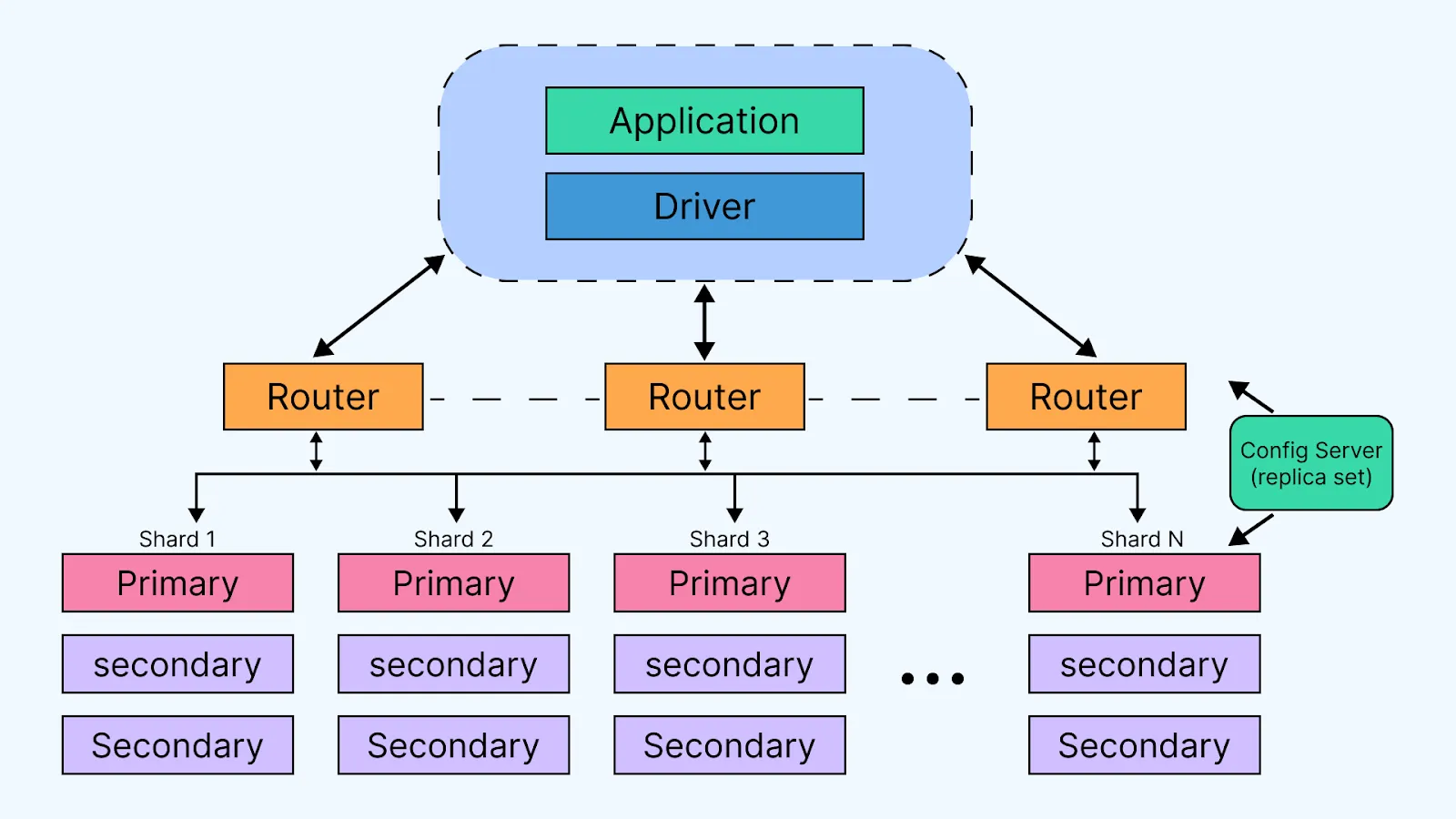
Gönderi

MongoDB ile NoSQL Veri Yönetimi

Python ile MongoDB kullanarak NoSQL veri yönetimi rehberi. PyMongo ve Motor ile CRUD işlemleri, aggregation pipeline, indexing stratejileri ve best practices.

MongoDB ile NoSQL Veri Yönetimi

MongoDB, document-oriented NoSQL veritabanı sistemlerinin en

popüler ve güçlü olanıdır. JSON benzeri BSON formatında veri saklayan MongoDB, esnekliği, ölçeklenebilirliği ve performansıyla modern uygulamaların vazgeçilmez bir parçası haline gelmiştir. Bu yazıda, MongoDB’yi Python ile kullanmayı ve NoSQL veri yönetimini derinlemesine inceleyeceğiz.

NoSQL ve MongoDB Nedir?

SQL vs NoSQL

1
2
3
4
5
6
7
8
9
10
11
12
13
14
15
16
17
18
19
20
21
22
23
24
25
# SQL (İlişkisel) yaklaşımı
users_table:
  id | username | email          | created_at
  ---|----------|----------------|------------
  1  | john     | john@mail.com  | 2024-01-01
  
posts_table:
  id | user_id | title    | content
  ---|---------|----------|--------
  1  | 1       | Post 1   | ...

# NoSQL (Document) yaklaşımı
{
  "_id": ObjectId("..."),
  "username": "john",
  "email": "[email protected]",
  "created_at": ISODate("2024-01-01"),
  "posts": [
    {
      "title": "Post 1",
      "content": "...",
      "created_at": ISODate("2024-01-02")
    }
  ]
}

MongoDB’nin Avantajları

  • Schema-less: Esnek veri yapıları, schema değişikliklerinde kolaylık
  • Horizontal Scalability: Sharding ile kolay ölçeklendirme
  • High Performance: Index desteği ve memory-mapped storage
  • Rich Query Language: Güçlü aggregation framework
  • Document Model: Doğal JSON/BSON veri yapıları
  • Replication: Otomatik replica sets ile high availability

MongoDB Kurulumu

MongoDB Server Kurulumu

1
2
3
4
5
6
7
8
9
10
11
12
13
14
15
# Ubuntu/Debian
wget -qO - https://www.mongodb.org/static/pgp/server-7.0.asc | sudo apt-key add -
echo "deb [ arch=amd64,arm64 ] https://repo.mongodb.org/apt/ubuntu jammy/mongodb-org/7.0 multiverse" | sudo tee /etc/apt/sources.list.d/mongodb-org-7.0.list
sudo apt-get update
sudo apt-get install -y mongodb-org

# MongoDB servisini başlatma
sudo systemctl start mongod
sudo systemctl enable mongod

# Durum kontrolü
sudo systemctl status mongod

# MongoDB shell'e bağlanma
mongosh

Python Kütüphaneleri

1
2
3
4
5
6
7
8
9
# PyMongo (senkron)
pip install pymongo

# Motor (asenkron - asyncio/FastAPI için)
pip install motor

# Additional tools
pip install dnspython  # MongoDB Atlas için
pip install python-dotenv  # Environment variables

PyMongo ile Temel İşlemler

Connection Kurulumu

1
2
3
4
5
6
7
8
9
10
11
12
13
14
15
16
17
18
19
20
21
22
23
24
25
26
27
28
29
30
31
32
33
from pymongo import MongoClient
from pymongo.errors import ConnectionFailure
import os
from dotenv import load_dotenv

load_dotenv()

# Local MongoDB bağlantısı
client = MongoClient('mongodb://localhost:27017/')

# Authentication ile bağlantı
client = MongoClient(
    'mongodb://localhost:27017/',
    username='admin',
    password='password',
    authSource='admin'
)

# MongoDB Atlas (Cloud) bağlantısı
MONGODB_URI = os.getenv('MONGODB_URI')
client = MongoClient(MONGODB_URI)

# Bağlantı testi
try:
    client.admin.command('ping')
    print("MongoDB bağlantısı başarılı!")
except ConnectionFailure:
    print("MongoDB bağlantı hatası!")

# Database ve Collection seçimi
db = client['myapp_db']
users_collection = db['users']
posts_collection = db['posts']

CRUD İşlemleri

Create (Ekleme)

1
2
3
4
5
6
7
8
9
10
11
12
13
14
15
16
17
18
19
20
21
22
23
24
25
26
27
28
29
30
31
32
33
34
35
36
37
38
39
40
41
42
43
44
45
46
47
48
49
50
51
52
53
54
55
56
from datetime import datetime
from bson import ObjectId

# Tek document ekleme
user_data = {
    "username": "john_doe",
    "email": "[email protected]",
    "age": 30,
    "created_at": datetime.utcnow(),
    "profile": {
        "first_name": "John",
        "last_name": "Doe",
        "bio": "Software Developer"
    },
    "tags": ["python", "mongodb", "developer"],
    "is_active": True
}

result = users_collection.insert_one(user_data)
print(f"Inserted ID: {result.inserted_id}")

# Çoklu document ekleme
new_users = [
    {
        "username": "alice",
        "email": "[email protected]",
        "age": 25,
        "created_at": datetime.utcnow()
    },
    {
        "username": "bob",
        "email": "[email protected]",
        "age": 35,
        "created_at": datetime.utcnow()
    }
]

result = users_collection.insert_many(new_users)
print(f"Inserted {len(result.inserted_ids)} documents")

# İlişkili document ekleme (embedding)
post_data = {
    "title": "MongoDB Tutorial",
    "content": "This is a comprehensive tutorial...",
    "author": {
        "user_id": result.inserted_id,
        "username": "john_doe"
    },
    "tags": ["mongodb", "tutorial", "nosql"],
    "comments": [],
    "likes": 0,
    "created_at": datetime.utcnow(),
    "updated_at": datetime.utcnow()
}

posts_collection.insert_one(post_data)

Read (Okuma)

1
2
3
4
5
6
7
8
9
10
11
12
13
14
15
16
17
18
19
20
21
22
23
24
25
26
27
28
29
30
31
32
33
34
35
36
37
38
39
40
41
42
43
44
45
46
47
48
49
50
51
52
53
54
55
56
57
58
59
60
61
62
63
64
# Tek document bulma
user = users_collection.find_one({"username": "john_doe"})
print(user)

# ID ile bulma
user_id = ObjectId("507f1f77bcf86cd799439011")
user = users_collection.find_one({"_id": user_id})

# Tüm documentları bulma
all_users = users_collection.find()
for user in all_users:
    print(user['username'])

# Query ile filtreleme
active_users = users_collection.find({"is_active": True})

# Karşılaştırma operatörleri
# $gt (greater than), $gte, $lt, $lte, $ne (not equal)
adults = users_collection.find({"age": {"$gte": 18}})

# $in operatörü
python_devs = users_collection.find({
    "tags": {"$in": ["python", "django"]}
})

# $and, $or, $not operatörleri
experienced_devs = users_collection.find({
    "$and": [
        {"age": {"$gte": 25}},
        {"tags": {"$in": ["python", "javascript"]}}
    ]
})

# Regex ile arama
email_search = users_collection.find({
    "email": {"$regex": "example.com$", "$options": "i"}
})

# Projection (sadece belirli alanları getir)
users = users_collection.find(
    {"is_active": True},
    {"username": 1, "email": 1, "_id": 0}
)

# Sorting
users = users_collection.find().sort("created_at", -1)  # Descending
users = users_collection.find().sort([
    ("age", -1),
    ("username", 1)
])

# Pagination
page = 1
per_page = 10
skip = (page - 1) * per_page

users = users_collection.find()\
    .sort("created_at", -1)\
    .skip(skip)\
    .limit(per_page)

# Count
total_users = users_collection.count_documents({})
active_users_count = users_collection.count_documents({"is_active": True})

Update (Güncelleme)

1
2
3
4
5
6
7
8
9
10
11
12
13
14
15
16
17
18
19
20
21
22
23
24
25
26
27
28
29
30
31
32
33
34
35
36
37
38
39
40
41
42
43
44
45
46
47
48
49
50
51
52
53
54
55
56
57
58
59
60
61
62
63
64
65
66
67
68
69
70
71
72
73
74
75
76
# Tek document güncelleme
result = users_collection.update_one(
    {"username": "john_doe"},
    {"$set": {
        "age": 31,
        "updated_at": datetime.utcnow()
    }}
)
print(f"Modified: {result.modified_count}")

# Çoklu alan güncelleme
users_collection.update_one(
    {"username": "john_doe"},
    {"$set": {
        "profile.bio": "Senior Software Developer",
        "profile.location": "New York",
        "is_verified": True
    }}
)

# Array'e eleman ekleme
users_collection.update_one(
    {"username": "john_doe"},
    {"$push": {"tags": "fastapi"}}
)

# Array'e çoklu eleman ekleme
users_collection.update_one(
    {"username": "john_doe"},
    {"$push": {"tags": {"$each": ["docker", "kubernetes"]}}}
)

# Array'den eleman çıkarma
users_collection.update_one(
    {"username": "john_doe"},
    {"$pull": {"tags": "mongodb"}}
)

# Sayısal değer artırma/azaltma
posts_collection.update_one(
    {"_id": post_id},
    {"$inc": {"likes": 1}}  # +1 artır
)

# Çoklu document güncelleme
result = users_collection.update_many(
    {"age": {"$lt": 18}},
    {"$set": {"is_minor": True}}
)
print(f"Modified {result.modified_count} documents")

# Upsert (yoksa ekle, varsa güncelle)
users_collection.update_one(
    {"username": "new_user"},
    {"$set": {
        "email": "[email protected]",
        "created_at": datetime.utcnow()
    }},
    upsert=True
)

# Array içinde güncelleme
posts_collection.update_one(
    {"_id": post_id, "comments._id": comment_id},
    {"$set": {"comments.$.content": "Updated comment"}}
)

# Replace (tüm document değiştirme)
users_collection.replace_one(
    {"username": "john_doe"},
    {
        "username": "john_doe",
        "email": "[email protected]",
        "age": 32
    }
)

Delete (Silme)

Delete işlemlerinde dikkatli olun! delete_many({}) tüm collection’ı siler ve geri alınamaz. Production’da mutlaka backup alın.

1
2
3
4
5
6
7
8
9
10
11
12
13
# Tek document silme
result = users_collection.delete_one({"username": "test_user"})
print(f"Deleted: {result.deleted_count}")

# Çoklu document silme
result = users_collection.delete_many({"is_active": False})
print(f"Deleted {result.deleted_count} documents")

# Tüm collection'ı silme
result = users_collection.delete_many({})

# Collection'ı drop etme
users_collection.drop()

Motor ile Async Operations

Motor Async Python Motor - Async MongoDB driver for Python

Motor Setup

1
2
3
4
5
6
7
8
9
10
11
12
13
14
15
16
17
18
19
20
21
22
23
24
25
import motor.motor_asyncio
from fastapi import FastAPI
import asyncio

# Motor client oluşturma
client = motor.motor_asyncio.AsyncIOMotorClient('mongodb://localhost:27017/')
db = client['myapp_db']
users_collection = db['users']

# FastAPI ile entegrasyon
app = FastAPI()

# Startup event
@app.on_event("startup")
async def startup_db_client():
    app.mongodb_client = motor.motor_asyncio.AsyncIOMotorClient(
        os.getenv("MONGODB_URI")
    )
    app.mongodb = app.mongodb_client['myapp_db']
    print("Connected to MongoDB")

@app.on_event("shutdown")
async def shutdown_db_client():
    app.mongodb_client.close()
    print("Closed MongoDB connection")

Async CRUD Operations

1
2
3
4
5
6
7
8
9
10
11
12
13
14
15
16
17
18
19
20
21
22
23
24
25
26
27
28
29
30
31
32
33
34
35
36
37
38
39
40
41
42
43
44
# Async insert
async def create_user(user_data: dict):
    result = await users_collection.insert_one(user_data)
    return str(result.inserted_id)

# Async find
async def get_user(username: str):
    user = await users_collection.find_one({"username": username})
    return user

# Async find many
async def get_all_users(skip: int = 0, limit: int = 10):
    cursor = users_collection.find().skip(skip).limit(limit)
    users = await cursor.to_list(length=limit)
    return users

# Async update
async def update_user(username: str, update_data: dict):
    result = await users_collection.update_one(
        {"username": username},
        {"$set": update_data}
    )
    return result.modified_count

# Async delete
async def delete_user(username: str):
    result = await users_collection.delete_one({"username": username})
    return result.deleted_count

# FastAPI endpoint
@app.get("/users/{username}")
async def get_user_endpoint(username: str):
    user = await get_user(username)
    if user:
        user['_id'] = str(user['_id'])  # ObjectId'yi string'e çevir
        return user
    return {"error": "User not found"}, 404

@app.post("/users/")
async def create_user_endpoint(user: UserCreate):
    user_data = user.dict()
    user_data['created_at'] = datetime.utcnow()
    user_id = await create_user(user_data)
    return {"id": user_id, "message": "User created"}

Aggregation Framework

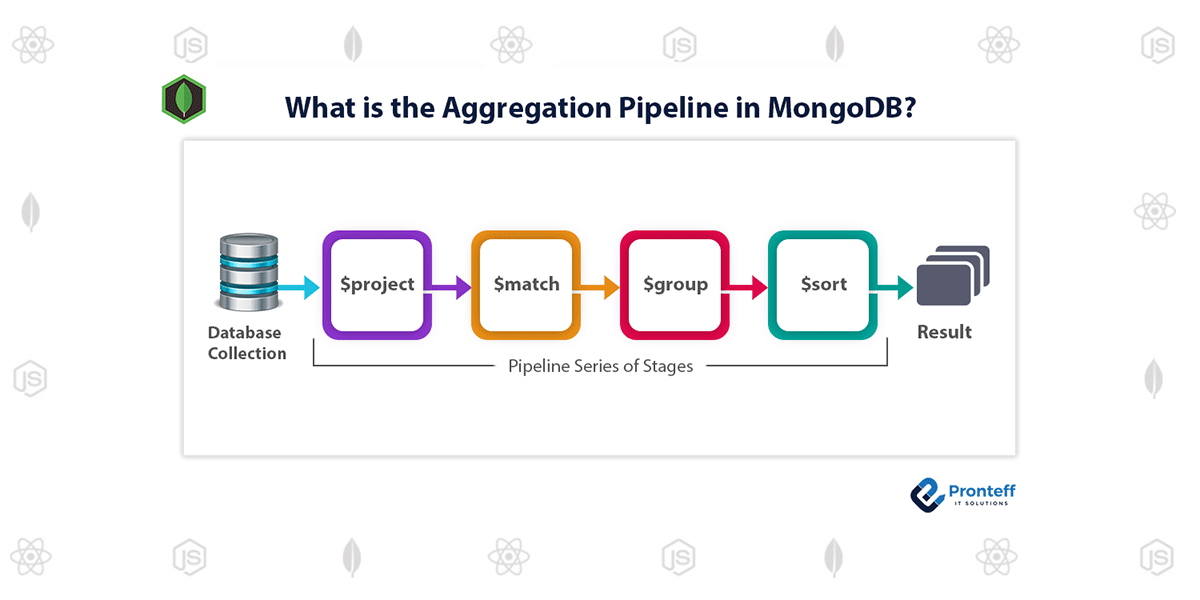
MongoDB Aggregation Pipeline MongoDB aggregation pipeline stages

Temel Aggregation Stages

1
2
3
4
5
6
7
8
9
10
11
12
13
14
15
16
17
18
19
20
21
22
23
24
25
26
27
28
29
30
31
32
33
34
35
36
37
38
39
40
41
42
43
44
45
46
47
48
49
50
51
52
# $match - Filtreleme (WHERE gibi)
pipeline = [
    {"$match": {"age": {"$gte": 18}}}
]
adults = list(users_collection.aggregate(pipeline))

# $project - Alan seçimi (SELECT gibi)
pipeline = [
    {"$project": {
        "_id": 0,
        "username": 1,
        "email": 1,
        "full_name": {
            "$concat": ["$profile.first_name", " ", "$profile.last_name"]
        }
    }}
]

# $group - Gruplama (GROUP BY gibi)
pipeline = [
    {"$group": {
        "_id": "$age",
        "count": {"$sum": 1},
        "avg_age": {"$avg": "$age"}
    }}
]

# $sort - Sıralama
pipeline = [
    {"$sort": {"created_at": -1}}  # -1: descending, 1: ascending
]

# $limit ve $skip - Pagination
pipeline = [
    {"$skip": 10},
    {"$limit": 10}
]

# $unwind - Array'i aç
pipeline = [
    {"$unwind": "$tags"}  # Her tag için ayrı document
]

# $lookup - Join (SQL JOIN gibi)
pipeline = [
    {"$lookup": {
        "from": "posts",
        "localField": "_id",
        "foreignField": "author.user_id",
        "as": "user_posts"
    }}
]

Gerçek Dünya Aggregation Örnekleri

1
2
3
4
5
6
7
8
9
10
11
12
13
14
15
16
17
18
19
20
21
22
23
24
25
26
27
28
29
30
31
32
33
34
35
36
37
38
39
40
41
42
43
44
45
46
47
48
49
50
51
52
53
54
55
56
57
58
59
60
61
62
63
64
65
66
67
68
69
70
71
72
73
74
75
76
77
78
79
80
81
82
83
84
85
86
87
88
89
90
91
92
93
94
95
96
97
98
99
100
101
102
103
104
105
106
107
108
109
110
111
112
113
114
115
116
117
118
119
120
121
122
123
124
125
126
127
128
129
130
131
132
133
134
135
136
137
138
139
140
141
142
143
144
145
146
147
148
149
150
151
152
153
154
155
156
# Örnek 1: Kullanıcı istatistikleri
def get_user_statistics():
    """Her kullanıcının post ve yorum sayısı"""
    pipeline = [
        {"$lookup": {
            "from": "posts",
            "localField": "_id",
            "foreignField": "author.user_id",
            "as": "posts"
        }},
        {"$lookup": {
            "from": "comments",
            "localField": "_id",
            "foreignField": "user_id",
            "as": "comments"
        }},
        {"$project": {
            "username": 1,
            "email": 1,
            "post_count": {"$size": "$posts"},
            "comment_count": {"$size": "$comments"},
            "total_activity": {
                "$add": [
                    {"$size": "$posts"},
                    {"$size": "$comments"}
                ]
            }
        }},
        {"$sort": {"total_activity": -1}},
        {"$limit": 10}
    ]
    
    return list(users_collection.aggregate(pipeline))

# Örnek 2: En popüler tag'ler
def get_popular_tags():
    """Her tag'in kullanım sayısı"""
    pipeline = [
        {"$unwind": "$tags"},
        {"$group": {
            "_id": "$tags",
            "count": {"$sum": 1},
            "users": {"$addToSet": "$username"}
        }},
        {"$project": {
            "tag": "$_id",
            "count": 1,
            "user_count": {"$size": "$users"},
            "_id": 0
        }},
        {"$sort": {"count": -1}},
        {"$limit": 20}
    ]
    
    return list(users_collection.aggregate(pipeline))

# Örnek 3: Aylık post istatistikleri
def get_monthly_post_stats():
    """Her ay kaç post paylaşıldı"""
    pipeline = [
        {"$group": {
            "_id": {
                "year": {"$year": "$created_at"},
                "month": {"$month": "$created_at"}
            },
            "post_count": {"$sum": 1},
            "total_likes": {"$sum": "$likes"},
            "avg_likes": {"$avg": "$likes"}
        }},
        {"$sort": {"_id.year": -1, "_id.month": -1}},
        {"$project": {
            "year": "$_id.year",
            "month": "$_id.month",
            "post_count": 1,
            "total_likes": 1,
            "avg_likes": {"$round": ["$avg_likes", 2]},
            "_id": 0
        }}
    ]
    
    return list(posts_collection.aggregate(pipeline))

# Örnek 4: En aktif kullanıcılar (son 30 gün)
from datetime import timedelta

def get_active_users_last_month():
    """Son 30 günde en aktif kullanıcılar"""
    thirty_days_ago = datetime.utcnow() - timedelta(days=30)
    
    pipeline = [
        {"$match": {
            "created_at": {"$gte": thirty_days_ago}
        }},
        {"$group": {
            "_id": "$author.user_id",
            "username": {"$first": "$author.username"},
            "post_count": {"$sum": 1},
            "total_likes": {"$sum": "$likes"}
        }},
        {"$lookup": {
            "from": "comments",
            "let": {"user_id": "$_id"},
            "pipeline": [
                {"$match": {
                    "$expr": {"$eq": ["$user_id", "$$user_id"]},
                    "created_at": {"$gte": thirty_days_ago}
                }},
                {"$count": "comment_count"}
            ],
            "as": "comments_data"
        }},
        {"$project": {
            "username": 1,
            "post_count": 1,
            "comment_count": {
                "$ifNull": [
                    {"$arrayElemAt": ["$comments_data.comment_count", 0]},
                    0
                ]
            },
            "total_likes": 1,
            "activity_score": {
                "$add": [
                    {"$multiply": ["$post_count", 3]},  # Post: 3 puan
                    {"$multiply": [
                        {"$ifNull": [
                            {"$arrayElemAt": ["$comments_data.comment_count", 0]},
                            0
                        ]},
                        1
                    ]},  # Yorum: 1 puan
                    "$total_likes"  # Her like: 1 puan
                ]
            }
        }},
        {"$sort": {"activity_score": -1}},
        {"$limit": 10}
    ]
    
    return list(posts_collection.aggregate(pipeline))

# Örnek 5: Text search ve skorlama
def search_posts(search_term: str):
    """Full-text search with scoring"""
    pipeline = [
        {"$match": {
            "$text": {"$search": search_term}
        }},
        {"$addFields": {
            "score": {"$meta": "textScore"}
        }},
        {"$sort": {"score": -1}},
        {"$limit": 20}
    ]
    
    return list(posts_collection.aggregate(pipeline))

Indexing ve Performans

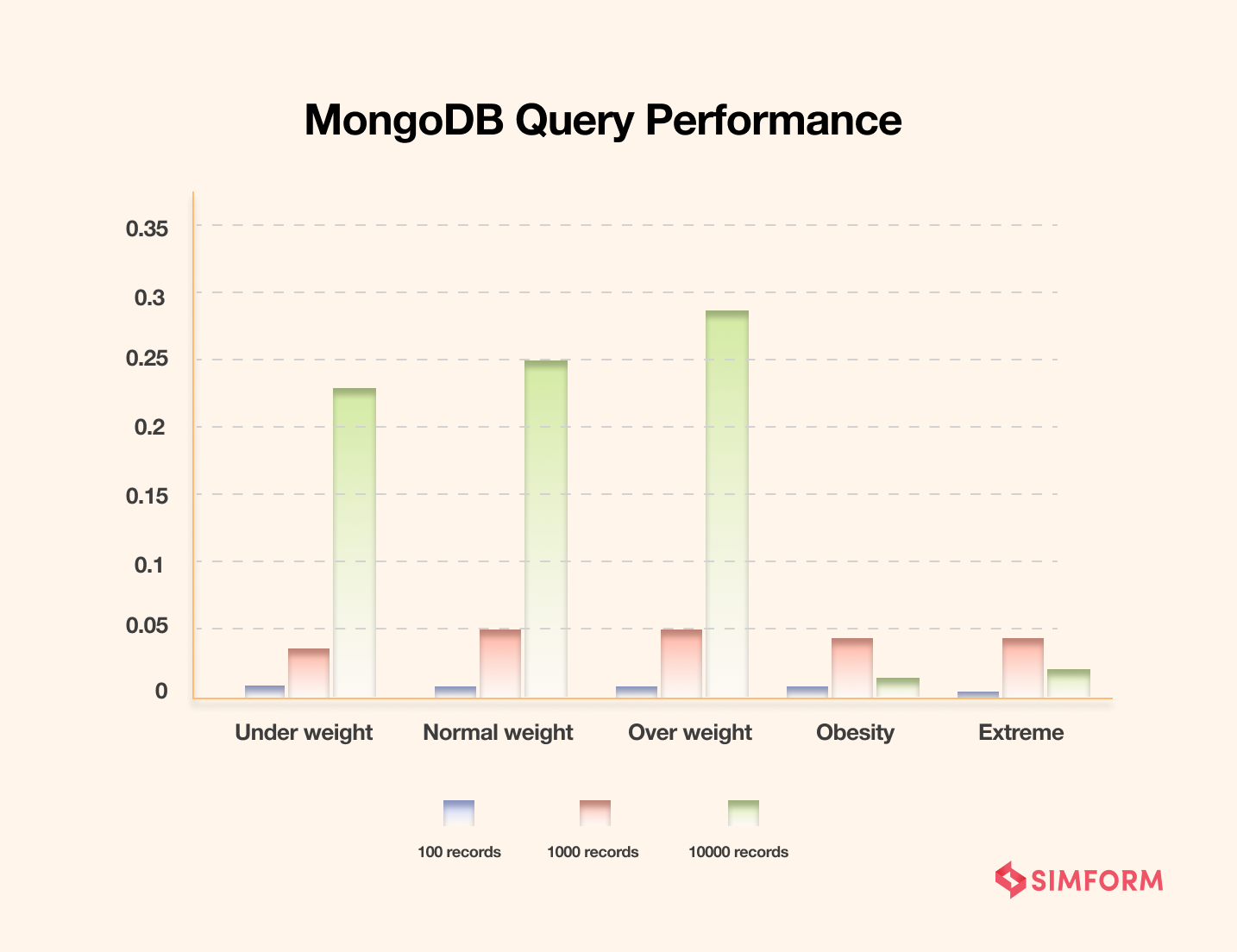
MongoDB Indexing MongoDB indexing impact on query performance

Index Tipleri

Sık kullandığınız query field’larına index ekleyerek performansı 10-100 kat artırabilirsiniz. Ancak her index write performansını düşürür, dengeli kullanın.

1
2
3
4
5
6
7
8
9
10
11
12
13
14
15
16
17
18
19
20
21
22
23
24
25
26
27
28
29
30
31
32
33
34
35
36
# Single field index
users_collection.create_index("username")
users_collection.create_index("email", unique=True)

# Compound index (çoklu alan)
users_collection.create_index([
    ("age", 1),  # Ascending
    ("created_at", -1)  # Descending
])

# Text index (full-text search için)
posts_collection.create_index([
    ("title", "text"),
    ("content", "text")
])

# Geospatial index
places_collection.create_index([("location", "2dsphere")])

# Hashed index (sharding için)
users_collection.create_index([("user_id", "hashed")])

# TTL index (expire documents)
sessions_collection.create_index(
    "created_at",
    expireAfterSeconds=3600  # 1 saat sonra sil
)

# Partial index (sadece belirli documentlar)
users_collection.create_index(
    "email",
    partialFilterExpression={"is_active": True}
)

# Sparse index
users_collection.create_index("phone", sparse=True)

Index Yönetimi

1
2
3
4
5
6
7
8
9
10
11
12
13
14
15
16
17
# Mevcut indexleri listeleme
indexes = users_collection.list_indexes()
for index in indexes:
    print(index)

# Index bilgilerini görme
index_info = users_collection.index_information()
print(index_info)

# Index silme
users_collection.drop_index("username_1")

# Tüm indexleri silme (varsayılan _id hariç)
users_collection.drop_indexes()

# Index adı belirtme
users_collection.create_index("email", name="unique_email_idx", unique=True)

Query Performance Analysis

Query performansını düzenli olarak analiz edin. explain() methodu ile hangi index’lerin kullanıldığını ve kaç document’in incelendiğini görebilirsiniz.

1
2
3
4
5
6
7
8
9
10
11
12
13
14
15
16
17
18
19
20
21
22
23
24
25
26
# Explain kullanımı
explain_result = users_collection.find({"age": {"$gte": 18}}).explain()
print(explain_result['executionStats'])

# Query planlama
def analyze_query_performance(collection, query):
    """Query performansını analiz et"""
    explain = collection.find(query).explain('executionStats')
    
    stats = explain['executionStats']
    print(f"Execution time: {stats['executionTimeMillis']}ms")
    print(f"Documents examined: {stats['totalDocsExamined']}")
    print(f"Documents returned: {stats['nReturned']}")
    print(f"Index used: {stats.get('indexName', 'No index')}")
    
    # Index kullanımı kontrolü
    if stats['totalDocsExamined'] > stats['nReturned'] * 10:
        print("Warning: Consider adding an index!")
    
    return stats

# Kullanım
analyze_query_performance(
    users_collection,
    {"age": {"$gte": 25}, "is_active": True}
)

Transactions

Transaction’lar MongoDB 4.0+ ve replica set kurulumu gerektirir. Single server’da çalışmaz. Production’da mutlaka replica set kullanın.

1
2
3
4
5
6
7
8
9
10
11
12
13
14
15
16
17
18
19
20
21
22
23
24
25
26
27
28
29
30
31
32
33
34
35
36
37
38
39
40
41
42
43
44
45
46
47
48
49
50
51
52
53
54
55
56
57
58
59
60
61
62
63
64
65
66
67
68
69
# Transaction kullanımı (MongoDB 4.0+)
def transfer_credits(from_user_id, to_user_id, amount):
    """İki kullanıcı arasında kredi transferi (transaction ile)"""
    
    with client.start_session() as session:
        with session.start_transaction():
            try:
                # From user'dan düş
                result1 = users_collection.update_one(
                    {
                        "_id": from_user_id,
                        "credits": {"$gte": amount}
                    },
                    {"$inc": {"credits": -amount}},
                    session=session
                )
                
                if result1.modified_count == 0:
                    raise Exception("Insufficient credits")
                
                # To user'a ekle
                result2 = users_collection.update_one(
                    {"_id": to_user_id},
                    {"$inc": {"credits": amount}},
                    session=session
                )
                
                # Transaction log
                transactions_collection.insert_one({
                    "from_user": from_user_id,
                    "to_user": to_user_id,
                    "amount": amount,
                    "timestamp": datetime.utcnow(),
                    "status": "completed"
                }, session=session)
                
                # Başarılıysa commit
                session.commit_transaction()
                return True
                
            except Exception as e:
                # Hata durumunda rollback
                session.abort_transaction()
                print(f"Transaction failed: {e}")
                return False

# Async transaction (Motor ile)
async def async_transfer_credits(from_user_id, to_user_id, amount):
    """Async transaction örneği"""
    async with await client.start_session() as session:
        async with session.start_transaction():
            try:
                await users_collection.update_one(
                    {"_id": from_user_id, "credits": {"$gte": amount}},
                    {"$inc": {"credits": -amount}},
                    session=session
                )
                
                await users_collection.update_one(
                    {"_id": to_user_id},
                    {"$inc": {"credits": amount}},
                    session=session
                )
                
                await session.commit_transaction()
                return True
            except Exception as e:
                await session.abort_transaction()
                return False

Schema Validation

1
2
3
4
5
6
7
8
9
10
11
12
13
14
15
16
17
18
19
20
21
22
23
24
25
26
27
28
29
30
31
32
33
34
35
36
37
38
39
40
41
42
43
44
45
46
47
48
49
50
51
52
53
54
55
56
# Collection oluşturma sırasında schema tanımlama
db.create_collection("users", validator={
    "$jsonSchema": {
        "bsonType": "object",
        "required": ["username", "email", "created_at"],
        "properties": {
            "username": {
                "bsonType": "string",
                "minLength": 3,
                "maxLength": 50,
                "description": "must be a string and is required"
            },
            "email": {
                "bsonType": "string",
                "pattern": "^[a-zA-Z0-9_.+-]+@[a-zA-Z0-9-]+\.[a-zA-Z0-9-.]+$",
                "description": "must be a valid email"
            },
            "age": {
                "bsonType": "int",
                "minimum": 0,
                "maximum": 150,
                "description": "must be an integer in range [0, 150]"
            },
            "tags": {
                "bsonType": "array",
                "items": {
                    "bsonType": "string"
                },
                "uniqueItems": True
            },
            "profile": {
                "bsonType": "object",
                "properties": {
                    "first_name": {"bsonType": "string"},
                    "last_name": {"bsonType": "string"}
                }
            },
            "created_at": {
                "bsonType": "date",
                "description": "must be a date"
            }
        }
    }
})

# Mevcut collection'a validation ekleme
db.command({
    "collMod": "users",
    "validator": {
        "$jsonSchema": {
            # Schema definition...
        }
    },
    "validationLevel": "strict",  # strict, moderate
    "validationAction": "error"   # error, warn
})

Change Streams (Real-time Updates)

1
2
3
4
5
6
7
8
9
10
11
12
13
14
15
16
17
18
19
20
21
22
23
24
25
26
27
28
29
30
31
32
33
34
35
# Change stream kullanımı
def watch_user_changes():
    """Kullanıcı değişikliklerini dinle"""
    with users_collection.watch() as stream:
        for change in stream:
            print(f"Change detected: {change}")
            operation = change['operationType']
            
            if operation == 'insert':
                print(f"New user: {change['fullDocument']['username']}")
            elif operation == 'update':
                print(f"User updated: {change['documentKey']['_id']}")
            elif operation == 'delete':
                print(f"User deleted: {change['documentKey']['_id']}")

# Filtered change stream
pipeline = [
    {"$match": {
        "operationType": {"$in": ["insert", "update"]},
        "fullDocument.is_active": True
    }}
]

with users_collection.watch(pipeline) as stream:
    for change in stream:
        # Process change
        pass

# Async change stream (Motor)
async def async_watch_changes():
    """Async change stream"""
    async with users_collection.watch() as stream:
        async for change in stream:
            print(change)
            # Process change asynchronously

Best Practices ve Güvenlik

Connection Pooling

1
2
3
4
5
6
7
8
9
10
11
12
13
# Production ayarları
client = MongoClient(
    MONGODB_URI,
    maxPoolSize=50,
    minPoolSize=10,
    maxIdleTimeMS=45000,
    socketTimeoutMS=20000,
    connectTimeoutMS=5000,
    serverSelectionTimeoutMS=5000,
    retryWrites=True,
    w='majority',  # Write concern
    journal=True
)

Error Handling

MongoDB işlemlerinde her zaman error handling kullanın. DuplicateKeyError, ConnectionFailure gibi yaygın hataları yakalayarak uygulamanızın stabil kalmasını sağlayın.

1
2
3
4
5
6
7
8
9
10
11
12
13
14
15
16
17
18
19
20
21
22
23
24
from pymongo.errors import (
    ConnectionFailure,
    OperationFailure,
    DuplicateKeyError,
    WriteError
)

def safe_insert_user(user_data: dict):
    """Güvenli kullanıcı ekleme"""
    try:
        result = users_collection.insert_one(user_data)
        return result.inserted_id
    except DuplicateKeyError:
        print("User already exists")
        return None
    except WriteError as e:
        print(f"Write error: {e}")
        return None
    except ConnectionFailure:
        print("MongoDB connection failed")
        return None
    except OperationFailure as e:
        print(f"Operation failed: {e}")
        return None

Security Best Practices

MongoDB connection string’lerini ve credential’ları asla kodunuza hard-code etmeyin. Environment variables kullanın ve .gitignore’a ekleyin.

1
2
3
4
5
6
7
8
9
10
11
12
13
14
15
16
17
18
19
20
21
22
23
24
25
26
27
28
29
30
31
32
33
# 1. Environment variables kullan
import os
from dotenv import load_dotenv

load_dotenv()
MONGODB_URI = os.getenv('MONGODB_URI')

# 2. User input sanitization
def sanitize_input(user_input):
    """NoSQL injection saldırılarını önle"""
    # NoSQL injection önleme
    if isinstance(user_input, dict):
        # Dict içinde operatör varsa reddet
        for key in user_input.keys():
            if key.startswith('$'):
                raise ValueError("Invalid input")
    return user_input

# 3. Read preference ayarları
from pymongo import ReadPreference

# Secondary'den okuma (read replicas)
users_collection_read = db.get_collection(
    'users',
    read_preference=ReadPreference.SECONDARY_PREFERRED
)

# 4. Write concern
users_collection.insert_one(
    user_data,
    w='majority',  # Çoğunluğa yazıldığında confirm et
    j=True  # Journal'a yazıldığında confirm et
)

Sonuç

MongoDB ve Python kombinasyonu, modern uygulamalarda güçlü ve esnek bir NoSQL çözümü sunar. Bu yazıda öğrendiklerimiz:

  • Temel İşlemler: PyMongo ile CRUD operations
  • Async Operations: Motor ile async/await pattern
  • Aggregation: Güçlü veri analizi ve transformasyon
  • Indexing: Performans optimizasyonu
  • Transactions: ACID garantileriyle veri tutarlılığı
  • Best Practices: Güvenlik, performance ve error handling

Önemli Noktalar

  1. Index‘leri doğru kullanarak query performansını optimize edin
  2. Aggregation framework ile karmaşık verianalizi yapın
  3. Connection pooling ayarlarını production’a göre optimize edin
  4. Schema validation ile veri tutarlılığını sağlayın
  5. Change streams ile real-time updates yakalayın

Kaynaklar

Bir sonraki yazımızda Systemd ile Python Servis Yönetimi konusunu işleyeceğiz!

Bu gönderi CC BY 4.0 lisansı altındadır.