Gönderi

Modern Web Arayüzü Geliştirme: CSS Grid, Flexbox ve Vanilla JavaScript

CSS Grid ve Flexbox ile modern responsive layout'lar oluşturun. Vanilla JavaScript ile DOM manipülasyonu, event handling ve component geliştirme teknikleri. CSS Variables ve performans optimizasyonu.

Modern Web Arayüzü Geliştirme: CSS Grid, Flexbox ve Vanilla JavaScript

Modern web geliştirmede kullanıcı arayüzü tasarımı, hem görsel çekicilik hem de işlevsellik açısından kritik öneme sahiptir. Bu yazıda, CSS Grid, Flexbox ve vanilla JavaScript kullanarak modern, responsive ve performanslı web arayüzleri oluşturmayı ele alacağız.

CSS Grid ve Flexbox: Modern Layout Sistemleri

CSS Grid: İki Boyutlu Layout

CSS Grid, satır ve sütunlarla çalışan iki boyutlu bir layout sistemidir. Karmaşık sayfa düzenlerini kolayca oluşturmanıza olanak tanır.

Temel Grid Yapısı:

1
2
3
4
5
6
7
8
9
10
11
12
13
14
15
16
17
18
19
20
21
22
/* Grid Container */
.container {
    display: grid;
    grid-template-columns: repeat(3, 1fr);
    grid-template-rows: auto;
    gap: 20px;
    padding: 20px;
}

/* Grid Items */
.item {
    background: #f0f0f0;
    padding: 20px;
    border-radius: 8px;
}

/* Responsive Grid */
@media (max-width: 768px) {
    .container {
        grid-template-columns: 1fr;
    }
}

Grid Template Areas ile Layout:

1
2
3
4
5
6
7
8
9
10
11
12
13
14
15
16
17
18
19
20
21
22
23
24
25
26
27
28
29
30
31
32
33
34
35
36
37
38
39
40
41
42
43
44
45
46
.page-layout {
    display: grid;
    grid-template-areas:
        "header header header"
        "sidebar main main"
        "footer footer footer";
    grid-template-columns: 250px 1fr 1fr;
    grid-template-rows: 80px 1fr 60px;
    min-height: 100vh;
    gap: 10px;
}

.header {
    grid-area: header;
    background: #333;
    color: white;
}

.sidebar {
    grid-area: sidebar;
    background: #f5f5f5;
}

.main {
    grid-area: main;
    background: white;
}

.footer {
    grid-area: footer;
    background: #333;
    color: white;
}

/* Responsive düzenleme */
@media (max-width: 1024px) {
    .page-layout {
        grid-template-areas:
            "header"
            "main"
            "sidebar"
            "footer";
        grid-template-columns: 1fr;
        grid-template-rows: auto;
    }
}

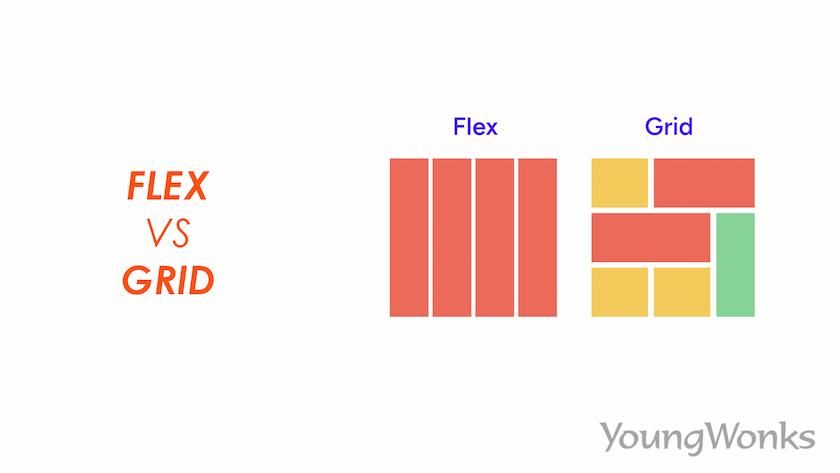
CSS Flexbox ve Grid Karşılaştırması CSS Grid ve Flexbox karşılaştırması - layout sistemleri

CSS Grid iki boyutlu (satır ve sütun) layout için idealdir. Karmaşık sayfa düzenlerinde Grid, basit tek yönlü hizalamalarda Flexbox tercih edilmelidir.

CSS Flexbox: Tek Boyutlu Layout

Flexbox, öğeleri tek bir yönde (satır veya sütun) hizalamak için idealdir. Navbar, card layouts ve component hizalamaları için mükemmeldir.

Temel Flexbox Kullanımı:

1
2
3
4
5
6
7
8
9
10
11
12
13
14
15
16
17
18
19
20
21
22
23
24
25
26
27
28
29
30
31
32
33
/* Flex Container */
.flex-container {
    display: flex;
    justify-content: space-between;
    align-items: center;
    gap: 15px;
}

/* Navbar örneği */
.navbar {
    display: flex;
    justify-content: space-between;
    align-items: center;
    padding: 1rem 2rem;
    background: #2c3e50;
    color: white;
}

.nav-links {
    display: flex;
    gap: 2rem;
    list-style: none;
}

.nav-links a {
    color: white;
    text-decoration: none;
    transition: color 0.3s;
}

.nav-links a:hover {
    color: #3498db;
}

Card Layout ile Flexbox:

1
2
3
4
5
6
7
8
9
10
11
12
13
14
15
16
17
18
19
20
21
22
23
24
25
26
27
28
29
30
31
32
33
34
35
36
37
38
39
40
.card-container {
    display: flex;
    flex-wrap: wrap;
    gap: 20px;
    padding: 20px;
}

.card {
    flex: 1 1 300px; /* grow shrink basis */
    min-width: 280px;
    max-width: 400px;
    background: white;
    border-radius: 12px;
    box-shadow: 0 4px 6px rgba(0,0,0,0.1);
    overflow: hidden;
    transition: transform 0.3s, box-shadow 0.3s;
}

.card:hover {
    transform: translateY(-5px);
    box-shadow: 0 8px 12px rgba(0,0,0,0.15);
}

.card-header {
    padding: 1.5rem;
    background: linear-gradient(135deg, #667eea 0%, #764ba2 100%);
    color: white;
}

.card-body {
    padding: 1.5rem;
}

.card-footer {
    padding: 1rem 1.5rem;
    background: #f8f9fa;
    display: flex;
    justify-content: space-between;
    align-items: center;
}

CSS Variables (Custom Properties)

CSS değişkenleri, tema yönetimi ve dinamik stillendirme için güçlü bir araçtır.

1
2
3
4
5
6
7
8
9
10
11
12
13
14
15
16
17
18
19
20
21
22
23
24
25
26
27
28
29
30
31
32
33
34
35
36
37
38
39
40
41
42
43
44
45
46
47
48
:root {
    /* Renkler */
    --primary-color: #3498db;
    --secondary-color: #2ecc71;
    --danger-color: #e74c3c;
    --text-color: #333;
    --bg-color: #ffffff;
    
    /* Spacing */
    --spacing-xs: 0.25rem;
    --spacing-sm: 0.5rem;
    --spacing-md: 1rem;
    --spacing-lg: 2rem;
    --spacing-xl: 4rem;
    
    /* Typography */
    --font-size-sm: 0.875rem;
    --font-size-base: 1rem;
    --font-size-lg: 1.25rem;
    --font-size-xl: 1.5rem;
    
    /* Border radius */
    --border-radius-sm: 4px;
    --border-radius-md: 8px;
    --border-radius-lg: 12px;
    
    /* Shadows */
    --shadow-sm: 0 2px 4px rgba(0,0,0,0.1);
    --shadow-md: 0 4px 6px rgba(0,0,0,0.1);
    --shadow-lg: 0 8px 12px rgba(0,0,0,0.15);
}

/* Dark mode tema */
[data-theme="dark"] {
    --primary-color: #5dade2;
    --text-color: #ecf0f1;
    --bg-color: #2c3e50;
}

/* Değişkenleri kullanma */
.button {
    background: var(--primary-color);
    color: white;
    padding: var(--spacing-sm) var(--spacing-md);
    border-radius: var(--border-radius-md);
    box-shadow: var(--shadow-md);
    font-size: var(--font-size-base);
}

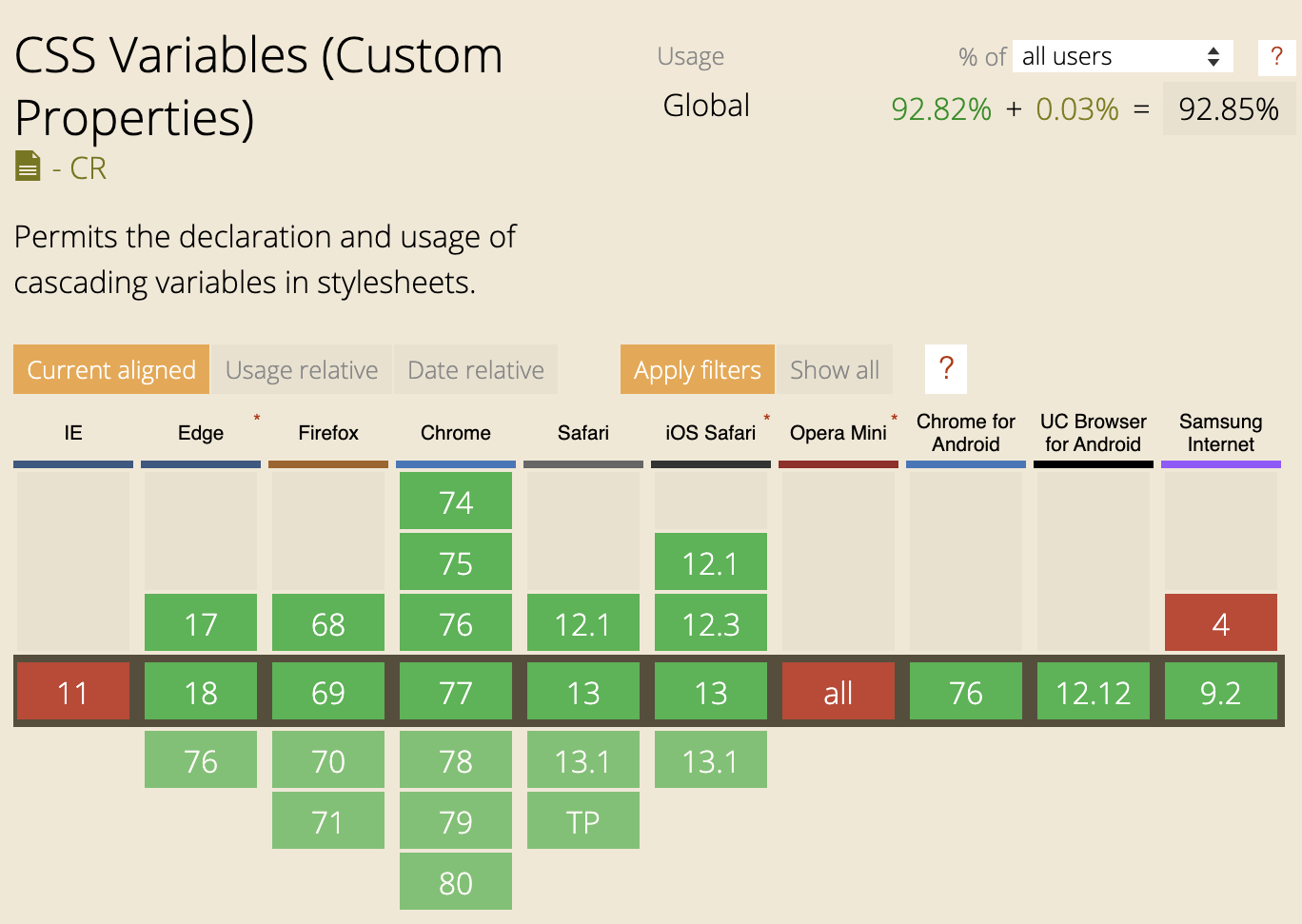
CSS Variables Theming CSS Variables ile dinamik tema yönetimi

JavaScript ile Tema Değiştirme:

1
2
3
4
5
6
7
8
9
10
11
12
13
14
15
16
17
18
19
20
21
22
// Tema toggle fonksiyonu
function toggleTheme() {
    const currentTheme = document.documentElement.getAttribute('data-theme');
    const newTheme = currentTheme === 'dark' ? 'light' : 'dark';
    
    document.documentElement.setAttribute('data-theme', newTheme);
    localStorage.setItem('theme', newTheme);
}

// Sayfa yüklendiğinde kaydedilen temayı uygula
document.addEventListener('DOMContentLoaded', () => {
    const savedTheme = localStorage.getItem('theme') || 'light';
    document.documentElement.setAttribute('data-theme', savedTheme);
});

// CSS değişkenini JavaScript'ten değiştirme
document.documentElement.style.setProperty('--primary-color', '#e74c3c');

// CSS değişkenini okuma
const primaryColor = getComputedStyle(document.documentElement)
    .getPropertyValue('--primary-color');
console.log(primaryColor); // #3498db

CSS Variables (Custom Properties) ile tema yönetimi, runtime’da JavaScript ile kolayca değiştirilebilir. Dark mode/light mode toggle için ideal bir yöntemdir.

Vanilla JavaScript ile DOM Manipulation

Modern web uygulamalarında, framework kullanmadan vanilla JavaScript ile DOM manipülasyonu yapmak performans ve kontrol açısından avantajlar sağlar.

Vanilla JavaScript DOM Manipulation Vanilla JavaScript ile DOM manipülasyon teknikleri

Element Seçme ve Oluşturma

1
2
3
4
5
6
7
8
9
10
11
12
13
14
15
16
17
18
19
20
21
22
23
24
25
26
27
28
29
30
// Modern element seçme metodları
const element = document.querySelector('.my-class');
const elements = document.querySelectorAll('.my-class');
const elementById = document.getElementById('myId');

// Element oluşturma
const div = document.createElement('div');
div.className = 'card';
div.id = 'myCard';
div.innerHTML = '<h2>Başlık</h2><p>İçerik</p>';

// Attribute yönetimi
div.setAttribute('data-id', '123');
div.getAttribute('data-id'); // "123"
div.removeAttribute('data-id');

// Modern özellikler
div.dataset.userId = '456'; // data-user-id="456"
console.log(div.dataset.userId); // "456"

// Class yönetimi
div.classList.add('active', 'visible');
div.classList.remove('hidden');
div.classList.toggle('expanded');
div.classList.contains('active'); // true

// Element ekleme
document.body.appendChild(div);
document.querySelector('.container').prepend(div);
element.insertAdjacentElement('beforebegin', div);

Event Handling

1
2
3
4
5
6
7
8
9
10
11
12
13
14
15
16
17
18
19
20
21
22
23
24
25
26
27
28
29
30
31
32
// Event listener ekleme
const button = document.querySelector('.btn');

button.addEventListener('click', (e) => {
    e.preventDefault();
    console.log('Button clicked!');
});

// Event delegation (dinamik elementler için)
document.querySelector('.list').addEventListener('click', (e) => {
    if (e.target.matches('.list-item')) {
        console.log('List item clicked:', e.target.textContent);
    }
});

// Multiple events
['click', 'touchstart'].forEach(event => {
    button.addEventListener(event, handleInteraction);
});

// Event listener kaldırma
button.removeEventListener('click', handleClick);

// Custom events
const customEvent = new CustomEvent('userLoggedIn', {
    detail: { userId: 123, username: 'john' }
});
document.dispatchEvent(customEvent);

document.addEventListener('userLoggedIn', (e) => {
    console.log('User logged in:', e.detail);
});

Dinamik Liste Oluşturma

1
2
3
4
5
6
7
8
9
10
11
12
13
14
15
16
17
18
19
20
21
22
23
24
25
26
27
28
29
30
31
32
33
34
35
36
37
38
39
40
41
42
43
44
45
46
47
48
49
50
51
52
53
54
55
56
57
58
59
60
61
62
63
64
65
66
67
68
69
70
71
72
73
74
75
76
77
78
79
80
81
82
83
84
85
86
87
88
89
90
class TodoList {
    constructor(containerSelector) {
        this.container = document.querySelector(containerSelector);
        this.todos = [];
        this.render();
        this.attachEventListeners();
    }
    
    addTodo(text) {
        const todo = {
            id: Date.now(),
            text: text,
            completed: false
        };
        this.todos.push(todo);
        this.render();
    }
    
    removeTodo(id) {
        this.todos = this.todos.filter(todo => todo.id !== id);
        this.render();
    }
    
    toggleTodo(id) {
        const todo = this.todos.find(t => t.id === id);
        if (todo) {
            todo.completed = !todo.completed;
            this.render();
        }
    }
    
    render() {
        this.container.innerHTML = `
            <div class="todo-list">
                <div class="todo-header">
                    <h2>Todo List</h2>
                    <input type="text" id="todoInput" placeholder="Yeni görev ekle">
                    <button id="addBtn">Ekle</button>
                </div>
                <ul class="todo-items">
                    ${this.todos.map(todo => `
                        <li class="todo-item ${todo.completed ? 'completed' : ''}" 
                            data-id="${todo.id}">
                            <input type="checkbox" 
                                   ${todo.completed ? 'checked' : ''}
                                   class="todo-checkbox">
                            <span class="todo-text">${todo.text}</span>
                            <button class="delete-btn">Sil</button>
                        </li>
                    `).join('')}
                </ul>
            </div>
        `;
    }
    
    attachEventListeners() {
        // Event delegation kullanımı
        this.container.addEventListener('click', (e) => {
            const todoItem = e.target.closest('.todo-item');
            if (!todoItem) return;
            
            const id = parseInt(todoItem.dataset.id);
            
            if (e.target.classList.contains('delete-btn')) {
                this.removeTodo(id);
            } else if (e.target.classList.contains('todo-checkbox')) {
                this.toggleTodo(id);
            }
        });
        
        this.container.addEventListener('click', (e) => {
            if (e.target.id === 'addBtn') {
                const input = document.getElementById('todoInput');
                if (input.value.trim()) {
                    this.addTodo(input.value.trim());
                    input.value = '';
                }
            }
        });
        
        this.container.addEventListener('keypress', (e) => {
            if (e.target.id === 'todoInput' && e.key === 'Enter') {
                document.getElementById('addBtn').click();
            }
        });
    }
}

// Kullanım
const todoList = new TodoList('#app');

Vanilla JavaScript ile class-based component yazımı, React benzeri yapılar oluşturmanıza olanak tanır. State yönetimi ve re-rendering için render() metodunu kullanın.

Fetch API ile Veri Yükleme

1
2
3
4
5
6
7
8
9
10
11
12
13
14
15
16
17
18
19
20
21
22
23
24
25
26
27
28
29
30
31
32
33
34
35
36
37
38
39
40
41
42
43
44
45
46
47
48
49
50
51
52
53
54
55
56
57
58
59
60
61
62
63
64
65
66
67
68
69
70
71
72
class DataTable {
    constructor(containerSelector) {
        this.container = document.querySelector(containerSelector);
        this.data = [];
        this.loading = false;
    }
    
    async fetchData(url) {
        this.loading = true;
        this.render();
        
        try {
            const response = await fetch(url);
            if (!response.ok) {
                throw new Error(`HTTP error! status: ${response.status}`);
            }
            this.data = await response.json();
        } catch (error) {
            console.error('Veri yükleme hatası:', error);
            this.showError(error.message);
        } finally {
            this.loading = false;
            this.render();
        }
    }
    
    render() {
        if (this.loading) {
            this.container.innerHTML = '<div class="loading">Yükleniyor...</div>';
            return;
        }
        
        this.container.innerHTML = `
            <table class="data-table">
                <thead>
                    <tr>
                        <th>ID</th>
                        <th>İsim</th>
                        <th>Email</th>
                        <th>İşlemler</th>
                    </tr>
                </thead>
                <tbody>
                    ${this.data.map(item => `
                        <tr data-id="${item.id}">
                            <td>${item.id}</td>
                            <td>${item.name}</td>
                            <td>${item.email}</td>
                            <td>
                                <button class="btn-edit">Düzenle</button>
                                <button class="btn-delete">Sil</button>
                            </td>
                        </tr>
                    `).join('')}
                </tbody>
            </table>
        `;
    }
    
    showError(message) {
        this.container.innerHTML = `
            <div class="error">
                <p>Hata: ${message}</p>
                <button onclick="location.reload()">Yeniden Dene</button>
            </div>
        `;
    }
}

// Kullanım
const dataTable = new DataTable('#data-container');
dataTable.fetchData('https://jsonplaceholder.typicode.com/users');

Form Validasyonu

1
2
3
4
5
6
7
8
9
10
11
12
13
14
15
16
17
18
19
20
21
22
23
24
25
26
27
28
29
30
31
32
33
34
35
36
37
38
39
40
41
42
43
44
45
46
47
48
49
50
51
52
53
54
55
56
57
58
59
60
61
62
63
64
65
66
67
68
69
70
71
72
73
74
75
76
77
78
79
80
81
82
83
84
85
86
87
88
89
90
91
92
93
94
95
96
97
98
99
100
101
102
103
104
105
106
107
108
109
110
111
112
113
114
115
116
117
118
119
120
121
122
123
124
125
126
127
128
129
130
131
class FormValidator {
    constructor(formSelector) {
        this.form = document.querySelector(formSelector);
        this.rules = {};
        this.errors = {};
        this.attachEventListeners();
    }
    
    addRule(fieldName, validators) {
        this.rules[fieldName] = validators;
    }
    
    validate() {
        this.errors = {};
        
        for (const [fieldName, validators] of Object.entries(this.rules)) {
            const field = this.form.querySelector(`[name="${fieldName}"]`);
            const value = field.value.trim();
            
            for (const validator of validators) {
                const error = validator(value, field);
                if (error) {
                    this.errors[fieldName] = error;
                    break;
                }
            }
        }
        
        this.displayErrors();
        return Object.keys(this.errors).length === 0;
    }
    
    displayErrors() {
        // Önce tüm hataları temizle
        this.form.querySelectorAll('.error-message').forEach(el => el.remove());
        this.form.querySelectorAll('.invalid').forEach(el => {
            el.classList.remove('invalid');
        });
        
        // Yeni hataları göster
        for (const [fieldName, error] of Object.entries(this.errors)) {
            const field = this.form.querySelector(`[name="${fieldName}"]`);
            field.classList.add('invalid');
            
            const errorDiv = document.createElement('div');
            errorDiv.className = 'error-message';
            errorDiv.textContent = error;
            field.parentNode.appendChild(errorDiv);
        }
    }
    
    attachEventListeners() {
        this.form.addEventListener('submit', (e) => {
            e.preventDefault();
            if (this.validate()) {
                this.handleSubmit();
            }
        });
        
        // Real-time validation
        this.form.addEventListener('blur', (e) => {
            if (e.target.matches('input, textarea, select')) {
                this.validate();
            }
        }, true);
    }
    
    handleSubmit() {
        const formData = new FormData(this.form);
        const data = Object.fromEntries(formData.entries());
        console.log('Form submitted:', data);
        
        // API'ye gönderme
        fetch('/api/submit', {
            method: 'POST',
            headers: { 'Content-Type': 'application/json' },
            body: JSON.stringify(data)
        })
        .then(response => response.json())
        .then(result => {
            console.log('Success:', result);
            this.form.reset();
        })
        .catch(error => console.error('Error:', error));
    }
}

// Validator fonksiyonları
const validators = {
    required: (value) => {
        return value ? null : 'Bu alan zorunludur';
    },
    
    email: (value) => {
        const emailRegex = /^[^\s@]+@[^\s@]+\.[^\s@]+$/;
        return emailRegex.test(value) ? null : 'Geçerli bir email adresi girin';
    },
    
    minLength: (min) => (value) => {
        return value.length >= min ? null : `En az ${min} karakter olmalıdır`;
    },
    
    maxLength: (max) => (value) => {
        return value.length <= max ? null : `En fazla ${max} karakter olabilir`;
    },
    
    pattern: (regex, message) => (value) => {
        return regex.test(value) ? null : message;
    }
};

// Kullanım
const formValidator = new FormValidator('#myForm');

formValidator.addRule('username', [
    validators.required,
    validators.minLength(3),
    validators.maxLength(20)
]);

formValidator.addRule('email', [
    validators.required,
    validators.email
]);

formValidator.addRule('password', [
    validators.required,
    validators.minLength(8),
    validators.pattern(/[A-Z]/, 'En az bir büyük harf içermelidir'),
    validators.pattern(/[0-9]/, 'En az bir rakam içermelidir')
]);

Modal/Dialog Component

1
2
3
4
5
6
7
8
9
10
11
12
13
14
15
16
17
18
19
20
21
22
23
24
25
26
27
28
29
30
31
32
33
34
35
36
37
38
39
40
41
42
43
44
45
46
47
48
49
50
51
52
53
54
55
56
57
58
59
60
61
62
63
64
65
66
67
68
69
70
71
72
73
74
75
76
77
78
79
80
81
82
83
84
85
86
87
88
89
90
91
92
93
94
95
96
97
98
99
100
101
102
103
104
105
106
107
108
109
110
111
112
113
114
115
116
117
118
119
120
121
122
123
124
125
126
127
128
129
130
131
132
133
134
135
136
137
138
139
140
141
142
143
144
145
146
147
148
149
150
151
152
153
154
155
156
157
158
159
160
161
162
163
164
165
166
167
168
169
170
171
172
173
174
175
176
177
178
179
180
181
182
class Modal {
    constructor() {
        this.modal = null;
        this.closeCallback = null;
    }
    
    open(options = {}) {
        const {
            title = 'Modal',
            content = '',
            buttons = [{ text: 'Kapat', onClick: () => this.close() }],
            closeOnOverlay = true
        } = options;
        
        // Modal HTML oluştur
        this.modal = document.createElement('div');
        this.modal.className = 'modal-overlay';
        this.modal.innerHTML = `
            <div class="modal-content">
                <div class="modal-header">
                    <h3>${title}</h3>
                    <button class="modal-close">&times;</button>
                </div>
                <div class="modal-body">
                    ${content}
                </div>
                <div class="modal-footer">
                    ${buttons.map((btn, index) => `
                        <button class="btn btn-${btn.type || 'default'}" 
                                data-btn-index="${index}">
                            ${btn.text}
                        </button>
                    `).join('')}
                </div>
            </div>
        `;
        
        document.body.appendChild(this.modal);
        
        // Animasyon için timeout
        setTimeout(() => this.modal.classList.add('active'), 10);
        
        // Event listeners
        this.modal.querySelector('.modal-close').addEventListener('click', () => {
            this.close();
        });
        
        if (closeOnOverlay) {
            this.modal.addEventListener('click', (e) => {
                if (e.target === this.modal) {
                    this.close();
                }
            });
        }
        
        // Button click handlers
        this.modal.querySelectorAll('[data-btn-index]').forEach(btn => {
            btn.addEventListener('click', () => {
                const index = parseInt(btn.dataset.btnIndex);
                if (buttons[index].onClick) {
                    buttons[index].onClick();
                }
            });
        });
        
        // ESC tuşu ile kapatma
        this.keyHandler = (e) => {
            if (e.key === 'Escape') {
                this.close();
            }
        };
        document.addEventListener('keydown', this.keyHandler);
    }
    
    close() {
        if (!this.modal) return;
        
        this.modal.classList.remove('active');
        
        setTimeout(() => {
            this.modal.remove();
            this.modal = null;
            document.removeEventListener('keydown', this.keyHandler);
            
            if (this.closeCallback) {
                this.closeCallback();
            }
        }, 300); // Animation duration
    }
    
    onClose(callback) {
        this.closeCallback = callback;
    }
}

// CSS (örnek)
const modalStyles = `
.modal-overlay {
    position: fixed;
    top: 0;
    left: 0;
    width: 100%;
    height: 100%;
    background: rgba(0, 0, 0, 0);
    display: flex;
    align-items: center;
    justify-content: center;
    z-index: 1000;
    transition: background 0.3s;
}

.modal-overlay.active {
    background: rgba(0, 0, 0, 0.5);
}

.modal-content {
    background: white;
    border-radius: 12px;
    max-width: 500px;
    width: 90%;
    transform: scale(0.9);
    opacity: 0;
    transition: transform 0.3s, opacity 0.3s;
}

.modal-overlay.active .modal-content {
    transform: scale(1);
    opacity: 1;
}

.modal-header {
    display: flex;
    justify-content: space-between;
    align-items: center;
    padding: 1.5rem;
    border-bottom: 1px solid #e0e0e0;
}

.modal-close {
    background: none;
    border: none;
    font-size: 1.5rem;
    cursor: pointer;
}

.modal-body {
    padding: 1.5rem;
}

.modal-footer {
    display: flex;
    justify-content: flex-end;
    gap: 1rem;
    padding: 1.5rem;
    border-top: 1px solid #e0e0e0;
}
`;

// Kullanım
const modal = new Modal();

document.querySelector('#openModalBtn').addEventListener('click', () => {
    modal.open({
        title: 'Onay Gerekli',
        content: '<p>Bu işlemi gerçekleştirmek istediğinizden emin misiniz?</p>',
        buttons: [
            {
                text: 'İptal',
                type: 'secondary',
                onClick: () => modal.close()
            },
            {
                text: 'Onayla',
                type: 'primary',
                onClick: () => {
                    console.log('Onaylandı!');
                    modal.close();
                }
            }
        ]
    });
});

Intersection Observer ile Lazy Loading

1
2
3
4
5
6
7
8
9
10
11
12
13
14
15
16
17
18
19
20
21
22
23
24
25
26
27
28
29
30
31
32
33
34
35
36
37
38
39
40
41
42
43
44
45
46
47
48
49
50
51
52
53
54
55
56
57
58
59
60
61
62
63
64
65
66
67
68
69
70
71
72
73
74
75
76
77
78
79
80
81
class LazyLoader {
    constructor(options = {}) {
        this.options = {
            root: null,
            rootMargin: '50px',
            threshold: 0.1,
            ...options
        };
        
        this.observer = new IntersectionObserver(
            this.handleIntersection.bind(this),
            this.options
        );
        
        this.observe();
    }
    
    observe() {
        // Lazy load images
        document.querySelectorAll('img[data-src]').forEach(img => {
            this.observer.observe(img);
        });
        
        // Lazy load sections
        document.querySelectorAll('[data-lazy]').forEach(section => {
            this.observer.observe(section);
        });
    }
    
    handleIntersection(entries) {
        entries.forEach(entry => {
            if (entry.isIntersecting) {
                const element = entry.target;
                
                if (element.tagName === 'IMG' && element.dataset.src) {
                    this.loadImage(element);
                } else if (element.dataset.lazy) {
                    this.loadSection(element);
                }
                
                this.observer.unobserve(element);
            }
        });
    }
    
    loadImage(img) {
        const src = img.dataset.src;
        const srcset = img.dataset.srcset;
        
        // Placeholder'dan gerçek görsele geçiş
        const tempImg = new Image();
        tempImg.onload = () => {
            img.src = src;
            if (srcset) img.srcset = srcset;
            img.classList.add('loaded');
        };
        tempImg.src = src;
    }
    
    loadSection(section) {
        // Section içeriğini lazy load et
        const content = section.dataset.lazy;
        
        fetch(content)
            .then(response => response.text())
            .then(html => {
                section.innerHTML = html;
                section.classList.add('loaded');
            })
            .catch(error => {
                console.error('Section loading error:', error);
            });
    }
}

// Kullanım
const lazyLoader = new LazyLoader();

// HTML örneği:
// <img data-src="image.jpg" data-srcset="image-2x.jpg 2x" alt="Lazy loaded">
// <section data-lazy="/api/content/section1"></section>

Performans İpuçları

Debounce ve Throttle

1
2
3
4
5
6
7
8
9
10
11
12
13
14
15
16
17
18
19
20
21
22
23
24
25
26
27
28
29
30
31
32
33
34
35
// Debounce: Son çağrıdan sonra belirli süre bekler
function debounce(func, delay) {
    let timeoutId;
    return function(...args) {
        clearTimeout(timeoutId);
        timeoutId = setTimeout(() => func.apply(this, args), delay);
    };
}

// Throttle: Belirli aralıklarla çalışır
function throttle(func, limit) {
    let inThrottle;
    return function(...args) {
        if (!inThrottle) {
            func.apply(this, args);
            inThrottle = true;
            setTimeout(() => inThrottle = false, limit);
        }
    };
}

// Kullanım örnekleri
const searchInput = document.querySelector('#search');

// Debounce - arama için ideal
searchInput.addEventListener('input', debounce((e) => {
    console.log('Searching for:', e.target.value);
    // API çağrısı yap
}, 300));

// Throttle - scroll için ideal
window.addEventListener('scroll', throttle(() => {
    console.log('Scroll position:', window.scrollY);
    // Scroll animasyonları
}, 100));

DOM Manipulation Optimizasyonu

1
2
3
4
5
6
7
8
9
10
11
12
13
14
15
16
17
18
19
20
21
// ❌ Yavaş: Her iterasyonda DOM'a erişim
for (let i = 0; i < 1000; i++) {
    const li = document.createElement('li');
    li.textContent = `Item ${i}`;
    document.querySelector('ul').appendChild(li);
}

// ✅ Hızlı: DocumentFragment kullanımı
const fragment = document.createDocumentFragment();
for (let i = 0; i < 1000; i++) {
    const li = document.createElement('li');
    li.textContent = `Item ${i}`;
    fragment.appendChild(li);
}
document.querySelector('ul').appendChild(fragment);

// ✅ En hızlı: innerHTML ile toplu ekleme
const items = Array.from({ length: 1000 }, (_, i) => 
    `<li>Item ${i}</li>`
).join('');
document.querySelector('ul').innerHTML = items;

Büyük listeler için DocumentFragment veya innerHTML kullanımı, tek tek appendChild() çağrılarından çok daha hızlıdır. Reflow/repaint sayısını minimize edin.

Sonuç

Modern web arayüzü geliştirme, CSS Grid ve Flexbox ile güçlü layout sistemleri, CSS değişkenleri ile kolay tema yönetimi ve vanilla JavaScript ile performanslı DOM manipülasyonu gerektirir. Bu yazıda ele aldığımız teknikler, framework kullanmadan da modern, responsive ve kullanıcı dostu web uygulamaları geliştirmenize olanak tanır.

Önemli Noktalar:

  • CSS Grid iki boyutlu, Flexbox tek boyutlu layoutlar için idealdir
  • CSS değişkenleri tema yönetimini kolaylaştırır
  • Vanilla JavaScript ile framework bağımlılığı olmadan güçlü uygulamalar yazılabilir
  • Event delegation performans için önemlidir
  • Debounce ve throttle fonksiyonları performans optimizasyonunda kritiktir
  • Intersection Observer lazy loading için modern çözümdür

Bu teknikleri projelerinizde uygulayarak, daha hızlı, daha erişilebilir ve daha bakımı kolay web uygulamaları geliştirebilirsiniz.

Bu gönderi CC BY 4.0 lisansı altındadır.