Kubernetes ile Container Orkestrasyon: Pod, Service ve Deployment Yönetimi
Kubernetes ile production-grade container orkestrasyon. Pod, Service, Deployment, ConfigMap, Secret yönetimi, HPA autoscaling, monitoring ve debugging best practices.
Modern yazılım geliştirmede containerization, uygulamaların taşınabilirliğini ve ölçeklenebilirliğini sağlayan temel bir teknoloji haline gelmiştir. Ancak production ortamında yüzlerce veya binlerce container’ı yönetmek, manuel olarak neredeyse imkansızdır. İşte tam bu noktada Kubernetes devreye girer ve container orkestrasyon sürecini otomatikleştirir.
Kubernetes Nedir?
Kubernetes (K8s olarak da bilinir), Google tarafından geliştirilen ve 2014 yılında açık kaynak yapılan bir container orkestrasyon platformudur. Container’ların deployment, scaling ve yönetimini otomatikleştiren güçlü bir sistemdir.
Kubernetes’in Temel Özellikleri
- Otomatik Deployment ve Rollback: Yeni versiyonları sorunsuz şekilde devreye alma
- Self-healing: Başarısız container’ları otomatik yeniden başlatma
- Horizontal Scaling: Yük bazlı otomatik ölçeklendirme
- Service Discovery ve Load Balancing: Otomatik servis keşfi
- Storage Orchestration: Otomatik storage mount işlemleri
- Secret ve Configuration Management: Güvenli yapılandırma yönetimi
Neden Kubernetes?
1
2
3
4
5
6
7
8
9
10
11
12
13
14
15
16
17
18
19
20
21
22
23
24
25
26
27
# Kubernetes olmadan (manuel yönetim):
# - Her sunucuya SSH ile bağlanma
# - Container'ları tek tek başlatma/durdurma
# - Load balancing manuel yapılandırma
# - Health check ve restart manuel müdahale
# - Scaling için yeni sunucu ekleme ve yapılandırma
# Kubernetes ile (deklaratif yönetim):
apiVersion: apps/v1
kind: Deployment
metadata:
name: my-app
spec:
replicas: 3 # 3 kopya çalıştır
selector:
matchLabels:
app: my-app
template:
metadata:
labels:
app: my-app
spec:
containers:
- name: app
image: myapp:v1.0
ports:
- containerPort: 8080
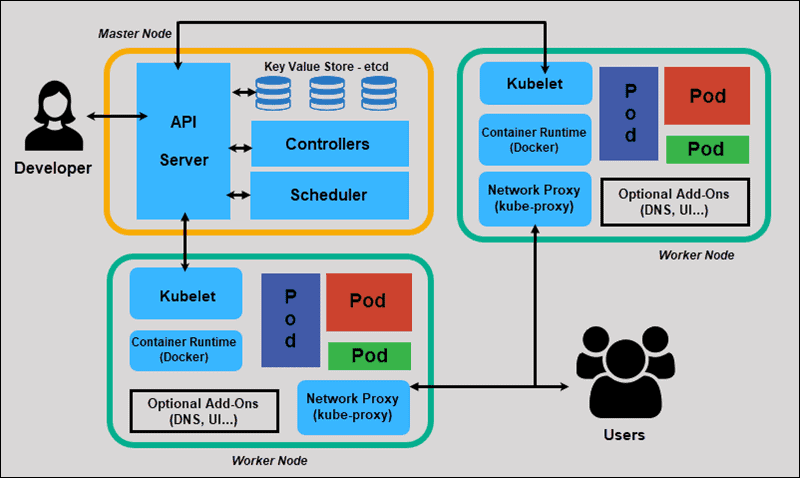
Kubernetes Mimarisi
Kubernetes temel bileşenleri ve etkileşimleri
Kubernetes cluster’ı iki ana bileşenden oluşur:
1. Control Plane (Master Node)
Control plane, cluster’ın beyni olarak çalışır ve tüm yönetim işlemlerini gerçekleştirir.
Temel Bileşenler:
- kube-apiserver: Kubernetes API’sini sunar, tüm işlemler buradan geçer
- etcd: Cluster verilerini saklayan distributed key-value store
- kube-scheduler: Pod’ları uygun node’lara atayan scheduler
- kube-controller-manager: Controller’ları çalıştıran yönetici
- cloud-controller-manager: Cloud provider entegrasyonu (opsiyonel)
2. Worker Nodes
Uygulamaların çalıştığı fiziksel veya sanal makinelerdir.
Temel Bileşenler:
- kubelet: Her node’da çalışan agent, pod’ları yönetir
- kube-proxy: Network proxy, service’lerin network kurallarını yönetir
- Container Runtime: Docker, containerd, CRI-O gibi container engine’leri
Detaylı Kubernetes cluster mimarisi
Temel Kubernetes Kavramları
1. Pod - En Küçük Deployment Birimi
Pod, Kubernetes’te deploy edilebilecek en küçük birimdir. Bir veya daha fazla container içerir.
1
2
3
4
5
6
7
8
9
10
11
12
13
14
15
16
17
18
19
20
apiVersion: v1
kind: Pod
metadata:
name: nginx-pod
labels:
app: nginx
environment: production
spec:
containers:
- name: nginx
image: nginx:1.21
ports:
- containerPort: 80
resources:
requests:
memory: "64Mi"
cpu: "250m"
limits:
memory: "128Mi"
cpu: "500m"
Pod’ları Yönetme:
1
2
3
4
5
6
7
8
9
10
11
12
13
14
15
16
17
18
19
20
# Pod oluşturma
kubectl apply -f simple-pod.yaml
# Pod'ları listeleme
kubectl get pods
kubectl get pods -o wide # Detaylı bilgi
# Pod detaylarını görme
kubectl describe pod nginx-pod
# Pod loglarını görme
kubectl logs nginx-pod
kubectl logs nginx-pod -f # Canlı log takibi
# Pod içinde komut çalıştırma
kubectl exec nginx-pod -- ls -la
kubectl exec -it nginx-pod -- /bin/bash # Interactive shell
# Pod'u silme
kubectl delete pod nginx-pod
Multi-Container Pod Örneği
1
2
3
4
5
6
7
8
9
10
11
12
13
14
15
16
17
18
19
20
21
22
23
24
25
26
27
apiVersion: v1
kind: Pod
metadata:
name: app-with-sidecar
spec:
containers:
# Ana uygulama container'ı
- name: web-app
image: myapp:1.0
ports:
- containerPort: 8080
volumeMounts:
- name: shared-logs
mountPath: /var/log/app
# Sidecar container (log collector)
- name: log-collector
image: fluentd:latest
volumeMounts:
- name: shared-logs
mountPath: /var/log/app
readOnly: true
# Shared volume
volumes:
- name: shared-logs
emptyDir: {}
2. Deployment - Deklaratif Uygulama Yönetimi
Deployment, pod’ların desired state’ini tanımlar ve otomatik olarak bu state’i korur.
1
2
3
4
5
6
7
8
9
10
11
12
13
14
15
16
17
18
19
20
21
22
23
24
25
26
27
28
29
30
31
32
33
34
35
36
37
38
39
40
41
42
43
44
45
46
47
48
49
50
51
52
53
54
55
56
57
58
apiVersion: apps/v1
kind: Deployment
metadata:
name: nginx-deployment
labels:
app: nginx
spec:
# Kaç kopya çalışacak
replicas: 3
# Hangi pod'ları yöneteceği
selector:
matchLabels:
app: nginx
# Rolling update stratejisi
strategy:
type: RollingUpdate
rollingUpdate:
maxSurge: 1 # Aynı anda 1 fazla pod oluşturabilir
maxUnavailable: 1 # Aynı anda 1 pod unavailable olabilir
# Pod template
template:
metadata:
labels:
app: nginx
spec:
containers:
- name: nginx
image: nginx:1.21
ports:
- containerPort: 80
# Liveness probe (container canlı mı?)
livenessProbe:
httpGet:
path: /
port: 80
initialDelaySeconds: 30
periodSeconds: 10
# Readiness probe (container hazır mı?)
readinessProbe:
httpGet:
path: /
port: 80
initialDelaySeconds: 5
periodSeconds: 5
# Resource limitleri
resources:
requests:
memory: "128Mi"
cpu: "250m"
limits:
memory: "256Mi"
cpu: "500m"
Deployment Yönetimi:
1
2
3
4
5
6
7
8
9
10
11
12
13
14
15
16
17
18
19
20
21
22
23
24
25
26
27
28
29
30
31
# Deployment oluşturma
kubectl apply -f nginx-deployment.yaml
# Deployment'ları listeleme
kubectl get deployments
kubectl get deploy -o wide
# Deployment detayları
kubectl describe deployment nginx-deployment
# Deployment'ı scale etme
kubectl scale deployment nginx-deployment --replicas=5
# Image güncelleme (rolling update)
kubectl set image deployment/nginx-deployment nginx=nginx:1.22
# Rollback yapma
kubectl rollout undo deployment/nginx-deployment
# Rollout geçmişi
kubectl rollout history deployment/nginx-deployment
# Rollout durumu
kubectl rollout status deployment/nginx-deployment
# Deployment'ı pause/resume etme
kubectl rollout pause deployment/nginx-deployment
kubectl rollout resume deployment/nginx-deployment
# Deployment'ı silme
kubectl delete deployment nginx-deployment
3. Service - Network Abstraction
Service, pod’lara erişim için sabit bir endpoint sağlar. Pod’lar ephemeral (geçici) olduğu için IP adresleri değişebilir, Service bu sorunu çözer.
Pod’lar her yeniden başlatıldığında yeni IP adresi alır. Bu nedenle pod IP adreslerine doğrudan bağlanmak yerine Service kullanmak kritik önem taşır.
Container orchestration ve service networking
ClusterIP Service (Varsayılan)
Cluster içinden erişilebilen internal service.
1
2
3
4
5
6
7
8
9
10
11
12
apiVersion: v1
kind: Service
metadata:
name: nginx-clusterip
spec:
type: ClusterIP
selector:
app: nginx # nginx label'ına sahip pod'lara yönlendir
ports:
- protocol: TCP
port: 80 # Service port'u
targetPort: 80 # Container port'u
NodePort Service
Her node’un belirli bir port’undan erişilebilen service.
1
2
3
4
5
6
7
8
9
10
11
12
13
apiVersion: v1
kind: Service
metadata:
name: nginx-nodeport
spec:
type: NodePort
selector:
app: nginx
ports:
- protocol: TCP
port: 80
targetPort: 80
nodePort: 30080 # 30000-32767 arasında olmalı
LoadBalancer Service
Cloud provider’ın load balancer’ını kullanarak external erişim sağlar.
1
2
3
4
5
6
7
8
9
10
11
12
apiVersion: v1
kind: Service
metadata:
name: nginx-loadbalancer
spec:
type: LoadBalancer
selector:
app: nginx
ports:
- protocol: TCP
port: 80
targetPort: 80
LoadBalancer service tipi sadece cloud provider’larda (AWS, GCP, Azure) çalışır. Local cluster’larda MetalLB gibi alternatifler kullanılabilir.
Service Yönetimi:
1
2
3
4
5
6
7
8
9
10
11
12
13
14
15
# Service oluşturma
kubectl apply -f nginx-service.yaml
# Service'leri listeleme
kubectl get services
kubectl get svc
# Service detayları
kubectl describe service nginx-clusterip
# Service endpoint'lerini görme
kubectl get endpoints nginx-clusterip
# Service'i silme
kubectl delete service nginx-clusterip
4. ConfigMap ve Secret - Yapılandırma Yönetimi
ConfigMap
Uygulama yapılandırmasını kod dışında tutmak için kullanılır.
1
2
3
4
5
6
7
8
9
10
11
12
13
14
15
16
17
18
19
20
apiVersion: v1
kind: ConfigMap
metadata:
name: app-config
data:
# Key-value pairs
database_host: "postgres.default.svc.cluster.local"
database_port: "5432"
app_mode: "production"
# Dosya içeriği
nginx.conf: |
server {
listen 80;
server_name example.com;
location / {
proxy_pass http://backend:8080;
}
}
ConfigMap Kullanımı:
1
2
3
4
5
6
7
8
9
10
11
12
13
14
15
16
17
18
19
20
21
22
23
24
25
26
27
28
29
30
31
apiVersion: v1
kind: Pod
metadata:
name: app-with-config
spec:
containers:
- name: app
image: myapp:1.0
# Environment variable olarak
env:
- name: DATABASE_HOST
valueFrom:
configMapKeyRef:
name: app-config
key: database_host
# Tüm ConfigMap'i env olarak
envFrom:
- configMapRef:
name: app-config
# Volume olarak mount etme
volumeMounts:
- name: config-volume
mountPath: /etc/config
volumes:
- name: config-volume
configMap:
name: app-config
Secret
Hassas verileri (şifreler, token’lar) güvenli şekilde saklar.
Secret’lar base64 ile encode edilir ancak encrypt edilmez! Production ortamında mutlaka etcd encryption at rest kullanın veya external secret management (Vault, AWS Secrets Manager) tercih edin.
1
2
3
4
5
6
7
8
9
# Secret oluşturma (imperative)
kubectl create secret generic db-credentials \
--from-literal=username=admin \
--from-literal=password='super-secret-password'
# Dosyadan secret oluşturma
kubectl create secret generic tls-secret \
--from-file=tls.crt=cert.pem \
--from-file=tls.key=key.pem
1
2
3
4
5
6
7
8
9
apiVersion: v1
kind: Secret
metadata:
name: db-credentials
type: Opaque
data:
# Base64 encoded values
username: YWRtaW4=
password: c3VwZXItc2VjcmV0LXBhc3N3b3Jk
Secret Kullanımı:
1
2
3
4
5
6
7
8
9
10
11
12
13
14
15
16
17
18
19
20
21
22
23
24
25
26
27
28
29
30
31
32
apiVersion: v1
kind: Pod
metadata:
name: app-with-secrets
spec:
containers:
- name: app
image: myapp:1.0
# Environment variable olarak
env:
- name: DB_USERNAME
valueFrom:
secretKeyRef:
name: db-credentials
key: username
- name: DB_PASSWORD
valueFrom:
secretKeyRef:
name: db-credentials
key: password
# Volume olarak mount (daha güvenli)
volumeMounts:
- name: secret-volume
mountPath: /etc/secrets
readOnly: true
volumes:
- name: secret-volume
secret:
secretName: db-credentials
5. Persistent Volume - Veri Kalıcılığı
Pod’lar geçici olduğu için, kalıcı veri storage çözümü gerekir.
1
2
3
4
5
6
7
8
9
10
11
12
13
apiVersion: v1
kind: PersistentVolume
metadata:
name: postgres-pv
spec:
capacity:
storage: 10Gi
accessModes:
- ReadWriteOnce
persistentVolumeReclaimPolicy: Retain
storageClassName: standard
hostPath:
path: /mnt/data/postgres
1
2
3
4
5
6
7
8
9
10
11
apiVersion: v1
kind: PersistentVolumeClaim
metadata:
name: postgres-pvc
spec:
accessModes:
- ReadWriteOnce
resources:
requests:
storage: 10Gi
storageClassName: standard
PVC Kullanımı:
1
2
3
4
5
6
7
8
9
10
11
12
13
14
15
16
17
18
19
20
21
22
apiVersion: v1
kind: Pod
metadata:
name: postgres
spec:
containers:
- name: postgres
image: postgres:14
env:
- name: POSTGRES_PASSWORD
valueFrom:
secretKeyRef:
name: db-credentials
key: password
volumeMounts:
- name: postgres-storage
mountPath: /var/lib/postgresql/data
volumes:
- name: postgres-storage
persistentVolumeClaim:
claimName: postgres-pvc
Gerçek Dünya Uygulaması: Full-Stack Web App
Şimdi tüm kavramları birleştirerek tam bir web uygulaması deploy edelim.
1. Namespace Oluşturma
1
2
3
4
apiVersion: v1
kind: Namespace
metadata:
name: myapp-production
2. PostgreSQL Database
1
2
3
4
5
6
7
8
9
10
11
12
13
14
15
16
17
18
19
20
21
22
23
24
25
26
27
28
29
30
31
32
33
34
35
36
37
38
39
40
41
42
43
44
45
46
47
48
49
50
51
52
apiVersion: apps/v1
kind: Deployment
metadata:
name: postgres
namespace: myapp-production
spec:
replicas: 1
selector:
matchLabels:
app: postgres
template:
metadata:
labels:
app: postgres
spec:
containers:
- name: postgres
image: postgres:14
env:
- name: POSTGRES_DB
value: myapp
- name: POSTGRES_USER
valueFrom:
secretKeyRef:
name: db-credentials
key: username
- name: POSTGRES_PASSWORD
valueFrom:
secretKeyRef:
name: db-credentials
key: password
ports:
- containerPort: 5432
volumeMounts:
- name: postgres-storage
mountPath: /var/lib/postgresql/data
volumes:
- name: postgres-storage
persistentVolumeClaim:
claimName: postgres-pvc
---
apiVersion: v1
kind: Service
metadata:
name: postgres
namespace: myapp-production
spec:
selector:
app: postgres
ports:
- port: 5432
targetPort: 5432
3. Backend API
1
2
3
4
5
6
7
8
9
10
11
12
13
14
15
16
17
18
19
20
21
22
23
24
25
26
27
28
29
30
31
32
33
34
35
36
37
38
39
40
41
42
43
44
45
46
47
48
49
50
51
52
53
54
55
56
57
58
59
60
61
62
63
64
65
66
apiVersion: apps/v1
kind: Deployment
metadata:
name: backend
namespace: myapp-production
spec:
replicas: 3
selector:
matchLabels:
app: backend
template:
metadata:
labels:
app: backend
spec:
containers:
- name: backend
image: myregistry/backend-api:v1.0
env:
- name: DATABASE_URL
value: "postgresql://$(DB_USER):$(DB_PASS)@postgres:5432/myapp"
- name: DB_USER
valueFrom:
secretKeyRef:
name: db-credentials
key: username
- name: DB_PASS
valueFrom:
secretKeyRef:
name: db-credentials
key: password
- name: REDIS_URL
value: "redis://redis:6379"
ports:
- containerPort: 8080
livenessProbe:
httpGet:
path: /health
port: 8080
initialDelaySeconds: 30
periodSeconds: 10
readinessProbe:
httpGet:
path: /ready
port: 8080
initialDelaySeconds: 5
periodSeconds: 5
resources:
requests:
memory: "256Mi"
cpu: "250m"
limits:
memory: "512Mi"
cpu: "500m"
---
apiVersion: v1
kind: Service
metadata:
name: backend
namespace: myapp-production
spec:
selector:
app: backend
ports:
- port: 8080
targetPort: 8080
4. Frontend Web App
1
2
3
4
5
6
7
8
9
10
11
12
13
14
15
16
17
18
19
20
21
22
23
24
25
26
27
28
29
30
31
32
33
34
35
36
37
38
39
40
41
42
43
apiVersion: apps/v1
kind: Deployment
metadata:
name: frontend
namespace: myapp-production
spec:
replicas: 2
selector:
matchLabels:
app: frontend
template:
metadata:
labels:
app: frontend
spec:
containers:
- name: frontend
image: myregistry/frontend-app:v1.0
ports:
- containerPort: 80
env:
- name: API_URL
value: "http://backend:8080"
resources:
requests:
memory: "128Mi"
cpu: "100m"
limits:
memory: "256Mi"
cpu: "200m"
---
apiVersion: v1
kind: Service
metadata:
name: frontend
namespace: myapp-production
spec:
type: LoadBalancer
selector:
app: frontend
ports:
- port: 80
targetPort: 80
5. Redis Cache
1
2
3
4
5
6
7
8
9
10
11
12
13
14
15
16
17
18
19
20
21
22
23
24
25
26
27
28
29
30
31
32
33
34
35
36
37
38
39
apiVersion: apps/v1
kind: Deployment
metadata:
name: redis
namespace: myapp-production
spec:
replicas: 1
selector:
matchLabels:
app: redis
template:
metadata:
labels:
app: redis
spec:
containers:
- name: redis
image: redis:7-alpine
ports:
- containerPort: 6379
resources:
requests:
memory: "128Mi"
cpu: "100m"
limits:
memory: "256Mi"
cpu: "200m"
---
apiVersion: v1
kind: Service
metadata:
name: redis
namespace: myapp-production
spec:
selector:
app: redis
ports:
- port: 6379
targetPort: 6379
Deployment Script
1
2
3
4
5
6
7
8
9
10
11
12
13
14
15
16
17
18
19
20
21
22
23
24
25
26
27
28
29
30
31
32
33
34
35
36
37
38
#!/bin/bash
# Namespace oluştur
kubectl apply -f namespace.yaml
# Secrets oluştur
kubectl create secret generic db-credentials \
--namespace=myapp-production \
--from-literal=username=myapp_user \
--from-literal=password='secure-password-123' \
--dry-run=client -o yaml | kubectl apply -f -
# PVC oluştur
kubectl apply -f postgres-pvc.yaml
# Database deploy
kubectl apply -f postgres-deployment.yaml
# Cache deploy
kubectl apply -f redis-deployment.yaml
# Backend API deploy
kubectl apply -f backend-deployment.yaml
# Frontend deploy
kubectl apply -f frontend-deployment.yaml
# Deployment durumunu kontrol et
echo "Waiting for deployments..."
kubectl wait --for=condition=available --timeout=300s \
deployment/postgres \
deployment/redis \
deployment/backend \
deployment/frontend \
-n myapp-production
echo "Deployment completed!"
kubectl get all -n myapp-production
Horizontal Pod Autoscaler (HPA)
Yük bazlı otomatik ölçeklendirme için HPA kullanılır.
1
2
3
4
5
6
7
8
9
10
11
12
13
14
15
16
17
18
19
20
21
22
23
24
25
26
27
28
29
30
31
32
33
34
35
36
37
38
apiVersion: autoscaling/v2
kind: HorizontalPodAutoscaler
metadata:
name: backend-hpa
namespace: myapp-production
spec:
scaleTargetRef:
apiVersion: apps/v1
kind: Deployment
name: backend
minReplicas: 2
maxReplicas: 10
metrics:
- type: Resource
resource:
name: cpu
target:
type: Utilization
averageUtilization: 70
- type: Resource
resource:
name: memory
target:
type: Utilization
averageUtilization: 80
behavior:
scaleDown:
stabilizationWindowSeconds: 300
policies:
- type: Percent
value: 50
periodSeconds: 60
scaleUp:
stabilizationWindowSeconds: 0
policies:
- type: Percent
value: 100
periodSeconds: 30
HPA için metrics-server’in cluster’da kurulu olması gerekir. Minikube’da
minikube addons enable metrics-serverkomutuyla aktifleştirebilirsiniz.
1
2
3
4
5
6
7
8
9
10
# HPA oluşturma
kubectl apply -f hpa.yaml
# HPA durumunu görme
kubectl get hpa -n myapp-production
kubectl describe hpa backend-hpa -n myapp-production
# HPA metriklerini görme
kubectl top pods -n myapp-production
kubectl top nodes
İzleme ve Debugging
Temel Debugging Komutları
1
2
3
4
5
6
7
8
9
10
11
12
13
14
15
16
17
18
19
20
21
22
23
24
25
26
27
28
29
30
# Pod durumlarını kontrol etme
kubectl get pods -n myapp-production
kubectl get pods --all-namespaces
# Pod detayları ve eventler
kubectl describe pod <pod-name> -n myapp-production
# Container logları
kubectl logs <pod-name> -n myapp-production
kubectl logs <pod-name> -c <container-name> -n myapp-production
kubectl logs <pod-name> --previous # Önceki container'ın logları
# Pod içinde komut çalıştırma
kubectl exec -it <pod-name> -n myapp-production -- /bin/sh
# Port forwarding (local testing)
kubectl port-forward pod/<pod-name> 8080:80 -n myapp-production
kubectl port-forward service/backend 8080:8080 -n myapp-production
# Resource kullanımı
kubectl top pods -n myapp-production
kubectl top nodes
# Cluster bilgileri
kubectl cluster-info
kubectl get nodes
kubectl get all -n myapp-production
# Events izleme
kubectl get events -n myapp-production --sort-by='.lastTimestamp'
Pod Sorun Giderme
1
2
3
4
5
6
7
8
9
10
11
12
13
14
15
16
17
18
# CrashLoopBackOff durumu
# 1. Logları kontrol et
kubectl logs <pod-name> --previous
# 2. Pod detaylarına bak
kubectl describe pod <pod-name>
# 3. Events'i incele
kubectl get events --field-selector involvedObject.name=<pod-name>
# ImagePullBackOff durumu
# Image adını ve credentials'ı kontrol et
kubectl describe pod <pod-name> | grep -A 5 "Events:"
# Pending durumu
# Resource yetersizliği veya node selector sorunları
kubectl describe pod <pod-name>
kubectl describe nodes
Best Practices
1. Resource Requests ve Limits
Her pod için mutlaka resource requests ve limits tanımlayın. Tanımsız pod’lar tüm node kaynaklarını tüketebilir ve diğer pod’ları etkileyebilir.
1
2
3
4
5
6
7
resources:
requests:
memory: "256Mi" # Minimum gereksinim
cpu: "250m"
limits:
memory: "512Mi" # Maksimum limit
cpu: "500m"
2. Health Checks
Liveness probe yanlış yapılandırılırsa pod’lar sürekli restart olur (crash loop). initialDelaySeconds değerini uygulaamanın başlatma süresinden uzun ayarlayın.
1
2
3
4
5
6
7
8
9
10
11
12
13
14
15
livenessProbe:
httpGet:
path: /health
port: 8080
initialDelaySeconds: 30
periodSeconds: 10
timeoutSeconds: 5
failureThreshold: 3
readinessProbe:
httpGet:
path: /ready
port: 8080
initialDelaySeconds: 5
periodSeconds: 5
3. Labels ve Annotations
1
2
3
4
5
6
7
8
9
metadata:
labels:
app: myapp
version: v1.0
environment: production
team: backend
annotations:
prometheus.io/scrape: "true"
prometheus.io/port: "9090"
4. Security
Container’ları asla root olarak çalıştırmayın! runAsNonRoot: true ayarı kritik güvenlik önlemidir. allowPrivilegeEscalation: false ile privilege escalation’u engelleyin.
1
2
3
4
5
6
7
8
securityContext:
runAsNonRoot: true
runAsUser: 1000
allowPrivilegeEscalation: false
readOnlyRootFilesystem: true
capabilities:
drop:
- ALL
5. ConfigMap ve Secret Kullanımı
1
2
3
4
5
6
# Yapılandırmayı kod dışında tut
envFrom:
- configMapRef:
name: app-config
- secretRef:
name: app-secrets
6. Rolling Update Strategy
1
2
3
4
5
strategy:
type: RollingUpdate
rollingUpdate:
maxSurge: 25% # Aynı anda %25 fazla pod
maxUnavailable: 25% # Aynı anda %25 eksik olabilir
Sonuç
Kubernetes, modern cloud-native uygulamaların deployment ve yönetiminde vazgeçilmez bir platform haline gelmiştir. Bu yazıda ele aldığımız temel kavramlar:
- Pod: En küçük deployment birimi
- Deployment: Deklaratif uygulama yönetimi
- Service: Network abstraction ve load balancing
- ConfigMap ve Secret: Yapılandırma yönetimi
- Persistent Volume: Veri kalıcılığı
- HPA: Otomatik ölçeklendirme
Kubernetes öğrenme eğrisi dik olsa da, production ortamında sağladığı faydalar bu zorluğun çok ötesindedir. Otomatik scaling, self-healing, rolling updates ve deklaratif yapılandırma, modern DevOps pratiklerinin temel taşlarıdır.
Production ortamına geçmeden önce mutlaka monitoring (Prometheus, Grafana), logging (ELK Stack) ve security (Pod Security Standards, Network Policies) konularını da öğrenin. Kubernetes, sadece bir başlangıçtır; ekosistemi çok geniştir.