Giriş
GitHub Actions, GitHub’ın yerleşik CI/CD (Continuous Integration/Continuous Deployment) platformudur. Kod değişikliklerini otomatik olarak test etme, build alma ve production’a deploy etme süreçlerini tamamen otomatikleştirir.
Bu rehberde, GitHub Actions ile sıfırdan production-ready bir CI/CD pipeline’ı nasıl oluşturacağınızı öğreneceksiniz. Test otomasyonu, Docker build, multi-environment deployment ve best practice’leri detaylıca ele alacağız.
GitHub Actions Nedir?
GitHub Actions, event-driven bir otomasyon platformudur. Repository’nizdeki belirli olaylar (push, pull request, release) tetiklendiğinde önceden tanımlanmış iş akışlarını (workflows) çalıştırır.
Temel Kavramlar
- Workflow: Otomatik süreç tanımı (YAML dosyası)
- Job: Workflow içindeki bağımsız görev grupları
- Step: Job içindeki tek bir komut veya action
- Action: Yeniden kullanılabilir otomasyon bileşeni
- Runner: Workflow’ları çalıştıran sanal makine
- Event: Workflow’ı tetikleyen olay (push, pull_request, schedule, vb.)
Workflow Dosya Yapısı
1
2
3
4
5
6
7
8
9
10
11
12
13
14
15
16
17
18
19
20
21
22
23
24
25
| # .github/workflows/ci.yml
name: CI Pipeline
# Tetikleyiciler
on:
push:
branches: [ main, develop ]
pull_request:
branches: [ main ]
# İş tanımları
jobs:
test:
runs-on: ubuntu-latest
steps:
- uses: actions/checkout@v4
- name: Run tests
run: npm test
build:
needs: test
runs-on: ubuntu-latest
steps:
- name: Build application
run: npm run build
|
İlk Workflow Oluşturma
Basit CI Workflow
1
2
3
4
5
6
7
8
9
10
11
12
13
14
15
16
17
18
19
20
21
22
23
24
| # .github/workflows/hello-world.yml
name: Hello World
on:
push:
branches: [ main ]
workflow_dispatch: # Manuel tetikleme
jobs:
greet:
runs-on: ubuntu-latest
steps:
- name: Checkout code
uses: actions/checkout@v4
- name: Say hello
run: echo "Hello, GitHub Actions!"
- name: Show environment
run: |
echo "Repository: $"
echo "Branch: $"
echo "Actor: $"
|
workflow_dispatch event’i ile GitHub UI’dan manuel olarak workflow tetikleyebilirsiniz.
Python Projesi için CI
1
2
3
4
5
6
7
8
9
10
11
12
13
14
15
16
17
18
19
20
21
22
23
24
25
26
27
28
29
30
31
32
33
34
35
36
37
38
39
40
41
42
43
44
45
46
47
48
| # .github/workflows/python-ci.yml
name: Python CI
on:
push:
branches: [ main, develop ]
pull_request:
branches: [ main ]
jobs:
test:
runs-on: ubuntu-latest
strategy:
matrix:
python-version: ['3.9', '3.10', '3.11', '3.12']
steps:
- name: Checkout code
uses: actions/checkout@v4
- name: Set up Python $
uses: actions/setup-python@v5
with:
python-version: $
- name: Cache pip packages
uses: actions/cache@v4
with:
path: ~/.cache/pip
key: $-pip-$
restore-keys: |
$-pip-
- name: Install dependencies
run: |
python -m pip install --upgrade pip
pip install -r requirements.txt
pip install pytest pytest-cov
- name: Run tests
run: |
pytest --cov=. --cov-report=xml
- name: Upload coverage
uses: codecov/codecov-action@v4
with:
file: ./coverage.xml
fail_ci_if_error: true
|
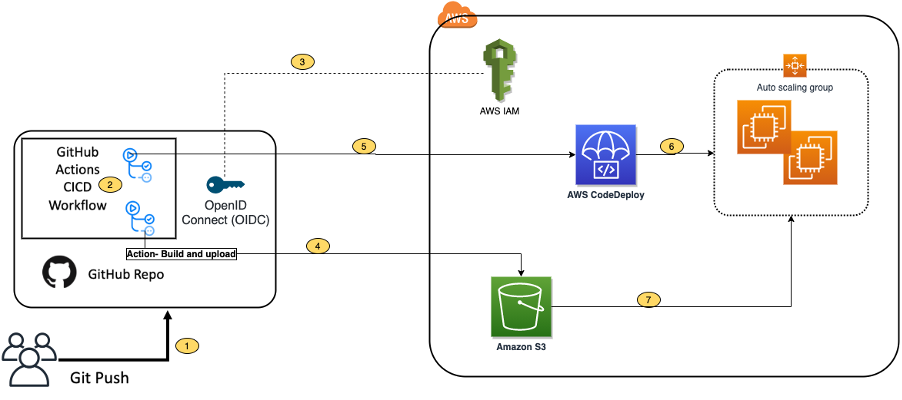
CI/CD deployment otomasyonu akış diyagramı
Node.js/JavaScript CI/CD
Complete Node.js Workflow
1
2
3
4
5
6
7
8
9
10
11
12
13
14
15
16
17
18
19
20
21
22
23
24
25
26
27
28
29
30
31
32
33
34
35
36
37
38
39
40
41
42
43
44
45
46
47
48
49
50
51
52
53
54
55
56
57
58
59
60
61
62
63
64
65
66
67
68
69
70
71
72
73
74
75
76
77
78
79
80
81
82
83
84
85
86
87
88
89
90
91
92
93
94
95
96
97
98
99
100
101
102
103
104
105
106
107
108
109
| # .github/workflows/node-ci-cd.yml
name: Node.js CI/CD
on:
push:
branches: [ main, develop ]
pull_request:
branches: [ main ]
env:
NODE_VERSION: '20.x'
jobs:
# Lint ve format kontrolü
lint:
runs-on: ubuntu-latest
steps:
- uses: actions/checkout@v4
- name: Setup Node.js
uses: actions/setup-node@v4
with:
node-version: $
cache: 'npm'
- name: Install dependencies
run: npm ci
- name: Run ESLint
run: npm run lint
- name: Check formatting
run: npm run format:check
# Test
test:
runs-on: ubuntu-latest
needs: lint
strategy:
matrix:
node-version: [18.x, 20.x, 22.x]
steps:
- uses: actions/checkout@v4
- name: Setup Node.js $
uses: actions/setup-node@v4
with:
node-version: $
cache: 'npm'
- name: Install dependencies
run: npm ci
- name: Run tests
run: npm test -- --coverage
- name: Upload coverage
if: matrix.node-version == '20.x'
uses: codecov/codecov-action@v4
with:
files: ./coverage/coverage-final.json
# Build
build:
runs-on: ubuntu-latest
needs: test
if: github.ref == 'refs/heads/main'
steps:
- uses: actions/checkout@v4
- name: Setup Node.js
uses: actions/setup-node@v4
with:
node-version: $
cache: 'npm'
- name: Install dependencies
run: npm ci
- name: Build application
run: npm run build
- name: Upload build artifact
uses: actions/upload-artifact@v4
with:
name: dist
path: dist/
retention-days: 7
# Deploy
deploy:
runs-on: ubuntu-latest
needs: build
if: github.ref == 'refs/heads/main'
steps:
- name: Download build artifact
uses: actions/download-artifact@v4
with:
name: dist
path: dist/
- name: Deploy to production
run: |
echo "Deploying to production..."
# Deploy komutları buraya
|
Docker Build ve Push
Docker Image Build
1
2
3
4
5
6
7
8
9
10
11
12
13
14
15
16
17
18
19
20
21
22
23
24
25
26
27
28
29
30
31
32
33
34
35
36
37
38
39
40
41
42
43
44
45
46
47
48
49
50
51
52
53
54
55
56
57
58
59
60
61
| # .github/workflows/docker-build.yml
name: Docker Build & Push
on:
push:
branches: [ main ]
tags:
- 'v*'
pull_request:
branches: [ main ]
env:
REGISTRY: ghcr.io
IMAGE_NAME: $
jobs:
build-and-push:
runs-on: ubuntu-latest
permissions:
contents: read
packages: write
steps:
- name: Checkout code
uses: actions/checkout@v4
- name: Set up QEMU
uses: docker/setup-qemu-action@v3
- name: Set up Docker Buildx
uses: docker/setup-buildx-action@v3
- name: Log in to Container Registry
uses: docker/login-action@v3
with:
registry: $
username: $
password: $
- name: Extract metadata
id: meta
uses: docker/metadata-action@v5
with:
images: $/$
tags: |
type=ref,event=branch
type=ref,event=pr
type=semver,pattern={{version}}
type=semver,pattern={{major}}.{{minor}}
type=sha,prefix={{branch}}-
- name: Build and push Docker image
uses: docker/build-push-action@v5
with:
context: .
platforms: linux/amd64,linux/arm64
push: $
tags: $
labels: $
cache-from: type=gha
cache-to: type=gha,mode=max
|
Multi-Stage Docker Build
1
2
3
4
5
6
7
8
9
10
11
12
13
14
15
16
17
18
19
20
21
22
23
24
25
26
| # Dockerfile
# Build stage
FROM node:20-alpine AS builder
WORKDIR /app
COPY package*.json ./
RUN npm ci --only=production
COPY . .
RUN npm run build
# Production stage
FROM node:20-alpine
WORKDIR /app
COPY --from=builder /app/dist ./dist
COPY --from=builder /app/node_modules ./node_modules
COPY package*.json ./
USER node
EXPOSE 3000
CMD ["node", "dist/index.js"]
|
GitHub Actions workflow YAML konfigürasyon örneği
Matrix Testing
1
2
3
4
5
6
7
8
9
10
11
12
13
14
15
16
17
18
19
20
21
22
23
24
25
26
27
28
29
30
31
32
33
34
35
36
37
38
39
40
| # .github/workflows/matrix-test.yml
name: Matrix Testing
on: [push, pull_request]
jobs:
test:
runs-on: $
strategy:
fail-fast: false
matrix:
os: [ubuntu-latest, windows-latest, macos-latest]
python-version: ['3.9', '3.10', '3.11', '3.12']
exclude:
# Windows'da Python 3.9 test etme
- os: windows-latest
python-version: '3.9'
include:
# Özel konfigürasyon ekle
- os: ubuntu-latest
python-version: '3.12'
experimental: true
steps:
- uses: actions/checkout@v4
- name: Set up Python $
uses: actions/setup-python@v5
with:
python-version: $
- name: Install dependencies
run: |
python -m pip install --upgrade pip
pip install -r requirements.txt
- name: Run tests
run: pytest
continue-on-error: $
|
Database Matrix
1
2
3
4
5
6
7
8
9
10
11
12
13
14
15
16
17
18
19
20
21
22
23
24
25
26
27
28
29
30
31
32
33
34
35
36
37
38
39
40
| # .github/workflows/db-matrix.yml
name: Database Tests
on: [push, pull_request]
jobs:
test-db:
runs-on: ubuntu-latest
strategy:
matrix:
database:
- postgres:14
- postgres:15
- postgres:16
- mysql:8.0
- mysql:8.2
services:
db:
image: $
env:
POSTGRES_PASSWORD: postgres
MYSQL_ROOT_PASSWORD: mysql
options: >-
--health-cmd "pg_isready || mysqladmin ping"
--health-interval 10s
--health-timeout 5s
--health-retries 5
ports:
- 5432:5432
- 3306:3306
steps:
- uses: actions/checkout@v4
- name: Run database tests
run: |
echo "Testing with $"
# Test komutları
|
Secrets Yönetimi
API key’leri, şifreleri ve token’ları asla GitHub repository’nizde saklamayın! GitHub Secrets kullanarak güvenli şekilde yönetin.
Repository Secrets
1
2
3
4
5
6
7
8
9
10
11
12
13
14
15
16
17
18
19
20
21
22
23
24
25
26
27
28
29
30
31
32
33
34
35
36
| # .github/workflows/deploy-with-secrets.yml
name: Deploy with Secrets
on:
push:
branches: [ main ]
jobs:
deploy:
runs-on: ubuntu-latest
steps:
- uses: actions/checkout@v4
- name: Configure AWS credentials
uses: aws-actions/configure-aws-credentials@v4
with:
aws-access-key-id: $
aws-secret-access-key: $
aws-region: us-east-1
- name: Login to Docker Hub
uses: docker/login-action@v3
with:
username: $
password: $
- name: Deploy to server
env:
SSH_PRIVATE_KEY: $
SERVER_HOST: $
run: |
mkdir -p ~/.ssh
echo "$SSH_PRIVATE_KEY" > ~/.ssh/id_rsa
chmod 600 ~/.ssh/id_rsa
ssh -o StrictHostKeyChecking=no user@$SERVER_HOST 'bash -s' < deploy.sh
|
Environment Secrets
1
2
3
4
5
6
7
8
9
10
11
12
13
14
15
16
17
18
19
20
21
22
23
24
25
26
27
28
29
30
31
32
33
34
35
36
37
| # .github/workflows/multi-env-deploy.yml
name: Multi-Environment Deploy
on:
push:
branches: [ main, staging, develop ]
jobs:
deploy-staging:
if: github.ref == 'refs/heads/staging'
runs-on: ubuntu-latest
environment:
name: staging
url: https://staging.example.com
steps:
- name: Deploy to staging
env:
API_KEY: $
DATABASE_URL: $
run: |
echo "Deploying to staging..."
deploy-production:
if: github.ref == 'refs/heads/main'
runs-on: ubuntu-latest
environment:
name: production
url: https://example.com
steps:
- name: Deploy to production
env:
API_KEY: $
DATABASE_URL: $
run: |
echo "Deploying to production..."
|
CI/CD pipeline aşamaları detaylı diyagram
Caching Stratejileri
Dependency Caching
1
2
3
4
5
6
7
8
9
10
11
12
13
14
15
16
17
18
19
20
21
22
23
24
25
26
27
28
29
30
31
32
33
34
35
36
37
38
39
40
41
42
43
44
45
46
47
48
49
50
| # .github/workflows/caching.yml
name: Caching Demo
on: [push, pull_request]
jobs:
python-cache:
runs-on: ubuntu-latest
steps:
- uses: actions/checkout@v4
- uses: actions/setup-python@v5
with:
python-version: '3.11'
cache: 'pip' # Otomatik pip cache
- name: Install dependencies
run: pip install -r requirements.txt
node-cache:
runs-on: ubuntu-latest
steps:
- uses: actions/checkout@v4
- uses: actions/setup-node@v4
with:
node-version: '20'
cache: 'npm' # Otomatik npm cache
- run: npm ci
custom-cache:
runs-on: ubuntu-latest
steps:
- uses: actions/checkout@v4
- name: Cache build outputs
uses: actions/cache@v4
with:
path: |
~/.cache
build/
dist/
key: $-build-$
restore-keys: |
$-build-
$-
- name: Build project
run: npm run build
|
Docker Layer Caching
1
2
3
4
5
6
7
8
9
10
11
12
13
14
15
16
17
18
19
20
21
22
| # .github/workflows/docker-cache.yml
name: Docker Layer Cache
on: push
jobs:
build:
runs-on: ubuntu-latest
steps:
- uses: actions/checkout@v4
- name: Set up Docker Buildx
uses: docker/setup-buildx-action@v3
- name: Build with cache
uses: docker/build-push-action@v5
with:
context: .
push: false
cache-from: type=gha
cache-to: type=gha,mode=max
tags: myapp:latest
|
Artifacts (Yapılar)
Build Artifacts
1
2
3
4
5
6
7
8
9
10
11
12
13
14
15
16
17
18
19
20
21
22
23
24
25
26
27
28
29
30
31
32
33
34
35
36
37
38
39
40
41
42
43
44
45
46
47
48
49
50
51
52
53
54
55
56
| # .github/workflows/artifacts.yml
name: Build Artifacts
on: [push, pull_request]
jobs:
build:
runs-on: ubuntu-latest
steps:
- uses: actions/checkout@v4
- name: Build application
run: |
mkdir -p dist
echo "Build output" > dist/app.js
echo "Build artifacts" > dist/assets.tar.gz
- name: Upload build artifacts
uses: actions/upload-artifact@v4
with:
name: build-artifacts
path: |
dist/**
!dist/**/*.map
retention-days: 30
if-no-files-found: error
test:
needs: build
runs-on: ubuntu-latest
steps:
- uses: actions/checkout@v4
- name: Download build artifacts
uses: actions/download-artifact@v4
with:
name: build-artifacts
path: dist/
- name: Run tests
run: |
ls -la dist/
echo "Testing build artifacts..."
deploy:
needs: [build, test]
if: github.ref == 'refs/heads/main'
runs-on: ubuntu-latest
steps:
- name: Download artifacts
uses: actions/download-artifact@v4
with:
name: build-artifacts
- name: Deploy
run: echo "Deploying artifacts..."
|
Conditional Execution
Path Filters
1
2
3
4
5
6
7
8
9
10
11
12
13
14
15
16
17
18
19
20
21
22
23
24
25
26
27
28
29
30
31
32
33
34
35
36
37
38
39
40
41
42
43
44
45
46
47
48
| # .github/workflows/conditional.yml
name: Conditional Execution
on:
push:
paths:
- 'src/**'
- 'tests/**'
- 'package.json'
jobs:
# Sadece frontend değişirse
frontend:
if: contains(github.event.head_commit.message, '[frontend]')
runs-on: ubuntu-latest
steps:
- run: echo "Building frontend..."
# Sadece backend değişirse
backend:
if: contains(github.event.head_commit.message, '[backend]')
runs-on: ubuntu-latest
steps:
- run: echo "Building backend..."
# Path-specific trigger
api-tests:
runs-on: ubuntu-latest
steps:
- uses: actions/checkout@v4
- uses: dorny/paths-filter@v3
id: changes
with:
filters: |
api:
- 'api/**'
- 'tests/api/**'
frontend:
- 'frontend/**'
- name: Run API tests
if: steps.changes.outputs.api == 'true'
run: npm run test:api
- name: Run frontend tests
if: steps.changes.outputs.frontend == 'true'
run: npm run test:frontend
|
Branch-Specific Actions
1
2
3
4
5
6
7
8
9
10
11
12
13
14
15
16
17
18
19
20
21
22
23
24
25
26
27
28
29
| # .github/workflows/branch-specific.yml
name: Branch-Specific Workflow
on:
push:
branches:
- main
- develop
- 'feature/**'
- 'release/**'
jobs:
develop-only:
if: github.ref == 'refs/heads/develop'
runs-on: ubuntu-latest
steps:
- run: echo "Running on develop branch"
main-only:
if: github.ref == 'refs/heads/main'
runs-on: ubuntu-latest
steps:
- run: echo "Running on main branch"
feature-branches:
if: startsWith(github.ref, 'refs/heads/feature/')
runs-on: ubuntu-latest
steps:
- run: echo "Running on feature branch"
|
Reusable Workflows
Workflow Template
1
2
3
4
5
6
7
8
9
10
11
12
13
14
15
16
17
18
19
20
21
22
23
24
25
26
27
28
29
30
31
32
33
34
35
36
37
38
39
| # .github/workflows/reusable-deploy.yml
name: Reusable Deploy
on:
workflow_call:
inputs:
environment:
required: true
type: string
version:
required: false
type: string
default: 'latest'
secrets:
deploy-token:
required: true
outputs:
deployment-url:
description: "Deployment URL"
value: $
jobs:
deploy:
runs-on: ubuntu-latest
environment: $
outputs:
url: $
steps:
- uses: actions/checkout@v4
- name: Deploy application
id: deploy
env:
TOKEN: $
VERSION: $
run: |
echo "Deploying version $VERSION to $"
echo "url=https://$.example.com" >> $GITHUB_OUTPUT
|
Calling Reusable Workflow
1
2
3
4
5
6
7
8
9
10
11
12
13
14
15
16
17
18
19
20
21
22
23
24
25
26
27
28
29
30
31
32
33
34
35
36
37
| # .github/workflows/main-deploy.yml
name: Main Deploy Pipeline
on:
push:
branches: [ main ]
jobs:
test:
runs-on: ubuntu-latest
steps:
- uses: actions/checkout@v4
- run: npm test
deploy-staging:
needs: test
uses: ./.github/workflows/reusable-deploy.yml
with:
environment: staging
version: $
secrets:
deploy-token: $
deploy-production:
needs: deploy-staging
uses: ./.github/workflows/reusable-deploy.yml
with:
environment: production
version: $
secrets:
deploy-token: $
notify:
needs: deploy-production
runs-on: ubuntu-latest
steps:
- run: echo "Deployed to $"
|
Custom Actions
JavaScript Action
1
2
3
4
5
6
7
8
9
10
11
12
13
14
15
16
| // .github/actions/hello/index.js
const core = require('@actions/core');
const github = require('@actions/github');
try {
const nameToGreet = core.getInput('who-to-greet');
console.log(`Hello ${nameToGreet}!`);
const time = new Date().toTimeString();
core.setOutput('time', time);
const payload = JSON.stringify(github.context.payload, undefined, 2);
console.log(`Event payload: ${payload}`);
} catch (error) {
core.setFailed(error.message);
}
|
1
2
3
4
5
6
7
8
9
10
11
12
13
14
| # .github/actions/hello/action.yml
name: 'Hello Action'
description: 'Greet someone'
inputs:
who-to-greet:
description: 'Who to greet'
required: true
default: 'World'
outputs:
time:
description: 'The time we greeted'
runs:
using: 'node20'
main: 'index.js'
|
Composite Action
1
2
3
4
5
6
7
8
9
10
11
12
13
14
15
16
17
18
19
20
21
22
23
24
25
26
27
28
| # .github/actions/setup-app/action.yml
name: 'Setup Application'
description: 'Setup Node.js and install dependencies'
inputs:
node-version:
description: 'Node.js version'
required: false
default: '20'
runs:
using: 'composite'
steps:
- name: Setup Node.js
uses: actions/setup-node@v4
with:
node-version: $
cache: 'npm'
- name: Install dependencies
shell: bash
run: npm ci
- name: Print versions
shell: bash
run: |
node --version
npm --version
|
Using Custom Action
1
2
3
4
5
6
7
8
9
10
11
12
13
14
15
16
17
18
19
20
21
22
23
| # .github/workflows/use-custom-action.yml
name: Use Custom Actions
on: push
jobs:
greet:
runs-on: ubuntu-latest
steps:
- uses: actions/checkout@v4
- name: Say hello
uses: ./.github/actions/hello
with:
who-to-greet: 'GitHub Actions'
- name: Setup app
uses: ./.github/actions/setup-app
with:
node-version: '20'
- name: Build
run: npm run build
|
Scheduled Workflows
Cron Jobs
1
2
3
4
5
6
7
8
9
10
11
12
13
14
15
16
17
18
19
20
21
22
23
24
25
26
27
28
29
30
31
32
33
34
35
36
37
| # .github/workflows/scheduled.yml
name: Scheduled Tasks
on:
schedule:
# Her gün saat 02:00'de (UTC)
- cron: '0 2 * * *'
# Her Pazartesi saat 09:00'da
- cron: '0 9 * * 1'
# Her 6 saatte bir
- cron: '0 */6 * * *'
workflow_dispatch: # Manuel tetikleme de ekle
jobs:
daily-backup:
runs-on: ubuntu-latest
steps:
- name: Backup database
run: |
echo "Running daily backup at $(date)"
# Backup komutları
weekly-cleanup:
runs-on: ubuntu-latest
if: github.event.schedule == '0 9 * * 1'
steps:
- name: Clean old artifacts
run: |
echo "Weekly cleanup at $(date)"
# Cleanup komutları
health-check:
runs-on: ubuntu-latest
steps:
- name: Check service health
run: |
curl -f https://api.example.com/health || exit 1
|
Deployment Strategies
Blue-Green Deployment
1
2
3
4
5
6
7
8
9
10
11
12
13
14
15
16
17
18
19
20
21
22
23
24
25
26
27
28
29
30
31
32
33
34
35
36
37
38
39
40
41
42
43
| # .github/workflows/blue-green-deploy.yml
name: Blue-Green Deployment
on:
push:
branches: [ main ]
jobs:
deploy:
runs-on: ubuntu-latest
steps:
- uses: actions/checkout@v4
- name: Build new version (green)
run: docker build -t myapp:green .
- name: Deploy to green environment
run: |
docker stop myapp-green || true
docker rm myapp-green || true
docker run -d --name myapp-green -p 8081:80 myapp:green
- name: Health check green
run: |
sleep 10
curl -f http://localhost:8081/health || exit 1
- name: Switch traffic (blue -> green)
run: |
# Load balancer'da trafiği green'e yönlendir
echo "Switching traffic to green..."
# nginx/haproxy reconfigure
- name: Monitor green
run: |
sleep 30
# Metrikler ve loglar kontrol et
- name: Cleanup old blue
run: |
docker stop myapp-blue || true
docker rm myapp-blue || true
docker tag myapp:green myapp:blue
|
Canary Deployment
1
2
3
4
5
6
7
8
9
10
11
12
13
14
15
16
17
18
19
20
21
22
23
24
25
26
27
28
29
30
31
32
33
34
35
36
37
38
39
40
41
| # .github/workflows/canary-deploy.yml
name: Canary Deployment
on:
push:
branches: [ main ]
jobs:
canary-deploy:
runs-on: ubuntu-latest
steps:
- uses: actions/checkout@v4
- name: Deploy canary (10% traffic)
run: |
kubectl set image deployment/myapp myapp=myapp:$
kubectl scale deployment/myapp-canary --replicas=1
kubectl scale deployment/myapp-stable --replicas=9
- name: Monitor canary
run: |
sleep 300 # 5 dakika izle
ERROR_RATE=$(kubectl logs deployment/myapp-canary | grep ERROR | wc -l)
if [ $ERROR_RATE -gt 10 ]; then
echo "Canary has high error rate, rolling back..."
exit 1
fi
- name: Increase canary traffic (50%)
run: |
kubectl scale deployment/myapp-canary --replicas=5
kubectl scale deployment/myapp-stable --replicas=5
- name: Monitor again
run: sleep 300
- name: Full rollout (100%)
run: |
kubectl set image deployment/myapp-stable myapp=myapp:$
kubectl scale deployment/myapp-stable --replicas=10
kubectl scale deployment/myapp-canary --replicas=0
|
Monitoring ve Notifications
Slack Notifications
1
2
3
4
5
6
7
8
9
10
11
12
13
14
15
16
17
18
19
20
21
22
23
24
25
26
27
28
29
30
31
32
33
34
35
36
37
38
39
40
41
42
43
44
45
46
47
48
49
50
51
52
53
54
55
56
57
58
59
60
61
62
63
64
65
66
67
68
69
70
71
72
73
74
| # .github/workflows/slack-notify.yml
name: Slack Notifications
on:
push:
branches: [ main ]
pull_request:
types: [opened, reopened]
jobs:
notify:
runs-on: ubuntu-latest
steps:
- name: Notify start
uses: slackapi/slack-github-action@v1
with:
payload: |
{
"text": "Deployment started for $",
"blocks": [
{
"type": "section",
"text": {
"type": "mrkdwn",
"text": "*Deployment Started*\nRepository: $\nBranch: $\nActor: $"
}
}
]
}
env:
SLACK_WEBHOOK_URL: $
- name: Deploy
run: echo "Deploying..."
- name: Notify success
if: success()
uses: slackapi/slack-github-action@v1
with:
payload: |
{
"text": "Deployment successful!",
"blocks": [
{
"type": "section",
"text": {
"type": "mrkdwn",
"text": "*Deployment Successful*\nRepository: $\nCommit: $"
}
}
]
}
env:
SLACK_WEBHOOK_URL: $
- name: Notify failure
if: failure()
uses: slackapi/slack-github-action@v1
with:
payload: |
{
"text": "❌ Deployment failed!",
"blocks": [
{
"type": "section",
"text": {
"type": "mrkdwn",
"text": "*❌ Deployment Failed*\nRepository: $\nWorkflow: $\nRun: $/$/actions/runs/$"
}
}
]
}
env:
SLACK_WEBHOOK_URL: $
|
Email Notifications
1
2
3
4
5
6
7
8
9
10
11
12
13
14
15
16
17
18
19
20
21
22
23
24
25
26
27
28
29
30
31
| # .github/workflows/email-notify.yml
name: Email Notifications
on:
workflow_run:
workflows: ["CI Pipeline"]
types: [completed]
jobs:
notify:
runs-on: ubuntu-latest
steps:
- name: Send email on failure
if: $
uses: dawidd6/action-send-mail@v3
with:
server_address: smtp.gmail.com
server_port: 465
username: $
password: $
subject: "CI Pipeline Failed: $"
body: |
Workflow failed for $
Branch: $
Commit: $
Author: $
View logs: $/$/actions/runs/$
to: [email protected]
from: [email protected]
|
Best Practices
Security Best Practices
1
2
3
4
5
6
7
8
9
10
11
12
13
14
15
16
17
18
19
20
21
22
23
24
25
26
27
28
29
30
31
32
33
34
35
36
37
38
39
40
41
42
43
44
45
46
47
48
49
50
51
| # .github/workflows/security.yml
name: Security Best Practices
on: [push, pull_request]
jobs:
security-checks:
runs-on: ubuntu-latest
permissions:
contents: read
security-events: write
steps:
- uses: actions/checkout@v4
# 1. Dependency vulnerability scanning
- name: Run Snyk to check for vulnerabilities
uses: snyk/actions/node@master
env:
SNYK_TOKEN: $
# 2. Code scanning (SAST)
- name: Initialize CodeQL
uses: github/codeql-action/init@v3
with:
languages: javascript, python
- name: Perform CodeQL Analysis
uses: github/codeql-action/analyze@v3
# 3. Secret scanning
- name: Gitleaks scan
uses: gitleaks/gitleaks-action@v2
env:
GITHUB_TOKEN: $
# 4. Container scanning
- name: Build Docker image
run: docker build -t myapp:test .
- name: Run Trivy vulnerability scanner
uses: aquasecurity/trivy-action@master
with:
image-ref: 'myapp:test'
format: 'sarif'
output: 'trivy-results.sarif'
- name: Upload Trivy results to GitHub Security
uses: github/codeql-action/upload-sarif@v3
with:
sarif_file: 'trivy-results.sarif'
|
1
2
3
4
5
6
7
8
9
10
11
12
13
14
15
16
17
18
19
20
21
22
23
24
25
26
27
28
29
30
31
32
33
34
35
36
37
38
39
40
41
42
43
44
45
46
47
| # .github/workflows/optimized.yml
name: Optimized Workflow
on: push
jobs:
parallel-jobs:
runs-on: ubuntu-latest
strategy:
matrix:
task: [lint, test, build]
steps:
- uses: actions/checkout@v4
# Paralel çalışma için görevleri ayır
- name: Run $
run: npm run $
conditional-steps:
runs-on: ubuntu-latest
steps:
- uses: actions/checkout@v4
# Cache kullan
- uses: actions/cache@v4
with:
path: ~/.npm
key: $-npm-$
# Değişen dosyalara göre çalıştır
- uses: dorny/paths-filter@v3
id: changes
with:
filters: |
src:
- 'src/**'
tests:
- 'tests/**'
- name: Build (only if src changed)
if: steps.changes.outputs.src == 'true'
run: npm run build
- name: Test (only if tests changed)
if: steps.changes.outputs.tests == 'true'
run: npm test
|
Error Handling
1
2
3
4
5
6
7
8
9
10
11
12
13
14
15
16
17
18
19
20
21
22
23
24
25
26
27
28
29
30
31
32
33
34
35
36
| # .github/workflows/error-handling.yml
name: Error Handling
on: push
jobs:
resilient-job:
runs-on: ubuntu-latest
steps:
- uses: actions/checkout@v4
# Timeout ekle
- name: Run tests with timeout
timeout-minutes: 10
run: npm test
# Retry mekanizması
- name: Deploy with retry
uses: nick-invision/retry@v2
with:
timeout_minutes: 5
max_attempts: 3
retry_wait_seconds: 30
command: npm run deploy
# Continue on error
- name: Optional linting
continue-on-error: true
run: npm run lint
# Conditional execution
- name: Cleanup on failure
if: failure()
run: |
echo "Workflow failed, cleaning up..."
docker system prune -af
|
Sonuç
GitHub Actions ile CI/CD pipeline’larınızı tamamen otomatikleştirebilir, kod kalitesini artırabilir ve deployment süreçlerinizi hızlandırabilirsiniz.
Key Takeaways
- Automation: Manuel süreçleri ortadan kaldırın
- Testing: Her commit’te otomatik test çalıştırın
- Security: Güvenlik taramaları entegre edin
- Monitoring: Pipeline’ları sürekli izleyin
- Optimization: Cache ve paralel execution kullanın
Kaynaklar
CI/CD pipeline’ınızı kurarken güvenlik, performans ve maintainability’yi öncelik olarak görün!