Profesyonel yazılım geliştirmede etkili bir Git iş akışı, ekip verimliliğini artırır, kod kalitesini iyileştirir ve deployment süreçlerini kolaylaştırır. Bu yazıda, popüler Git branch stratejilerini, best practice’leri ve gerçek dünya senaryolarını ele alacağız.
Git Branch Stratejileri
1. GitFlow: Geniş Ekipler İçin
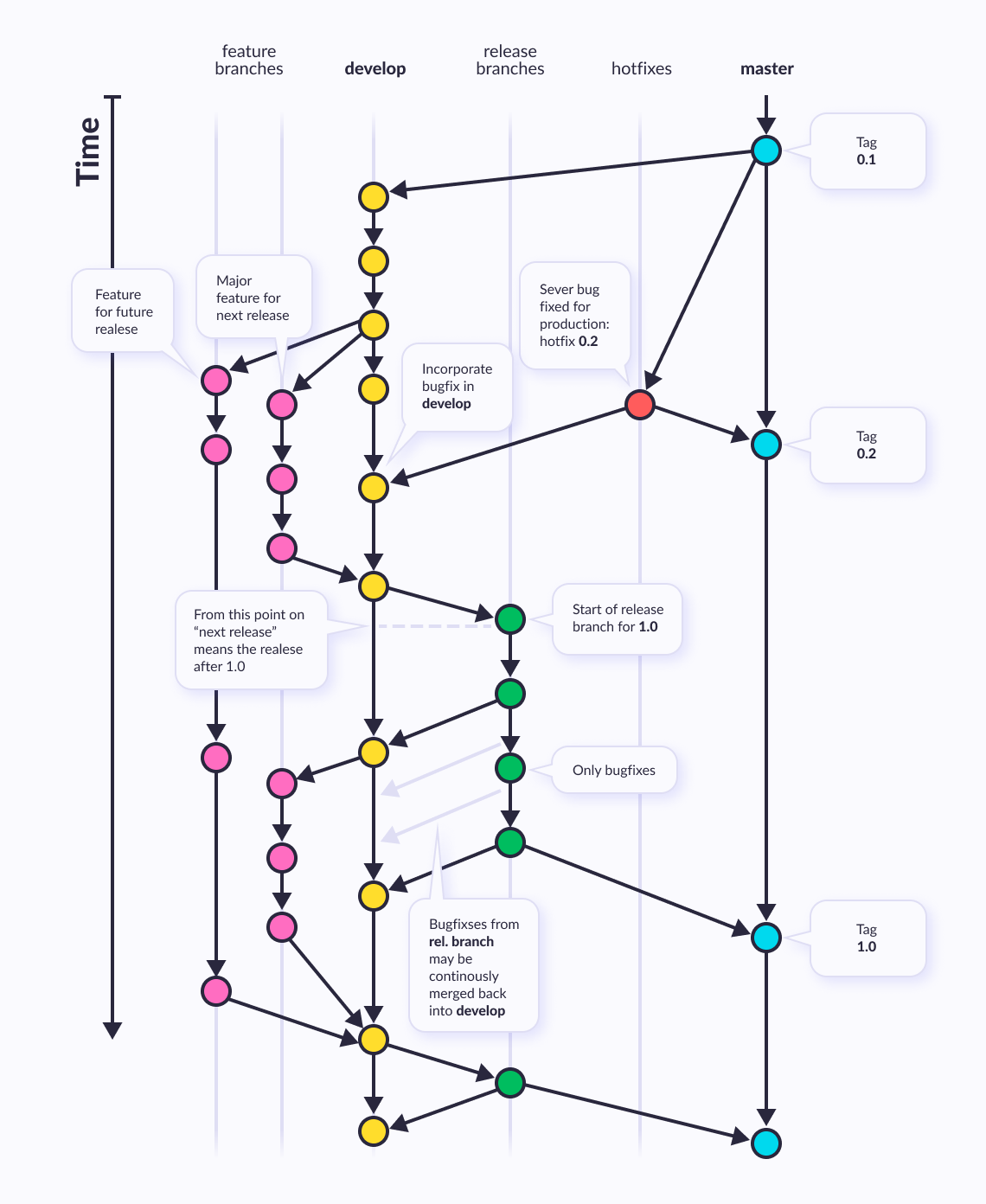
GitFlow, Vincent Driessen tarafından geliştirilmiş, belirli rollere sahip branch’lerle çalışan yapılandırılmış bir iş akışıdır.
GitFlow branch yapısı ve iş akışı diyagramı
GitFlow, çoklu versiyon desteği gereken büyük projelerde idealdir. Küçük ekipler için GitHub Flow daha basit olabilir.
GitFlow Branch Yapısı:
1
2
3
4
5
6
7
8
| # Ana branch'ler
main (master) # Production-ready kod
develop # Gelişt irme branch'i
# Destekleyici branch'ler
feature/* # Yeni özellikler
release/* # Release hazırlıkları
hotfix/* # Acil production fix'leri
|
GitFlow Kurulumu:
1
2
3
4
5
6
7
8
9
10
11
12
13
14
| # Git flow extension kurulumu (Linux/Mac)
sudo apt-get install git-flow # Ubuntu/Debian
brew install git-flow # macOS
# Git flow başlatma
git flow init
# Sorulara cevap ver:
# Production branch: main
# Development branch: develop
# Feature prefix: feature/
# Release prefix: release/
# Hotfix prefix: hotfix/
# Version tag prefix: v
|
Feature Branch Workflow:
1
2
3
4
5
6
7
8
9
10
11
12
13
14
15
16
17
18
| # Yeni feature başlat
git flow feature start user-authentication
# Çalışmalar...
git add .
git commit -m "Add user login functionality"
git commit -m "Add password hashing"
# Feature'ı bitir (develop'a merge eder)
git flow feature finish user-authentication
# Alternatif: Manuel workflow
git checkout develop
git checkout -b feature/user-authentication
# ... çalışmalar ...
git checkout develop
git merge --no-ff feature/user-authentication
git branch -d feature/user-authentication
|
Release Branch Workflow:
1
2
3
4
5
6
7
8
9
10
11
12
13
14
15
16
17
18
19
20
| # Release branch oluştur
git flow release start 1.2.0
# Release branch'te son düzenlemeler
git commit -m "Bump version to 1.2.0"
git commit -m "Update CHANGELOG"
# Release'i bitir (main ve develop'a merge, tag oluştur)
git flow release finish 1.2.0
# Manuel workflow
git checkout develop
git checkout -b release/1.2.0
# ... son düzenlemeler ...
git checkout main
git merge --no-ff release/1.2.0
git tag -a v1.2.0 -m "Release version 1.2.0"
git checkout develop
git merge --no-ff release/1.2.0
git branch -d release/1.2.0
|
Hotfix Branch Workflow:
1
2
3
4
5
6
7
8
9
10
11
12
13
14
15
16
17
18
19
| # Production'da acil bug var
git flow hotfix start critical-security-fix
# Fix'i yap
git commit -m "Fix SQL injection vulnerability"
# Hotfix'i bitir (main ve develop'a merge)
git flow hotfix finish critical-security-fix
# Manuel workflow
git checkout main
git checkout -b hotfix/critical-security-fix
# ... fix ...
git checkout main
git merge --no-ff hotfix/critical-security-fix
git tag -a v1.2.1 -m "Hotfix 1.2.1"
git checkout develop
git merge --no-ff hotfix/critical-security-fix
git branch -d hotfix/critical-security-fix
|
2. GitHub Flow: Basit ve Hızlı
GitHub Flow, sürekli deployment yapan ekipler için ideal, daha basit bir workflow’dur.
1
2
3
4
5
6
7
8
9
10
11
12
13
14
15
16
17
18
19
20
21
22
23
24
25
| # 1. Ana branch'ten yeni branch oluştur
git checkout main
git pull origin main
git checkout -b feature/add-payment-integration
# 2. Değişiklikler yap ve commit et
git add .
git commit -m "Add Stripe payment integration"
git commit -m "Add payment confirmation email"
# 3. Remote'a push et
git push origin feature/add-payment-integration
# 4. Pull Request oluştur (GitHub UI'dan)
# - Kod review
# - CI/CD testleri
# - Approval
# 5. Main'e merge (GitHub UI'dan)
# Genellikle "Squash and merge" kullanılır
# 6. Local'de cleanup
git checkout main
git pull origin main
git branch -d feature/add-payment-integration
|
GitHub Flow Özellikleri:
- Tek bir ana branch (main)
- Her değişiklik için kısa ömürlü feature branch
- Pull Request zorunlu
- Continuous deployment
- Basit ve anlaşılır
3. Trunk-Based Development
Trunk-based development, tüm geliştiricilerin doğrudan main branch’te veya çok kısa ömürlü branch’lerde çalıştığı bir stratejidir.
1
2
3
4
5
6
7
8
9
10
11
12
13
14
15
16
17
18
19
20
21
22
23
24
25
26
27
28
29
30
31
32
33
| # Küçük değişiklikler için doğrudan main
git checkout main
git pull origin main
# Küçük değişiklik yap
git add .
git commit -m "Fix typo in documentation"
git push origin main
# Büyük değişiklikler için kısa ömürlü branch (1-2 gün)
git checkout -b short-lived-feature
# Değişiklikler...
git commit -m "Add feature X - part 1"
git push origin short-lived-feature
# Hızlıca merge
git checkout main
git merge short-lived-feature
git push origin main
git branch -d short-lived-feature
# Feature flag kullanımı
# config/features.py
FEATURES = {
'new_dashboard': os.getenv('ENABLE_NEW_DASHBOARD', 'false') == 'true',
'payment_v2': os.getenv('ENABLE_PAYMENT_V2', 'false') == 'true',
}
# views.py
from config.features import FEATURES
def dashboard(request):
if FEATURES['new_dashboard']:
return render(request, 'dashboard_v2.html')
return render(request, 'dashboard_v1.html')
|
Git Merge vs Rebase vs Cherry-pick
Git Merge
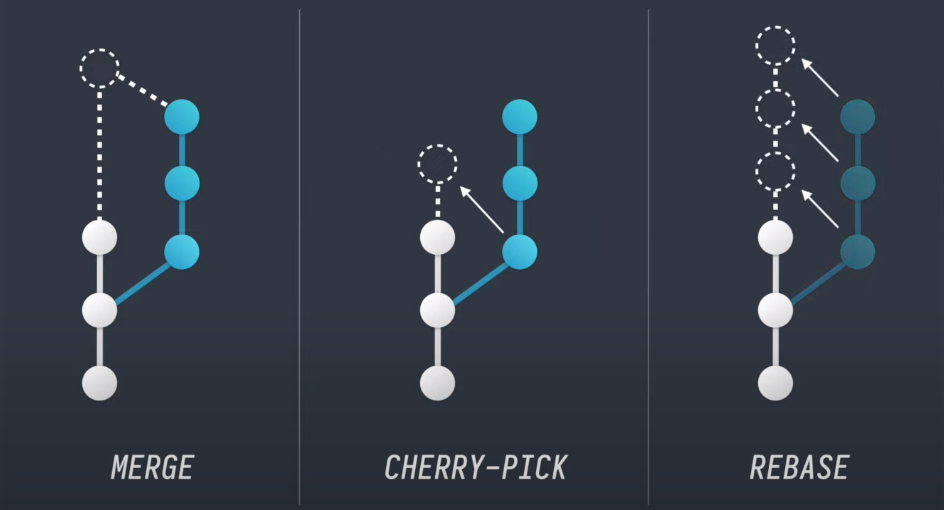
Merge, iki branch’in tarihçesini birleştirir ve merge commit oluşturur.
1
2
3
4
5
6
7
8
9
10
11
12
13
14
15
16
| # Feature branch'i main'e merge et
git checkout main
git merge feature/new-feature
# Merge commit mesajı otomatik oluşturulur:
# "Merge branch 'feature/new-feature' into main"
# Fast-forward merge'i engelle (merge commit oluştur)
git merge --no-ff feature/new-feature
# Conflict çözümü
git merge feature/new-feature
# Conflict var!
# Dosyaları düzenle
git add resolved-file.txt
git commit # Merge tamamlanır
|
Merge Conflict Örneği:
1
2
3
4
5
6
7
8
9
10
11
12
13
14
15
16
17
18
19
20
21
| # file.py - main branch
def calculate_total(items):
return sum(item.price for item in items)
# file.py - feature branch
def calculate_total(items):
return sum(item.price * item.quantity for item in items)
# Merge conflict:
<<<<<<< HEAD
def calculate_total(items):
return sum(item.price for item in items)
=======
def calculate_total(items):
return sum(item.price * item.quantity for item in items)
>>>>>>> feature/add-quantity
# Çözüm:
def calculate_total(items):
"""Calculate total price including quantity"""
return sum(item.price * item.quantity for item in items)
|
Git Rebase
Rebase, branch’in başlangıç noktasını değiştirir ve daha temiz bir history oluşturur.
1
2
3
4
5
6
7
8
9
10
11
12
13
14
15
16
17
18
19
20
21
22
23
24
25
26
27
28
29
30
| # Feature branch'i main üzerine rebase et
git checkout feature/new-feature
git rebase main
# Interactive rebase ile commit'leri düzenle
git rebase -i HEAD~5
# Interactive rebase komutları:
# pick - commit'i kullan
# reword - commit mesajını değiştir
# edit - commit'i düzenlemek için dur
# squash - önceki commit'le birleştir
# fixup - önceki commit'le birleştir (mesajı at)
# drop - commit'i sil
# Örnek interactive rebase:
pick 1a2b3c4 Add user model
squash 5d6e7f8 Fix typo in user model
reword 9g0h1i2 Add user authentication
pick 3j4k5l6 Add password reset
# Rebase conflict çözümü
git rebase main
# Conflict!
# Dosyaları düzenle
git add resolved-file.txt
git rebase --continue
# Rebase'i iptal et
git rebase --abort
|
Merge vs Rebase Karşılaştırma:
1
2
3
4
5
6
7
8
9
| # Merge ile:
# A - B - C - D - E (main)
# \ /
# F - G (feature) -> merge commit E
# Rebase ile:
# A - B - C - D (main)
# \
# F' - G' (feature) -> yeniden yazılmış commitler
|
Git Cherry-pick
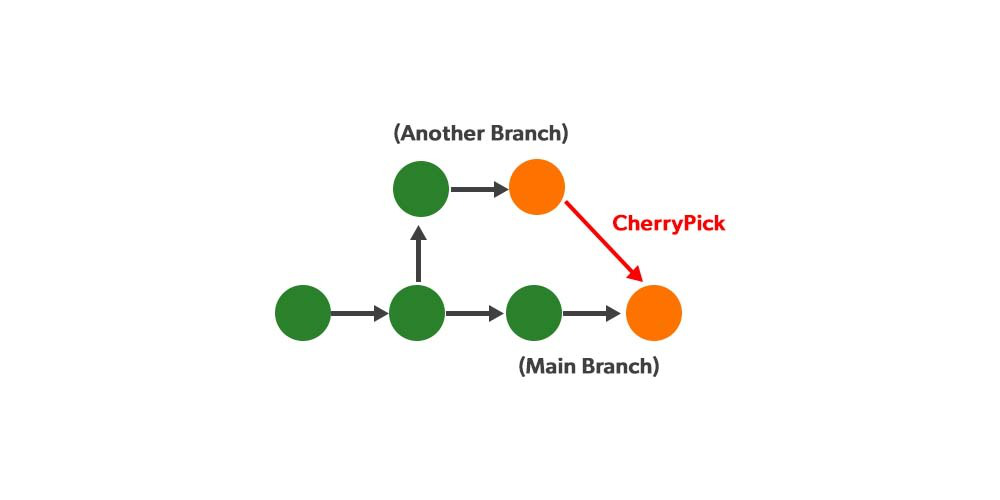
Cherry-pick, belirli commit’leri seçerek başka bir branch’e taşır.
1
2
3
4
5
6
7
8
9
10
11
12
13
14
15
16
17
18
19
20
21
22
23
24
25
26
| # Tek bir commit'i cherry-pick et
git checkout main
git cherry-pick 1a2b3c4
# Birden fazla commit
git cherry-pick 1a2b3c4 5d6e7f8 9g0h1i2
# Commit range
git cherry-pick main~3..main~1
# Cherry-pick conflict çözümü
git cherry-pick 1a2b3c4
# Conflict!
git status
# Dosyaları düzenle
git add .
git cherry-pick --continue
# Cherry-pick'i iptal et
git cherry-pick --abort
# Commit mesajını düzenle
git cherry-pick -e 1a2b3c4
# Commit yapmadan cherry-pick (staging'e al)
git cherry-pick -n 1a2b3c4
|
Cherry-pick Kullanım Senaryoları:
1
2
3
4
5
6
7
8
9
10
11
12
13
14
15
16
17
18
19
20
21
22
23
| # Senaryo 1: Hotfix'i birden fazla branch'e uygula
git checkout release-2.0
git cherry-pick hotfix-commit-hash
git checkout release-1.9
git cherry-pick hotfix-commit-hash
# Senaryo 2: Feature'dan sadece bir commit'i al
git log feature/experimental
# 1a2b3c4 - Güzel bir utility function (BU)
# 5d6e7f8 - Deneysel özellik (BUNU İSTEMİYORUZ)
git cherry-pick 1a2b3c4
# Senaryo 3: Yanlış branch'e commit atıldı
git checkout feature-A
# Yanlışlıkla buraya commit atıldı
git log # Son commit: 1a2b3c4
git checkout feature-B # Doğru branch
git cherry-pick 1a2b3c4
git checkout feature-A
git reset --hard HEAD~1 # Yanlış commit'i sil
|
Advanced Git Workflows
Pull Request Best Practices
1
2
3
4
5
6
7
8
9
10
11
12
13
14
15
16
17
18
19
20
21
22
23
24
25
26
27
28
29
30
31
32
33
34
35
36
37
38
39
40
| # 1. Feature branch oluştur
git checkout -b feature/user-profile
# 2. Küçük, mantıklı commitler
git add user_profile.py
git commit -m "Add user profile model"
git add tests/test_user_profile.py
git commit -m "Add tests for user profile"
git add views.py
git commit -m "Add user profile view"
# 3. Push öncesi rebase (temiz history)
git fetch origin
git rebase origin/main
# 4. Push
git push origin feature/user-profile
# 5. PR oluştur (GitHub/GitLab UI)
# - Descriptive title
# - Detailed description
# - Link related issues
# - Add reviewers
# 6. Feedback sonrası güncellemeler
git add .
git commit -m "Address review comments"
git push origin feature/user-profile
# 7. Merge öncesi son rebase
git fetch origin
git rebase origin/main
git push --force-with-lease origin feature/user-profile
# 8. PR merge edildikten sonra
git checkout main
git pull origin main
git branch -d feature/user-profile
|
Commit Message Convention
1
2
3
4
5
6
7
8
9
10
11
12
13
14
15
16
17
18
19
20
21
22
23
24
25
26
27
28
29
30
31
32
33
34
35
36
| # Conventional Commits format
<type>(<scope>): <subject>
<body>
<footer>
# Types:
# feat: Yeni özellik
# fix: Bug fix
# docs: Documentation
# style: Code formatting
# refactor: Code refactoring
# test: Test ekleme/güncelleme
# chore: Build, CI/CD güncellemeleri
# Örnekler:
git commit -m "feat(auth): add OAuth2 login support"
git commit -m "fix(api): handle null user in /profile endpoint"
git commit -m "docs: update API documentation for v2"
git commit -m "refactor(database): optimize user query performance"
# Breaking change
git commit -m "feat(api): change authentication endpoint
BREAKING CHANGE: /auth/login endpoint moved to /api/v2/auth/login"
# Multiple changes
git commit -m "feat(user): add profile picture upload
- Add file upload middleware
- Implement image processing
- Update user model
- Add profile picture tests
Closes #123"
|
Git Hooks ile Automation
1
2
3
4
5
6
7
8
9
10
11
12
13
14
15
16
17
18
19
20
21
22
23
24
25
26
27
28
29
30
31
32
33
| # .git/hooks/pre-commit
#!/bin/bash
# Pre-commit hook: Kod kalitesi kontrolleri
echo "Running pre-commit checks..."
# Python linting
echo "Checking Python code style..."
black --check .
if [ $? -ne 0 ]; then
echo "❌ Black formatting failed. Run 'black .' to fix."
exit 1
fi
flake8 .
if [ $? -ne 0 ]; then
echo "❌ Flake8 linting failed."
exit 1
fi
# Tests
echo "Running tests..."
pytest
if [ $? -ne 0 ]; then
echo "❌ Tests failed."
exit 1
fi
echo "✅ Pre-commit checks passed!"
exit 0
# Hook'u aktif et
chmod +x .git/hooks/pre-commit
|
1
2
3
4
5
6
7
8
9
10
11
12
13
14
15
16
17
18
19
20
21
22
| # .git/hooks/commit-msg
#!/bin/bash
# Commit message format kontrolü
commit_msg_file=$1
commit_msg=$(cat "$commit_msg_file")
# Conventional commits format kontrolü
pattern="^(feat|fix|docs|style|refactor|test|chore)(\(.+\))?: .{1,50}"
if ! echo "$commit_msg" | grep -qE "$pattern"; then
echo "❌ Invalid commit message format!"
echo "Format: <type>(<scope>): <subject>"
echo "Example: feat(auth): add OAuth2 support"
exit 1
fi
echo "✅ Commit message format is valid"
exit 0
# Hook'u aktif et
chmod +x .git/hooks/commit-msg
|
Git Stash: Geçici Değişiklikleri Saklama
1
2
3
4
5
6
7
8
9
10
11
12
13
14
15
16
17
18
19
20
21
22
23
24
25
26
27
28
29
30
31
32
33
34
35
| # Değişiklikleri stash'le
git stash
# Mesajlı stash
git stash save "WIP: working on new feature"
# Untracked dosyaları da dahil et
git stash -u
# Stash listesi
git stash list
# stash@{0}: WIP: working on new feature
# stash@{1}: On feature-branch: 1234567
# stash@{2}: WIP on main: abcdefg
# Stash'i geri getir
git stash pop # Son stash'i geri getirir ve siler
# Stash'i geri getir ama silme
git stash apply stash@{1}
# Stash içeriğini göster
git stash show -p stash@{0}
# Stash'ten yeni branch oluştur
git stash branch new-feature-branch stash@{0}
# Belirli dosyaları stash'le
git stash push -m "WIP: database changes" database.py models.py
# Stash'i sil
git stash drop stash@{1}
# Tüm stash'leri sil
git stash clear
|
Collaborative Workflows
Code Review Süreci
1
2
3
4
5
6
7
8
9
10
11
12
13
14
15
16
17
18
| # 1. Reviewer olarak PR'ı local'e çek
git fetch origin pull/123/head:pr-123
git checkout pr-123
# 2. Kodu incele, testleri çalıştır
pytest
npm test
# 3. Feedback ver (GitHub UI)
# - Inline comments
# - Approval / Request changes
# - Overall comment
# 4. Author güncellemeler yaptıktan sonra
git checkout pr-123
git pull origin feature/pr-branch
# 5. Approve ve merge (GitHub UI)
|
Conflict Resolution Strategy
1
2
3
4
5
6
7
8
9
10
11
12
13
14
15
16
17
18
19
20
21
22
23
24
25
26
27
28
29
30
31
32
33
34
35
| # Conflict senaryosu
git merge feature-branch
# CONFLICT in file.py
# 1. Conflict'i gör
git status
git diff
# 2. Merge tool kullan
git mergetool
# 3. Manuel çözüm
<<<<<<< HEAD
def calculate(a, b):
return a + b
=======
def calculate(a, b):
return a * b
>>>>>>> feature-branch
# Çözüm:
def calculate(a, b, operation='add'):
"""Calculate with specified operation"""
if operation == 'add':
return a + b
elif operation == 'multiply':
return a * b
raise ValueError(f"Unknown operation: {operation}")
# 4. Çözümü kaydet
git add file.py
git commit
# Merge'i iptal etmek istersen
git merge --abort
|
Monorepo Workflow
1
2
3
4
5
6
7
8
9
10
11
12
13
14
15
16
17
18
19
20
21
22
23
| # Monorepo yapısı
project/
frontend/
backend/
mobile/
shared/
# Sadece ilgili dizinde çalış
git log -- backend/
git diff HEAD~1 -- frontend/
# Dizin bazlı commit
git add frontend/
git commit -m "feat(frontend): update UI components"
# Dizin bazlı branch
git checkout -b feature/backend-api
# Sadece backend/ değişiklikleri
# Subdirectory'yi clone et (sparse checkout)
git clone --filter=blob:none --sparse https://github.com/user/repo.git
cd repo
git sparse-checkout set backend/
|
Advanced Git Techniques
Git Bisect: Bug Hunting
1
2
3
4
5
6
7
8
9
10
11
12
13
14
15
16
17
18
19
20
21
22
| # Binary search ile hatalı commit'i bul
git bisect start
git bisect bad # Mevcut commit hatalı
git bisect good v1.2.0 # Bu version iyiydi
# Git otomatik olarak ortadaki commit'e geçer
# Testi çalıştır
pytest tests/test_feature.py
# Sonuca göre işaretle
git bisect good # Veya git bisect bad
# Git tekrar ortadaki commit'e geçer
# İşlemi tekrarla...
# Hatalı commit bulundu!
git bisect reset # Normal duruma dön
# Otomatik bisect (test script ile)
git bisect start HEAD v1.2.0
git bisect run pytest tests/test_feature.py
# Git otomatik olarak her commit'te testi çalıştırır
|
Git Reflog: Kayıp Commit’leri Kurtar
1
2
3
4
5
6
7
8
9
10
11
12
13
14
| # Yanlışlıkla branch silindi veya reset yapıldı
git reflog
# Output:
# 1a2b3c4 HEAD@{0}: reset: moving to HEAD~1
# 5d6e7f8 HEAD@{1}: commit: important feature
# 9g0h1i2 HEAD@{2}: checkout: moving from main to feature
# Kayıp commit'i kurtar
git checkout 5d6e7f8
git checkout -b recovered-branch
# Veya reset ile
git reset --hard 5d6e7f8
|
Git Worktree: Çoklu Branch’lerle Çalışma
1
2
3
4
5
6
7
8
9
10
11
12
13
14
15
16
17
18
19
20
21
22
23
24
25
26
27
| # Ana proje
cd /path/to/project
# Yeni worktree oluştur
git worktree add ../project-feature feature/new-feature
git worktree add ../project-hotfix hotfix/critical-bug
# Worktree'ler
/path/to/project/ # main branch
/path/to/project-feature/ # feature branch
/path/to/project-hotfix/ # hotfix branch
# Her worktree'de bağımsız çalış
cd ../project-feature
# Feature geliştirme
cd ../project-hotfix
# Hotfix
cd ../project
# Main branch
# Worktree listesi
git worktree list
# Worktree sil
git worktree remove ../project-feature
|
Best Practices ve İpuçları
1. Küçük, Sık Commitler
1
2
3
4
5
6
7
8
9
10
11
12
13
| # ❌ Kötü: Tek büyük commit
git add .
git commit -m "Add feature X"
# ✅ İyi: Mantıklı küçük commitler
git add models.py
git commit -m "feat(models): add User model"
git add views.py
git commit -m "feat(views): add user registration view"
git add tests/
git commit -m "test(user): add user registration tests"
|
2. Branch Naming Convention
1
2
3
4
5
6
7
8
9
10
11
| # Format: <type>/<description>
feature/user-authentication
feature/payment-integration
bugfix/login-error
hotfix/security-vulnerability
release/v1.2.0
chore/update-dependencies
# Issue/ticket numarası ile
feature/PROJ-123-user-profile
bugfix/JIRA-456-fix-null-pointer
|
3. Remote Branch Yönetimi
1
2
3
4
5
6
7
8
9
10
11
| # Remote branch'leri listele
git branch -r
# Silinen remote branch'leri temizle
git fetch --prune
# Local'de olmayan remote branch'leri sil
git remote prune origin
# Tüm remote tracking branch'leri göster
git branch -vv
|
4. Git Aliases
1
2
3
4
5
6
7
8
9
10
11
12
13
14
15
16
| # ~/.gitconfig
[alias]
st = status
co = checkout
br = branch
ci = commit
unstage = reset HEAD --
last = log -1 HEAD
visual = log --oneline --graph --all
amend = commit --amend --no-edit
undo = reset --soft HEAD~1
# Kullanım
git st
git co main
git visual
|
Sonuç
Etkili bir Git iş akışı, takım büyüklüğü, proje tipi ve deployment stratejisine bağlı olarak şekillendirilmelidir:
- GitFlow: Scheduled release’ler olan büyük projeler için
- GitHub Flow: Continuous deployment yapan küçük-orta ekipler için
- Trunk-Based: Çok sık deployment yapan olgun ekipler için
Önemli Noktalar:
- Tutarlı branch naming convention kullanın
- Descriptive commit mesajları yazın
- Code review sürecini atlama yın
- Merge conflict’lerden kaçınmak için sık sık rebase yapın
- Git hooks ile otomasyonu artırın
- Ekip kültürüne uygun bir strateji seçin
Doğru Git workflow’u, kod kalitesini artırır, deployment risklerini azaltır ve ekip collaborasyonunu güçlendirir.