Gönderi

Elasticsearch ile Tam Metin Arama: Index, Query ve Aggregation

Elasticsearch ile production-grade full-text search. Index mapping, query DSL, bool queries, aggregations, analyzer ve performance optimization best practices.

Elasticsearch ile Tam Metin Arama: Index, Query ve Aggregation

Elasticsearch, Apache Lucene üzerine inşa edilmiş, dağıtık ve ölçeklenebilir tam metin arama motorudur. Büyük veri setlerinde hızlı arama, analiz ve görselleştirme için ideal bir çözümdür. Bu yazıda Elasticsearch’ün temellerinden ileri seviye kullanımına kadar detaylı bir rehber sunacağız.

Elasticsearch Nedir?

Elasticsearch, RESTful API ile kullanılan, JSON tabanlı, açık kaynaklı bir arama ve analiz motorudur. ELK Stack (Elasticsearch, Logstash, Kibana) ve Elastic Stack’in kalbidir.

Temel Özellikler

  • Full-Text Search: Güçlü metin analizi ve arama
  • Distributed: Yatay ölçeklenebilir mimari
  • Real-time: Near real-time arama ve indexing
  • Schema-free: Dinamik mapping
  • RESTful API: HTTP/JSON tabanlı iletişim
  • Multi-tenancy: Birden fazla index ve type desteği

Kullanım Alanları

1
2
3
4
5
6
7
8
9
10
11
12
13
14
15
16
17
18
# Log analizi (ELK Stack)
- Application logs
- Security logs
- Infrastructure monitoring

# E-ticaret arama
- Product search
- Faceted search
- Autocomplete suggestions

# Analitik
- Real-time analytics
- Business intelligence
- Metrics aggregation

# Geospatial
- Location-based search
- Geolocation analytics

Kurulum ve Başlangıç

Docker ile Hızlı Başlangıç

1
2
3
4
5
6
7
8
9
10
11
12
13
14
15
16
17
18
19
20
21
# Elasticsearch 8.x container
docker run -d \
  --name elasticsearch \
  -p 9200:9200 -p 9300:9300 \
  -e "discovery.type=single-node" \
  -e "xpack.security.enabled=false" \
  -e "ES_JAVA_OPTS=-Xms512m -Xmx512m" \
  docker.elastic.co/elasticsearch/elasticsearch:8.11.0

# Health check
curl http://localhost:9200
# {
#   "name" : "node-1",
#   "cluster_name" : "docker-cluster",
#   "version" : {
#     "number" : "8.11.0"
#   }
# }

# Cluster health
curl http://localhost:9200/_cluster/health?pretty

Python Elasticsearch Client

1
pip install elasticsearch
1
2
3
4
5
6
7
8
9
10
11
12
13
14
15
from elasticsearch import Elasticsearch
from datetime import datetime

# Bağlantı oluşturma
es = Elasticsearch(
    hosts=['http://localhost:9200'],
    basic_auth=('elastic', 'password')  # Eğer authentication varsa
)

# Cluster info
print(es.info())

# Ping test
if es.ping():
    print("Elasticsearch bağlantısı başarılı!")

Elasticsearch bağlantısı kurarken mutlaka timeout ve retry mekanizmaları ekleyin. Production ortamında connection pooling kullanın.

Index ve Mapping

Elasticsearch Internal Architecture Elasticsearch iç mimarisi ve indexing yapısı

Index Oluşturma

1
2
3
4
5
6
7
8
9
10
11
12
13
14
15
16
17
18
19
20
21
22
23
24
25
26
27
28
29
30
31
32
33
34
35
36
37
38
39
40
41
42
43
44
45
46
47
48
49
50
51
52
53
54
55
56
57
58
59
60
61
62
63
64
65
66
67
68
69
70
71
# Basit index oluşturma
es.indices.create(index='products')

# Ayarlar ve mapping ile
index_body = {
    "settings": {
        "number_of_shards": 3,
        "number_of_replicas": 2,
        "analysis": {
            "analyzer": {
                "turkish_analyzer": {
                    "type": "custom",
                    "tokenizer": "standard",
                    "filter": ["lowercase", "turkish_stop", "turkish_stemmer"]
                }
            },
            "filter": {
                "turkish_stop": {
                    "type": "stop",
                    "stopwords": "_turkish_"
                },
                "turkish_stemmer": {
                    "type": "stemmer",
                    "language": "turkish"
                }
            }
        }
    },
    "mappings": {
        "properties": {
            "title": {
                "type": "text",
                "analyzer": "turkish_analyzer",
                "fields": {
                    "keyword": {
                        "type": "keyword",
                        "ignore_above": 256
                    }
                }
            },
            "description": {
                "type": "text",
                "analyzer": "turkish_analyzer"
            },
            "price": {
                "type": "float"
            },
            "stock": {
                "type": "integer"
            },
            "category": {
                "type": "keyword"
            },
            "tags": {
                "type": "keyword"
            },
            "created_at": {
                "type": "date",
                "format": "yyyy-MM-dd HH:mm:ss||yyyy-MM-dd||epoch_millis"
            },
            "location": {
                "type": "geo_point"
            },
            "is_active": {
                "type": "boolean"
            }
        }
    }
}

es.indices.create(index='products', body=index_body)

Türkçe içerik için özel analyzer tanımlayın. Turkish stop words ve stemmer kullanımı arama kalitesini önemli ölçüde artırır.

Mapping Types

1
2
3
4
5
6
7
8
9
10
11
12
13
14
15
16
17
18
19
20
21
22
23
24
25
26
27
28
29
30
31
32
33
34
35
36
# Field data types
field_types = {
    # Text fields
    "text": "Full-text search",
    "keyword": "Exact match, aggregations",
    
    # Numeric
    "long": "64-bit integer",
    "integer": "32-bit integer",
    "short": "16-bit integer",
    "byte": "8-bit integer",
    "double": "64-bit float",
    "float": "32-bit float",
    
    # Date
    "date": "Date values",
    
    # Boolean
    "boolean": "true/false",
    
    # Binary
    "binary": "Base64 encoded binary",
    
    # Range
    "integer_range": "Range of integers",
    "float_range": "Range of floats",
    "date_range": "Range of dates",
    
    # Complex
    "object": "JSON object",
    "nested": "Nested object array",
    
    # Geo
    "geo_point": "Latitude/longitude",
    "geo_shape": "Complex shapes"
}

Document İşlemleri

Document Ekleme

1
2
3
4
5
6
7
8
9
10
11
12
13
14
15
16
17
18
# Tek document ekleme
doc = {
    "title": "MacBook Pro 16\"",
    "description": "Apple M3 Max işlemci, 32GB RAM, 1TB SSD",
    "price": 85000.00,
    "stock": 15,
    "category": "electronics",
    "tags": ["laptop", "apple", "premium"],
    "created_at": datetime.now().strftime("%Y-%m-%d %H:%M:%S"),
    "is_active": True
}

result = es.index(index='products', id='1', document=doc)
print(f"Document indexed: {result['result']}")

# Auto-generated ID
result = es.index(index='products', document=doc)
print(f"Generated ID: {result['_id']}")

Bulk Operations

1
2
3
4
5
6
7
8
9
10
11
12
13
14
15
16
17
18
19
20
21
22
23
24
25
26
27
28
29
30
31
32
33
34
35
from elasticsearch.helpers import bulk

# Bulk indexing
products = [
    {
        "_index": "products",
        "_id": i,
        "_source": {
            "title": f"Product {i}",
            "description": f"Description for product {i}",
            "price": 100 + (i * 10),
            "stock": i * 5,
            "category": "electronics" if i % 2 == 0 else "clothing",
            "tags": ["tag1", "tag2"],
            "created_at": datetime.now().strftime("%Y-%m-%d %H:%M:%S"),
            "is_active": True
        }
    }
    for i in range(1, 1001)
]

# Bulk insert
success, failed = bulk(es, products)
print(f"Successfully indexed: {success}, Failed: {failed}")

# Bulk API manual
from elasticsearch import helpers

actions = [
    {"_op_type": "index", "_index": "products", "_id": 1, "_source": doc},
    {"_op_type": "update", "_index": "products", "_id": 2, "doc": {"price": 120}},
    {"_op_type": "delete", "_index": "products", "_id": 3}
]

helpers.bulk(es, actions)

Bulk operasyonlarda chunk_size ve max_chunk_bytes parametrelerini ayarlayın. Çok büyük batch’ler memory sorunlarına yol açabilir.

Document Güncelleme ve Silme

1
2
3
4
5
6
7
8
9
10
11
12
13
14
15
16
17
18
19
20
21
22
23
24
25
26
27
28
29
30
31
32
33
34
35
36
37
38
39
40
41
42
43
44
45
46
# Update
es.update(
    index='products',
    id='1',
    body={
        "doc": {
            "price": 82000.00,
            "stock": 12
        }
    }
)

# Update with script
es.update(
    index='products',
    id='1',
    body={
        "script": {
            "source": "ctx._source.stock -= params.count",
            "params": {"count": 1}
        }
    }
)

# Upsert
es.update(
    index='products',
    id='1',
    body={
        "doc": {"price": 80000},
        "doc_as_upsert": True
    }
)

# Delete
es.delete(index='products', id='1')

# Delete by query
es.delete_by_query(
    index='products',
    body={
        "query": {
            "term": {"is_active": False}
        }
    }
)

Delete by query operasyonu geri alınamaz! Production ortamında mutlaka önce query’yi test edin ve backup alın.

Arama Query’leri

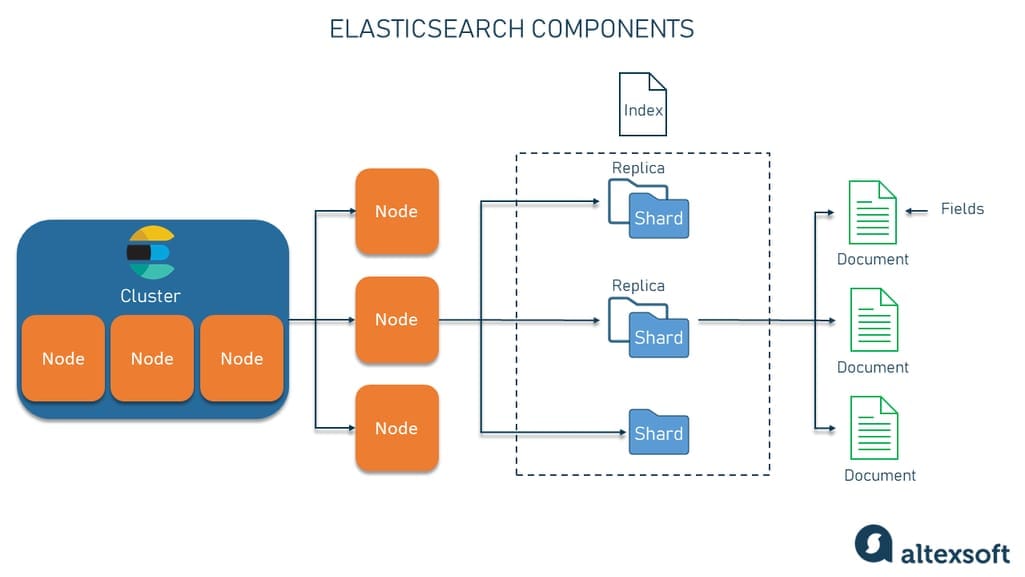
Elasticsearch Physical Structure Elasticsearch cluster yapısı: node, shard ve replica mimarisi

Match Query

1
2
3
4
5
6
7
8
9
10
11
12
13
14
15
16
17
18
19
20
21
22
23
24
25
26
27
28
29
30
31
32
33
34
35
36
37
38
39
40
41
42
43
# Simple match
response = es.search(
    index='products',
    body={
        "query": {
            "match": {
                "description": "MacBook Pro"
            }
        }
    }
)

for hit in response['hits']['hits']:
    print(f"{hit['_score']}: {hit['_source']['title']}")

# Match with operator
response = es.search(
    index='products',
    body={
        "query": {
            "match": {
                "description": {
                    "query": "MacBook Pro Apple",
                    "operator": "and"  # Tüm kelimeler olmalı
                }
            }
        }
    }
)

# Multi-match (birden fazla field)
response = es.search(
    index='products',
    body={
        "query": {
            "multi_match": {
                "query": "MacBook",
                "fields": ["title^2", "description"],  # ^2 = boosting
                "type": "best_fields"
            }
        }
    }
)

Term Query (Exact Match)

1
2
3
4
5
6
7
8
9
10
11
12
13
14
15
16
17
18
19
20
21
22
23
24
25
26
27
28
29
30
31
32
33
34
35
36
37
38
39
40
41
42
43
44
45
46
47
48
49
50
# Term query (keyword field)
response = es.search(
    index='products',
    body={
        "query": {
            "term": {
                "category": "electronics"
            }
        }
    }
)

# Terms query (multiple values)
response = es.search(
    index='products',
    body={
        "query": {
            "terms": {
                "tags": ["laptop", "premium"]
            }
        }
    }
)

# Range query
response = es.search(
    index='products',
    body={
        "query": {
            "range": {
                "price": {
                    "gte": 50000,
                    "lte": 100000
                }
            }
        }
    }
)

# Exists query
response = es.search(
    index='products',
    body={
        "query": {
            "exists": {
                "field": "discount"
            }
        }
    }
)

Bool Query (Compound)

1
2
3
4
5
6
7
8
9
10
11
12
13
14
15
16
17
18
19
20
21
22
23
24
25
# Bool query: must, should, must_not, filter
response = es.search(
    index='products',
    body={
        "query": {
            "bool": {
                "must": [
                    {"match": {"title": "MacBook"}}
                ],
                "filter": [
                    {"term": {"category": "electronics"}},
                    {"range": {"price": {"lte": 90000}}}
                ],
                "should": [
                    {"term": {"tags": "premium"}},
                    {"term": {"tags": "new"}}
                ],
                "must_not": [
                    {"term": {"is_active": False}}
                ],
                "minimum_should_match": 1
            }
        }
    }
)

Bool query’de filter context kullanmak scoring’i atlar ve cache’lenebilir. Performance için range ve term query’leri filter içinde kullanın.

Fuzzy ve Wildcard

1
2
3
4
5
6
7
8
9
10
11
12
13
14
15
16
17
18
19
20
21
22
23
24
25
26
27
28
29
30
31
32
33
34
35
36
37
38
39
40
41
42
43
44
45
46
47
48
49
50
# Fuzzy search (typo tolerance)
response = es.search(
    index='products',
    body={
        "query": {
            "fuzzy": {
                "title": {
                    "value": "MacBok",  # Typo
                    "fuzziness": "AUTO"  # Levenshtein distance
                }
            }
        }
    }
)

# Wildcard
response = es.search(
    index='products',
    body={
        "query": {
            "wildcard": {
                "title": "*Book*"
            }
        }
    }
)

# Prefix
response = es.search(
    index='products',
    body={
        "query": {
            "prefix": {
                "title": "Mac"
            }
        }
    }
)

# Regexp
response = es.search(
    index='products',
    body={
        "query": {
            "regexp": {
                "title": "Mac.*Pro"
            }
        }
    }
)

Wildcard ve regexp query’ler yavaştır. Prefix query veya n-gram tokenizer kullanmak daha performanslıdır.

Aggregations

Metrics Aggregations

1
2
3
4
5
6
7
8
9
10
11
12
13
14
15
16
17
18
19
20
21
22
23
24
25
26
27
28
29
30
31
32
# Stats aggregation
response = es.search(
    index='products',
    body={
        "size": 0,  # Sadece aggregation sonucu
        "aggs": {
            "price_stats": {
                "stats": {
                    "field": "price"
                }
            }
        }
    }
)

stats = response['aggregations']['price_stats']
print(f"Min: {stats['min']}, Max: {stats['max']}, Avg: {stats['avg']}")

# Multiple metrics
response = es.search(
    index='products',
    body={
        "size": 0,
        "aggs": {
            "min_price": {"min": {"field": "price"}},
            "max_price": {"max": {"field": "price"}},
            "avg_price": {"avg": {"field": "price"}},
            "sum_stock": {"sum": {"field": "stock"}},
            "value_count": {"value_count": {"field": "price"}}
        }
    }
)

Bucket Aggregations

1
2
3
4
5
6
7
8
9
10
11
12
13
14
15
16
17
18
19
20
21
22
23
24
25
26
27
28
29
30
31
32
33
34
35
36
37
38
39
40
41
42
43
44
45
46
47
48
49
50
51
52
53
54
55
56
57
# Terms aggregation (group by)
response = es.search(
    index='products',
    body={
        "size": 0,
        "aggs": {
            "categories": {
                "terms": {
                    "field": "category",
                    "size": 10,
                    "order": {"_count": "desc"}
                }
            }
        }
    }
)

for bucket in response['aggregations']['categories']['buckets']:
    print(f"{bucket['key']}: {bucket['doc_count']}")

# Range aggregation
response = es.search(
    index='products',
    body={
        "size": 0,
        "aggs": {
            "price_ranges": {
                "range": {
                    "field": "price",
                    "ranges": [
                        {"to": 1000},
                        {"from": 1000, "to": 5000},
                        {"from": 5000, "to": 10000},
                        {"from": 10000}
                    ]
                }
            }
        }
    }
)

# Date histogram
response = es.search(
    index='products',
    body={
        "size": 0,
        "aggs": {
            "sales_over_time": {
                "date_histogram": {
                    "field": "created_at",
                    "calendar_interval": "month",
                    "format": "yyyy-MM"
                }
            }
        }
    }
)

Nested Aggregations

1
2
3
4
5
6
7
8
9
10
11
12
13
14
15
16
17
18
19
20
21
22
23
24
25
26
27
28
29
30
31
32
# Sub-aggregations
response = es.search(
    index='products',
    body={
        "size": 0,
        "aggs": {
            "categories": {
                "terms": {"field": "category"},
                "aggs": {
                    "avg_price": {"avg": {"field": "price"}},
                    "total_stock": {"sum": {"field": "stock"}},
                    "price_ranges": {
                        "range": {
                            "field": "price",
                            "ranges": [
                                {"to": 1000},
                                {"from": 1000, "to": 5000},
                                {"from": 5000}
                            ]
                        }
                    }
                }
            }
        }
    }
)

for category in response['aggregations']['categories']['buckets']:
    print(f"\nCategory: {category['key']}")
    print(f"  Count: {category['doc_count']}")
    print(f"  Avg Price: {category['avg_price']['value']}")
    print(f"  Total Stock: {category['total_stock']['value']}")

Aggregation sonuçları cache’lenir. Sık kullanılan aggregation’ları filter context ile birleştirerek cache hit rate’i artırın.

İleri Seviye Özellikler

Highlighting

1
2
3
4
5
6
7
8
9
10
11
12
13
14
15
16
17
18
19
20
21
22
response = es.search(
    index='products',
    body={
        "query": {
            "match": {"description": "MacBook"}
        },
        "highlight": {
            "fields": {
                "description": {
                    "pre_tags": ["<strong>"],
                    "post_tags": ["</strong>"],
                    "fragment_size": 150,
                    "number_of_fragments": 3
                }
            }
        }
    }
)

for hit in response['hits']['hits']:
    if 'highlight' in hit:
        print(hit['highlight']['description'])

Suggestions

1
2
3
4
5
6
7
8
9
10
11
12
13
14
15
16
17
18
19
20
21
22
23
24
25
26
27
28
29
30
31
32
33
34
35
36
37
38
39
40
41
42
43
44
45
# Term suggester (typo correction)
response = es.search(
    index='products',
    body={
        "suggest": {
            "title_suggest": {
                "text": "MacBok",
                "term": {
                    "field": "title"
                }
            }
        }
    }
)

# Completion suggester (autocomplete)
# Önce mapping ile completion field tanımlama
mapping = {
    "properties": {
        "title_suggest": {
            "type": "completion"
        }
    }
}

es.indices.put_mapping(index='products', body=mapping)

# Completion query
response = es.search(
    index='products',
    body={
        "suggest": {
            "title_autocomplete": {
                "prefix": "Mac",
                "completion": {
                    "field": "title_suggest",
                    "size": 5,
                    "fuzzy": {
                        "fuzziness": "AUTO"
                    }
                }
            }
        }
    }
)

Scroll API (Pagination)

1
2
3
4
5
6
7
8
9
10
11
12
13
14
15
16
17
18
19
20
21
22
23
# Large result set için scroll
response = es.search(
    index='products',
    body={"query": {"match_all": {}}},
    scroll='2m',  # Scroll context timeout
    size=100
)

scroll_id = response['_scroll_id']
hits = response['hits']['hits']

while len(hits) > 0:
    # Process hits
    for hit in hits:
        print(hit['_source']['title'])
    
    # Get next batch
    response = es.scroll(scroll_id=scroll_id, scroll='2m')
    scroll_id = response['_scroll_id']
    hits = response['hits']['hits']

# Clear scroll context
es.clear_scroll(scroll_id=scroll_id)

Scroll API yerine Search After kullanmak daha verimlidir. Scroll context memory tüketir ve mutlaka clear edilmelidir.

1
2
3
4
5
6
7
8
9
10
11
12
13
14
15
16
17
18
19
20
21
22
23
24
25
26
27
28
29
30
31
32
33
34
35
36
37
38
39
40
41
42
# Percolator index oluşturma
es.indices.create(
    index='alerts',
    body={
        "mappings": {
            "properties": {
                "query": {"type": "percolator"},
                "alert_name": {"type": "keyword"}
            }
        }
    }
)

# Query kaydetme
es.index(
    index='alerts',
    id='1',
    body={
        "alert_name": "expensive_products",
        "query": {
            "range": {
                "price": {"gte": 50000}
            }
        }
    }
)

# Document ile eşleşen query'leri bulma
response = es.search(
    index='alerts',
    body={
        "query": {
            "percolate": {
                "field": "query",
                "document": {
                    "title": "MacBook Pro",
                    "price": 85000
                }
            }
        }
    }
)

Elasticsearch Python Helper Sınıfı

1
2
3
4
5
6
7
8
9
10
11
12
13
14
15
16
17
18
19
20
21
22
23
24
25
26
27
28
29
30
31
32
33
34
35
36
37
38
39
40
41
42
43
44
45
46
47
48
49
50
51
52
53
54
55
56
57
58
59
60
61
62
63
64
65
66
67
68
69
70
71
72
73
74
75
76
77
78
79
80
81
82
83
84
85
86
87
88
89
90
91
92
93
94
95
96
97
98
99
100
101
from elasticsearch import Elasticsearch
from elasticsearch.helpers import bulk
from typing import List, Dict, Any
import logging

class ElasticsearchClient:
    def __init__(self, hosts: List[str], index_name: str):
        self.es = Elasticsearch(hosts=hosts)
        self.index = index_name
        self.logger = logging.getLogger(__name__)
    
    def create_index(self, mapping: Dict[str, Any]) -> bool:
        """Index oluştur"""
        try:
            if not self.es.indices.exists(index=self.index):
                self.es.indices.create(index=self.index, body=mapping)
                self.logger.info(f"Index created: {self.index}")
                return True
            return False
        except Exception as e:
            self.logger.error(f"Index creation error: {e}")
            return False
    
    def bulk_index(self, documents: List[Dict[str, Any]]) -> tuple:
        """Toplu indexleme"""
        actions = [
            {
                "_index": self.index,
                "_id": doc.get("id"),
                "_source": doc
            }
            for doc in documents
        ]
        
        success, failed = bulk(self.es, actions)
        self.logger.info(f"Indexed: {success}, Failed: {failed}")
        return success, failed
    
    def search(self, query: Dict[str, Any], size: int = 10) -> List[Dict]:
        """Arama yap"""
        try:
            response = self.es.search(
                index=self.index,
                body={"query": query, "size": size}
            )
            return [hit['_source'] for hit in response['hits']['hits']]
        except Exception as e:
            self.logger.error(f"Search error: {e}")
            return []
    
    def aggregate(self, aggs: Dict[str, Any]) -> Dict:
        """Aggregation yap"""
        try:
            response = self.es.search(
                index=self.index,
                body={"size": 0, "aggs": aggs}
            )
            return response['aggregations']
        except Exception as e:
            self.logger.error(f"Aggregation error: {e}")
            return {}
    
    def update_by_query(self, query: Dict, script: Dict) -> int:
        """Query ile güncelleme"""
        try:
            response = self.es.update_by_query(
                index=self.index,
                body={"query": query, "script": script}
            )
            return response['updated']
        except Exception as e:
            self.logger.error(f"Update error: {e}")
            return 0

# Kullanım
es_client = ElasticsearchClient(
    hosts=['http://localhost:9200'],
    index_name='products'
)

# Index oluştur
mapping = {
    "mappings": {
        "properties": {
            "title": {"type": "text"},
            "price": {"type": "float"},
            "category": {"type": "keyword"}
        }
    }
}
es_client.create_index(mapping)

# Bulk indexing
products = [
    {"id": 1, "title": "Product 1", "price": 100, "category": "A"},
    {"id": 2, "title": "Product 2", "price": 200, "category": "B"}
]
es_client.bulk_index(products)

# Search
results = es_client.search({"match": {"title": "Product"}})

Bu helper class production kullanımı için connection pooling, retry logic ve comprehensive error handling ile genişletilebilir.

Best Practices

Index Yapılandırması

1
2
3
4
5
6
7
8
9
10
11
12
13
14
15
16
17
18
19
20
21
22
23
24
25
26
27
28
29
30
31
# Production index settings
index_settings = {
    "settings": {
        # Shard configuration
        "number_of_shards": 3,  # Data size based
        "number_of_replicas": 2,  # HA için
        
        # Refresh interval
        "refresh_interval": "30s",  # Default 1s, yüksek indexing için artır
        
        # Translog
        "translog": {
            "durability": "async",
            "sync_interval": "5s"
        },
        
        # Codec
        "codec": "best_compression",  # Disk kullanımını azalt
        
        # Analysis
        "analysis": {
            "analyzer": {
                "custom_analyzer": {
                    "type": "custom",
                    "tokenizer": "standard",
                    "filter": ["lowercase", "stop", "snowball"]
                }
            }
        }
    }
}

Production ortamında refresh_interval’i artırarak indexing performansını iyileştirin. Ancak bu near real-time search’ü etkiler.

Monitoring

1
2
3
4
5
6
7
8
9
10
11
12
13
14
# Cluster health
curl "localhost:9200/_cluster/health?pretty"

# Node stats
curl "localhost:9200/_nodes/stats?pretty"

# Index stats
curl "localhost:9200/products/_stats?pretty"

# Hot threads
curl "localhost:9200/_nodes/hot_threads"

# Pending tasks
curl "localhost:9200/_cluster/pending_tasks?pretty"

Sonuç

Production’da Elasticsearch kullanırken monitoring, alerting ve backup stratejisi mutlaka kurulmalıdır. Elastic Cloud veya self-managed cluster için X-Pack özellikleri kullanın.

Elasticsearch, modern uygulamalarda arama ve analitik için güçlü bir araçtır. Bu yazıda ele aldığımız konular:

  1. Indexing: Document yönetimi ve mapping stratejileri
  2. Querying: Match, term, bool ve complex query’ler
  3. Aggregations: Metrics ve bucket aggregations
  4. Advanced Features: Highlighting, suggestions, percolator
  5. Best Practices: Performance tuning ve monitoring

Production ortamında mutlaka clustering, security (X-Pack), backup stratejisi ve monitoring altyapısı kurulmalıdır. Kibana ile görselleştirme ve Logstash ile data pipeline entegrasyonu eksiksiz bir ELK Stack oluşturur.

Kaynaklar

Bu gönderi CC BY 4.0 lisansı altındadır.