Giriş
Modern yazılım geliştirme dünyasında containerization (konteynerleştirme), uygulamaları geliştirme, test etme ve production ortamlarında çalıştırma şeklimizi kökten değiştirdi. Docker, bu devrimin öncüsü olarak, “works on my machine” (benim makinemde çalışıyor) sorununu tarihe gömdü ve uygulamaların her ortamda tutarlı bir şekilde çalışmasını sağladı.
Python, veri bilimi, web geliştirme, otomasyon ve API geliştirme gibi birçok alanda kullanılan popüler bir programlama dilidir. Ancak Python uygulamalarının deployment sürecinde sıklıkla karşılaşılan bazı zorluklar vardır:
- Bağımlılık Yönetimi: Farklı projelerin farklı kütüphane versiyonlarına ihtiyaç duyması
- Ortam Tutarsızlıkları: Development, staging ve production ortamları arasındaki farklar
- Sistem Bağımlılıkları: C extension’lar ve sistem seviyesi kütüphaneler
- Ölçeklenebilirlik: Uygulamanın yatay ve dikey olarak kolayca ölçeklenmesi
- İzolasyon: Farklı projelerin birbirini etkilememesi
Docker, bu sorunların tümüne elegant bir çözüm sunar. Bu kapsamlı rehberde, Python uygulamalarınızı Docker ile containerize etmeyi, multi-stage build teknikleriyle optimize etmeyi, docker-compose ile mikroservis mimarisi oluşturmayı ve production-ready deployment stratejilerini öğreneceksiniz.
Bu Yazıda Neler Öğreneceksiniz?
- Docker temel kavramları ve Python için önemi
- Dockerfile oluşturma ve best practices
- Multi-stage builds ile image boyutunu küçültme
- Docker Compose ile çoklu servis yönetimi
- Environment variables ve secrets yönetimi
- Production deployment stratejileri
- Logging, monitoring ve debugging teknikleri
- Performance optimization ve güvenlik
Docker Nedir ve Neden Önemlidir?
Docker, uygulamaları izole edilmiş ortamlarda (container) çalıştırmak için kullanılan açık kaynaklı bir containerization platformudur. Virtual machine’lerden farklı olarak, Docker container’lar host işletim sisteminin kernel’ını paylaşır, bu da onları son derece hafif ve hızlı başlatılabilir yapar.
Docker’ın Temel Bileşenleri
- Docker Engine: Container’ları çalıştıran runtime
- Docker Image: Uygulamanın ve bağımlılıklarının snapshot’ı
- Docker Container: Image’in çalışan instance’ı
- Dockerfile: Image oluşturmak için kullanılan instruction set
- Docker Hub/Registry: Image’ların saklandığı repository
Python için Docker’ın Avantajları
1
2
3
4
5
6
7
8
9
10
11
12
13
14
15
16
17
18
| # Geleneksel deployment sorunları
"""
Developer: "Python 3.11 ile çalışıyor"
Server: "Bizde Python 3.8 var"
Developer: "Bu library'nin bu versiyonu gerekli"
Server: "Başka bir proje farklı version kullanıyor"
Developer: "PostgreSQL 15 lazım"
Server: "Sadece PostgreSQL 12 kurulu"
"""
# Docker ile çözüm
"""
Developer: "Docker image'ı çalıştır"
Server: "Tamam, çalıştı!"
# Her ortamda aynı Python versiyonu
# Her ortamda aynı dependencies
# Her ortamda aynı sistem konfigürasyonu
"""
|
Docker vs Virtual Machines
1
2
3
4
5
6
7
8
9
10
11
12
13
14
15
16
17
18
19
20
| Virtual Machine Yaklaşımı:
┌─────────────────────────────────────┐
│ Hypervisor (ESXi, etc.) │
├─────────────┬──────────┬────────────┤
│ VM 1 │ VM 2 │ VM 3 │
│ Guest OS │ Guest OS │ Guest OS │
│ (2-4 GB) │ (2-4 GB) │ (2-4 GB) │
│ App + Deps │App + Deps│ App + Deps │
└─────────────┴──────────┴────────────┘
Host Operating System
Docker Container Yaklaşımı:
┌─────────────────────────────────────┐
│ Container 1 │Container 2│Container 3│
│ App + Deps │App + Deps │App + Deps │
│ (100 MB) │ (100 MB) │ (100 MB) │
├──────────────┴───────────┴───────────┤
│ Docker Engine │
│ Host Operating System │
└──────────────────────────────────────┘
|
Docker Kurulumu ve İlk Adımlar
Docker Kurulumu
1
2
3
4
5
6
7
8
9
10
11
12
13
14
15
16
17
| # Ubuntu/Debian için Docker kurulumu
curl -fsSL https://get.docker.com -o get-docker.sh
sudo sh get-docker.sh
# Docker'ı sudo olmadan kullanmak için
sudo usermod -aG docker $USER
newgrp docker
# Kurulumu doğrulama
docker --version
docker run hello-world
# Docker Compose kurulumu
sudo apt-get install docker-compose-plugin
# Compose versiyonunu kontrol et
docker compose version
|
1
2
3
4
5
| # macOS için (Homebrew ile)
brew install --cask docker
# Windows için
# Docker Desktop'ı indir: https://www.docker.com/products/docker-desktop
|
Temel Docker Komutları
1
2
3
4
5
6
7
8
9
10
11
12
13
14
15
16
17
18
19
20
21
22
23
24
25
26
27
28
| # Image işlemleri
docker images # Mevcut image'ları listele
docker pull python:3.11 # Python image'ını çek
docker rmi image_name # Image'ı sil
docker image prune # Kullanılmayan image'ları temizle
# Container işlemleri
docker ps # Çalışan container'ları listele
docker ps -a # Tüm container'ları listele
docker run image_name # Container çalıştır
docker stop container_id # Container'ı durdur
docker rm container_id # Container'ı sil
docker logs container_id # Container loglarını göster
docker exec -it container_id bash # Container'a shell erişimi
# Build işlemleri
docker build -t myapp:latest . # Image oluştur
docker tag source target # Image'ı tagla
# Registry işlemleri
docker login # Docker Hub'a giriş
docker push username/image # Image'ı registry'ye gönder
docker pull username/image # Image'ı registry'den çek
# Sistem temizliği
docker system prune -a # Kullanılmayan tüm kaynakları temizle
docker volume prune # Kullanılmayan volume'ları temizle
docker network prune # Kullanılmayan network'leri temizle
|
İlk Python Dockerfile Oluşturma
Basit Bir Flask Uygulaması
Öncelikle basit bir Flask uygulaması oluşturalım:
1
2
3
4
5
6
7
8
9
10
11
12
13
14
15
16
17
18
19
20
21
22
23
24
25
26
27
28
29
30
31
32
33
34
35
36
37
| from flask import Flask, jsonify
import os
import socket
app = Flask(__name__)
@app.route('/')
def hello():
"""Ana endpoint - sistem bilgilerini döndürür"""
return jsonify({
'message': 'Hello from Docker!',
'hostname': socket.gethostname(),
'python_version': os.sys.version,
'environment': os.getenv('ENVIRONMENT', 'development')
})
@app.route('/health')
def health():
"""Health check endpoint"""
return jsonify({'status': 'healthy'}), 200
@app.route('/api/data')
def get_data():
"""Örnek data endpoint"""
data = {
'users': [
{'id': 1, 'name': 'Alice'},
{'id': 2, 'name': 'Bob'}
],
'total': 2
}
return jsonify(data)
if __name__ == '__main__':
# Debug mode sadece development ortamında
debug_mode = os.getenv('ENVIRONMENT') == 'development'
app.run(host='0.0.0.0', port=5000, debug=debug_mode)
|
Flask==3.0.0
gunicorn==21.2.0
python-dotenv==1.0.0
Basit Dockerfile
1
2
3
4
5
6
7
8
9
10
11
12
13
14
15
16
17
18
19
20
21
22
23
| # Base image olarak Python 3.11 kullan
FROM python:3.11-slim
# Çalışma dizinini ayarla
WORKDIR /app
# Requirements dosyasını kopyala
COPY requirements.txt .
# Bağımlılıkları yükle
RUN pip install --no-cache-dir -r requirements.txt
# Uygulama kodunu kopyala
COPY . .
# Port tanımla (dokümantasyon amaçlı)
EXPOSE 5000
# Environment variable tanımla
ENV ENVIRONMENT=production
# Uygulamayı başlat
CMD ["gunicorn", "--bind", "0.0.0.0:5000", "--workers", "4", "app:app"]
|
Image Oluşturma ve Çalıştırma
1
2
3
4
5
6
7
8
9
10
11
12
13
14
15
16
17
18
19
20
21
22
23
24
25
26
27
28
29
30
31
32
33
34
35
36
37
38
39
40
41
42
43
44
45
| # Image'ı build et
docker build -t flask-app:v1 .
# Build sürecini izle
"""
[+] Building 45.2s (10/10) FINISHED
=> [internal] load build definition from Dockerfile
=> [internal] load .dockerignore
=> [internal] load metadata for docker.io/library/python:3.11-slim
=> [1/5] FROM docker.io/library/python:3.11-slim
=> [2/5] WORKDIR /app
=> [3/5] COPY requirements.txt .
=> [4/5] RUN pip install --no-cache-dir -r requirements.txt
=> [5/5] COPY . .
=> exporting to image
=> => naming to docker.io/library/flask-app:v1
"""
# Image boyutunu kontrol et
docker images flask-app:v1
"""
REPOSITORY TAG IMAGE ID CREATED SIZE
flask-app v1 abc123def456 2 minutes ago 195MB
"""
# Container'ı çalıştır
docker run -d -p 5000:5000 --name my-flask-app flask-app:v1
# Uygulamayı test et
curl http://localhost:5000
"""
{
"message": "Hello from Docker!",
"hostname": "abc123def456",
"python_version": "3.11.6 ...",
"environment": "production"
}
"""
# Logları kontrol et
docker logs my-flask-app
# Container'ı durdur ve sil
docker stop my-flask-app
docker rm my-flask-app
|
Multi-Stage Builds ile Optimizasyon
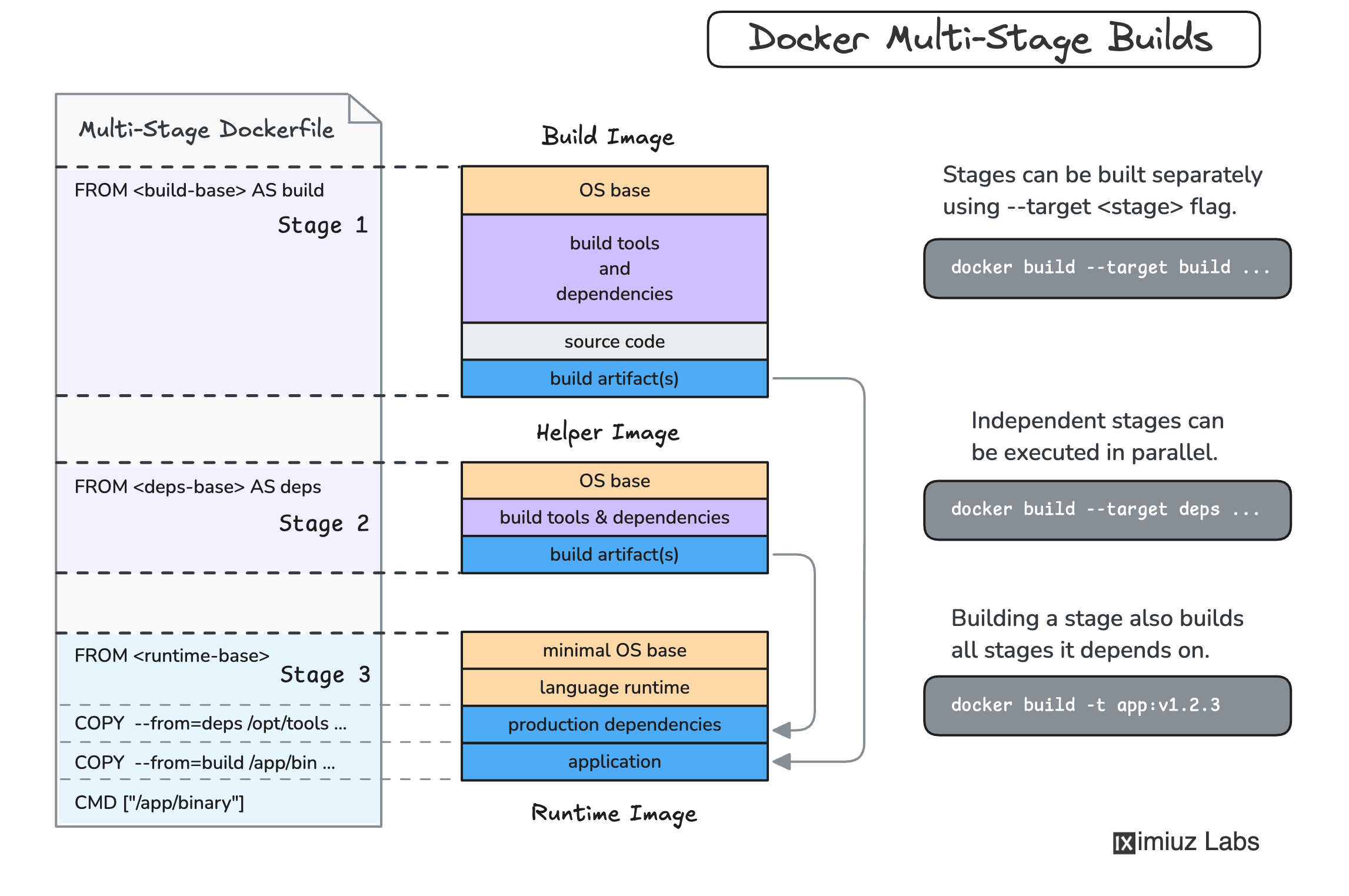
Multi-stage build, Docker’ın en güçlü özelliklerinden biridir. Birden fazla FROM statement kullanarak, build aşamasında kullanılan araçları final image’dan uzak tutabilir ve image boyutunu dramatik şekilde küçültebilirsiniz.
Şekil 1: Multi-Stage Build ile katmanlı image oluşturma süreci
Multi-Stage Dockerfile
1
2
3
4
5
6
7
8
9
10
11
12
13
14
15
16
17
18
19
20
21
22
23
24
25
26
27
28
29
30
31
32
33
34
35
36
37
38
39
40
41
42
43
44
45
46
47
48
49
50
51
52
53
54
55
56
57
58
59
60
61
| # ==========================================
# STAGE 1: Builder - Bağımlılıkları derle
# ==========================================
FROM python:3.11-slim AS builder
# Build araçlarını yükle
RUN apt-get update && apt-get install -y \
gcc \
g++ \
postgresql-dev \
&& rm -rf /var/lib/apt/lists/*
# Virtual environment oluştur
RUN python -m venv /opt/venv
ENV PATH="/opt/venv/bin:$PATH"
# Requirements'ı kopyala ve yükle
COPY requirements.txt .
RUN pip install --no-cache-dir --upgrade pip && \
pip install --no-cache-dir -r requirements.txt
# ==========================================
# STAGE 2: Runtime - Sadece gerekli dosyalar
# ==========================================
FROM python:3.11-slim
# Runtime bağımlılıklarını yükle
RUN apt-get update && apt-get install -y \
libpq5 \
&& rm -rf /var/lib/apt/lists/*
# Non-root user oluştur (güvenlik için)
RUN useradd -m -u 1000 appuser && \
mkdir -p /app && \
chown -R appuser:appuser /app
# Virtual environment'ı builder'dan kopyala
COPY --from=builder /opt/venv /opt/venv
# Çalışma dizini ve PATH
WORKDIR /app
ENV PATH="/opt/venv/bin:$PATH"
ENV PYTHONUNBUFFERED=1
ENV PYTHONDONTWRITEBYTECODE=1
# Uygulama dosyalarını kopyala
COPY --chown=appuser:appuser . .
# Non-root user olarak çalıştır
USER appuser
# Health check ekle
HEALTHCHECK --interval=30s --timeout=3s --start-period=40s --retries=3 \
CMD python -c "import requests; requests.get('http://localhost:5000/health')" || exit 1
# Port expose et
EXPOSE 5000
# Entrypoint ve CMD
ENTRYPOINT ["gunicorn"]
CMD ["--bind", "0.0.0.0:5000", "--workers", "4", "--timeout", "60", "app:app"]
|
Image Boyutu Karşılaştırması
1
2
3
4
5
6
7
8
9
10
11
12
13
14
15
16
17
18
| # Single-stage build
docker build -t flask-app:single-stage -f Dockerfile.single .
docker images flask-app:single-stage
"""
REPOSITORY TAG SIZE
flask-app single-stage 395MB # Tüm build araçları dahil
"""
# Multi-stage build
docker build -t flask-app:multi-stage -f Dockerfile.multi .
docker images flask-app:multi-stage
"""
REPOSITORY TAG SIZE
flask-app multi-stage 165MB # %58 daha küçük!
"""
# Build history'yi incele
docker history flask-app:multi-stage
|
.dockerignore Dosyası
.dockerignore dosyası, build context’e dahil edilmemesi gereken dosyaları belirtir:
1
2
3
4
5
6
7
8
9
10
11
12
13
14
15
16
17
18
19
20
21
22
23
24
25
26
27
28
29
30
31
32
33
34
35
36
37
38
39
40
41
42
43
44
45
46
47
48
49
50
51
52
53
54
55
56
57
58
59
60
61
62
63
64
65
66
| # .dockerignore
# Python
__pycache__/
*.py[cod]
*$py.class
*.so
.Python
env/
venv/
ENV/
build/
develop-eggs/
dist/
downloads/
eggs/
.eggs/
lib/
lib64/
parts/
sdist/
var/
wheels/
*.egg-info/
.installed.cfg
*.egg
# Testing
.pytest_cache/
.coverage
htmlcov/
.tox/
.hypothesis/
# IDEs
.vscode/
.idea/
*.swp
*.swo
*~
# Git
.git/
.gitignore
# Docker
Dockerfile*
docker-compose*.yml
.dockerignore
# Documentation
README.md
docs/
*.md
# Environment
.env
.env.*
!.env.example
# Logs
*.log
logs/
# OS
.DS_Store
Thumbs.db
|
Docker Compose ile Multi-Container Uygulamalar
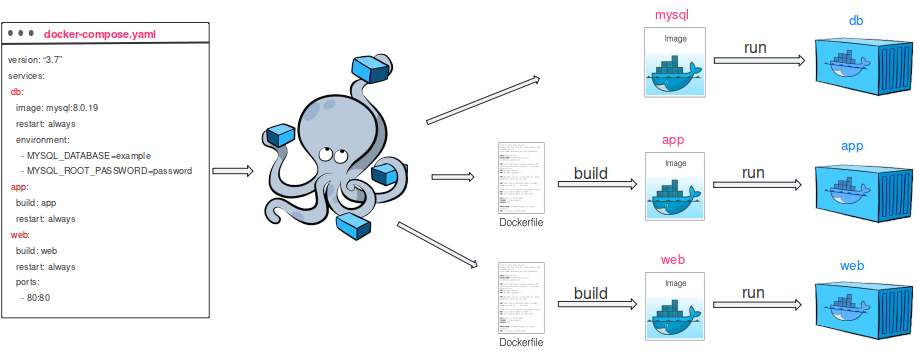
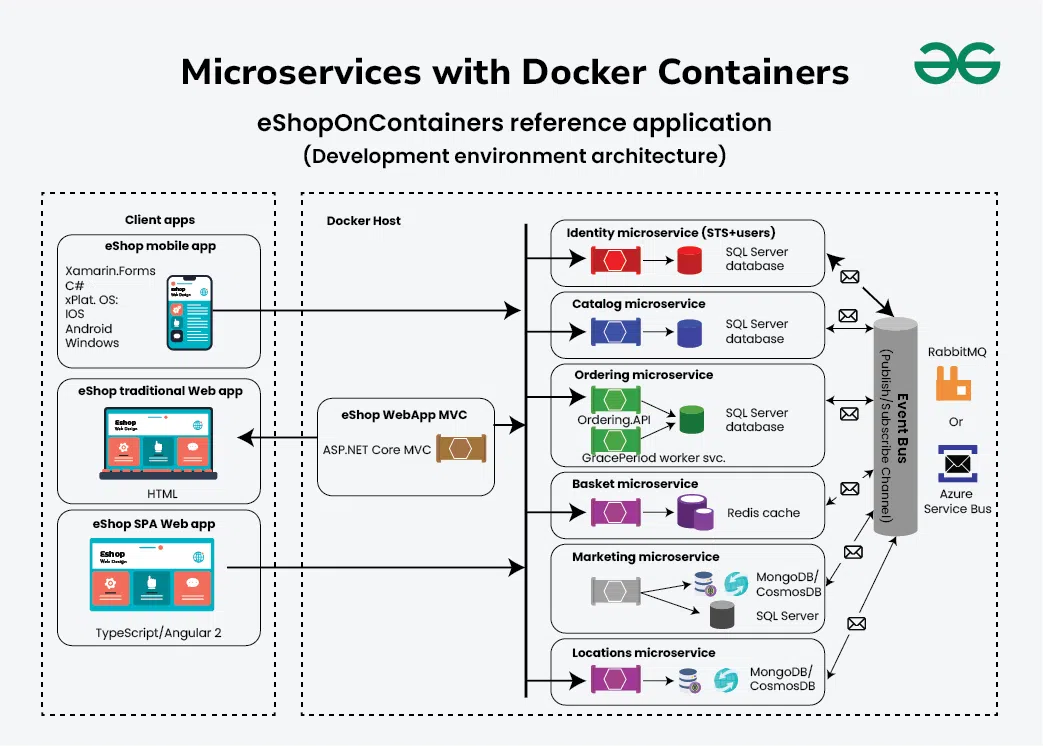
Docker Compose, birden fazla container’dan oluşan uygulamaları tanımlamak ve çalıştırmak için kullanılır. Özellikle mikroservis mimarilerinde vazgeçilmezdir.
Şekil 2: Docker Compose ile mikroservis mimarisi
Kapsamlı Docker Compose Örneği
1
2
3
4
5
6
7
8
9
10
11
12
13
14
15
16
17
18
19
20
21
22
23
24
25
26
27
28
29
30
31
32
33
34
35
36
37
38
39
40
41
42
43
44
45
46
47
48
49
50
51
52
53
54
55
56
57
58
59
60
61
62
63
64
65
66
67
68
69
70
71
72
73
74
75
76
77
78
79
80
81
82
83
84
85
86
87
88
89
90
91
92
93
94
95
96
97
98
99
100
101
102
103
104
105
106
107
108
109
110
111
112
113
114
115
116
117
118
119
120
121
122
123
124
125
126
127
128
129
130
131
132
133
134
135
136
137
138
139
140
141
142
143
144
145
146
147
148
149
150
151
152
153
154
155
156
157
158
159
160
161
162
163
164
165
166
167
168
169
170
171
172
173
174
175
176
177
178
179
| version: '3.8'
services:
# ==========================================
# Web Application (Flask API)
# ==========================================
web:
build:
context: .
dockerfile: Dockerfile
args:
- BUILD_DATE=${BUILD_DATE}
- VERSION=${VERSION:-latest}
image: flask-app:${VERSION:-latest}
container_name: flask-web
restart: unless-stopped
ports:
- "5000:5000"
environment:
- ENVIRONMENT=production
- DATABASE_URL=postgresql://postgres:password@db:5432/appdb
- REDIS_URL=redis://redis:6379/0
- SECRET_KEY=${SECRET_KEY}
env_file:
- .env
depends_on:
db:
condition: service_healthy
redis:
condition: service_started
networks:
- app-network
volumes:
- ./logs:/app/logs
- ./uploads:/app/uploads
healthcheck:
test: ["CMD", "curl", "-f", "http://localhost:5000/health"]
interval: 30s
timeout: 10s
retries: 3
start_period: 40s
labels:
- "com.example.description=Flask API Service"
- "com.example.version=${VERSION:-latest}"
# ==========================================
# PostgreSQL Database
# ==========================================
db:
image: postgres:15-alpine
container_name: postgres-db
restart: unless-stopped
environment:
- POSTGRES_DB=appdb
- POSTGRES_USER=postgres
- POSTGRES_PASSWORD=password
- PGDATA=/var/lib/postgresql/data/pgdata
volumes:
- postgres-data:/var/lib/postgresql/data
- ./init-scripts:/docker-entrypoint-initdb.d
networks:
- app-network
ports:
- "5432:5432"
healthcheck:
test: ["CMD-SHELL", "pg_isready -U postgres"]
interval: 10s
timeout: 5s
retries: 5
# ==========================================
# Redis Cache
# ==========================================
redis:
image: redis:7-alpine
container_name: redis-cache
restart: unless-stopped
command: redis-server --appendonly yes --requirepass redispassword
volumes:
- redis-data:/data
networks:
- app-network
ports:
- "6379:6379"
healthcheck:
test: ["CMD", "redis-cli", "ping"]
interval: 10s
timeout: 3s
retries: 5
# ==========================================
# Celery Worker (Background Tasks)
# ==========================================
worker:
build:
context: .
dockerfile: Dockerfile
image: flask-app:${VERSION:-latest}
container_name: celery-worker
restart: unless-stopped
command: celery -A tasks.celery worker --loglevel=info --concurrency=4
environment:
- ENVIRONMENT=production
- DATABASE_URL=postgresql://postgres:password@db:5432/appdb
- REDIS_URL=redis://redis:6379/0
- CELERY_BROKER_URL=redis://redis:6379/1
depends_on:
- db
- redis
networks:
- app-network
volumes:
- ./logs:/app/logs
# ==========================================
# Nginx Reverse Proxy
# ==========================================
nginx:
image: nginx:alpine
container_name: nginx-proxy
restart: unless-stopped
ports:
- "80:80"
- "443:443"
volumes:
- ./nginx/nginx.conf:/etc/nginx/nginx.conf:ro
- ./nginx/ssl:/etc/nginx/ssl:ro
- ./static:/usr/share/nginx/html/static:ro
depends_on:
- web
networks:
- app-network
healthcheck:
test: ["CMD", "nginx", "-t"]
interval: 30s
timeout: 10s
retries: 3
# ==========================================
# pgAdmin (Database Management - Optional)
# ==========================================
pgadmin:
image: dpage/pgadmin4:latest
container_name: pgadmin
restart: unless-stopped
environment:
- [email protected]
- PGADMIN_DEFAULT_PASSWORD=admin
ports:
- "5050:80"
depends_on:
- db
networks:
- app-network
volumes:
- pgadmin-data:/var/lib/pgadmin
profiles:
- tools # Bu servisi sadece "tools" profile ile çalıştır
# ==========================================
# Networks
# ==========================================
networks:
app-network:
driver: bridge
ipam:
config:
- subnet: 172.28.0.0/16
# ==========================================
# Volumes
# ==========================================
volumes:
postgres-data:
driver: local
redis-data:
driver: local
pgadmin-data:
driver: local
|
Docker Compose Komutları
1
2
3
4
5
6
7
8
9
10
11
12
13
14
15
16
17
18
19
20
21
22
23
24
25
26
27
28
29
30
31
32
33
34
35
36
37
38
39
40
41
42
43
44
45
46
47
48
49
50
51
52
| # Tüm servisleri başlat
docker compose up -d
# Specific servis başlat
docker compose up -d web db
# Build ile başlat
docker compose up -d --build
# Logları takip et
docker compose logs -f
docker compose logs -f web # Sadece web servisinin logları
# Servisleri listele
docker compose ps
# Servis detaylarını göster
docker compose ps --format json | jq
# Belirli bir servisi yeniden başlat
docker compose restart web
# Servisleri durdur (container'lar kalır)
docker compose stop
# Servisleri durdur ve container'ları sil
docker compose down
# Volume'ları da sil
docker compose down -v
# Image'ları da sil
docker compose down --rmi all
# Servisleri scale et
docker compose up -d --scale web=3
# Belirli bir servise komut çalıştır
docker compose exec web python manage.py migrate
docker compose exec db psql -U postgres -d appdb
# Tools profile ile çalıştır (pgadmin dahil)
docker compose --profile tools up -d
# Environment variable ile çalıştır
VERSION=v2.0 BUILD_DATE=$(date -u +"%Y-%m-%dT%H:%M:%SZ") docker compose up -d
# Config dosyasını validate et
docker compose config
# Resource kullanımını göster
docker compose stats
|
Environment Variables Yönetimi
1
2
3
4
5
6
7
8
9
10
11
12
13
14
15
16
17
18
19
20
21
22
23
24
25
26
27
28
29
30
| # .env dosyası
# Application
ENVIRONMENT=production
SECRET_KEY=your-secret-key-here
DEBUG=False
# Database
DATABASE_URL=postgresql://postgres:password@db:5432/appdb
DB_POOL_SIZE=20
DB_MAX_OVERFLOW=10
# Redis
REDIS_URL=redis://redis:6379/0
REDIS_PASSWORD=redispassword
# Celery
CELERY_BROKER_URL=redis://redis:6379/1
CELERY_RESULT_BACKEND=redis://redis:6379/2
# Build
VERSION=v1.0.0
BUILD_DATE=2024-10-14T09:30:00Z
# Security
ALLOWED_HOSTS=localhost,127.0.0.1
CORS_ORIGINS=http://localhost:3000,https://example.com
# Monitoring
LOG_LEVEL=INFO
SENTRY_DSN=https://your-sentry-dsn
|
1
2
3
4
5
6
7
8
9
10
11
12
13
14
15
16
17
18
19
20
21
22
23
24
25
26
27
28
29
30
31
32
33
34
35
36
37
38
39
40
41
42
43
44
45
46
47
48
49
50
51
52
| # config.py - Environment variable yönetimi
import os
from dotenv import load_dotenv
from typing import Optional
# .env dosyasını yükle
load_dotenv()
class Config:
"""Base configuration"""
# Application
ENVIRONMENT = os.getenv('ENVIRONMENT', 'development')
SECRET_KEY = os.getenv('SECRET_KEY', 'dev-secret-key')
DEBUG = os.getenv('DEBUG', 'False').lower() == 'true'
# Database
DATABASE_URL = os.getenv('DATABASE_URL', 'sqlite:///app.db')
DB_POOL_SIZE = int(os.getenv('DB_POOL_SIZE', '20'))
DB_MAX_OVERFLOW = int(os.getenv('DB_MAX_OVERFLOW', '10'))
# Redis
REDIS_URL = os.getenv('REDIS_URL', 'redis://localhost:6379/0')
# Celery
CELERY_BROKER_URL = os.getenv('CELERY_BROKER_URL', REDIS_URL)
CELERY_RESULT_BACKEND = os.getenv('CELERY_RESULT_BACKEND', REDIS_URL)
# Security
ALLOWED_HOSTS = os.getenv('ALLOWED_HOSTS', 'localhost').split(',')
@classmethod
def validate(cls) -> None:
"""Validate required configuration"""
required_vars = ['SECRET_KEY', 'DATABASE_URL']
missing = [var for var in required_vars if not getattr(cls, var)]
if missing:
raise ValueError(f"Missing required environment variables: {', '.join(missing)}")
@classmethod
def get_database_config(cls) -> dict:
"""Get database configuration"""
return {
'url': cls.DATABASE_URL,
'pool_size': cls.DB_POOL_SIZE,
'max_overflow': cls.DB_MAX_OVERFLOW,
'echo': cls.DEBUG
}
# Konfigürasyonu validate et
Config.validate()
|
Production Deployment Stratejileri
Nginx Reverse Proxy Konfigürasyonu
1
2
3
4
5
6
7
8
9
10
11
12
13
14
15
16
17
18
19
20
21
22
23
24
25
26
27
28
29
30
31
32
33
34
35
36
37
38
39
40
41
42
43
44
45
46
47
48
49
50
51
52
53
54
55
56
57
58
59
60
61
62
63
64
65
66
67
68
69
70
71
72
73
74
75
76
77
78
79
80
81
82
83
84
85
86
87
88
89
90
91
92
93
94
95
96
97
98
99
100
101
102
103
104
105
106
107
108
109
110
111
112
113
114
115
116
117
118
119
120
121
122
123
124
125
126
127
128
| # nginx/nginx.conf
user nginx;
worker_processes auto;
error_log /var/log/nginx/error.log warn;
pid /var/run/nginx.pid;
events {
worker_connections 1024;
use epoll;
}
http {
include /etc/nginx/mime.types;
default_type application/octet-stream;
# Logging
log_format main '$remote_addr - $remote_user [$time_local] "$request" '
'$status $body_bytes_sent "$http_referer" '
'"$http_user_agent" "$http_x_forwarded_for"';
access_log /var/log/nginx/access.log main;
# Performance
sendfile on;
tcp_nopush on;
tcp_nodelay on;
keepalive_timeout 65;
types_hash_max_size 2048;
client_max_body_size 20M;
# Gzip compression
gzip on;
gzip_vary on;
gzip_proxied any;
gzip_comp_level 6;
gzip_types text/plain text/css text/xml text/javascript
application/json application/javascript application/xml+rss;
# Rate limiting
limit_req_zone $binary_remote_addr zone=api_limit:10m rate=10r/s;
limit_conn_zone $binary_remote_addr zone=addr:10m;
# Upstream servers
upstream flask_app {
least_conn;
server web:5000 max_fails=3 fail_timeout=30s;
keepalive 32;
}
# HTTP Server
server {
listen 80;
server_name example.com www.example.com;
# Redirect to HTTPS
return 301 https://$server_name$request_uri;
}
# HTTPS Server
server {
listen 443 ssl http2;
server_name example.com www.example.com;
# SSL Configuration
ssl_certificate /etc/nginx/ssl/fullchain.pem;
ssl_certificate_key /etc/nginx/ssl/privkey.pem;
ssl_protocols TLSv1.2 TLSv1.3;
ssl_ciphers HIGH:!aNULL:!MD5;
ssl_prefer_server_ciphers on;
ssl_session_cache shared:SSL:10m;
ssl_session_timeout 10m;
# Security headers
add_header Strict-Transport-Security "max-age=31536000; includeSubDomains" always;
add_header X-Frame-Options "SAMEORIGIN" always;
add_header X-Content-Type-Options "nosniff" always;
add_header X-XSS-Protection "1; mode=block" always;
add_header Referrer-Policy "no-referrer-when-downgrade" always;
# Root location
location / {
# Rate limiting
limit_req zone=api_limit burst=20 nodelay;
limit_conn addr 10;
# Proxy settings
proxy_pass http://flask_app;
proxy_http_version 1.1;
proxy_set_header Host $host;
proxy_set_header X-Real-IP $remote_addr;
proxy_set_header X-Forwarded-For $proxy_add_x_forwarded_for;
proxy_set_header X-Forwarded-Proto $scheme;
proxy_set_header Connection "";
# Timeouts
proxy_connect_timeout 60s;
proxy_send_timeout 60s;
proxy_read_timeout 60s;
# Buffering
proxy_buffering on;
proxy_buffer_size 4k;
proxy_buffers 8 4k;
proxy_busy_buffers_size 8k;
}
# Static files
location /static/ {
alias /usr/share/nginx/html/static/;
expires 30d;
add_header Cache-Control "public, immutable";
}
# Health check
location /health {
access_log off;
proxy_pass http://flask_app;
}
# Deny access to sensitive files
location ~ /\. {
deny all;
access_log off;
log_not_found off;
}
}
}
|
Health Checks ve Monitoring
1
2
3
4
5
6
7
8
9
10
11
12
13
14
15
16
17
18
19
20
21
22
23
24
25
26
27
28
29
30
31
32
33
34
35
36
37
38
39
40
41
42
43
44
45
46
47
48
49
50
51
52
53
54
55
56
57
58
59
60
61
62
63
64
65
66
67
68
69
70
71
72
73
74
75
76
77
78
79
80
81
82
83
84
85
86
87
88
89
90
91
92
93
94
95
96
97
98
99
100
101
102
| # health.py - Comprehensive health check system
from flask import Blueprint, jsonify
import psycopg2
import redis
import time
from functools import wraps
health_bp = Blueprint('health', __name__)
def check_timeout(timeout=5):
"""Decorator to add timeout to health checks"""
def decorator(func):
@wraps(func)
def wrapper(*args, **kwargs):
start_time = time.time()
try:
result = func(*args, **kwargs)
elapsed = time.time() - start_time
return {
'status': 'healthy' if result else 'unhealthy',
'response_time': f"{elapsed:.3f}s"
}
except Exception as e:
elapsed = time.time() - start_time
return {
'status': 'unhealthy',
'error': str(e),
'response_time': f"{elapsed:.3f}s"
}
return wrapper
return decorator
@check_timeout(timeout=5)
def check_database():
"""Check database connectivity"""
conn = psycopg2.connect(os.getenv('DATABASE_URL'))
cursor = conn.cursor()
cursor.execute('SELECT 1')
result = cursor.fetchone()
cursor.close()
conn.close()
return result is not None
@check_timeout(timeout=3)
def check_redis():
"""Check Redis connectivity"""
r = redis.from_url(os.getenv('REDIS_URL'))
r.ping()
return True
@check_timeout(timeout=2)
def check_disk_space():
"""Check disk space availability"""
import shutil
stat = shutil.disk_usage('/')
free_percent = (stat.free / stat.total) * 100
return free_percent > 10 # At least 10% free space
@health_bp.route('/health')
def health_check():
"""Basic health check"""
return jsonify({'status': 'healthy'}), 200
@health_bp.route('/health/detailed')
def detailed_health_check():
"""Detailed health check with all dependencies"""
checks = {
'database': check_database(),
'redis': check_redis(),
'disk': check_disk_space(),
}
# Overall status
all_healthy = all(c['status'] == 'healthy' for c in checks.values())
status_code = 200 if all_healthy else 503
response = {
'status': 'healthy' if all_healthy else 'unhealthy',
'timestamp': time.time(),
'checks': checks,
'version': os.getenv('VERSION', 'unknown')
}
return jsonify(response), status_code
@health_bp.route('/health/liveness')
def liveness():
"""Kubernetes liveness probe"""
# Basit check - container hala ayakta mı?
return jsonify({'status': 'alive'}), 200
@health_bp.route('/health/readiness')
def readiness():
"""Kubernetes readiness probe"""
# Tüm dependencies hazır mı?
db_healthy = check_database()['status'] == 'healthy'
redis_healthy = check_redis()['status'] == 'healthy'
if db_healthy and redis_healthy:
return jsonify({'status': 'ready'}), 200
else:
return jsonify({'status': 'not_ready'}), 503
|
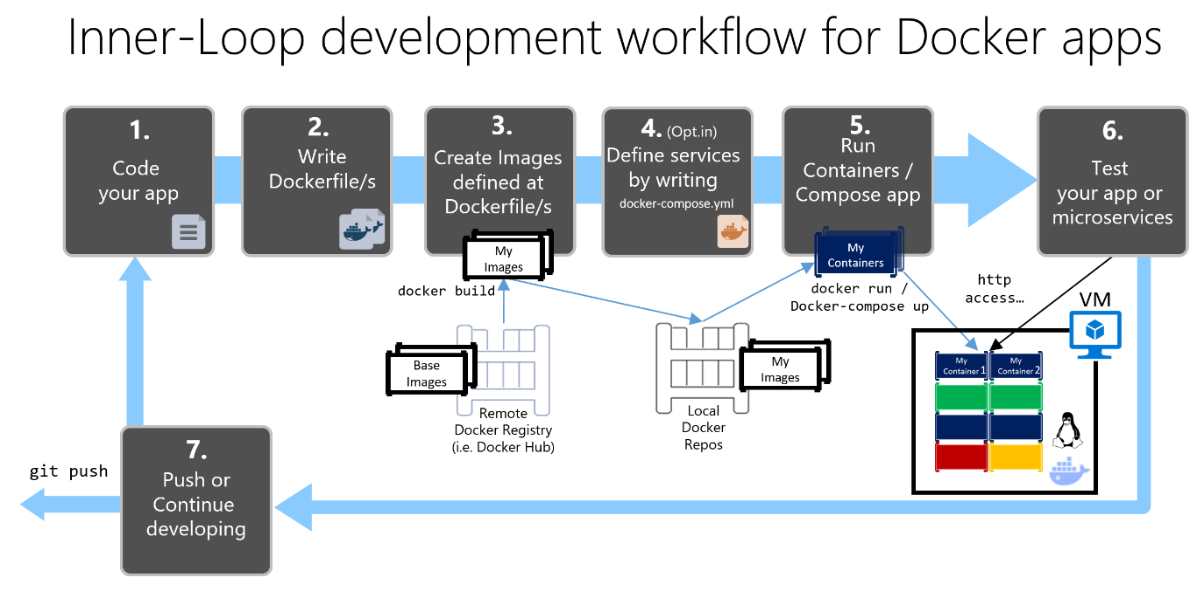
Şekil 3: Docker container deployment lifecycle ve workflow
Logging Stratejisi
1
2
3
4
5
6
7
8
9
10
11
12
13
14
15
16
17
18
19
20
21
22
23
24
25
26
27
28
29
30
31
32
33
34
35
36
37
38
39
40
41
42
43
44
45
46
47
48
49
50
51
52
53
54
55
56
57
58
59
60
61
62
63
64
65
66
67
68
| # logging_config.py - Structured logging for containers
import logging
import json
import sys
from datetime import datetime
from typing import Any, Dict
class JsonFormatter(logging.Formatter):
"""Format logs as JSON for easy parsing"""
def format(self, record: logging.LogRecord) -> str:
log_data: Dict[str, Any] = {
'timestamp': datetime.utcnow().isoformat(),
'level': record.levelname,
'logger': record.name,
'message': record.getMessage(),
'module': record.module,
'function': record.funcName,
'line': record.lineno,
}
# Add exception info if present
if record.exc_info:
log_data['exception'] = self.formatException(record.exc_info)
# Add custom fields
if hasattr(record, 'user_id'):
log_data['user_id'] = record.user_id
if hasattr(record, 'request_id'):
log_data['request_id'] = record.request_id
return json.dumps(log_data)
def setup_logging(app_name: str = 'flask-app', log_level: str = 'INFO'):
"""Setup logging configuration"""
# Create logger
logger = logging.getLogger(app_name)
logger.setLevel(getattr(logging, log_level.upper()))
# Clear existing handlers
logger.handlers.clear()
# Console handler (for Docker logs)
console_handler = logging.StreamHandler(sys.stdout)
console_handler.setFormatter(JsonFormatter())
logger.addHandler(console_handler)
# File handler (optional, for persistent logs)
if os.path.exists('/app/logs'):
file_handler = logging.FileHandler('/app/logs/app.log')
file_handler.setFormatter(JsonFormatter())
logger.addHandler(file_handler)
return logger
# Usage
logger = setup_logging('flask-app', os.getenv('LOG_LEVEL', 'INFO'))
@app.before_request
def log_request():
"""Log incoming requests"""
logger.info('Incoming request', extra={
'request_id': request.headers.get('X-Request-ID'),
'method': request.method,
'path': request.path,
'ip': request.remote_addr
})
|
Docker Secrets Yönetimi
1
2
3
4
5
| # Docker Swarm secrets (production için)
# Secret oluştur
echo "my-db-password" | docker secret create db_password -
# Compose file ile secrets kullan
|
1
2
3
4
5
6
7
8
9
10
11
12
13
14
15
16
17
18
| # docker-compose.prod.yml
version: '3.8'
services:
web:
image: flask-app:latest
secrets:
- db_password
- api_key
environment:
- DATABASE_PASSWORD_FILE=/run/secrets/db_password
- API_KEY_FILE=/run/secrets/api_key
secrets:
db_password:
external: true
api_key:
external: true
|
1
2
3
4
5
6
7
8
9
10
11
12
13
14
15
16
17
18
19
20
21
22
23
24
25
26
27
| # secrets.py - Read secrets from files
import os
from pathlib import Path
def get_secret(secret_name: str, default: str = None) -> str:
"""
Read secret from Docker secret file or environment variable
Docker secrets are mounted at /run/secrets/secret_name
Falls back to environment variable if secret file doesn't exist
"""
secret_file = Path(f'/run/secrets/{secret_name}')
if secret_file.exists():
return secret_file.read_text().strip()
# Fallback to environment variable
env_var = f'{secret_name.upper()}_FILE'
if env_var in os.environ:
return Path(os.environ[env_var]).read_text().strip()
# Final fallback to direct environment variable
return os.getenv(secret_name.upper(), default)
# Usage
DATABASE_PASSWORD = get_secret('db_password')
API_KEY = get_secret('api_key')
|
Best Practices ve Güvenlik
Dockerfile Best Practices
1
2
3
4
5
6
7
8
9
10
11
12
13
14
15
16
17
18
19
20
21
22
23
24
25
26
27
28
29
30
31
32
33
34
35
36
37
38
39
40
41
42
43
44
45
46
47
48
49
50
51
52
53
54
55
56
57
58
59
60
61
62
63
64
65
66
67
68
69
| # Dockerfile.best-practices
# 1. Use specific base image versions (avoid 'latest')
FROM python:3.11.6-slim-bookworm AS builder
# 2. Set labels for documentation
LABEL maintainer="[email protected]" \
version="1.0" \
description="Flask application container"
# 3. Update packages and install dependencies in one layer
RUN apt-get update && apt-get install -y \
gcc \
postgresql-dev \
&& rm -rf /var/lib/apt/lists/* \
&& apt-get clean
# 4. Create virtual environment
ENV VIRTUAL_ENV=/opt/venv
RUN python -m venv $VIRTUAL_ENV
ENV PATH="$VIRTUAL_ENV/bin:$PATH"
# 5. Copy only requirements first (leverage Docker cache)
COPY requirements.txt .
RUN pip install --no-cache-dir --upgrade pip && \
pip install --no-cache-dir -r requirements.txt
# 6. Runtime stage
FROM python:3.11.6-slim-bookworm
# 7. Install only runtime dependencies
RUN apt-get update && apt-get install -y \
libpq5 \
curl \
&& rm -rf /var/lib/apt/lists/*
# 8. Copy virtual environment from builder
COPY --from=builder /opt/venv /opt/venv
ENV PATH="/opt/venv/bin:$PATH"
# 9. Create non-root user
RUN groupadd -r appuser && useradd -r -g appuser appuser
# 10. Set working directory with proper permissions
WORKDIR /app
RUN chown appuser:appuser /app
# 11. Copy application files
COPY --chown=appuser:appuser . .
# 12. Set environment variables
ENV PYTHONUNBUFFERED=1 \
PYTHONDONTWRITEBYTECODE=1 \
PIP_NO_CACHE_DIR=1 \
PIP_DISABLE_PIP_VERSION_CHECK=1
# 13. Switch to non-root user
USER appuser
# 14. Expose port (documentation only)
EXPOSE 5000
# 15. Health check
HEALTHCHECK --interval=30s --timeout=3s --start-period=5s --retries=3 \
CMD curl -f http://localhost:5000/health || exit 1
# 16. Use ENTRYPOINT for executable, CMD for default args
ENTRYPOINT ["gunicorn"]
CMD ["--bind", "0.0.0.0:5000", "--workers", "4", "app:app"]
|
Güvenlik Kontrol Listesi
1
2
3
4
5
6
7
8
9
10
11
12
13
14
15
16
17
18
19
20
21
22
23
24
25
26
27
28
| # 1. Base image güvenlik taraması
docker scan flask-app:latest
# 2. Trivy ile vulnerability scanning
trivy image flask-app:latest
# 3. Container içeriğini incele
docker history flask-app:latest
docker image inspect flask-app:latest
# 4. Non-root user kontrolü
docker run --rm flask-app:latest id
"""
uid=1000(appuser) gid=1000(appuser) groups=1000(appuser)
"""
# 5. Read-only root filesystem (mümkün olduğunda)
docker run --read-only --tmpfs /tmp flask-app:latest
# 6. Resource limits
docker run -m 512m --cpus=1 flask-app:latest
# 7. Security options
docker run \
--security-opt=no-new-privileges \
--cap-drop=ALL \
--cap-add=NET_BIND_SERVICE \
flask-app:latest
|
Docker Compose Production Overrides
1
2
3
4
5
6
7
8
9
10
11
12
13
14
15
16
17
18
19
20
21
22
23
24
25
26
27
28
29
30
31
32
33
34
35
| # docker-compose.override.yml (development)
version: '3.8'
services:
web:
volumes:
- .:/app # Hot reload için kod mount
environment:
- DEBUG=True
- ENVIRONMENT=development
command: flask run --host=0.0.0.0 --reload
# docker-compose.prod.yml (production)
version: '3.8'
services:
web:
deploy:
replicas: 3
resources:
limits:
cpus: '1'
memory: 512M
reservations:
cpus: '0.5'
memory: 256M
restart_policy:
condition: on-failure
delay: 5s
max_attempts: 3
logging:
driver: "json-file"
options:
max-size: "10m"
max-file: "3"
|
1
2
3
4
5
| # Development ortamı
docker compose up
# Production ortamı
docker compose -f docker-compose.yml -f docker-compose.prod.yml up -d
|
Image Build Optimization
1
2
3
4
5
6
7
8
9
10
11
12
13
| # Optimize layer caching
# Bad practice:
COPY . .
RUN pip install -r requirements.txt
# Good practice:
COPY requirements.txt .
RUN pip install -r requirements.txt
COPY . .
# Use BuildKit for better caching
# Enable BuildKit:
# export DOCKER_BUILDKIT=1
|
1
2
3
4
5
6
7
8
9
10
11
| # Build with cache mount (BuildKit)
docker build \
--build-arg BUILDKIT_INLINE_CACHE=1 \
--cache-from flask-app:latest \
-t flask-app:v2 .
# Multi-platform build
docker buildx build \
--platform linux/amd64,linux/arm64 \
-t flask-app:multiarch \
--push .
|
1
2
3
4
5
6
7
8
9
10
11
12
13
14
15
16
17
18
19
20
21
22
23
24
25
26
27
28
29
30
31
32
33
34
35
36
37
38
39
40
41
42
43
44
45
46
47
48
49
50
| # gunicorn_config.py - Production server configuration
import multiprocessing
import os
# Server socket
bind = '0.0.0.0:5000'
backlog = 2048
# Worker processes
workers = int(os.getenv('GUNICORN_WORKERS', multiprocessing.cpu_count() * 2 + 1))
worker_class = 'sync' # or 'gevent', 'eventlet' for async
worker_connections = 1000
max_requests = 1000
max_requests_jitter = 50
timeout = 60
keepalive = 5
# Logging
accesslog = '-' # stdout
errorlog = '-' # stderr
loglevel = os.getenv('LOG_LEVEL', 'info')
access_log_format = '%(h)s %(l)s %(u)s %(t)s "%(r)s" %(s)s %(b)s "%(f)s" "%(a)s" %(D)s'
# Process naming
proc_name = 'flask-app'
# Server mechanics
daemon = False
pidfile = None
umask = 0
user = None
group = None
tmp_upload_dir = None
# SSL (if needed)
# keyfile = '/path/to/key.pem'
# certfile = '/path/to/cert.pem'
# Hooks
def on_starting(server):
"""Called just before the master process is initialized"""
server.log.info('Starting Flask application')
def when_ready(server):
"""Called just after the server is started"""
server.log.info('Server is ready. Spawning workers')
def on_reload(server):
"""Called to recycle workers during a reload via SIGHUP"""
server.log.info('Reloading workers')
|
1
2
| # Dockerfile ile gunicorn config kullanımı
CMD ["gunicorn", "--config", "gunicorn_config.py", "app:app"]
|
Debugging ve Troubleshooting
Container İçine Erişim
1
2
3
4
5
6
7
8
9
10
11
12
13
14
| # Running container'a bash erişimi
docker exec -it container_name bash
# Python shell başlat
docker exec -it container_name python
# Specific komut çalıştır
docker exec -it container_name ls -la /app
# Environment variables göster
docker exec container_name env
# Process listesi
docker exec container_name ps aux
|
Log Analysis
1
2
3
4
5
6
7
8
9
10
11
12
13
14
15
16
17
18
| # Tüm logları göster
docker logs container_name
# Son 100 satır
docker logs --tail 100 container_name
# Realtime follow
docker logs -f container_name
# Timestamp ile
docker logs -t container_name
# Belirli zaman aralığı
docker logs --since 1h container_name
docker logs --since "2024-10-14T10:00:00" container_name
# JSON format logları parse et
docker logs container_name 2>&1 | jq '.level, .message'
|
Network Debugging
1
2
3
4
5
6
7
8
9
10
11
12
13
14
15
16
| # Container network bilgileri
docker network inspect bridge
# Container IP adresi
docker inspect -f '{{range.NetworkSettings.Networks}}{{.IPAddress}}{{end}}' container_name
# Port mapping kontrolü
docker port container_name
# Network connectivity test
docker exec container_name ping db
docker exec container_name curl http://web:5000/health
# DNS resolution test
docker exec container_name nslookup db
docker exec container_name cat /etc/hosts
|
1
2
3
4
5
6
7
8
9
10
11
12
13
14
15
16
17
18
| # Resource kullanımı
docker stats
# Specific container stats
docker stats container_name
# Top processes
docker top container_name
# Disk usage
docker system df
docker system df -v
# Container inspect
docker inspect container_name
# Image layers
docker history flask-app:latest
|
CI/CD Pipeline Entegrasyonu
GitHub Actions Workflow
1
2
3
4
5
6
7
8
9
10
11
12
13
14
15
16
17
18
19
20
21
22
23
24
25
26
27
28
29
30
31
32
33
34
35
36
37
38
39
40
41
42
43
44
45
46
47
48
49
50
51
52
53
54
55
56
57
58
59
60
61
62
63
64
65
66
67
68
69
70
71
72
73
74
75
76
77
78
79
80
81
82
83
84
85
86
87
88
89
90
91
92
93
94
95
96
97
98
99
100
101
| # .github/workflows/docker-build.yml
name: Docker Build and Push
on:
push:
branches: [ main, develop ]
tags: [ 'v*' ]
pull_request:
branches: [ main ]
env:
REGISTRY: ghcr.io
IMAGE_NAME: $
jobs:
test:
runs-on: ubuntu-latest
steps:
- uses: actions/checkout@v3
- name: Set up Python
uses: actions/setup-python@v4
with:
python-version: '3.11'
- name: Install dependencies
run: |
python -m pip install --upgrade pip
pip install -r requirements.txt
pip install pytest pytest-cov
- name: Run tests
run: |
pytest --cov=app tests/
- name: Upload coverage
uses: codecov/codecov-action@v3
build-and-push:
needs: test
runs-on: ubuntu-latest
permissions:
contents: read
packages: write
steps:
- name: Checkout code
uses: actions/checkout@v3
- name: Set up Docker Buildx
uses: docker/setup-buildx-action@v2
- name: Log in to Container Registry
uses: docker/login-action@v2
with:
registry: $
username: $
password: $
- name: Extract metadata
id: meta
uses: docker/metadata-action@v4
with:
images: $/$
tags: |
type=ref,event=branch
type=ref,event=pr
type=semver,pattern={{version}}
type=semver,pattern={{major}}.{{minor}}
type=sha
- name: Build and push
uses: docker/build-push-action@v4
with:
context: .
push: $
tags: $
labels: $
cache-from: type=gha
cache-to: type=gha,mode=max
build-args: |
BUILD_DATE=$
VERSION=$
deploy:
needs: build-and-push
runs-on: ubuntu-latest
if: github.ref == 'refs/heads/main'
steps:
- name: Deploy to production
uses: appleboy/ssh-action@master
with:
host: $
username: $
key: $
script: |
cd /opt/flask-app
docker compose pull
docker compose up -d
docker system prune -f
|
Kubernetes Deployment (Bonus)
Kubernetes’e geçiş için temel manifesto:
1
2
3
4
5
6
7
8
9
10
11
12
13
14
15
16
17
18
19
20
21
22
23
24
25
26
27
28
29
30
31
32
33
34
35
36
37
38
39
40
41
42
43
44
45
46
47
48
49
50
51
52
53
54
55
56
57
58
59
60
61
62
63
| # k8s/deployment.yaml
apiVersion: apps/v1
kind: Deployment
metadata:
name: flask-app
labels:
app: flask-app
spec:
replicas: 3
selector:
matchLabels:
app: flask-app
template:
metadata:
labels:
app: flask-app
spec:
containers:
- name: flask-app
image: flask-app:latest
ports:
- containerPort: 5000
env:
- name: ENVIRONMENT
value: "production"
- name: DATABASE_URL
valueFrom:
secretKeyRef:
name: flask-secrets
key: database-url
resources:
requests:
memory: "256Mi"
cpu: "250m"
limits:
memory: "512Mi"
cpu: "500m"
livenessProbe:
httpGet:
path: /health/liveness
port: 5000
initialDelaySeconds: 30
periodSeconds: 10
readinessProbe:
httpGet:
path: /health/readiness
port: 5000
initialDelaySeconds: 5
periodSeconds: 5
---
apiVersion: v1
kind: Service
metadata:
name: flask-app-service
spec:
selector:
app: flask-app
ports:
- protocol: TCP
port: 80
targetPort: 5000
type: LoadBalancer
|
Sonuç ve Öneriler
Docker ile Python uygulamalarını containerize etmek, modern yazılım geliştirme süreçlerinin vazgeçilmez bir parçası haline gelmiştir. Bu rehberde öğrendiğiniz tekniklerle:
✅ Kazanımlar
- Tutarlı Ortamlar: Development, staging ve production ortamları arasında tam tutarlılık
- Kolay Deployment: Tek bir komutla uygulamanızı herhangi bir yere deploy edebilme
- Ölçeklenebilirlik: Docker Compose ve Kubernetes ile kolayca scale edilebilir mikroservisler
- İzolasyon: Her servis kendi container’ında çalışır, bağımlılık çakışmaları ortadan kalkar
- Hızlı Geliştirme: Multi-stage builds ile optimize edilmiş image boyutları ve hızlı build süreleri
📊 Best Practices Özeti
Dockerfile:
- ✅ Multi-stage builds kullan
- ✅ Specific base image versiyonları tercih et
- ✅ Layer caching’i optimize et
- ✅ Non-root user kullan
- ✅ Health check ekle
- ✅ .dockerignore dosyası oluştur
Docker Compose:
- ✅ Environment variables ile konfigürasyon
- ✅ Named volumes kullan
- ✅ Health checks ve depends_on tanımla
- ✅ Network izolasyonu sağla
- ✅ Resource limits belirle
Güvenlik:
- ✅ Minimal base image’lar (alpine, slim)
- ✅ Secrets management
- ✅ Regular security scans
- ✅ Non-root execution
- ✅ Read-only root filesystem
Production:
- ✅ Reverse proxy kullan (Nginx)
- ✅ Structured logging implement et
- ✅ Comprehensive health checks
- ✅ Resource limits ve monitoring
- ✅ Automated backups
🚀 Sonraki Adımlar
- Monitoring ve Observability: Prometheus, Grafana, ELK Stack entegrasyonu
- Service Mesh: Istio veya Linkerd ile advanced networking
- CI/CD Maturity: GitOps, ArgoCD ile declarative deployment
- Cloud Native: AWS ECS, GKE, Azure Container Instances
- Advanced Orchestration: Kubernetes advanced patterns (operators, CRDs)
📚 Ek Kaynaklar
💡 Son Tavsiyeler
Docker öğrenmek bir yolculuktur. Başlangıçta karmaşık görünebilir, ancak temel prensipleri öğrendikten sonra development workflow’unuzu büyük ölçüde geliştirecektir. Küçük projelerle başlayın, deneyler yapın ve yavaş yavaş production-ready sistemlere doğru ilerleyin.
Containerization sadece bir teknoloji değil, aynı zamanda bir kültür değişimidir. DevOps prensiplerini benimseyin, otomasyona yatırım yapın ve sürekli öğrenmeye devam edin. Happy Dockerizing! 🐳
Sorularınız mı var? Docker ve Python containerization hakkında deneyimlerinizi yorumlarda paylaşabilirsiniz. Bu yazının faydalı olduğunu düşünüyorsanız, sosyal medyada paylaşmayı unutmayın!