Gönderi

Asenkron Görev Kuyruğu - Celery ve ARQ Karşılaştırması

Python asenkron task queue sistemleri. Celery vs ARQ karşılaştırması, Redis/RabbitMQ entegrasyonu, worker scaling ve production best practices.

Asenkron Görev Kuyruğu - Celery ve ARQ Karşılaştırması

Modern web uygulamalarında, kullanıcı isteğine anında yanıt verilmesi gereken durumlarda uzun süren işlemlerin arka planda çalıştırılması kritik öneme sahiptir. E-posta gönderimi, raporlama, veri işleme, görsel dönüştürme gibi operasyonlar için asenkron görev kuyruğu sistemleri vazgeçilmezdir. Bu yazıda Python ekosisteminin iki önemli görev kuyruğu çözümü olan Celery ve ARQ‘yu detaylıca inceleyeceğiz.

İçindekiler

  1. Görev Kuyruğu Nedir?
  2. Celery Nedir ve Nasıl Çalışır?
  3. ARQ Nedir ve Özellikleri
  4. Celery vs ARQ: Detaylı Karşılaştırma
  5. Celery Kurulumu ve Yapılandırması
  6. ARQ Kurulumu ve Yapılandırması
  7. Distributed Worker Deployment
  8. Result Backend ve Task Tracking
  9. Periodic Tasks ve Scheduling
  10. Error Handling ve Retry Stratejileri
  11. Monitoring ve Performance
  12. Hangi Durumda Hangisi?

1. Görev Kuyruğu Nedir?

Görev kuyruğu (task queue), uygulamanızın uzun süren işlemlerini ana iş akışından ayırarak arka planda çalıştırmanızı sağlayan bir mimari desendir.

Distributed Task Queue Architecture Dağıtık Görev Kuyruğu Mimarisi

Temel Bileşenler

1. Producer (Üretici)

  • Görevleri kuyruğa ekleyen uygulama
  • Web sunucusu, API endpoint’leri
  • Scheduled job’lar

2. Message Broker (Mesaj Aracısı)

  • Görevleri saklayan ve dağıtan sistem
  • Redis, RabbitMQ, Amazon SQS
  • Mesaj garantisi ve sıralama

3. Worker (İşçi)

  • Görevleri çalıştıran process’ler
  • Birden fazla worker paralel çalışabilir
  • Horizontal scaling

4. Result Backend

  • Görev sonuçlarını saklayan sistem
  • Redis, database, file system
  • Task state tracking

Kullanım Senaryoları

1
2
3
4
5
6
7
8
9
10
11
# Örnek senaryo: E-posta gönderimi
@app.post("/register")
async def register_user(user: UserCreate):
    # Kullanıcıyı hemen kaydet
    new_user = await create_user(user)
    
    # E-postayı arka planda gönder (BLOCKING YOK!)
    send_welcome_email.delay(new_user.email, new_user.name)
    
    # Anında yanıt dön
    return {"id": new_user.id, "status": "registered"}

2. Celery Nedir ve Nasıl Çalışır?

Celery, Python’un en olgun ve yaygın kullanılan dağıtık görev kuyruğu sistemidir. 2009’dan beri geliştiriliyor ve production-ready özelliklere sahip.

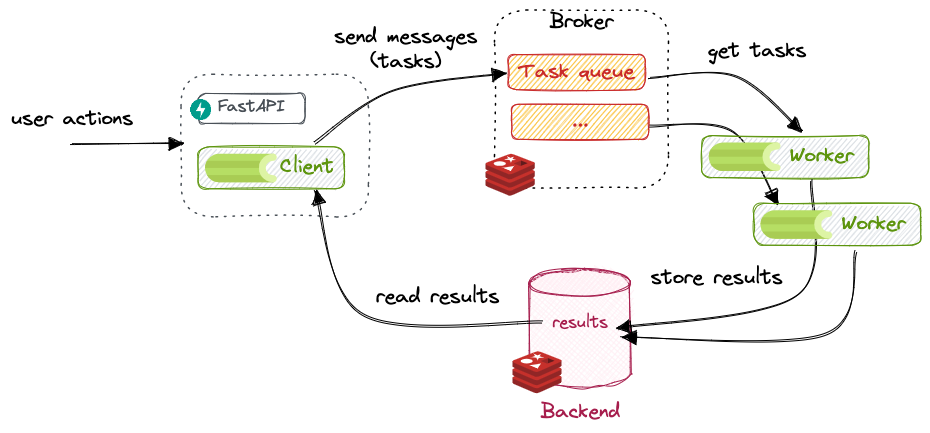
Celery Mimarisi

Celery Architecture with FastAPI Celery ve FastAPI Entegrasyonu

Temel Özellikler

1. Çoklu Broker Desteği

1
2
3
4
5
6
7
8
# RabbitMQ
CELERY_BROKER_URL = "amqp://user:pass@localhost:5672//"

# Redis
CELERY_BROKER_URL = "redis://localhost:6379/0"

# Amazon SQS
CELERY_BROKER_URL = "sqs://aws_access_key:aws_secret@"

2. Task Routing ve Prioritization

1
2
3
4
5
6
7
8
9
10
# Farklı queue'lar için routing
app.conf.task_routes = {
    'tasks.send_email': {'queue': 'emails'},
    'tasks.process_video': {'queue': 'videos'},
    'tasks.generate_report': {'queue': 'reports'},
}

# Priority ayarlama
send_urgent_email.apply_async(priority=0)  # Highest
send_newsletter.apply_async(priority=9)    # Lowest

3. Chord ve Group Primitives

1
2
3
4
5
6
7
8
9
from celery import group, chord, chain

# Paralel çalıştır, sonuçları topla
callback = tsum.s()
header = group(add.s(i, i) for i in range(10))
result = chord(header)(callback)

# Sıralı çalıştır (pipeline)
result = chain(add.s(2, 2), mul.s(8), sub.s(10))()

Celery Task Lifecycle

1
2
3
4
5
6
7
8
9
10
11
12
13
14
15
16
17
18
19
20
21
# Task tanımlama
from celery import Celery

app = Celery('tasks', broker='redis://localhost:6379/0')

@app.task(bind=True, max_retries=3)
def process_data(self, data_id):
    try:
        # İş mantığı
        data = fetch_data(data_id)
        result = transform_data(data)
        save_result(result)
        return {"status": "success", "data_id": data_id}
    
    except NetworkError as exc:
        # Geçici hata: retry
        raise self.retry(exc=exc, countdown=60)
    
    except ValidationError:
        # Kalıcı hata: fail
        return {"status": "failed", "reason": "invalid_data"}

Advanced Task Options

1
2
3
4
5
6
7
8
9
10
11
12
13
14
15
16
@app.task(
    bind=True,                    # self parametresi için
    max_retries=3,                # Maksimum deneme sayısı
    default_retry_delay=300,      # 5 dakika bekle
    rate_limit='100/m',           # Dakikada 100 task
    time_limit=600,               # 10 dakika timeout
    soft_time_limit=300,          # 5 dakika soft limit
    acks_late=True,               # Task bitince ACK
    reject_on_worker_lost=True,   # Worker crash'te reject
    autoretry_for=(NetworkError,),# Otomatik retry exceptions
    retry_backoff=True,           # Exponential backoff
    retry_jitter=True,            # Jitter ekle
)
def robust_task(self, data):
    # Critical task implementation
    pass

3. ARQ Nedir ve Özellikleri

ARQ (Async Redis Queue), modern Python async/await syntax’ına native destek veren, Redis tabanlı minimalist bir görev kuyruğu sistemidir.

ARQ Workflow

ARQ Async Task Queue ARQ Asenkron Görev Akışı

Temel Özellikler

1. Native AsyncIO Support

1
2
3
4
5
6
7
# ARQ tamamen async/await ile çalışır
async def download_content(ctx, url: str):
    async with aiohttp.ClientSession() as session:
        async with session.get(url) as response:
            content = await response.text()
            await process_content(content)
            return len(content)

2. Basit ve Minimal API

1
2
3
4
5
6
7
8
9
10
11
12
13
from arq import create_pool
from arq.connections import RedisSettings

# Worker fonksiyonu tanımlama
async def example_task(ctx, name: str):
    await asyncio.sleep(2)  # Simulate work
    return f"Hello {name}"

# Task'ı kuyruğa ekleme
async def enqueue_task():
    redis = await create_pool(RedisSettings())
    job = await redis.enqueue_job('example_task', 'World')
    print(f"Job ID: {job.job_id}")

3. Built-in Cron Scheduler

1
2
3
4
5
6
7
8
9
10
11
12
13
14
15
# arq worker'da cron tanımlama
from arq.cron import cron

async def cleanup_old_files(ctx):
    # Günlük temizlik
    deleted = await remove_old_temp_files()
    return {"deleted_count": deleted}

class WorkerSettings:
    functions = [example_task]
    
    cron_jobs = [
        cron(cleanup_old_files, hour=2, minute=30),  # Her gün 02:30
        cron(send_reports, day_of_week='mon', hour=9),  # Pazartesi 09:00
    ]

ARQ Worker Configuration

1
2
3
4
5
6
7
8
9
10
11
12
13
14
15
16
17
18
19
20
21
22
23
24
25
26
27
28
29
30
31
32
33
34
# settings.py
from arq import create_pool
from arq.connections import RedisSettings

async def startup(ctx):
    """Worker başlarken çalışır"""
    ctx['db'] = await create_db_pool()
    ctx['http_client'] = aiohttp.ClientSession()

async def shutdown(ctx):
    """Worker kapanırken çalışır"""
    await ctx['http_client'].close()
    await ctx['db'].close()

class WorkerSettings:
    redis_settings = RedisSettings(
        host='localhost',
        port=6379,
        database=0,
    )
    
    functions = [
        download_content,
        process_image,
        send_notification,
    ]
    
    on_startup = startup
    on_shutdown = shutdown
    
    max_jobs = 10              # Paralel job sayısı
    job_timeout = 300          # 5 dakika timeout
    keep_result = 3600         # Sonuçları 1 saat sakla
    health_check_interval = 60 # Health check

4. Celery vs ARQ: Detaylı Karşılaştırma

Celery vs ARQ Comparison Celery ve ARQ Özellik Karşılaştırması

Karşılaştırma Tablosu

ÖzellikCeleryARQ
Broker DesteğiRedis, RabbitMQ, SQS, KafkaSadece Redis
Async/AwaitKısmi destek (Celery 5+)Native async support
Result BackendRedis, DB, File, RPCSadece Redis
Task RoutingAdvanced (queue, exchange)Basit (tek queue)
Priority Queue✅ Var❌ Yok
Retry LogicAdvanced (exponential, jitter)Basit (linear)
MonitoringFlower, PrometheusBasit (Redis keys)
Chord/Group✅ Var❌ Yok
Cron SchedulerCelery Beat (ayrı process)Built-in
Learning CurveYüksekDüşük
Performanceİyi (sync tasks için)Çok iyi (async için)
CommunityÇok büyükKüçük ama aktif
DocumentationKapsamlıSade ama yeterli

Performance Karşılaştırması

1
2
3
4
5
6
7
8
9
10
11
12
13
# Benchmark: 10,000 task enqueue + process

# Celery (sync)
# Enqueue: 8.5s
# Process (4 workers): 45s
# Total: 53.5s

# ARQ (async)
# Enqueue: 2.1s
# Process (10 concurrent): 18s
# Total: 20.1s

# ARQ, async operasyonlarda ~2.5x daha hızlı!

Hangi Durumda Hangisi?

Celery Kullanın:

  • ✅ Karmaşık workflow ihtiyacınız varsa (chord, chain, group)
  • ✅ Multiple broker/backend gerekiyorsa
  • ✅ Priority queue gerekiyorsa
  • ✅ Mature ecosystem ve geniş community istiyorsanız
  • ✅ Sync kod tabanınız varsa
  • ✅ Enterprise-grade features (retry policies, monitoring)

ARQ Kullanın:

  • ✅ AsyncIO tabanlı modern Python yazıyorsanız
  • ✅ FastAPI, aiohttp gibi async framework’ler kullanıyorsanız
  • ✅ Basit ve minimal bir çözüm istiyorsanız
  • ✅ Redis zaten infrastructure’ınızda varsa
  • ✅ Yüksek throughput async I/O işleri yapıyorsanız
  • ✅ Cron scheduler’a ihtiyacınız varsa

5. Celery Kurulumu ve Yapılandırması

Temel Kurulum

1
2
3
4
5
6
7
8
# Redis broker ile
pip install celery[redis]

# RabbitMQ broker ile
pip install celery[amqp]

# Full installation (monitoring dahil)
pip install celery[redis,msgpack,auth,tblib] flower

Proje Yapısı

1
2
3
4
5
6
7
8
project/
├── app/
│   ├── __init__.py
│   ├── celery_app.py      # Celery instance
│   ├── tasks.py           # Task definitions
│   └── config.py          # Configuration
├── worker.py              # Worker başlatma
└── requirements.txt

Celery App Configuration

1
2
3
4
5
6
7
8
9
10
11
12
13
14
15
16
17
18
19
20
21
22
23
24
25
26
27
28
29
30
31
32
33
34
35
36
37
38
39
40
41
42
43
44
45
46
47
48
49
50
51
# app/celery_app.py
from celery import Celery
from kombu import Exchange, Queue

app = Celery('myapp')

# Configuration
app.conf.update(
    # Broker settings
    broker_url='redis://localhost:6379/0',
    result_backend='redis://localhost:6379/1',
    
    # Serialization
    task_serializer='json',
    result_serializer='json',
    accept_content=['json'],
    
    # Timezone
    timezone='Europe/Istanbul',
    enable_utc=True,
    
    # Task routing
    task_routes={
        'app.tasks.send_email': {'queue': 'emails'},
        'app.tasks.process_video': {'queue': 'videos'},
    },
    
    # Queue definitions
    task_queues=(
        Queue('default', Exchange('default'), routing_key='default'),
        Queue('emails', Exchange('emails'), routing_key='emails.#'),
        Queue('videos', Exchange('videos'), routing_key='videos.#'),
    ),
    
    # Worker settings
    worker_prefetch_multiplier=4,
    worker_max_tasks_per_child=1000,
    
    # Result backend settings
    result_expires=3600,  # 1 hour
    result_compression='gzip',
    
    # Task execution
    task_acks_late=True,
    task_reject_on_worker_lost=True,
    task_track_started=True,
    
    # Monitoring
    worker_send_task_events=True,
    task_send_sent_event=True,
)

Task Definitions

1
2
3
4
5
6
7
8
9
10
11
12
13
14
15
16
17
18
19
20
21
22
23
24
25
26
27
28
29
30
31
32
33
34
35
36
37
38
39
40
41
42
43
44
45
46
47
48
49
50
51
52
53
54
55
56
57
58
59
60
61
62
# app/tasks.py
from celery import Task
from app.celery_app import app
import requests

class CallbackTask(Task):
    """Custom base task with callbacks"""
    
    def on_success(self, retval, task_id, args, kwargs):
        print(f"Task {task_id} succeeded with result: {retval}")
    
    def on_failure(self, exc, task_id, args, kwargs, einfo):
        print(f"Task {task_id} failed: {exc}")
    
    def on_retry(self, exc, task_id, args, kwargs, einfo):
        print(f"Task {task_id} retrying: {exc}")

@app.task(
    base=CallbackTask,
    bind=True,
    max_retries=3,
    autoretry_for=(requests.HTTPError,),
    retry_backoff=True,
)
def fetch_data(self, url: str):
    """Fetch data from external API"""
    try:
        response = requests.get(url, timeout=10)
        response.raise_for_status()
        return response.json()
    
    except requests.RequestException as exc:
        # Log and retry
        self.retry(exc=exc, countdown=2 ** self.request.retries)

@app.task(name='send_email')
def send_email(to: str, subject: str, body: str):
    """Send email task"""
    # Email sending logic
    import smtplib
    from email.mime.text import MIMEText
    
    msg = MIMEText(body)
    msg['Subject'] = subject
    msg['To'] = to
    
    # Send email (simplified)
    return {"status": "sent", "to": to}

@app.task(bind=True)
def long_running_task(self, iterations: int):
    """Task with progress tracking"""
    for i in range(iterations):
        # Update progress
        self.update_state(
            state='PROGRESS',
            meta={'current': i, 'total': iterations}
        )
        # Do work
        time.sleep(0.1)
    
    return {'status': 'complete', 'iterations': iterations}

FastAPI Integration

1
2
3
4
5
6
7
8
9
10
11
12
13
14
15
16
17
18
19
20
21
22
23
24
25
26
27
28
29
30
31
32
33
34
35
36
37
38
39
40
41
42
43
44
# app/main.py
from fastapi import FastAPI, BackgroundTasks
from app.celery_app import app as celery_app
from app.tasks import send_email, fetch_data

app = FastAPI()

@app.post("/send-email")
async def send_email_endpoint(to: str, subject: str, body: str):
    """Trigger email sending"""
    task = send_email.delay(to, subject, body)
    return {"task_id": task.id, "status": "queued"}

@app.get("/task-status/{task_id}")
async def get_task_status(task_id: str):
    """Check task status"""
    task = celery_app.AsyncResult(task_id)
    
    if task.state == 'PENDING':
        response = {'state': task.state, 'status': 'Pending...'}
    elif task.state == 'PROGRESS':
        response = {
            'state': task.state,
            'current': task.info.get('current', 0),
            'total': task.info.get('total', 1),
        }
    elif task.state == 'SUCCESS':
        response = {
            'state': task.state,
            'result': task.result,
        }
    else:
        response = {
            'state': task.state,
            'error': str(task.info),
        }
    
    return response

@app.post("/fetch-data")
async def fetch_data_endpoint(url: str):
    """Fetch external data async"""
    task = fetch_data.apply_async(args=[url], countdown=5)  # 5 saniye sonra başla
    return {"task_id": task.id}

Worker Başlatma

1
2
3
4
5
6
7
8
9
10
11
12
13
14
# Basic worker
celery -A app.celery_app worker --loglevel=info

# Specific queue
celery -A app.celery_app worker -Q emails --loglevel=info

# Multiple workers with concurrency
celery -A app.celery_app worker --concurrency=8

# Autoscale workers
celery -A app.celery_app worker --autoscale=10,3

# Worker with events (monitoring için)
celery -A app.celery_app worker --loglevel=info -E

Celery Beat (Periodic Tasks)

1
2
3
4
5
6
7
8
9
10
11
12
13
14
15
16
17
# app/celery_app.py - beat schedule ekleme
from celery.schedules import crontab

app.conf.beat_schedule = {
    'cleanup-every-night': {
        'task': 'app.tasks.cleanup_old_files',
        'schedule': crontab(hour=2, minute=0),  # Her gün 02:00
    },
    'send-weekly-report': {
        'task': 'app.tasks.generate_report',
        'schedule': crontab(day_of_week='monday', hour=9, minute=0),
    },
    'health-check-every-5min': {
        'task': 'app.tasks.health_check',
        'schedule': 300.0,  # 5 dakika (saniye cinsinden)
    },
}
1
2
3
4
5
# Beat scheduler başlatma
celery -A app.celery_app beat --loglevel=info

# Worker + beat birlikte (development için)
celery -A app.celery_app worker --beat --loglevel=info

6. ARQ Kurulumu ve Yapılandırması

Kurulum

1
pip install arq aioredis

Proje Yapısı

1
2
3
4
5
6
7
project/
├── app/
│   ├── __init__.py
│   ├── tasks.py           # Task definitions
│   ├── worker.py          # Worker settings
│   └── main.py            # FastAPI app
└── requirements.txt

Task Definitions

1
2
3
4
5
6
7
8
9
10
11
12
13
14
15
16
17
18
19
20
21
22
23
24
25
26
27
28
29
30
31
32
33
34
35
36
37
38
39
40
41
42
43
44
45
46
47
48
49
50
51
# app/tasks.py
import asyncio
import aiohttp
from typing import Dict, Any

async def download_content(ctx: Dict[str, Any], url: str) -> int:
    """Download content from URL"""
    async with ctx['http_session'].get(url) as response:
        content = await response.text()
        # Process content
        await asyncio.sleep(1)  # Simulate processing
        return len(content)

async def send_notification(ctx: Dict[str, Any], user_id: int, message: str):
    """Send push notification"""
    # Notification logic
    await asyncio.sleep(0.5)
    return {"user_id": user_id, "sent": True}

async def process_image(ctx: Dict[str, Any], image_path: str, operations: list):
    """Process image with given operations"""
    from PIL import Image
    
    img = Image.open(image_path)
    
    for op in operations:
        if op == 'resize':
            img = img.resize((800, 600))
        elif op == 'grayscale':
            img = img.convert('L')
    
    output_path = image_path.replace('.jpg', '_processed.jpg')
    img.save(output_path)
    
    return {"output": output_path}

async def cleanup_old_files(ctx: Dict[str, Any]):
    """Periodic cleanup task"""
    import os
    from datetime import datetime, timedelta
    
    cutoff = datetime.now() - timedelta(days=7)
    deleted = 0
    
    for file in os.listdir('/tmp/uploads'):
        file_path = os.path.join('/tmp/uploads', file)
        if os.path.getctime(file_path) < cutoff.timestamp():
            os.remove(file_path)
            deleted += 1
    
    return {"deleted_count": deleted}

Worker Configuration

1
2
3
4
5
6
7
8
9
10
11
12
13
14
15
16
17
18
19
20
21
22
23
24
25
26
27
28
29
30
31
32
33
34
35
36
37
38
39
40
41
42
43
44
45
46
47
48
49
50
51
52
53
54
55
56
57
58
59
60
61
62
63
64
65
66
67
68
69
70
71
# app/worker.py
import aiohttp
import asyncpg
from arq.connections import RedisSettings
from arq.cron import cron
from app.tasks import (
    download_content,
    send_notification,
    process_image,
    cleanup_old_files,
)

async def startup(ctx):
    """Worker initialization"""
    ctx['http_session'] = aiohttp.ClientSession()
    ctx['db_pool'] = await asyncpg.create_pool(
        'postgresql://user:pass@localhost/db',
        min_size=5,
        max_size=20,
    )
    print("Worker started with connections")

async def shutdown(ctx):
    """Worker cleanup"""
    await ctx['http_session'].close()
    await ctx['db_pool'].close()
    print("Worker shutdown complete")

class WorkerSettings:
    """ARQ worker configuration"""
    
    # Redis connection
    redis_settings = RedisSettings(
        host='localhost',
        port=6379,
        database=0,
        password=None,
    )
    
    # Task functions
    functions = [
        download_content,
        send_notification,
        process_image,
    ]
    
    # Cron jobs
    cron_jobs = [
        cron(cleanup_old_files, hour=2, minute=30),  # Daily at 02:30
    ]
    
    # Lifecycle hooks
    on_startup = startup
    on_shutdown = shutdown
    
    # Worker settings
    max_jobs = 10                    # Paralel job sayısı
    job_timeout = 300                # 5 dakika timeout
    keep_result = 3600               # Sonuçları 1 saat sakla
    keep_result_forever = False      # Sonuçları temizle
    poll_delay = 0.5                 # Queue polling interval
    queue_read_limit = 100           # Batch job reading
    max_tries = 3                    # Retry count
    health_check_interval = 60       # Health check interval
    health_check_key = 'arq:health-check'
    
    # Logging
    log_results = True
    
    # Retry settings
    retry_jobs = True

FastAPI Integration

1
2
3
4
5
6
7
8
9
10
11
12
13
14
15
16
17
18
19
20
21
22
23
24
25
26
27
28
29
30
31
32
33
34
35
36
37
38
39
40
41
42
43
44
45
46
47
48
49
50
51
52
53
54
55
56
57
58
59
60
61
62
63
64
65
66
67
68
69
70
71
72
73
74
75
76
77
78
79
80
# app/main.py
from fastapi import FastAPI, HTTPException
from arq import create_pool
from arq.connections import RedisSettings
from arq.jobs import Job

app = FastAPI()

# Redis pool (singleton)
redis_pool = None

@app.on_event("startup")
async def startup():
    global redis_pool
    redis_pool = await create_pool(RedisSettings())

@app.on_event("shutdown")
async def shutdown():
    if redis_pool:
        await redis_pool.close()

@app.post("/download")
async def trigger_download(url: str):
    """Enqueue download task"""
    job = await redis_pool.enqueue_job(
        'download_content',
        url,
        _job_id=f'download_{url}',  # Custom job ID
    )
    
    return {
        "job_id": job.job_id,
        "status": "queued",
        "url": url,
    }

@app.post("/notify")
async def send_notification_endpoint(user_id: int, message: str):
    """Send notification"""
    job = await redis_pool.enqueue_job(
        'send_notification',
        user_id,
        message,
        _defer_by=10,  # 10 saniye sonra çalıştır
    )
    
    return {"job_id": job.job_id}

@app.get("/job/{job_id}")
async def get_job_status(job_id: str):
    """Check job status"""
    job = Job(job_id, redis_pool)
    
    try:
        info = await job.info()
        result = await job.result()
        
        return {
            "job_id": job_id,
            "status": info.status,
            "enqueue_time": info.enqueue_time,
            "start_time": info.start_time,
            "finish_time": info.finish_time,
            "result": result,
        }
    
    except Exception as e:
        raise HTTPException(status_code=404, detail=f"Job not found: {e}")

@app.post("/process-image")
async def process_image_endpoint(image_path: str, operations: list):
    """Process image asynchronously"""
    job = await redis_pool.enqueue_job(
        'process_image',
        image_path,
        operations,
        _job_try=3,  # Max 3 retry
    )
    
    return {"job_id": job.job_id}

Worker Başlatma

1
2
3
4
5
6
7
8
9
10
11
12
13
14
15
16
17
18
19
20
21
# Basic worker
arq app.worker.WorkerSettings

# Verbose logging
arq app.worker.WorkerSettings --verbose

# Watch mode (development)
arq app.worker.WorkerSettings --watch app

# Multiple workers (scale)
# Terminal 1
arq app.worker.WorkerSettings

# Terminal 2
arq app.worker.WorkerSettings

# Docker ile
docker run -d --name arq-worker \
  -v $(pwd):/app \
  python:3.11 \
  arq app.worker.WorkerSettings

7. Distributed Worker Deployment

Celery Multi-Node Deployment

1
2
3
4
5
6
7
8
9
10
11
12
13
14
15
16
17
18
19
20
21
22
23
24
25
26
27
28
29
30
31
32
33
34
35
36
37
38
39
40
41
42
43
44
45
46
47
48
49
50
51
52
53
# docker-compose.yml
version: '3.8'

services:
  redis:
    image: redis:7-alpine
    ports:
      - "6379:6379"
    volumes:
      - redis_data:/data

  celery-worker-default:
    build: .
    command: celery -A app.celery_app worker -Q default --concurrency=4
    volumes:
      - ./app:/app
    depends_on:
      - redis
    environment:
      - CELERY_BROKER_URL=redis://redis:6379/0
      - CELERY_RESULT_BACKEND=redis://redis:6379/1
    deploy:
      replicas: 2  # 2 worker instance

  celery-worker-emails:
    build: .
    command: celery -A app.celery_app worker -Q emails --concurrency=2
    volumes:
      - ./app:/app
    depends_on:
      - redis
    environment:
      - CELERY_BROKER_URL=redis://redis:6379/0

  celery-beat:
    build: .
    command: celery -A app.celery_app beat --loglevel=info
    volumes:
      - ./app:/app
    depends_on:
      - redis

  flower:
    build: .
    command: celery -A app.celery_app flower --port=5555
    ports:
      - "5555:5555"
    depends_on:
      - redis
      - celery-worker-default

volumes:
  redis_data:

ARQ Multi-Worker Setup

1
2
3
4
5
6
7
8
9
10
11
12
13
14
15
16
17
18
19
20
21
22
23
24
25
26
27
28
29
# docker-compose.yml (ARQ)
version: '3.8'

services:
  redis:
    image: redis:7-alpine
    ports:
      - "6379:6379"

  arq-worker:
    build: .
    command: arq app.worker.WorkerSettings
    volumes:
      - ./app:/app
    depends_on:
      - redis
    environment:
      - REDIS_HOST=redis
      - REDIS_PORT=6379
    deploy:
      replicas: 3  # 3 worker instance

  api:
    build: .
    command: uvicorn app.main:app --host 0.0.0.0 --port 8000
    ports:
      - "8000:8000"
    depends_on:
      - redis

Kubernetes Deployment

1
2
3
4
5
6
7
8
9
10
11
12
13
14
15
16
17
18
19
20
21
22
23
24
25
26
27
28
29
30
31
32
33
34
35
36
37
38
39
40
41
42
43
44
45
46
47
48
# celery-worker-deployment.yaml
apiVersion: apps/v1
kind: Deployment
metadata:
  name: celery-worker
spec:
  replicas: 5
  selector:
    matchLabels:
      app: celery-worker
  template:
    metadata:
      labels:
        app: celery-worker
    spec:
      containers:
      - name: worker
        image: myapp:latest
        command: ["celery", "-A", "app.celery_app", "worker", "--concurrency=4"]
        env:
        - name: CELERY_BROKER_URL
          value: "redis://redis-service:6379/0"
        resources:
          requests:
            memory: "256Mi"
            cpu: "250m"
          limits:
            memory: "512Mi"
            cpu: "500m"
---
apiVersion: autoscaling/v2
kind: HorizontalPodAutoscaler
metadata:
  name: celery-worker-hpa
spec:
  scaleTargetRef:
    apiVersion: apps/v1
    kind: Deployment
    name: celery-worker
  minReplicas: 3
  maxReplicas: 10
  metrics:
  - type: Resource
    resource:
      name: cpu
      target:
        type: Utilization
        averageUtilization: 70

8. Result Backend ve Task Tracking

Celery Result Backend

1
2
3
4
5
6
7
8
9
10
11
12
13
14
15
16
17
18
19
20
21
22
23
24
25
26
27
28
# Redis result backend
from celery.result import AsyncResult

# Task'ı çalıştır
result = process_data.delay(data_id=123)

# Task ID
print(result.id)  # "a82f8c01-9e5d-4f41-9e91-3e0c91c9f8a3"

# Status kontrolü
if result.ready():
    print("Task completed")
    print(result.result)
elif result.failed():
    print("Task failed")
    print(result.traceback)
else:
    print("Task is still running")

# Blocking wait (timeout ile)
try:
    result_value = result.get(timeout=10)
    print(result_value)
except TimeoutError:
    print("Task didn't complete in time")

# Revoke task (iptal et)
result.revoke(terminate=True)

ARQ Result Retrieval

1
2
3
4
5
6
7
8
9
10
11
12
13
14
15
16
17
18
19
20
21
22
23
24
from arq import create_pool
from arq.jobs import Job, JobStatus

async def check_job():
    redis = await create_pool(RedisSettings())
    
    # Job oluştur
    job = await redis.enqueue_job('download_content', 'https://example.com')
    
    # Job bilgisi
    info = await job.info()
    print(f"Status: {info.status}")  # JobStatus.queued
    
    # Bekle ve sonucu al
    result = await job.result(timeout=30)
    print(result)
    
    # Manuel status check
    if info.status == JobStatus.complete:
        print("Job completed")
    elif info.status == JobStatus.in_progress:
        print("Job running")
    elif info.status == JobStatus.not_found:
        print("Job not found (expired?)")

9. Periodic Tasks ve Scheduling

Celery Beat Patterns

1
2
3
4
5
6
7
8
9
10
11
12
13
14
15
16
17
18
19
20
21
22
23
24
25
26
27
28
29
30
31
32
33
from celery.schedules import crontab, solar

app.conf.beat_schedule = {
    # Her 10 dakikada bir
    'cleanup-temp': {
        'task': 'tasks.cleanup_temp_files',
        'schedule': 600.0,
    },
    
    # Her gün sabah 8'de
    'morning-report': {
        'task': 'tasks.generate_daily_report',
        'schedule': crontab(hour=8, minute=0),
    },
    
    # Her Pazartesi 09:00
    'weekly-summary': {
        'task': 'tasks.send_weekly_summary',
        'schedule': crontab(day_of_week='monday', hour=9, minute=0),
    },
    
    # Her ayın ilk günü
    'monthly-billing': {
        'task': 'tasks.process_monthly_billing',
        'schedule': crontab(day_of_month=1, hour=0, minute=0),
    },
    
    # Güneş doğumunda (solar schedule!)
    'sunrise-notification': {
        'task': 'tasks.send_sunrise_alert',
        'schedule': solar('sunrise', 41.0082, 28.9784),  # Istanbul
    },
}

ARQ Cron Jobs

1
2
3
4
5
6
7
8
9
10
11
12
13
14
15
16
from arq.cron import cron

class WorkerSettings:
    cron_jobs = [
        # Her gün 02:00
        cron(cleanup_task, hour=2, minute=0),
        
        # Her Pazar 23:00
        cron(weekly_backup, day_of_week='sun', hour=23, minute=0),
        
        # Her 15 dakikada (run_at_startup=True)
        cron(health_check, minute={0, 15, 30, 45}, run_at_startup=True),
        
        # Her saat başı
        cron(hourly_sync, minute=0),
    ]

10. Error Handling ve Retry Stratejileri

Celery Advanced Retry

1
2
3
4
5
6
7
8
9
10
11
12
13
14
15
16
17
18
19
20
21
22
23
24
25
26
27
28
29
30
31
32
33
34
35
36
37
38
39
40
41
42
43
44
45
46
47
48
49
50
51
52
53
54
55
56
57
58
59
60
61
62
from celery.exceptions import Reject, Retry

@app.task(
    bind=True,
    autoretry_for=(NetworkError, TimeoutError),
    retry_kwargs={'max_retries': 5},
    retry_backoff=True,        # Exponential: 2^retry
    retry_backoff_max=600,     # Max 10 dakika
    retry_jitter=True,         # Jitter ekle
)
def resilient_task(self, data):
    try:
        result = external_api_call(data)
        return result
    
    except ValidationError:
        # Permanent failure - retry yapmayın
        raise Reject("Invalid data", requeue=False)
    
    except RateLimitError as exc:
        # Özel retry logic
        retry_in = exc.retry_after or 60
        raise self.retry(exc=exc, countdown=retry_in)

# Custom retry decorator
from functools import wraps

def task_with_circuit_breaker(max_failures=5, timeout=300):
    """Circuit breaker pattern"""
    failures = {'count': 0, 'last_failure': 0}
    
    def decorator(func):
        @wraps(func)
        def wrapper(*args, **kwargs):
            import time
            now = time.time()
            
            # Circuit açık mı?
            if failures['count'] >= max_failures:
                if now - failures['last_failure'] < timeout:
                    raise Exception("Circuit breaker is OPEN")
                else:
                    # Reset circuit
                    failures['count'] = 0
            
            try:
                result = func(*args, **kwargs)
                failures['count'] = 0  # Reset on success
                return result
            
            except Exception as e:
                failures['count'] += 1
                failures['last_failure'] = now
                raise
        
        return wrapper
    return decorator

@app.task
@task_with_circuit_breaker(max_failures=3, timeout=60)
def api_call_with_breaker(url):
    return requests.get(url).json()

ARQ Error Handling

1
2
3
4
5
6
7
8
9
10
11
12
13
14
15
16
17
18
19
20
21
22
23
24
25
26
27
async def task_with_retry(ctx, data):
    """ARQ automatic retry with exponential backoff"""
    try:
        result = await process_data(data)
        return result
    
    except TemporaryError:
        # Bu exception tekrar dene
        raise
    
    except PermanentError:
        # Bu exception'da tekrar deneme
        # ARQ retry yapmaz, task failed olur
        return {"status": "failed", "error": "permanent"}

# Custom retry logic
from arq import Retry

async def smart_retry_task(ctx, url):
    try:
        async with ctx['http_session'].get(url) as resp:
            return await resp.json()
    
    except aiohttp.ClientError as e:
        # Özel backoff stratejisi
        retry_in = min(60, 2 ** ctx['job_try'])  # Max 60 saniye
        raise Retry(defer=retry_in) from e

11. Monitoring ve Performance

Celery + Flower Monitoring

1
2
3
4
# Flower başlat
celery -A app.celery_app flower --port=5555

# Browser'da aç: http://localhost:5555

Flower özellikleri:

  • Real-time task monitoring
  • Worker status ve resource usage
  • Task history ve statistics
  • Queue length monitoring
  • Task revoke ve retry
  • Rate limit viewing

Prometheus Metrics

1
2
3
4
5
6
7
8
9
10
11
12
13
14
15
16
17
18
19
20
21
22
23
24
25
26
27
28
29
30
# Celery metrics export
from prometheus_client import Counter, Histogram, start_http_server

task_counter = Counter(
    'celery_tasks_total',
    'Total tasks executed',
    ['task_name', 'status']
)

task_duration = Histogram(
    'celery_task_duration_seconds',
    'Task execution time',
    ['task_name']
)

@app.task(bind=True)
def monitored_task(self):
    with task_duration.labels(task_name=self.name).time():
        # Task logic
        result = do_work()
        
        task_counter.labels(
            task_name=self.name,
            status='success'
        ).inc()
        
        return result

# Start metrics server
start_http_server(9090)

ARQ Health Checks

1
2
3
4
5
6
7
8
9
10
11
12
13
14
15
16
17
18
19
20
21
22
23
24
25
26
27
# ARQ health check endpoint
from fastapi import FastAPI, Response

@app.get("/health/workers")
async def check_workers():
    """Check if ARQ workers are healthy"""
    try:
        # Health check key kontrol et
        health_check = await redis_pool.get('arq:health-check')
        
        if health_check:
            last_check = float(health_check)
            now = time.time()
            
            if now - last_check < 120:  # Son 2 dakika içinde
                return {"status": "healthy", "last_check": last_check}
        
        return Response(
            content='{"status": "unhealthy"}',
            status_code=503
        )
    
    except Exception as e:
        return Response(
            content=f'{{"status": "error", "error": "{e}"}}',
            status_code=500
        )

12. Production Best Practices

Celery Production Checklist

1
2
3
4
5
6
7
8
9
10
11
12
13
14
15
16
17
18
19
20
# ✅ Yapılandırma best practices
app.conf.update(
    # Performance
    worker_prefetch_multiplier=1,      # Fair distribution
    worker_max_tasks_per_child=1000,   # Memory leak önleme
    task_acks_late=True,                # Task güvenliği
    task_reject_on_worker_lost=True,   # Crash handling
    
    # Monitoring
    worker_send_task_events=True,
    task_send_sent_event=True,
    
    # Result backend
    result_expires=3600,                # Sonuçları temizle
    result_compression='gzip',          # Bandwidth tasarrufu
    
    # Broker connection
    broker_connection_retry_on_startup=True,
    broker_connection_max_retries=10,
)

ARQ Production Tips

1
2
3
4
5
6
7
8
9
10
11
12
13
14
15
16
17
18
19
20
21
class ProductionWorkerSettings:
    # ✅ Connection pooling
    redis_settings = RedisSettings(
        host='redis-cluster.example.com',
        port=6379,
        conn_timeout=5,
        conn_retries=5,
        conn_retry_delay=1,
    )
    
    # ✅ Resource limits
    max_jobs = 20                   # CPU core sayısına göre ayarla
    job_timeout = 600               # Task timeout
    keep_result = 3600              # 1 saat
    
    # ✅ Error handling
    max_tries = 3
    retry_jobs = True
    
    # ✅ Health checks
    health_check_interval = 30

Logging Configuration

1
2
3
4
5
6
7
8
9
10
11
12
13
14
15
16
17
18
19
20
21
22
23
24
25
26
27
28
29
30
31
32
33
34
35
36
37
38
39
40
41
42
# Celery logging
import logging

@signals.setup_logging.connect
def setup_celery_logging(**kwargs):
    logging.basicConfig(
        level=logging.INFO,
        format='%(asctime)s - %(name)s - %(levelname)s - %(message)s',
        handlers=[
            logging.StreamHandler(),
            logging.FileHandler('/var/log/celery/worker.log'),
        ]
    )

# ARQ logging
import logging.config

logging.config.dictConfig({
    'version': 1,
    'handlers': {
        'console': {
            'class': 'logging.StreamHandler',
            'formatter': 'standard',
        },
        'file': {
            'class': 'logging.handlers.RotatingFileHandler',
            'filename': '/var/log/arq/worker.log',
            'maxBytes': 10485760,  # 10MB
            'backupCount': 5,
            'formatter': 'standard',
        },
    },
    'formatters': {
        'standard': {
            'format': '%(asctime)s [%(levelname)s] %(name)s: %(message)s'
        },
    },
    'root': {
        'handlers': ['console', 'file'],
        'level': 'INFO',
    },
})

Sonuç

Celery ve ARQ, Python ekosisteminde güçlü asenkron görev kuyruğu çözümleridir. Her ikisi de production-ready olmakla birlikte, farklı ihtiyaçlara hitap ederler.

Celery: Enterprise-Grade Features

  • ✅ Mature ecosystem (2009’dan beri)
  • ✅ Multiple broker/backend support
  • ✅ Advanced workflow primitives
  • ✅ Comprehensive monitoring (Flower)
  • ⚠️ Daha karmaşık setup
  • ⚠️ Async support sınırlı

ARQ: Modern Async-First

  • ✅ Native async/await support
  • ✅ Minimal ve sade API
  • ✅ Excellent performance (async I/O)
  • ✅ Built-in cron scheduler
  • ⚠️ Sadece Redis
  • ⚠️ Küçük community

Projeniz için doğru seçimi, workflow karmaşıklığınıza, mevcut infrastructure’ınıza ve async ihtiyaçlarınıza göre yapın. Modern async Python projelerinde ARQ, legacy sync kod tabanlarında ve complex enterprise senaryolarda Celery öne çıkar.

Her iki tool da production’da güvenle kullanılabilir. Önemli olan, hangi senaryoda hangi tool’un size daha fazla değer katacağını belirlemektir!

Kaynaklar

Bu gönderi CC BY 4.0 lisansı altındadır.