Pyrogram ile Telegram Bot Geliştirme: MTProto API Kullanımı
Pyrogram ile gelişmiş Telegram bot geliştirme. MTProto API, userbot, medya yönetimi, inline keyboard ve gerçek zamanlı mesajlaşma.

Telegram, dünya çapında 800 milyondan fazla aktif kullanıcısı olan bir mesajlaşma platformudur ve güçlü bot API’si ile otomasyon ve uygulama geliştirme için ideal bir ortam sunar. Pyrogram, Telegram’ın MTProto API’sini kullanan modern ve asenkron bir Python framework’üdür. Bu yazıda Pyrogram ile hem normal bot hem de userbot geliştirmeyi, plugin sistemini ve advanced özellikleri detaylıca inceleyeceğiz.
Pyrogram Nedir ve Neden Kullanmalıyız?
Pyrogram, Telegram’ın native MTProto protokolünü kullanan, modern ve elegant bir Python kütüphanesidir. Diğer popüler kütüphanelerden (python-telegram-bot, aiogram) farklı olarak, Bot API’nin üzerine değil, doğrudan MTProto üzerinde çalışır.
Pyrogram’ın Avantajları
- MTProto Desteği: Bot API limitlerinden bağımsız, direkt Telegram API’sine erişim
- Async/Await: Modern asenkron programlama desteği
- Userbot Özellikleri: Kendi hesabınızla bot gibi çalışabilme
- Type Hints: Tam Python type hint desteği
- Kolay Kullanım: Basit ve anlaşılır API tasarımı
- Plugin Sistemi: Modüler kod yapısı
 Pyrogram: Modern ve Elegant Telegram MTProto Framework
Kurulum ve İlk Adımlar
Pyrogram’ı kurmak ve API kimlik bilgilerini almak oldukça basittir:
1
2
3
4
5
# Pyrogram kurulumu
pip install pyrogram tgcrypto

# Opsiyonel bağımlılıklar
pip install aiohttp aiofiles pillow
API Kimlik Bilgilerini Alma
Telegram API kullanmak için önce API ID ve API Hash almanız gerekir:
- my.telegram.org adresine gidin
- Telefon numaranızla giriş yapın
- “API development tools” bölümüne tıklayın
- API ID ve API Hash değerlerini kaydedin
Bot Token Alma
BotFather’dan bot token almak için:
1
2
3
4
1. Telegram'da @BotFather'ı bulun
2. /newbot komutunu gönderin
3. Bot ismi ve kullanıcı adı belirleyin
4. Verilen token'ı kaydedin
Basit Telegram Botu Oluşturma
İlk Pyrogram botumuzu oluşturalım:
1
2
3
4
5
6
7
8
9
10
11
12
13
14
15
16
17
18
19
20
21
22
23
24
25
26
27
28
29
30
31
32
33
34
35
36
37
38
39
40
41
42
43
44
45
46
47
48
49
50
51
52
53
54
55
56
57
58
59
60
61
62
63
64
65
66
67
68
69
70
71
72
from pyrogram import Client, filters
from pyrogram.types import Message
# Bot istemcisi oluşturma
app = Client(
"my_bot",
api_id=12345678, # my.telegram.org'dan alınan
api_hash="0123456789abcdef0123456789abcdef", # API Hash
bot_token="123456:ABC-DEF1234ghIkl-zyx57W2v1u123ew11" # BotFather token
)
# /start komutu handler'ı
@app.on_message(filters.command("start"))
async def start_command(client: Client, message: Message):
await message.reply_text(
f"Merhaba {message.from_user.mention}!\n"
"Ben Pyrogram ile yazılmış bir botum. 🤖"
)
# /help komutu
@app.on_message(filters.command("help"))
async def help_command(client: Client, message: Message):
help_text = """
📖 **Kullanılabilir Komutlar:**
/start - Botu başlat
/help - Yardım menüsü
/echo <mesaj> - Mesajı tekrarla
/info - Kullanıcı bilgileri
"""
await message.reply_text(help_text)
# Echo komutu - mesajı tekrar gönder
@app.on_message(filters.command("echo"))
async def echo_command(client: Client, message: Message):
# Komut argümanlarını al
text = message.text.split(None, 1)[1] if len(message.command) > 1 else None
if text:
await message.reply_text(text)
else:
await message.reply_text("❌ Lütfen tekrarlanacak bir mesaj yazın!")
# Kullanıcı bilgilerini göster
@app.on_message(filters.command("info"))
async def info_command(client: Client, message: Message):
user = message.from_user
info_text = f"""
👤 **Kullanıcı Bilgileri:**
🆔 ID: `{user.id}`
👨💼 İsim: {user.mention}
🔤 Kullanıcı Adı: @{user.username if user.username else 'Yok'}
🤖 Bot: {"Evet" if user.is_bot else "Hayır"}
🔒 Premium: {"Evet" if user.is_premium else "Hayır"}
"""
await message.reply_text(info_text)
# Tüm metin mesajlarını yakala (komut olmayanlar)
@app.on_message(filters.text & ~filters.command(["start", "help", "echo", "info"]))
async def handle_text(client: Client, message: Message):
await message.reply_text(
f"Mesajınızı aldım: {message.text}\n"
f"Komutlar için /help yazın."
)
# Botu çalıştır
if __name__ == "__main__":
print("Bot başlatılıyor...")
app.run()
Botu çalıştırmak için:
1
python bot.py
Filters (Filtreler) ile Mesaj İşleme
Pyrogram’ın güçlü filtre sistemi, mesajları seçici olarak işlemenizi sağlar:
1
2
3
4
5
6
7
8
9
10
11
12
13
14
15
16
17
18
19
20
21
22
23
24
25
26
27
28
29
30
31
32
33
34
35
36
37
38
39
40
41
42
43
44
45
46
47
48
49
50
51
52
53
54
55
56
57
58
59
60
61
62
63
64
65
66
67
68
69
70
from pyrogram import filters
from pyrogram.types import Message, CallbackQuery

# Sadece private mesajlar
@app.on_message(filters.private)
async def private_handler(client: Client, message: Message):
    await message.reply("Bu bir private mesaj!")

# Sadece grup mesajları
@app.on_message(filters.group)
async def group_handler(client: Client, message: Message):
    await message.reply("Bu bir grup mesajı!")

# Sadece admin mesajları
@app.on_message(filters.group & filters.user("admins"))
async def admin_handler(client: Client, message: Message):
    await message.reply("Admin komutu alındı!")

# Fotoğraf mesajları
@app.on_message(filters.photo)
async def photo_handler(client: Client, message: Message):
    await message.reply("Güzel fotoğraf! 📸")

    # Fotoğrafı indir
    file_path = await message.download()
    print(f"Fotoğraf indirildi: {file_path}")

# Video mesajları
@app.on_message(filters.video)
async def video_handler(client: Client, message: Message):
    video = message.video
    await message.reply(
        f"📹 Video bilgileri:\n"
        f"Süre: {video.duration} saniye\n"
        f"Boyut: {video.file_size / 1024 / 1024:.2f} MB"
    )

# Doküman mesajları
@app.on_message(filters.document)
async def document_handler(client: Client, message: Message):
    doc = message.document
    await message.reply(
        f"📄 Dosya: {doc.file_name}\n"
        f"Boyut: {doc.file_size / 1024 / 1024:.2f} MB"
    )

# Regex ile metin filtresi
@app.on_message(filters.regex(r"(?i)python"))
async def python_mention(client: Client, message: Message):
    await message.reply("Python'dan bahsediyorsun! 🐍")

# Birden fazla filtre kombinasyonu
@app.on_message(
    filters.group &
    filters.text &
    filters.regex(r"(?i)(bot|pyrogram)")
)
async def bot_mention(client: Client, message: Message):
    await message.reply("Bot veya Pyrogram'dan mı bahsediyorsunuz? 🤔")

# Custom filter oluşturma
def custom_filter(_, __, message: Message):
    # Mesaj 10 kelimeden uzunsa True döndür
    return len(message.text.split()) > 10 if message.text else False

long_message_filter = filters.create(custom_filter)

@app.on_message(long_message_filter)
async def long_message_handler(client: Client, message: Message):
    await message.reply("Uzun bir mesaj yazdınız! 📝")
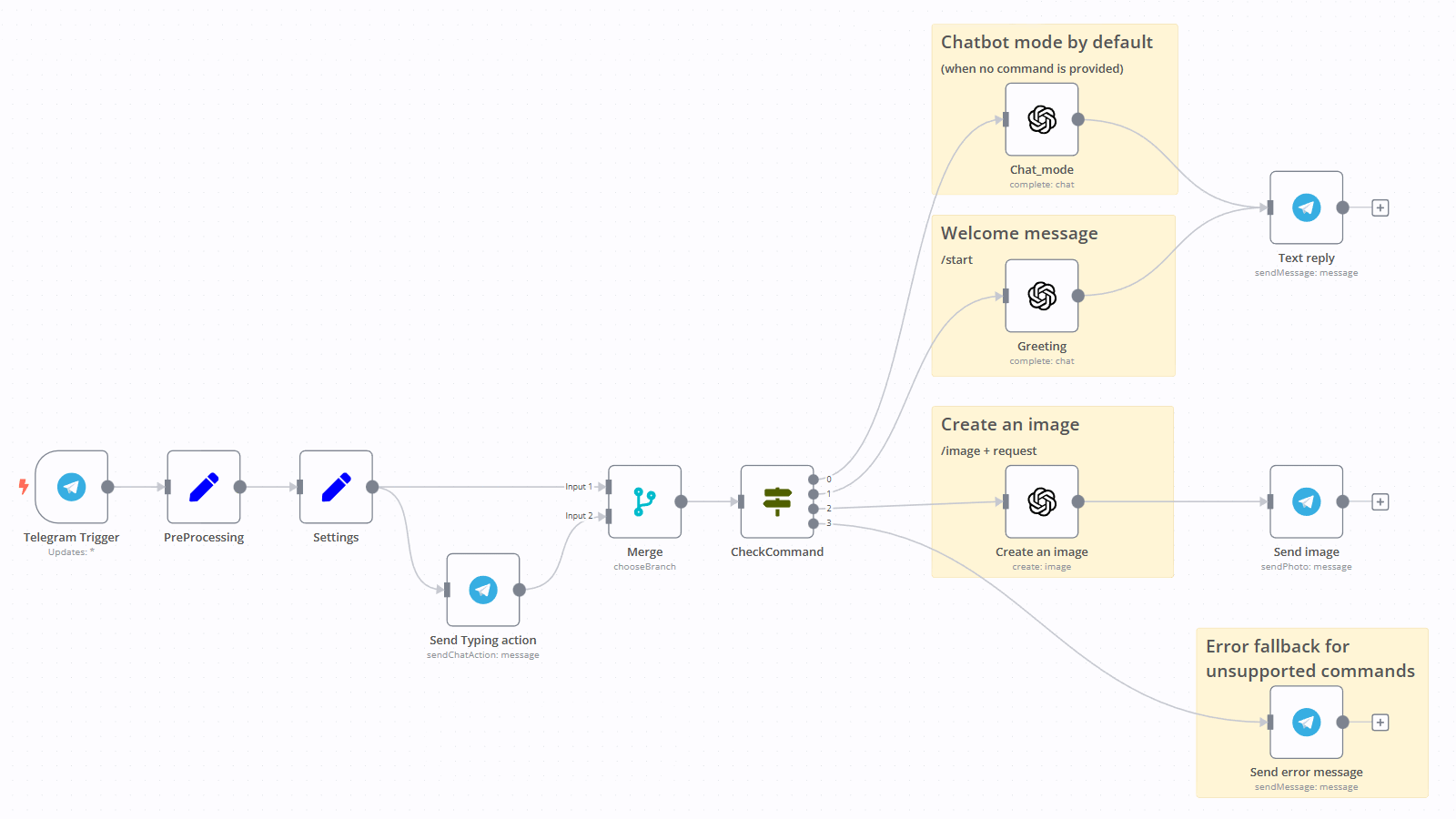 Telegram Bot İş Akışı ve Otomasyon Mimarisi
Inline Keyboards ve Callback Queries
Kullanıcı etkileşimi için inline keyboard’lar kullanabiliriz:
1
2
3
4
5
6
7
8
9
10
11
12
13
14
15
16
17
18
19
20
21
22
23
24
25
26
27
28
29
30
31
32
33
34
35
36
37
38
39
40
41
42
43
44
45
46
47
48
49
50
51
52
53
54
55
56
57
58
59
60
61
62
63
64
65
66
67
68
69
70
71
72
73
74
75
76
77
78
79
80
81
82
83
84
85
86
87
88
89
90
91
92
93
94
95
96
97
98
99
100
101
102
103
104
105
106
107
108
109
110
111
112
113
114
115
116
117
118
from pyrogram.types import InlineKeyboardMarkup, InlineKeyboardButton

# Ana menü
@app.on_message(filters.command("menu"))
async def menu_command(client: Client, message: Message):
    keyboard = InlineKeyboardMarkup([
        [
            InlineKeyboardButton("📊 İstatistikler", callback_data="stats"),
            InlineKeyboardButton("ℹ️ Bilgi", callback_data="info")
        ],
        [
            InlineKeyboardButton("⚙️ Ayarlar", callback_data="settings"),
            InlineKeyboardButton("❓ Yardım", callback_data="help")
        ],
        [
            InlineKeyboardButton("🔗 Website", url="https://github.com/pyrogram/pyrogram")
        ]
    ])

    await message.reply_text(
        "**Ana Menü**\n\nLütfen bir seçenek seçin:",
        reply_markup=keyboard
    )

# Callback query handler
@app.on_callback_query()
async def callback_handler(client: Client, callback_query: CallbackQuery):
    data = callback_query.data

    # İstatistikler
    if data == "stats":
        await callback_query.edit_message_text(
            "📊 **Bot İstatistikleri:**\n\n"
            "👥 Toplam Kullanıcı: 1,234\n"
            "💬 Toplam Mesaj: 45,678\n"
            "📅 Aktif Günler: 120"
        )

    # Bilgi
    elif data == "info":
        await callback_query.edit_message_text(
            "ℹ️ **Bot Bilgileri:**\n\n"
            "🤖 Pyrogram Bot\n"
            "📦 Version: 2.0.0\n"
            "💻 Python 3.11"
        )

    # Ayarlar
    elif data == "settings":
        settings_keyboard = InlineKeyboardMarkup([
            [
                InlineKeyboardButton("🌐 Dil", callback_data="lang"),
                InlineKeyboardButton("🔔 Bildirimler", callback_data="notif")
            ],
            [
                InlineKeyboardButton("◀️ Geri", callback_data="back")
            ]
        ])

        await callback_query.edit_message_text(
            "⚙️ **Ayarlar**\n\nBir ayar seçin:",
            reply_markup=settings_keyboard
        )

    # Yardım
    elif data == "help":
        await callback_query.edit_message_text(
            "❓ **Yardım**\n\n"
            "Bot kullanımı hakkında yardım için /help komutunu kullanın."
        )

    # Geri dön
    elif data == "back":
        # Tekrar ana menüyü göster (menu_command fonksiyonundaki keyboard)
        keyboard = InlineKeyboardMarkup([
            [
                InlineKeyboardButton("📊 İstatistikler", callback_data="stats"),
                InlineKeyboardButton("ℹ️ Bilgi", callback_data="info")
            ],
            [
                InlineKeyboardButton("⚙️ Ayarlar", callback_data="settings"),
                InlineKeyboardButton("❓ Yardım", callback_data="help")
            ]
        ])

        await callback_query.edit_message_text(
            "**Ana Menü**\n\nLütfen bir seçenek seçin:",
            reply_markup=keyboard
        )

    # Callback query'yi yanıtla (yükleme animasyonunu kaldır)
    await callback_query.answer()

# Inline mode ile pagination örneği
@app.on_message(filters.command("list"))
async def list_command(client: Client, message: Message):
    page = 1
    items_per_page = 5

    # Örnek veri
    items = [f"Item {i}" for i in range(1, 51)]

    # Sayfa hesaplama
    start_idx = (page - 1) * items_per_page
    end_idx = start_idx + items_per_page
    current_items = items[start_idx:end_idx]

    # Pagination keyboard
    keyboard = InlineKeyboardMarkup([
        [
            InlineKeyboardButton("◀️ Önceki", callback_data=f"page_{page-1}"),
            InlineKeyboardButton(f"{page}/{len(items)//items_per_page}", callback_data="current"),
            InlineKeyboardButton("Sonraki ▶️", callback_data=f"page_{page+1}")
        ]
    ])

    text = "**Liste:**\n\n" + "\n".join(current_items)
    await message.reply_text(text, reply_markup=keyboard)
Grup Yönetimi ve Admin Komutları
Grup yönetimi için özel handler’lar ve admin kontrolleri:
1
2
3
4
5
6
7
8
9
10
11
12
13
14
15
16
17
18
19
20
21
22
23
24
25
26
27
28
29
30
31
32
33
34
35
36
37
38
39
40
41
42
43
44
45
46
47
48
49
50
51
52
53
54
55
56
57
58
59
60
61
62
63
64
65
66
67
68
69
70
71
72
73
74
75
76
77
78
79
80
81
82
83
84
85
86
87
88
89
90
91
92
93
94
95
96
97
98
99
100
101
102
103
104
105
106
107
108
109
110
111
112
113
114
115
116
117
118
119
120
121
122
123
124
125
126
127
128
129
130
131
132
133
134
135
136
137
138
139
140
141
142
143
144
145
146
147
148
149
150
151
152
153
154
155
156
157
158
159
160
161
162
163
164
165
166
167
168
169
170
171
172
173
174
175
from pyrogram.types import ChatPermissions
from pyrogram.enums import ChatMemberStatus

# Admin kontrolü yapan decorator
def admin_only(func):
    async def wrapper(client: Client, message: Message):
        # Kullanıcının admin olup olmadığını kontrol et
        member = await client.get_chat_member(
            message.chat.id,
            message.from_user.id
        )

        if member.status in [ChatMemberStatus.OWNER, ChatMemberStatus.ADMINISTRATOR]:
            return await func(client, message)
        else:
            await message.reply_text("❌ Bu komutu sadece adminler kullanabilir!")

    return wrapper

# Kullanıcıyı sustur (mute)
@app.on_message(filters.command("mute") & filters.group)
@admin_only
async def mute_user(client: Client, message: Message):
    # Reply edilen kullanıcıyı sustur
    if message.reply_to_message:
        user_id = message.reply_to_message.from_user.id
        chat_id = message.chat.id

        # Kullanıcıyı sustur
        await client.restrict_chat_member(
            chat_id=chat_id,
            user_id=user_id,
            permissions=ChatPermissions()  # Tüm izinleri kaldır
        )

        await message.reply_text(
            f"🔇 {message.reply_to_message.from_user.mention} susturuldu!"
        )
    else:
        await message.reply_text("❌ Bir kullanıcıya reply yapın!")

# Kullanıcının susturmasını kaldır (unmute)
@app.on_message(filters.command("unmute") & filters.group)
@admin_only
async def unmute_user(client: Client, message: Message):
    if message.reply_to_message:
        user_id = message.reply_to_message.from_user.id
        chat_id = message.chat.id

        # Varsayılan izinleri geri ver
        await client.restrict_chat_member(
            chat_id=chat_id,
            user_id=user_id,
            permissions=ChatPermissions(
                can_send_messages=True,
                can_send_media_messages=True,
                can_send_polls=True,
                can_send_other_messages=True,
                can_add_web_page_previews=True,
                can_change_info=False,
                can_invite_users=True,
                can_pin_messages=False
            )
        )

        await message.reply_text(
            f"🔊 {message.reply_to_message.from_user.mention} artık konuşabilir!"
        )
    else:
        await message.reply_text("❌ Bir kullanıcıya reply yapın!")

# Kullanıcıyı gruptan at (kick)
@app.on_message(filters.command("kick") & filters.group)
@admin_only
async def kick_user(client: Client, message: Message):
    if message.reply_to_message:
        user_id = message.reply_to_message.from_user.id
        chat_id = message.chat.id
        user_mention = message.reply_to_message.from_user.mention

        # Kullanıcıyı at
        await client.ban_chat_member(chat_id, user_id)
        # Hemen ban'ı kaldır (sadece at)
        await client.unban_chat_member(chat_id, user_id)

        await message.reply_text(f"👢 {user_mention} gruptan atıldı!")
    else:
        await message.reply_text("❌ Bir kullanıcıya reply yapın!")

# Kullanıcıyı kalıcı banla
@app.on_message(filters.command("ban") & filters.group)
@admin_only
async def ban_user(client: Client, message: Message):
    if message.reply_to_message:
        user_id = message.reply_to_message.from_user.id
        chat_id = message.chat.id
        user_mention = message.reply_to_message.from_user.mention

        # Kullanıcıyı banla
        await client.ban_chat_member(chat_id, user_id)

        await message.reply_text(f"🚫 {user_mention} kalıcı olarak banlandı!")
    else:
        await message.reply_text("❌ Bir kullanıcıya reply yapın!")

# Ban'ı kaldır (unban)
@app.on_message(filters.command("unban") & filters.group)
@admin_only
async def unban_user(client: Client, message: Message):
    if message.reply_to_message:
        user_id = message.reply_to_message.from_user.id
        chat_id = message.chat.id
        user_mention = message.reply_to_message.from_user.mention

        # Ban'ı kaldır
        await client.unban_chat_member(chat_id, user_id)

        await message.reply_text(f"✅ {user_mention} ban'ı kaldırıldı!")
    else:
        await message.reply_text("❌ Bir kullanıcıya reply yapın!")

# Mesaj silme
@app.on_message(filters.command("del") & filters.group)
@admin_only
async def delete_message(client: Client, message: Message):
    if message.reply_to_message:
        # Reply edilen mesajı sil
        await message.reply_to_message.delete()
        # Komutu da sil
        await message.delete()
    else:
        await message.reply_text("❌ Silinecek mesaja reply yapın!")

# Toplu mesaj silme (purge)
@app.on_message(filters.command("purge") & filters.group)
@admin_only
async def purge_messages(client: Client, message: Message):
    if message.reply_to_message:
        # Reply edilen mesajdan itibaren tüm mesajları sil
        message_ids = []

        async for msg in client.get_chat_history(
            message.chat.id,
            limit=100
        ):
            # Reply edilen mesaja ulaşana kadar topla
            if msg.id == message.reply_to_message.id:
                message_ids.append(msg.id)
                break
            message_ids.append(msg.id)

        # Mesajları sil
        await client.delete_messages(
            message.chat.id,
            message_ids
        )

        await message.reply_text(f"🗑 {len(message_ids)} mesaj silindi!")
    else:
        await message.reply_text("❌ Silinecek ilk mesaja reply yapın!")

# Yeni üye karşılama
@app.on_message(filters.new_chat_members)
async def welcome_new_members(client: Client, message: Message):
    for user in message.new_chat_members:
        await message.reply_text(
            f"👋 Hoş geldin {user.mention}!\n"
            f"Kuralları okumayı unutma: /rules"
        )

# Üye ayrıldığında
@app.on_message(filters.left_chat_member)
async def goodbye_member(client: Client, message: Message):
    user = message.left_chat_member
    await message.reply_text(f"👋 {user.mention} aramızdan ayrıldı.")
Userbot Geliştirme
Pyrogram, kendi Telegram hesabınızla bot gibi çalışan userbot’lar oluşturmanıza da olanak tanır:
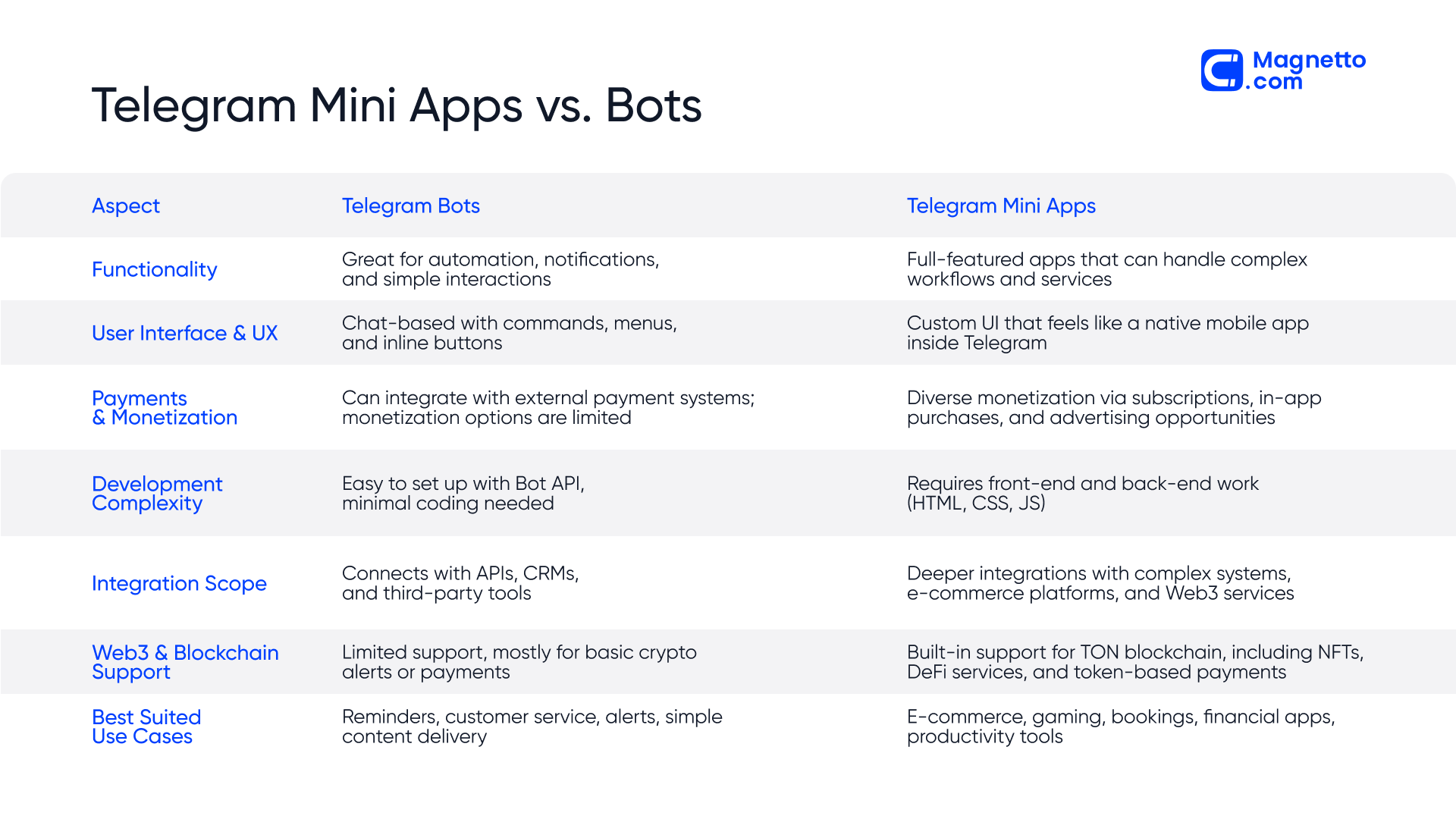 Telegram Bot ve Mini Apps Karşılaştırması
1
2
3
4
5
6
7
8
9
10
11
12
13
14
15
16
17
18
19
20
21
22
23
24
25
26
27
28
29
30
31
32
33
34
35
36
37
38
39
40
41
42
43
44
45
46
47
48
49
50
51
52
53
54
55
56
57
58
from pyrogram import Client

# Userbot client oluşturma (bot_token YOK)
userbot = Client(
    "my_userbot",
    api_id=12345678,
    api_hash="0123456789abcdef0123456789abcdef"
)

# İlk çalıştırmada telefon numarası ve kod isteyecek
# Session dosyası oluşturulduktan sonra otomatik giriş yapar

# Gelen tüm private mesajlara otomatik cevap
@userbot.on_message(filters.private & filters.incoming & ~filters.me)
async def auto_reply(client: Client, message: Message):
    await message.reply_text(
        "🤖 Otomatik yanıt: Şu an müsait değilim. "
        "Mesajınızı daha sonra cevaplayacağım."
    )

# Kendimize gelen mesajları forward et
@userbot.on_message(filters.private & filters.incoming & ~filters.me)
async def forward_to_saved(client: Client, message: Message):
    # "Saved Messages"a forward et
    await message.forward("me")

# Belirli kelimeleri içeren mesajları kaydet
@userbot.on_message(filters.text & filters.regex(r"(?i)(önemli|urgent|acil)"))
async def save_important(client: Client, message: Message):
    # Önemli mesajları kendimize forward et
    await client.send_message(
        "me",
        f"⚠️ Önemli mesaj:\n\n"
        f"👤 Gönderen: {message.from_user.mention}\n"
        f"💬 Mesaj: {message.text}\n"
        f"🔗 Link: {message.link}"
    )

# Otomatik mesaj silme
@userbot.on_message(filters.outgoing & filters.command("delete", prefixes="."))
async def auto_delete(client: Client, message: Message):
    # Komutu sil
    await message.delete()

    # Reply edilen mesajı sil
    if message.reply_to_message:
        await message.reply_to_message.delete()

# Grup mesajlarını otomatik oku olarak işaretle
@userbot.on_message(filters.group & filters.incoming)
async def auto_read(client: Client, message: Message):
    # Mesajı oku olarak işaretle
    await client.read_chat_history(message.chat.id)

# Userbot'u çalıştır
if __name__ == "__main__":
    print("Userbot başlatılıyor...")
    userbot.run()
Plugin Sistemi ile Modüler Yapı
Pyrogram’ın plugin sistemi, kodunuzu modüler hale getirmenizi sağlar:
1
2
3
4
5
6
7
8
9
10
11
12
13
# main.py
from pyrogram import Client

app = Client(
    "my_bot",
    api_id=12345678,
    api_hash="0123456789abcdef0123456789abcdef",
    bot_token="123456:ABC-DEF",
    plugins=dict(root="plugins")  # plugins klasöründeki dosyaları yükle
)

if __name__ == "__main__":
    app.run()
1
2
3
4
5
6
7
# plugins/start.py
from pyrogram import Client, filters
from pyrogram.types import Message

@Client.on_message(filters.command("start"))
async def start_command(client: Client, message: Message):
    await message.reply_text("Bot başlatıldı! 🚀")
1
2
3
4
5
6
7
8
9
10
11
12
# plugins/echo.py
from pyrogram import Client, filters
from pyrogram.types import Message

@Client.on_message(filters.command("echo"))
async def echo_command(client: Client, message: Message):
    text = message.text.split(None, 1)[1] if len(message.command) > 1 else None

    if text:
        await message.reply_text(text)
    else:
        await message.reply_text("Lütfen tekrarlanacak bir mesaj yazın!")
1
2
3
4
5
6
7
8
9
10
11
12
13
# plugins/admin.py - Grup yönetim komutları
from pyrogram import Client, filters
from pyrogram.types import Message, ChatPermissions

@Client.on_message(filters.command("mute") & filters.group)
async def mute_user(client: Client, message: Message):
    # Mute logic...
    pass

@Client.on_message(filters.command("ban") & filters.group)
async def ban_user(client: Client, message: Message):
    # Ban logic...
    pass
Database Entegrasyonu
Kullanıcı verilerini saklamak için database entegrasyonu:
1
2
3
4
5
6
7
8
9
10
11
12
13
14
15
16
17
18
19
20
21
22
23
24
25
26
27
28
29
30
31
32
33
34
35
36
37
38
39
40
41
42
43
44
45
46
47
48
49
50
51
52
53
54
55
56
57
58
59
60
61
62
63
64
65
66
67
68
69
70
71
72
73
74
import aiosqlite
from pyrogram import Client, filters
from pyrogram.types import Message

# Database başlatma
async def init_db():
    async with aiosqlite.connect("bot.db") as db:
        await db.execute("""
            CREATE TABLE IF NOT EXISTS users (
                user_id INTEGER PRIMARY KEY,
                username TEXT,
                first_name TEXT,
                join_date TIMESTAMP DEFAULT CURRENT_TIMESTAMP,
                message_count INTEGER DEFAULT 0
            )
        """)
        await db.commit()

# Kullanıcı kaydet
async def register_user(user_id: int, username: str, first_name: str):
    async with aiosqlite.connect("bot.db") as db:
        await db.execute(
            "INSERT OR IGNORE INTO users (user_id, username, first_name) VALUES (?, ?, ?)",
            (user_id, username, first_name)
        )
        await db.commit()

# Mesaj sayısını artır
async def increment_message_count(user_id: int):
    async with aiosqlite.connect("bot.db") as db:
        await db.execute(
            "UPDATE users SET message_count = message_count + 1 WHERE user_id = ?",
            (user_id,)
        )
        await db.commit()

# İstatistik komutu
@app.on_message(filters.command("stats"))
async def stats_command(client: Client, message: Message):
    user_id = message.from_user.id

    async with aiosqlite.connect("bot.db") as db:
        async with db.execute(
            "SELECT username, first_name, join_date, message_count FROM users WHERE user_id = ?",
            (user_id,)
        ) as cursor:
            row = await cursor.fetchone()

            if row:
                username, first_name, join_date, msg_count = row
                stats_text = f"""
📊 **İstatistikleriniz:**

👤 İsim: {first_name}
🔤 Kullanıcı Adı: @{username if username else 'Yok'}
📅 Katılma Tarihi: {join_date}
💬 Toplam Mesaj: {msg_count}
"""
                await message.reply_text(stats_text)
            else:
                await message.reply_text("❌ Kullanıcı bulunamadı!")

# Her mesajda kullanıcı kaydet ve sayaç artır
@app.on_message(filters.private)
async def track_user(client: Client, message: Message):
    user = message.from_user
    await register_user(user.id, user.username, user.first_name)
    await increment_message_count(user.id)

# Bot başlangıcında database'i başlat
@app.on_message(filters.command("start"))
async def start_with_db(client: Client, message: Message):
    await init_db()
    await message.reply_text("Bot hazır! Database başlatıldı. 🚀")
Dosya İşleme ve Medya
Dosya indirme, yükleme ve işleme örnekleri:
1
2
3
4
5
6
7
8
9
10
11
12
13
14
15
16
17
18
19
20
21
22
23
24
25
26
27
28
29
30
31
32
33
34
35
36
37
38
39
40
41
42
43
44
45
46
47
48
49
50
51
52
53
54
55
56
57
58
59
60
61
62
63
64
65
66
import os
from PIL import Image

# Fotoğraf indirme ve işleme
@app.on_message(filters.photo)
async def process_photo(client: Client, message: Message):
    # Progress callback
    async def progress(current, total):
        print(f"İndiriliyor: {current * 100 / total:.1f}%")

    # Fotoğrafı indir
    file_path = await message.download(
        file_name=f"downloads/{message.photo.file_unique_id}.jpg",
        progress=progress
    )

    # Fotoğrafı işle (örnek: thumbnail oluştur)
    with Image.open(file_path) as img:
        # Thumbnail boyutu
        img.thumbnail((200, 200))
        thumb_path = f"downloads/thumb_{message.photo.file_unique_id}.jpg"
        img.save(thumb_path)

    # Thumbnail'i gönder
    await message.reply_photo(
        thumb_path,
        caption="✅ Thumbnail oluşturuldu!"
    )

    # Dosyaları temizle
    os.remove(file_path)
    os.remove(thumb_path)

# Video indirme
@app.on_message(filters.video)
async def download_video(client: Client, message: Message):
    video = message.video

    # Video bilgileri
    await message.reply_text(
        f"📹 **Video İndiriliyor...**\n\n"
        f"📁 Boyut: {video.file_size / 1024 / 1024:.2f} MB\n"
        f"⏱ Süre: {video.duration} saniye"
    )

    # Video'yu indir (progress ile)
    progress_msg = await message.reply_text("İndirme başladı... 0%")

    async def progress(current, total):
        percentage = current * 100 / total
        if int(percentage) % 10 == 0:  # Her %10'da bir güncelle
            await progress_msg.edit_text(f"İndirme devam ediyor... {percentage:.0f}%")

    file_path = await message.download(progress=progress)

    await progress_msg.edit_text("✅ Video indirildi!")

# Dosya gönderme
@app.on_message(filters.command("send_file"))
async def send_file(client: Client, message: Message):
    # Dosyayı gönder
    await message.reply_document(
        "document.pdf",
        caption="📄 İşte dosyanız!",
        progress=lambda c, t: print(f"Gönderiliyor: {c * 100 / t:.1f}%")
    )
Production Best Practices
Production ortamında bot çalıştırmak için öneriler:
Environment Variables
1
2
3
4
5
6
7
8
9
10
11
import os
from dotenv import load_dotenv

load_dotenv()

app = Client(
    "my_bot",
    api_id=int(os.getenv("API_ID")),
    api_hash=os.getenv("API_HASH"),
    bot_token=os.getenv("BOT_TOKEN")
)
Error Handling
1
2
3
4
5
6
7
8
9
10
11
12
13
14
15
16
17
18
19
20
21
22
23
24
25
26
27
28
29
30
31
from pyrogram import Client
from pyrogram.errors import (
    FloodWait,
    MessageNotModified,
    UserIsBlocked
)
import asyncio

@app.on_message(filters.command("test"))
async def handle_errors(client: Client, message: Message):
    try:
        await message.reply_text("Test mesajı")

    except FloodWait as e:
        # Rate limit hatası - bekle ve tekrar dene
        print(f"FloodWait: {e.value} saniye bekleniyor...")
        await asyncio.sleep(e.value)
        await message.reply_text("Test mesajı (retry)")

    except MessageNotModified:
        # Mesaj zaten aynı içerikte
        print("Mesaj değiştirilmedi")

    except UserIsBlocked:
        # Kullanıcı botu engellemiş
        print(f"Kullanıcı {message.from_user.id} botu engellemiş")

    except Exception as e:
        # Genel hata yakalama
        print(f"Hata: {e}")
        await message.reply_text("❌ Bir hata oluştu!")
Logging
1
2
3
4
5
6
7
8
9
10
11
12
13
14
15
16
17
import logging

logging.basicConfig(
    level=logging.INFO,
    format='%(asctime)s - %(name)s - %(levelname)s - %(message)s',
    handlers=[
        logging.FileHandler('bot.log'),
        logging.StreamHandler()
    ]
)

logger = logging.getLogger(__name__)

@app.on_message(filters.command("log_test"))
async def log_example(client: Client, message: Message):
    logger.info(f"Komut alındı: {message.from_user.id}")
    await message.reply_text("Log kaydedildi!")
Systemd Service
1
2
3
4
5
6
7
8
9
10
11
12
13
14
15
# /etc/systemd/system/telegram-bot.service
[Unit]
Description=Pyrogram Telegram Bot
After=network.target

[Service]
Type=simple
User=botuser
WorkingDirectory=/home/botuser/bot
ExecStart=/home/botuser/bot/venv/bin/python main.py
Restart=always
RestartSec=10

[Install]
WantedBy=multi-user.target
Servisi başlatma:
1
2
3
sudo systemctl enable telegram-bot
sudo systemctl start telegram-bot
sudo systemctl status telegram-bot
Sonuç
Pyrogram, Telegram bot geliştirme için güçlü ve esnek bir framework sunuyor. MTProto API desteği, asenkron yapı ve modüler tasarım ile hem basit botlar hem de karmaşık userbot uygulamaları geliştirebilirsiniz.
Bu yazıda öğrendikleriniz:
- Pyrogram temel yapısı ve bot oluşturma
- Filters ile mesaj işleme ve filtreleme
- Inline keyboards ve callback queries
- Grup yönetimi ve admin komutları
- Userbot geliştirme ve otomasyon
- Plugin sistemi ile modüler yapı
- Database entegrasyonu ve dosya işleme
- Production best practices
Önerilen Kaynaklar
- Pyrogram Resmi Dokümantasyonu
- Telegram Bot API
- MTProto Protocol
- Pyrogram GitHub Repository
- Telegram Bot Examples
Bir sonraki yazımızda, Docker ve Docker Compose ile mikroservis mimarisi geliştirmeyi inceleyeceğiz. Takipte kalın!