

A RabbitMQ message queue looks simple: one service publishes, another consumes. The questions that matter in production are different. Does a message survive a broker restart? Who picks it up if a consumer crashes mid-task? Can one bad message block the queue forever?
This post covers the settings I use when I run RabbitMQ from Python with aio-pika. The examples target RabbitMQ 4.x and aio-pika 9.x.
The shape: exchange, queue and DLX#
Producers don't publish to queues. They publish to an exchange, which looks at the routing key and bindings and copies the message into one or more queues. Messages that can't be processed go through a dead letter exchange (DLX) into a separate queue.
Pick the exchange type for the job:
direct: the routing key must match exactly. Enough for plain work distribution.fanout: the routing key is ignored and every bound queue gets a copy. Useful when both the email service and analytics need "user signed up".topic: matches patterns likeorder.createdororder.*.eu, where*is one word and#is zero or more. I start most projects with this one.headers: routes on header values instead of the key. I've rarely needed it.
Four settings that stop message loss#
They only protect you when all four are on:
- Declare the queue with
durable=Trueso its definition survives a broker restart. - Publish with
delivery_mode=PERSISTENTso the message is written to disk. Quorum queues persist messages anyway, but classic queues need this. - Turn on publisher confirms. Without them,
publishreturns and you have no idea whether the broker actually took the message. In aio-pika, channels have confirms on by default andawait exchange.publish(...)waits for the broker's ack. - Don't use automatic acks on the consumer. With
no_ack=True, the message is deleted the moment it reaches the consumer, so a crash mid-task loses it. Ack after the work is done.
Publishing with aio-pika#
Don't open a connection per message. Open one at startup and keep it; connect_robust reconnects on its own after a network drop.
import asyncio
import json

import aio_pika

AMQP_URL = "amqp://app:secret@localhost/"


async def main() -> None:
    connection = await aio_pika.connect_robust(AMQP_URL)
    async with connection:
        channel = await connection.channel()  # publisher confirms are on by default
        exchange = await channel.declare_exchange(
            "orders", aio_pika.ExchangeType.TOPIC, durable=True
        )

        order = {"id": 42, "total": 199.90}
        await exchange.publish(
            aio_pika.Message(
                body=json.dumps(order).encode(),
                content_type="application/json",
                delivery_mode=aio_pika.DeliveryMode.PERSISTENT,
                message_id=str(order["id"]),
            ),
            routing_key="order.created",
        )
        print("broker confirmed the message")


asyncio.run(main())
Keep message bodies small. Instead of a 10 MB JSON blob or a base64 image, upload the file to object storage and put its path in the message. RabbitMQ is comfortable with messages of a few KB.
Consuming: prefetch, acks and the DLX#
The most important consumer setting is prefetch_count: how many unacked messages a consumer may hold at once. Without it, RabbitMQ can push the whole backlog to the first consumer that connects, which then fills its memory while the others sit idle.
For slow, heavy jobs start at 1 so work is spread evenly. For small, fast messages, values between 20 and 100 cut network round trips and raise throughput. Measure to find the right number.
import asyncio
import json

import aio_pika

AMQP_URL = "amqp://app:secret@localhost/"


async def handle(order: dict) -> None:
    if "id" not in order:
        raise ValueError("missing id")
    await asyncio.sleep(0.1)  # real work goes here


async def main() -> None:
    connection = await aio_pika.connect_robust(AMQP_URL)
    async with connection:
        channel = await connection.channel()
        await channel.set_qos(prefetch_count=10)

        dlx = await channel.declare_exchange(
            "orders.dlx", aio_pika.ExchangeType.FANOUT, durable=True
        )
        dead = await channel.declare_queue("orders.dead", durable=True)
        await dead.bind(dlx)

        exchange = await channel.declare_exchange(
            "orders", aio_pika.ExchangeType.TOPIC, durable=True
        )
        queue = await channel.declare_queue(
            "orders",
            durable=True,
            arguments={
                "x-queue-type": "quorum",
                "x-dead-letter-exchange": "orders.dlx",
                "x-delivery-limit": 5,
            },
        )
        await queue.bind(exchange, routing_key="order.*")

        async with queue.iterator() as messages:
            async for message in messages:
                # Ack if the block finishes, reject(requeue=False) on an exception
                async with message.process(requeue=False):
                    await handle(json.loads(message.body))


asyncio.run(main())
message.process(requeue=False) does two jobs: it acks when the block completes and rejects without requeueing when it raises. Because of x-dead-letter-exchange, the rejected message lands in orders.dead instead of disappearing.
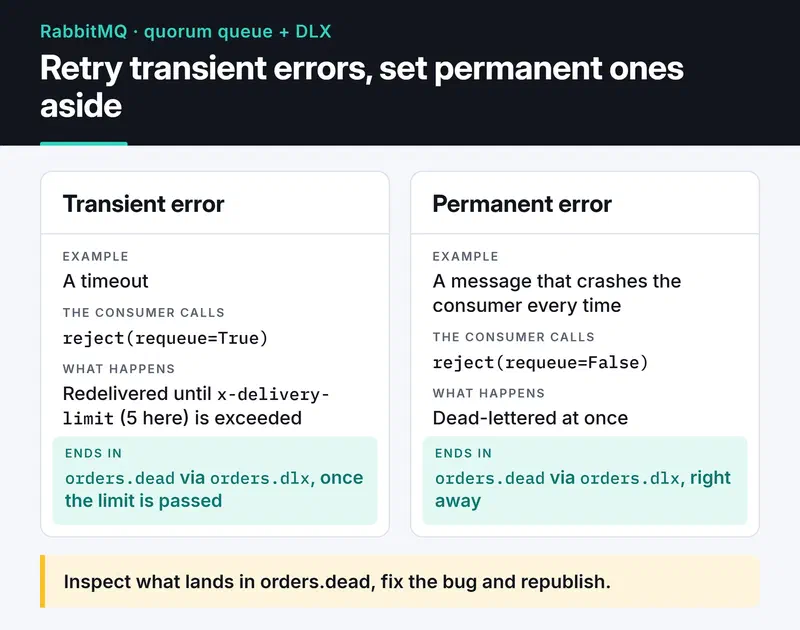
If a message crashes the consumer every time and you keep requeueing it, it loops forever and blocks everything behind it. With a DLX it's set aside, and you can inspect it, fix the bug and republish. For transient failures like a timeout you can reject with requeue=True and let the quorum queue's x-delivery-limit cap the retries; past the limit the message is dead-lettered. Since RabbitMQ 4.0 quorum queues default that limit to 20.
Here are both paths side by side:
Classic or quorum queues?#
Older guides recommend mirrored classic queues for high availability. RabbitMQ 4.0 removed them. If you need a replicated, durable queue, use a quorum queue: it replicates through Raft, stays consistent when a node dies and gives you the delivery limit above.
Classic queues still make sense for transient data you can afford to lose and for single-node setups. Also skip global=True on prefetch_count. Quorum queues don't support global QoS, and a per-consumer limit is what you want anyway.
Monitoring#
The management UI shows the current state but keeps no history. Enable the built-in rabbitmq_prometheus plugin and scrape it with Prometheus; I covered that setup in my Prometheus and Grafana post. Per-queue metrics come from the /metrics/per-object endpoint. The ones I alert on:
rabbitmq_queue_messages_ready: the backlog. If it keeps growing, consumers can't keep up.rabbitmq_queue_messages_unacked: delivered but not acked. High values mean stuck consumers or missing acks, and the broker holds these messages in memory.rabbitmq_queue_consumers: if it drops below what you expect, a service may be down.- The depth of the dead letter queue: anything above zero needs a human.
Before you go live#
- Is the default
guestuser gone? It can only connect from localhost, but remove it anyway. - If several projects share a broker, does each have its own vhost and user?
- Do queues have a ceiling via
x-max-lengthorx-message-ttl, so a stalled consumer can't fill the disk? - Does the app use one long-lived connection and a channel per task?
- In a cluster, did you choose a partition handling strategy (
cluster_partition_handling, usuallypause_minority) on purpose?
RabbitMQ or Kafka?#
They solve different problems. RabbitMQ is a smart broker: it routes messages by rules and deletes them once acked. It fits work queues, order processing and RPC, the "someone please do this job" cases. Kafka is an append-only log that doesn't delete on consumption: each consumer tracks its own offset, can replay history and handles very high volume. If you need event streams and replay, see my Kafka post. RabbitMQ's own stream queues are a middle ground for smaller replay use cases.
Where to go next#
For plain background jobs, a task queue library is less code than raw RabbitMQ; I compared two of them in my Celery and ARQ post. If you use aio-pika directly, point the consumer above at a local RabbitMQ, publish a deliberately broken message and watch it land in orders.dead. The aio-pika docs and RabbitMQ's reliability guide are good next reads.


