

I wrote my first Telegram bots in 2023: one that relayed messages anonymously into a group, an opt-out blacklist bot for a browser-game community, and a Pyrogram script that copied posts from one channel into several others. Later I carried that over to trading. My DEX arbitrage watcher reported opportunities to me over Telegram, and I wrote a separate SDK for Telegram Wallet's P2P market.
This post is the setup I'd use today for a Telegram trading bot in Python: python-telegram-bot v22 plus async CCXT, answering only me, setting price alerts. It deliberately doesn't place orders, and I'll explain why near the end.
What my old bots taught me#
My 2023 bots used the v13 API of python-telegram-bot: Updater, dispatcher, synchronous handlers, Filters. v20 replaced all of it. The library went fully asyncio, Updater gave way to Application, and Filters became the filters module. Most snippets you'll find online still use the old API, which is why copy-pasted code so often fails.
The second lesson hurt more. In one of those early bots the token sat right in the source file, in a public repository. The token is the whole bot. If you ever see yours in code, revoke it with /revoke in BotFather and issue a new one. These days the token and the allow-list always come from environment variables.
The third is about notifications. My flash-loan arbitrage bot sent its Telegram messages by calling the Bot API's sendMessage directly with aiohttp. If all you need is to push notifications, that's enough. Once you need commands, per-user behavior and scheduled jobs, a framework pays for itself.
Architecture#
The bot does three things: /price returns the current price, /alert registers an alert, and a background job checks alerts every 30 seconds. The commands and the scheduled job share one CCXT exchange object.
You need Python 3.10 or newer. JobQueue has an optional dependency, so install the extra:
pip install "python-telegram-bot[job-queue]>=22" "ccxt>=4.5"The code#
It all fits in one file. Code first, then the reasoning.
import logging
import os

import ccxt.async_support as ccxt
from telegram import Update
from telegram.ext import (
    Application, CommandHandler, ContextTypes, PicklePersistence, filters,
)

logging.basicConfig(level=logging.INFO, format="%(asctime)s %(levelname)s %(name)s: %(message)s")
logging.getLogger("httpx").setLevel(logging.WARNING)  # keep token-bearing URLs out of logs
log = logging.getLogger("alert-bot")

ALLOWED_IDS = {int(x) for x in os.environ["ALLOWED_USER_IDS"].split(",")}
ONLY_ME = filters.User(user_id=ALLOWED_IDS)
USAGE = "Usage: /alert BTC/USDT above|below 70000"

# The exchange object can't be pickled, so it lives here instead of in bot_data.
exchange = ccxt.binance({"enableRateLimit": True})


async def post_init(app: Application) -> None:
    await exchange.load_markets()
    app.bot_data.setdefault("alerts", [])
    app.job_queue.run_repeating(check_alerts, interval=30, first=10)


async def post_shutdown(app: Application) -> None:
    await exchange.close()


async def price(update: Update, context: ContextTypes.DEFAULT_TYPE) -> None:
    if not context.args:
        await update.message.reply_text("Usage: /price BTC/USDT")
        return
    symbol = context.args[0].upper()
    if symbol not in exchange.markets:
        await update.message.reply_text(f"{symbol} is not listed on this exchange.")
        return
    ticker = await exchange.fetch_ticker(symbol)
    await update.message.reply_text(f"{symbol}: {ticker['last']}")


async def alert(update: Update, context: ContextTypes.DEFAULT_TYPE) -> None:
    if len(context.args) != 3 or context.args[1] not in ("above", "below"):
        await update.message.reply_text(USAGE)
        return
    symbol, direction, raw_level = context.args
    try:
        level = float(raw_level)
    except ValueError:
        await update.message.reply_text(USAGE)
        return
    symbol = symbol.upper()
    if symbol not in exchange.markets:
        await update.message.reply_text(f"{symbol} is not listed on this exchange.")
        return
    context.bot_data["alerts"].append(
        {"chat_id": update.effective_chat.id, "symbol": symbol,
         "direction": direction, "level": level}
    )
    await update.message.reply_text(f"OK: {symbol} {direction} {level}")


async def check_alerts(context: ContextTypes.DEFAULT_TYPE) -> None:
    alerts = context.bot_data["alerts"]
    if not alerts:
        return
    symbols = sorted({a["symbol"] for a in alerts})
    try:
        tickers = await exchange.fetch_tickers(symbols)
    except ccxt.NetworkError as exc:  # transient: try again next round
        log.warning("fetch_tickers failed: %s", exc)
        return

    fired = []
    for a in list(alerts):
        last = tickers[a["symbol"]]["last"]
        hit = last >= a["level"] if a["direction"] == "above" else last <= a["level"]
        if hit:
            await context.bot.send_message(
                a["chat_id"], f"ALERT {a['symbol']} {last} ({a['direction']} {a['level']})"
            )
            fired.append(a)
    # New alerts may arrive while send_message is awaited, so don't rebuild the list
    for a in fired:
        alerts.remove(a)


async def on_error(update: object, context: ContextTypes.DEFAULT_TYPE) -> None:
    log.error("Handler error", exc_info=context.error)


def main() -> None:
    app = (
        Application.builder()
        .token(os.environ["TELEGRAM_BOT_TOKEN"])
        .post_init(post_init)
        .post_shutdown(post_shutdown)
        .persistence(PicklePersistence(filepath="bot_state.pickle"))
        .build()
    )
    app.add_handler(CommandHandler("price", price, filters=ONLY_ME))
    app.add_handler(CommandHandler("alert", alert, filters=ONLY_ME))
    app.add_error_handler(on_error)
    app.run_polling(allowed_updates=Update.ALL_TYPES)


if __name__ == "__main__":
    main()
Run it with:
export TELEGRAM_BOT_TOKEN="token from BotFather"
export ALLOWED_USER_IDS="123456789"
python bot.py
To find your own user ID, message a bot like @userinfobot or log update.effective_user.id from a handler.
Why it's built this way#
Only allowed users#
Anyone who finds your bot's username can message it. Handlers guarded by filters.User never even see messages from strangers. That's safer than an if user_id not in ... check inside every handler, because a new command can't forget it.
One request, many alerts#
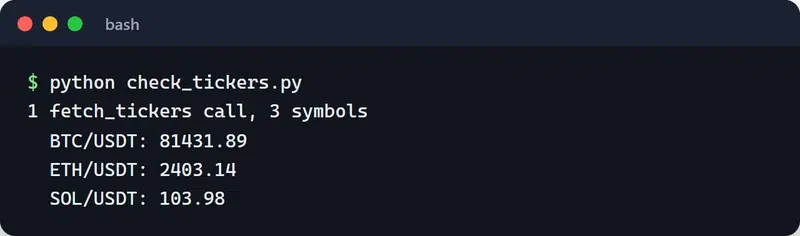
The obvious approach is one job per alert, but twenty alerts then means twenty fetch_ticker calls every 30 seconds. Here a single job collects the symbols and fetches them all with one fetch_tickers call, which keeps you comfortably inside the exchange's rate limits.
To try that call on its own before wiring up Telegram, this small script is enough. It reads Binance's public market data, so it needs no API key:
import asyncio
import ccxt.async_support as ccxt


async def main():
    exchange = ccxt.binance({"enableRateLimit": True})
    try:
        await exchange.load_markets()
        symbols = ["BTC/USDT", "ETH/USDT", "SOL/USDT"]
        tickers = await exchange.fetch_tickers(symbols)  # one request
        print(f"1 fetch_tickers call, {len(tickers)} symbols")
        for symbol in symbols:
            print(f"  {symbol}: {tickers[symbol]['last']}")
    finally:
        await exchange.close()


asyncio.run(main())
On my machine the last prices for all three symbols came back in a single response:
Exchange lifecycle#
ccxt.async_support opens an aiohttp session. Skip exchange.close() in post_shutdown and you'll get "Unclosed client session" warnings on every exit. load_markets() runs once at startup, so validating a symbol costs no network round trip.
Persistent state#
PicklePersistence writes bot_data to disk, so alerts survive a restart. It's also why the exchange object isn't in bot_data: it can't be pickled. A pickle file is fine for a single-user bot. With several processes or hosts, move state into Redis or PostgreSQL.
Network errors and logs#
NetworkError is transient, so the job skips that round and waits for the next. Everything else lands in on_error and gets logged. I raise the httpx logger to WARNING because at INFO it logs every request URL, and Bot API URLs contain the token.
Polling or webhook?#
run_polling needs no open ports, which is what I want on a home server or a small VPS. A webhook needs an HTTPS endpoint; python-telegram-bot supports it through app.run_webhook(listen="0.0.0.0", port=8443, url_path=..., webhook_url=..., secret_token=...). I switch to webhooks when the bot already lives behind a web service or serves many users. A personal alert bot doesn't need one.
I keep the bot alive with a systemd unit or a Docker container. On SIGTERM, run_polling shuts down cleanly and post_shutdown runs. More on that in my post on graceful shutdown and signal handling.
Why it doesn't place orders#
I kept this an alert bot on purpose. A /buy command in Telegram sounds convenient, but the failure modes are expensive: a typo in the amount, a hijacked Telegram account, or a message processed twice all turn straight into losses.
When I do need order execution, two rules apply:
- The exchange API key has withdrawals disabled and is restricted to the server's IP address.
- Instead of writing strategy and order management from scratch, I run a tested bot such as Freqtrade. It ships its own Telegram integration with commands like
/status,/profitand/forceexit. I also wrote freqtrade-mcp to expose the same REST API to AI agents.
Another example of reading market data around Telegram is my Telegram Wallet P2P SDK, a strictly read-only client for P2P listings, best prices and spreads. I wrote up how it was built in the Telegram Wallet P2P SDK and MCP server post.
One last thing: setting alerts doesn't amount to a strategy, and nothing in this post is financial advice. Crypto is volatile, and automation only executes a bad decision faster.
Next steps#
Run the bot with your own user ID and set a few alerts. A natural next step is adding a simple indicator condition, such as an RSI threshold, or wiring alerts to the output of a backtest. The bigger system this kind of bot plugs into is covered in building automated trading systems in Python. For the current API, see the python-telegram-bot documentation.


