

The most expensive mistake with slow Python code is guessing instead of measuring. You decide "this part must be slow", rewrite a function, and nothing changes, because the time goes somewhere else. Python performance profiling replaces the guess with a measurement. This post covers the three tools I reach for and when: cProfile during development, py-spy on a running process, and Scalene for line-level analysis including memory. At the end, I show how I prove a fix actually helped.
Which tool when#
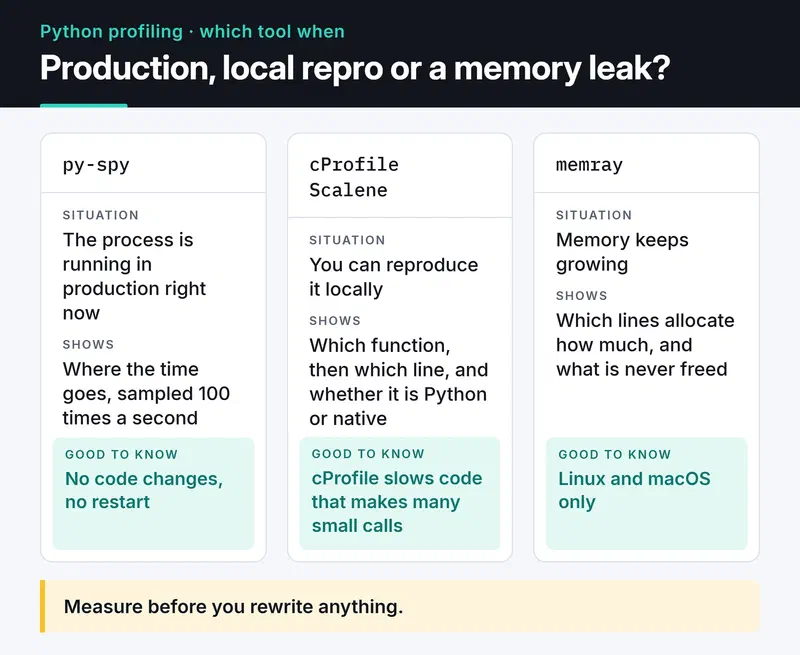
Which tool to start with depends on two questions: is the process running in production right now, and is the problem CPU or memory? The card below sums it up.
Example: a slow report function#
To show the tools on real output, I wrote a small script. It parses JSON log lines and, for requests slower than 500 ms, counts unique users per endpoint:
# slow_report.py
import json
import random
import re


def make_lines(n: int) -> list[str]:
    rnd = random.Random(42)
    return [
        json.dumps(
            {
                "user": f"u{rnd.randint(1, 5000)}",
                "ms": rnd.randint(1, 900),
                "path": f"/api/items/{rnd.randint(1, 50)}",
            }
        )
        for _ in range(n)
    ]


def slow_endpoints(lines: list[str]) -> dict[str, int]:
    users_by_path: dict[str, list[str]] = {}
    for line in lines:
        rec = json.loads(line)
        if re.match(r"^/api/items/\d+$", rec["path"]) and rec["ms"] > 500:
            users = users_by_path.setdefault(rec["path"], [])
            if rec["user"] not in users:  # membership test on a list: O(n)
                users.append(rec["user"])
    return {path: len(users) for path, users in users_by_path.items()}


if __name__ == "__main__":
    lines = make_lines(300_000)
    result = slow_endpoints(lines)
    print(len(result), sum(result.values()))
The comment gives the bug away. In real code it's rarely this obvious.
cProfile: which function?#
cProfile ships with Python and is deterministic: it counts every function call and times it. You can run it without touching the code:
python -m cProfile -s tottime slow_report.pyOn my machine (Python 3.12) the top of the output looked like this (trimmed):
         13758639 function calls (13758494 primitive calls) in 40.434 seconds

   Ordered by: internal time

   ncalls  tottime  percall  cumtime  percall filename:lineno(function)
        1   20.674   20.674   28.907   28.907 slow_report.py:21(slow_endpoints)
   300000    2.176    0.000    2.176    0.000 encoder.py:205(iterencode)
   900000    2.004    0.000    5.139    0.000 random.py:291(randrange)
   900000    1.610    0.000    1.610    0.000 {method 'match' of 're.Pattern' objects}
        1    1.489    1.489   11.443   11.443 slow_report.py:7(make_lines)
   300000    0.941    0.000    5.686    0.000 __init__.py:299(loads)
Know the two columns apart. tottime is time spent inside the function itself; cumtime includes everything it calls. slow_endpoints spends about 21 of its 29 seconds in its own body. Most of the rest is JSON parsing (loads, 5.7 seconds) and regex matching (1.6 seconds). So the culprit is neither json nor re; it's something in the function body. cProfile doesn't show lines, but it told me where to look.
You can also save the profile and inspect it later or visually:
python -m cProfile -o profile.prof slow_report.py
python -c "import pstats; pstats.Stats('profile.prof').sort_stats('cumulative').print_stats(15)"
uvx snakeviz profile.prof   # interactive view in the browser
cProfile has a cost. Because it instruments every call, it noticeably slows down code that makes many small calls and can inflate the share of tiny functions. It's great for local analysis and a bad fit for attaching to production.
Python 3.15 added a profiling package to the standard library. cProfile stays (it's also available as profiling.tracing), and a sampling profiler joined it; more on that below.
py-spy: profile a running process without touching it#
py-spy is a sampling profiler. It reads the target process's memory from the outside and, by default, looks at the stack 100 times a second. No code changes, no restart, and very low overhead. That's why it's what I attach to a FastAPI or Django process in production.
# top-like live view: which functions take the most time right now
py-spy top --pid 12345

# sample for 60 seconds and save a flame graph
py-spy record -o profile.svg --pid 12345 --duration 60

# speedscope format (open at https://www.speedscope.app)
py-spy record -o profile.json --format speedscope -- python slow_report.py

# where is every thread of a stuck process right now?
py-spy dump --pid 12345
dump is the least known and, to me, the most useful. When a worker stops responding, it shows within seconds which line it's waiting on: a lock, a socket read, an infinite loop.
When reading a flame graph, look at width: the wider a box, the more samples landed in that function. The Y axis is call depth and the colors mean nothing. By default py-spy hides idle threads; add --idle to see I/O waits too. --native shows what happens inside C extensions like NumPy.
I recorded a flame graph for the example with py-spy record -o flame.svg -- python slow_report.py. py-spy records line numbers too: the widest box is slow_endpoints (slow_report.py:27), the line with the not in check on the list.
A few practical notes:
- On Linux, reading another process's memory needs privileges, usually
sudo. Inside a container you need theSYS_PTRACEcapability (docker run --cap-add SYS_PTRACE, orsecurityContext.capabilities.addin Kubernetes). - py-spy has to understand each new Python version's internals. After upgrading Python, check the release notes to confirm py-spy supports it.
- For multi-process setups like Gunicorn or Celery, attach to the parent with
--subprocesses.
On Python 3.15 you also get a similar tool in the standard library:
python -m profiling.sampling attach --flamegraph -d 30 -o profile.html 12345The profiler and the target have to run the same Python minor version. Not needing an extra package helps in locked-down production environments.
Scalene: which line, and is it Python or native?#
cProfile pointed me at slow_endpoints but not at a line. Scalene fills that gap: per line, it splits CPU time into Python code, native code (C extensions) and system time (I/O), and shows memory allocations on the same lines.
pip install scalene
scalene run slow_report.py      # saves the profile to scalene-profile.json
scalene view                    # opens it in the browser
scalene view --cli              # or in the terminal
scalene run --cpu-only slow_report.py   # CPU only, faster
In this example the line to look at is if rec["user"] not in users: the 21 seconds of tottime that cProfile reported for slow_endpoints are spent there, in pure Python. The fact that this time disappears after the fix below confirms it. Here's why the per-line split matters: if time piles up in the native column (NumPy, the regex engine, a JSON parser), micro-optimizing your Python is pointless; you need a different algorithm or library. If system time is high, the problem is I/O, not CPU.
If memory keeps growing until the process is OOM-killed, Bloomberg's memray goes deeper: it shows which lines allocate how much and what never gets freed.
memray run -o memory.bin slow_report.py
memray flamegraph memory.bin    # HTML report
memray runs on Linux and macOS, not Windows.
The fix, and the proof#
The problem in the example is an in check on a growing list. Every check scans the whole list, and once an endpoint has a couple of thousand users, that line eats everything. A set brings lookups down to constant time on average:
def slow_endpoints(lines: list[str]) -> dict[str, int]:
    users_by_path: dict[str, set[str]] = {}
    for line in lines:
        rec = json.loads(line)
        if re.match(r"^/api/items/\d+$", rec["path"]) and rec["ms"] > 500:
            users_by_path.setdefault(rec["path"], set()).add(rec["user"])
    return {path: len(users) for path, users in users_by_path.items()}
With the same 300,000 lines, timed without the profiler, the function went from 21.3 seconds to 2.3 seconds on my machine. Exact numbers depend on the machine; what matters is the roughly ninefold difference. Most of the remaining time is now in json.loads; if it had to get faster still, a faster parser like orjson would be next. Again, profile first.
"It feels faster" isn't proof. Tie the measurement to a test with pytest-benchmark:
# test_report.py
from slow_report import make_lines, slow_endpoints

LINES = make_lines(50_000)


def test_slow_endpoints_speed(benchmark):
    result = benchmark(slow_endpoints, LINES)
    assert len(result) == 50
pytest test_report.py --benchmark-autosave
# after your change, compare against the last saved run
pytest test_report.py --benchmark-compareIt reports min, max, mean and standard deviation. If the mean dropped but the deviation exploded, the measurement is noisy; close other work on the machine and run it again.
Fixes that keep coming up#
Once a profile tells you what's slow, these are the fixes I use most:
- The right data structure:
setordictfor membership checks,collections.dequefor queues. One line, as in the example above, can make a big difference. - Not repeating work:
functools.lru_cacheorfunctools.cachefor expensive functions that return the same result for the same input. Watch for unbounded growth and unhashable arguments, and remember that on methods the cache keepsselfalive. - Batching I/O: one bulk query instead of a query per loop iteration, or concurrent requests with asyncio. My asyncio post covers that.
- Vectorizing: NumPy or pandas operations instead of Python loops for numeric work.
- Lots of small objects eating memory:
@dataclass(slots=True)or__slots__removes the per-object__dict__.
Micro-optimizations like list comprehensions beating loops are real but usually small. If the profile doesn't point at that line, it's not worth hurting readability; when in doubt, measure with python -m timeit.
Profiling is only meaningful if the environment is reproducible, so pin your dependencies first; my Poetry vs uv post covers that.
Continuous profiling#
Instead of profiling only during an incident, you can collect low-frequency profiles all the time. Tools like Grafana Pyroscope show changes such as "the login service uses more CPU since yesterday's deploy", release by release. A small project doesn't need it; with several services and regular deploys it's worth a look. How I put logs and metrics next to it is in my Python logging post.
What's next#
Next time someone reports something slow, take a profile before changing any code: python -m cProfile -s tottime locally, py-spy top --pid in production. The first ten lines usually tell you where to look.
If the bottleneck turns out to be I/O rather than CPU, my asyncio post is the next step.


