

Most of my MCP servers and trading bots run on Python asyncio. They all do roughly the same thing: call a few APIs, wait for the responses, keep a WebSocket open on the side. Writing async/await is the easy part. The hard part is noticing the one blocking call that freezes the whole service, and making sure half-finished tasks get cleaned up when something fails.
This is how I use asyncio today: TaskGroup, asyncio.timeout, Semaphore, to_thread, and error handling with except*. The examples target Python 3.12 and later; most of them also run on 3.11.
What asyncio is good at#
asyncio is an event loop on a single thread. When a task hits await and waits on the network, the loop switches to another task. That gives you concurrency. It does not give you parallelism.
Concurrent (asyncio, one thread):

  thread  | A A B A C C B A C B |   one task runs at a time,
                                    the loop switches at every await

Parallel (several cores):

  core 1  | A A A A |
  core 2  | B B B B |               tasks really run at the same time
  core 3  | C C C C |
          ------------------------> time
In practice, asyncio handles thousands of connections on one core when the work is I/O: HTTP calls, database queries, socket reads. For CPU-heavy work like image processing or number crunching it gains you nothing and blocks the loop. That needs a process pool, which I cover below.
Start tasks with TaskGroup#
For years the default was asyncio.gather(). Its problem: when one task fails, the others keep running in the background and nobody cancels them. asyncio.TaskGroup, added in Python 3.11, fixes this with structured concurrency. No task outlives the async with block.
import asyncio


async def fetch(name: str, delay: float) -> str:
    await asyncio.sleep(delay)
    if name == "b":
        raise ValueError(f"service {name} did not respond")
    return f"{name} ok"


async def main() -> None:
    try:
        async with asyncio.TaskGroup() as tg:
            t1 = tg.create_task(fetch("a", 0.2))
            t2 = tg.create_task(fetch("b", 0.1))
            t3 = tg.create_task(fetch("c", 1.0))
    except* ValueError as eg:
        for exc in eg.exceptions:
            print("Error:", exc)
    else:
        print(t1.result(), t2.result(), t3.result())


asyncio.run(main())
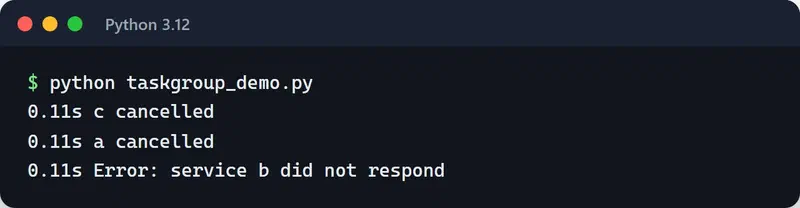
As soon as b raises, the group cancels the remaining tasks, waits for them to finish, and raises everything in an ExceptionGroup. The one-second sleep in c is cut short.
To see the order, I added an except CancelledError to fetch that prints a timestamp. b fails at 0.1 seconds, a and c are cancelled right away, and only then does the error reach the caller:
gather() still has a place. I use it with return_exceptions=True when I want "run everything, collect whatever comes back, failures included". Anywhere a failure should cancel the rest, I use TaskGroup.
Handling several failures with except*#
Several tasks in a group can fail at once. except* splits the ExceptionGroup by type:
try:
    async with asyncio.TaskGroup() as tg:
        tg.create_task(call_payment_api())
        tg.create_task(call_inventory_api())
except* TimeoutError as eg:
    log.warning("Timed out: %d tasks", len(eg.exceptions))
except* ConnectionError as eg:
    log.error("Connection errors: %s", eg.exceptions)
More than one except* branch can run for the same group. A plain except Exception also catches an ExceptionGroup, but then you have to unpack it yourself.
Put a timeout on every external call#
A socket that waits forever quietly kills a worker. Since Python 3.11 there is the asyncio.timeout() context manager, which reads better than wait_for:
async def get_price(client, symbol: str) -> float:
    async with asyncio.timeout(5):
        resp = await client.get(f"/ticker/{symbol}")
        return float(resp.json()["price"])
When the deadline passes, the work inside the block is cancelled and a TimeoutError comes out. If you need to move the deadline at runtime, there is asyncio.timeout_at() and the context manager's reschedule() method.
Cap concurrency with a Semaphore#
asyncio produces requests so quickly that you will hit the other side's rate limit almost immediately if you are careless. I have done this to exchange APIs more than once. A Semaphore caps how many tasks can be inside a block at the same time:
import asyncio
import httpx


async def fetch_all(urls: list[str], limit: int = 10) -> list[int]:
    sem = asyncio.Semaphore(limit)

    async with httpx.AsyncClient(timeout=10) as client:

        async def fetch(url: str) -> int:
            async with sem:
                resp = await client.get(url)
                return resp.status_code

        async with asyncio.TaskGroup() as tg:
            tasks = [tg.create_task(fetch(u)) for u in urls]

    return [t.result() for t in tasks]
Pass it a thousand URLs and at most ten requests are in flight. A semaphore limits concurrency, not requests per second. For a per-second limit you need something like a token bucket, which I wrote about in the API rate limiting post.
Don't block the event loop#
The most common asyncio bug is running synchronous, blocking code inside the loop:
import time


async def bad():
    time.sleep(5)  # the loop stops for 5 seconds, nobody gets a response
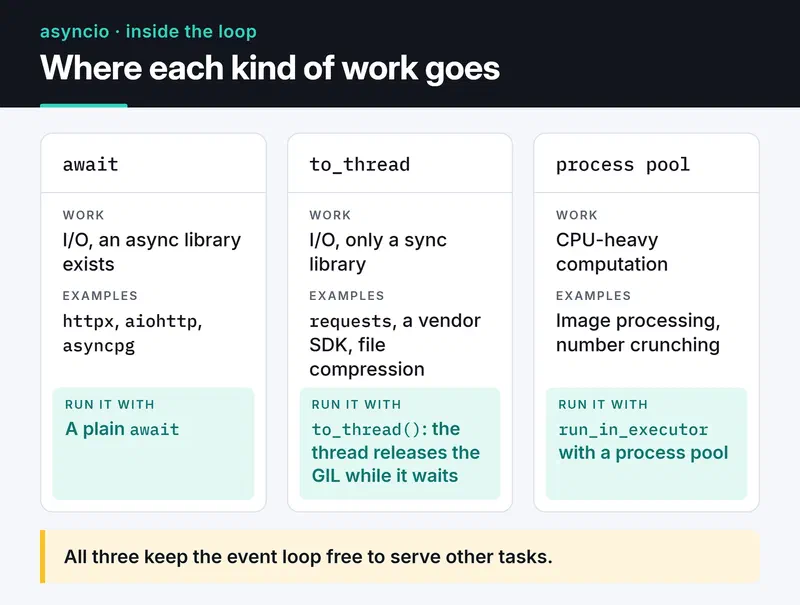
If you are stuck with a sync library (requests, a vendor SDK, file compression), push the call to a thread with asyncio.to_thread():
import asyncio
import requests


async def legacy_call() -> dict:
    resp = await asyncio.to_thread(requests.get, "https://httpbin.org/json", timeout=10)
    return resp.json()
That works for I/O because the thread releases the GIL while it waits. For CPU-bound work, use a ProcessPoolExecutor:
import asyncio
from concurrent.futures import ProcessPoolExecutor


def crunch(n: int) -> int:
    return sum(i * i for i in range(n))


async def main() -> None:
    loop = asyncio.get_running_loop()
    with ProcessPoolExecutor() as pool:
        result = await loop.run_in_executor(pool, crunch, 10_000_000)
    print(result)


if __name__ == "__main__":
    asyncio.run(main())
On a new project, pick async libraries from the start: httpx or aiohttp for HTTP, asyncpg or SQLAlchemy's AsyncSession for PostgreSQL. The card below is the decision I make for any piece of work that has to run from inside the loop.
Stream large data with async generators#
When pulling millions of rows from a paginated API, process one page at a time with async for instead of loading everything:
from collections.abc import AsyncIterator

import httpx


async def iter_pages(client: httpx.AsyncClient, url: str) -> AsyncIterator[list[dict]]:
    page = 1
    while True:
        resp = await client.get(url, params={"page": page})
        resp.raise_for_status()
        items = resp.json()
        if not items:
            return
        yield items
        page += 1


async def main() -> None:
    async with httpx.AsyncClient(timeout=10) as client:
        async for items in iter_pages(client, "https://api.example.com/trades"):
            print(len(items), "rows processed")
Only one page sits in memory at a time.
What Python 3.12, 3.13 and 3.14 added#
The asyncio changes from recent releases that I actually use:
- 3.12:
asyncio.eager_task_factory. If a coroutine can finish without suspending (a cache hit, say), it completes synchronously and never touches the loop. Code that spawns many short tasks can get noticeably faster. Turn it on withloop.set_task_factory(asyncio.eager_task_factory). - 3.12: general asyncio speedups; creating tasks and calling
current_task()got cheaper. - 3.13:
asyncio.Queue.shutdown(). Producer/consumer queues can be closed without pushing sentinel values. - 3.13:
asyncio.as_completed()works withasync forand yields the original task objects. - 3.14:
python -m asyncio ps <PID>andpython -m asyncio pstree <PID>attach to a running process and show which task is awaiting what. That used to need extra tools likeaiomonitor.
Finding the stall: debug mode#
The quickest way to find what blocks the loop is debug mode:
asyncio.run(main(), debug=True)The PYTHONASYNCIODEBUG=1 environment variable or python -X dev does the same. In debug mode every callback that runs longer than 100 ms gets logged (Executing <Task ...> took 0.512 seconds), and you get warnings for coroutines that were never awaited. Whatever function shows up in that line needs to move to to_thread or be rewritten with an async library.
For a one-line coroutine that calls time.sleep(0.5) under debug=True, Python 3.12 reported that the task took 0.500 seconds.
cProfile can mislead you on async code because it counts time spent waiting in await as time in the function. py-spy and yappi do better here; py-spy can even attach to a running process without restarting it.
Swapping the loop: uvloop#
uvloop is a drop-in event loop built on libuv. On Python 3.12 and later, the old uvloop.install() is replaced by:
import uvloop

uvloop.run(main())
Uvicorn picks up uvloop automatically when installed as uvicorn[standard]. The gain shows up in network-heavy services; in most apps the bottleneck is the database, not the loop. Measure before switching. uvloop also doesn't run on Windows.
Testing async code#
I use pytest-asyncio. With auto mode in pyproject.toml, every async test function just runs:
[tool.pytest.ini_options]
asyncio_mode = "auto"
from unittest.mock import AsyncMock
async def test_get_price():
client = AsyncMock()
client.get.return_value.json = lambda: {"price": "42.5"}
assert await get_price(client, "BTCUSDT") == 42.5Mock async functions with AsyncMock, not MagicMock, or the await line will fail. Fixtures, mocking and what changed in pytest 8 are in the pytest post.
Pre-production checklist#
- Does every external call have a timeout (
asyncio.timeoutor the client's own)? - Are the drivers really async, or is
requestsor a sync ORM being called inside the loop? - Do you keep a reference to tasks started with
create_task()? A task nobody references can be garbage-collected mid-flight. TaskGroup takes care of this for you. - Are tasks cancelled cleanly on SIGTERM? See the graceful shutdown post.
- Is work that must not be interrupted (writing a payment record, for example) wrapped in
asyncio.shield()? - Does logging block the loop? Under heavy logging, hand the writes to a thread with
logging.handlers.QueueHandler.
Where to go next#
Search your code for gather() and decide what should happen when one task fails. If the rest should be cancelled, move it to a TaskGroup. Then run once with debug=True and fix whatever shows up as blocking. If you need background jobs rather than in-process concurrency, the Celery and ARQ post is a good next step.
Official references: the asyncio docs and What's New in Python 3.14.


