

Almost every trading bot I've written ends up doing the same thing: pull OHLCV candles from an exchange and compute indicators and signals in pandas. When crypto analysis in pandas feels slow, Python is rarely the problem. The usual culprit is a Python loop hiding inside a DataFrame call.
This post works through a synthetic series of 500,000 one-minute BTC/USDT candles. Everything runs on pandas 3.1 and Polars 2.0, and the data generator is included so you can reproduce the timings yourself.
The test data#
You can pull real candles with CCXT, but a reproducible series is more useful for benchmarking. This generates a random-walk minute series:
import numpy as np
import pandas as pd


def make_ohlcv(n: int = 500_000, seed: int = 42) -> pd.DataFrame:
    rng = np.random.default_rng(seed)
    ts = pd.date_range("2024-01-01", periods=n, freq="min", tz="UTC")
    close = 60_000 * np.exp(np.cumsum(rng.normal(0, 0.0008, n)))
    open_ = np.concatenate([[close[0]], close[:-1]])
    spread = np.abs(rng.normal(0, 0.0005, n)) * close
    return pd.DataFrame({
        "timestamp": ts,
        "open": open_,
        "high": np.maximum(open_, close) + spread,
        "low": np.minimum(open_, close) - spread,
        "close": close,
        "volume": rng.gamma(2.0, 0.8, n),  # crypto volume is fractional
    })


df = make_ohlcv()
For live data, load the output of exchange.fetch_ohlcv("BTC/USDT", "1m") into a DataFrame with the same column names and convert with pd.to_datetime(df["timestamp"], unit="ms", utc=True).
iterrows vs apply vs vectorized code#
Take the simplest possible feature, close minus open for every candle:
# 1) iterrows: builds a Series object for every row
diffs = [row["close"] - row["open"] for _, row in df.iterrows()]

# 2) apply(axis=1): still calls a Python function per row
df["diff_apply"] = df.apply(lambda r: r["close"] - r["open"], axis=1)

# 3) vectorized: one NumPy operation
df["diff"] = df["close"] - df["open"]
I timed all three on 500k rows with time.perf_counter(). iterrows took over 65 seconds, apply 11 seconds, and the vectorized subtraction 14 milliseconds:
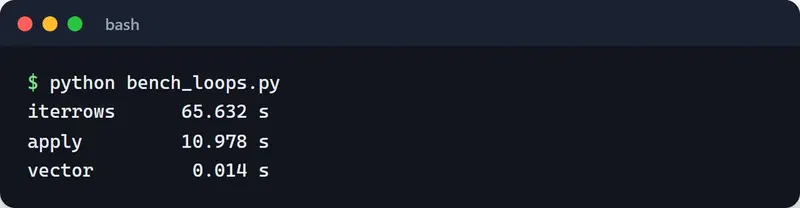
Your numbers will differ; the three orders of magnitude between them won't. People reach for apply because it looks like a pandas method, but with axis=1 it is a for loop with extra steps.
Whenever I see iterrows or apply(axis=1) in a review, I ask whether it can be written as column arithmetic, np.where, or shift. Usually it can.
Rolling windows and signals#
The moving-average crossover is the hello world of trading code, and it needs no loop:
df = df.set_index("timestamp")

df["ma_fast"] = df["close"].rolling(50).mean()
df["ma_slow"] = df["close"].rolling(200).mean()

above = df["ma_fast"] > df["ma_slow"]
# Only the crossing candle: above now, not above on the previous candle
df["golden_cross"] = above & ~above.shift(1, fill_value=False)

df["ret"] = df["close"].pct_change()
A common way to build the signal is np.where(ma_fast > ma_slow, "BUY", "SELL"). That gives you a state on every candle, not the moment of the cross, and a bot wired to it will try to buy again on every bar. Comparing against the previous bar with shift fixes that.
There's a quieter trap here too. rolling(50).mean() includes the current candle's close. That's fine if you act after the candle closes. A backtest that assumes you filled at that same close has peeked into the future (look-ahead bias). Shifting the signal by one bar (signal.shift(1)) is the cheapest guard.
Resampling minutes to hours is a one-liner:
hourly = df.resample("1h").agg(
    {"open": "first", "high": "max", "low": "min", "close": "last", "volume": "sum"}
)
Since pandas 2.2 the frequency aliases are lowercase: "h" instead of "H", "min" instead of "T". Older code still trips over the deprecation warning.
What changed in pandas 3#
Since pandas 3.0, Copy-on-Write is the default. In practice, a filtered slice now behaves like its own object:
sub = df[df["volume"] > 3]
sub["flag"] = True        # only sub changes; df is untouched
In pandas 2 this line raised the infamous SettingWithCopyWarning. Now there's no warning and the behavior is predictable. The flip side is that chained assignment such as df["close"][0] = 1 never modifies the original anymore. Use df.loc[...] when you mean to write.
The other big change is strings. Text columns now get the dedicated str dtype instead of object (backed by PyArrow when it's installed), which uses far less memory. For a handful of repeated values like symbol names, category is still the smallest option.
Dtypes and memory#
Casting volume to int32 is common memory advice, and for crypto it's wrong: BTC volume is fractional, so an integer cast truncates your data. Downcasting prices to float32 is risky as well. float32 holds about seven significant digits, so at a price of 60,000 the cents start to blur.
My rules now:
- Prices and volumes stay
float64. I round to the exchange's precision when placing orders anyway. - Repeated labels (symbol, exchange, signal name) become
category. - Timestamps are always timezone-aware UTC.
df["symbol"] = "BTC/USDT"
print(df.memory_usage(deep=True).sum() / 1e6, "MB")
df["symbol"] = df["symbol"].astype("category")
print(df.memory_usage(deep=True).sum() / 1e6, "MB")
When memory really becomes a problem, reading fewer columns saves far more than shrinking dtypes, which brings us to file formats.
Parquet instead of CSV#
CSV is text, stores no types, and gets parsed from scratch on every read, including that timestamp column you have to run through to_datetime again. Parquet is columnar, compressed and typed:
df.reset_index().to_parquet("ohlcv.parquet")

# Read only the columns you need
closes = pd.read_parquet("ohlcv.parquet", columns=["timestamp", "close"])
print(closes.dtypes)  # timestamp comes back as UTC
With columns=, only those columns come off the disk. Keeping months of candles in Parquet and loading just the close for analysis made the biggest single difference in my own bots.
Method chaining#
Chaining reads better than a trail of df1, df2, df3:
result = (
    df.reset_index()
    .dropna()
    .query("volume > 1")
    .assign(range_pct=lambda x: (x["high"] - x["low"]) / x["close"])
    .sort_values("range_pct", ascending=False)
    .head(5)
)
To inspect an intermediate step I drop in .pipe(lambda d: print(d.shape) or d). With Copy-on-Write, chains like this also stop producing needless copies.
Measure first#
Before optimizing anything, find out where the time goes. I use %timeit in Jupyter for single expressions and cProfile for whole scripts:
python -m cProfile -o profile.out analysis.py
snakeviz profile.out
SnakeViz draws the result as nested rings in the browser. In a terminal, pstats gives you the same numbers:
import pstats

stats = pstats.Stats("profile.out")
stats.sort_stats("cumulative").print_stats(10)  # the 10 most expensive call paths
# ncalls  : how many times the function was called
# tottime : time spent in the function itself
# cumtime : time including everything it called (the ring width in SnakeViz)
The slow part isn't always the math. File reads and date parsing can eat most of the runtime, which is exactly why guessing doesn't work. I go deeper on this in my Python profiling guide.
When Polars is worth it#
Polars is a DataFrame library written in Rust that runs on all cores and evaluates lazily. The same job looks like this:
import polars as pl

hourly = (
    pl.scan_parquet("ohlcv.parquet")
    .sort("timestamp")
    .group_by_dynamic("timestamp", every="1h")
    .agg(
        pl.col("open").first(),
        pl.col("high").max(),
        pl.col("low").min(),
        pl.col("close").last(),
        pl.col("volume").sum(),
    )
    .with_columns(pl.col("close").rolling_mean(window_size=24).alias("ma_24h"))
    .collect()
)
scan_parquet doesn't read anything yet; it builds a query plan. On collect(), Polars works out which columns it needs and reads only those.
At this size (500k rows) Polars didn't pull ahead at all. I wrote the same read, hourly aggregation and 24-hour mean in pandas with read_parquet, resample and rolling(24), then ran each version five times. The best times were 0.062 s for pandas and 0.087 s for Polars:
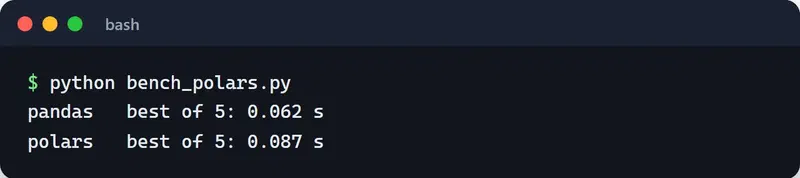
Polars pulls ahead once you're into millions of rows, multi-symbol group-bys, or files that don't fit in RAM.
So my split is simple. Code inside the bot, working on windows of a few thousand candles, stays in pandas, because CCXT, Freqtrade and the backtesting libraries all speak pandas. Batch jobs that clean and summarize months of raw data go to Polars. df.to_pandas() and pl.from_pandas(df) move data between the two.
Where to go next#
Grep your own code for three things: iterrows and apply(axis=1), historical data stored as CSV, and price or volume columns cast to float32 or integers. Fixing those usually buys more than switching libraries.
I show how this data feeds a live bot in building automated trading systems in Python, and how to test ML-based signals without fooling yourself in AI-powered trading strategies. The examples here are for learning; none of it is financial advice.


