

I've heard "ORMs are slow, just write SQL" many times, yet almost every slow ORM page I've debugged came from nobody looking at the SQL it generated. SQLAlchemy 2.0 is my default for relational databases in Python. This is the setup I use on MySQL and PostgreSQL: typed models with Mapped, async sessions, settings that stop N+1 queries before they ship, Alembic migrations and a connection pool that doesn't fall over. I ran the examples with Python 3.12 and SQLAlchemy 2.0.
How SQLAlchemy's layers fit together#
Your code talks to a Session, and the engine does the rest. The engine owns a dialect that knows the SQL flavor and a pool that holds connections, while the DBAPI driver does the actual network traffic.
SQLAlchemy lets you write queries that map closely to SQL, and when you do need raw SQL, text() runs in the same session.
Drivers and connection URLs#
Async needs an async DBAPI driver:
| Database | Driver | URL |
|---|---|---|
| MySQL / MariaDB | asyncmy or aiomysql | mysql+asyncmy://app:secret@localhost:3306/shop?charset=utf8mb4 |
| PostgreSQL | asyncpg | postgresql+asyncpg://app:secret@localhost:5432/shop |
| SQLite (tests, demos) | aiosqlite | sqlite+aiosqlite:///./shop.db |
On MySQL, always set charset=utf8mb4. The legacy utf8 charset is a 3-byte subset, and emoji and some other characters get mangled without an error.
Models with Mapped and mapped_column#
In 2.0, models are declared with Python type hints. Mypy and Pyright know user.email is a str and user.phone is str | None, and nullability is inferred from the type.
import asyncio
from datetime import datetime
from decimal import Decimal

from sqlalchemy import ForeignKey, Index, Numeric, String, func, select
from sqlalchemy.ext.asyncio import AsyncSession, async_sessionmaker, create_async_engine
from sqlalchemy.orm import (
    DeclarativeBase,
    Mapped,
    joinedload,
    mapped_column,
    relationship,
    selectinload,
)


class Base(DeclarativeBase):
    pass


class User(Base):
    __tablename__ = "users"

    id: Mapped[int] = mapped_column(primary_key=True)
    email: Mapped[str] = mapped_column(String(255), unique=True)
    full_name: Mapped[str] = mapped_column(String(100))
    phone: Mapped[str | None] = mapped_column(String(20))
    is_active: Mapped[bool] = mapped_column(default=True)
    created_at: Mapped[datetime] = mapped_column(server_default=func.now())

    orders: Mapped[list["Order"]] = relationship(back_populates="user", lazy="raise")


class Order(Base):
    __tablename__ = "orders"
    __table_args__ = (Index("ix_orders_status_created", "status", "created_at"),)

    id: Mapped[int] = mapped_column(primary_key=True)
    user_id: Mapped[int] = mapped_column(ForeignKey("users.id"), index=True)
    total: Mapped[Decimal] = mapped_column(Numeric(10, 2))
    status: Mapped[str] = mapped_column(String(20), default="pending")
    created_at: Mapped[datetime] = mapped_column(server_default=func.now())

    user: Mapped[User] = relationship(back_populates="orders", lazy="raise")
Two details matter here. The common default=datetime.utcnow pattern for created_at is outdated, because utcnow() is deprecated since Python 3.12. Letting the database set the timestamp with server_default=func.now() is more consistent anyway. Money is Numeric and Decimal, never float.
I declare indexes on the model. MySQL InnoDB indexes foreign key columns automatically, PostgreSQL doesn't, so index=True on user_id gives the same result on both. The composite index on status and created_at lives here too, and Alembic turns it into a migration.
Queries in 2.0 style#
session.query(User).filter(...) is the legacy API now. The 2.0 style uses select(), shared between Core and the ORM:
async def active_users_with_orders(session: AsyncSession) -> list[User]:
    stmt = (
        select(User)
        .where(User.is_active)
        .options(selectinload(User.orders))
        .order_by(User.created_at.desc())
    )
    return list(await session.scalars(stmt))


async def recent_orders(session: AsyncSession) -> list[Order]:
    stmt = select(Order).options(joinedload(Order.user)).order_by(Order.id.desc()).limit(50)
    return list(await session.scalars(stmt))
session.scalars() returns ORM objects rather than rows. For a single record I use session.get(User, 42) or (await session.scalars(stmt)).first().
N+1 queries and lazy="raise" in async code#
Say you list 100 orders and show order.user.email next to each. With lazy loading, that's one query for the orders and then one per order for its user: 101 queries. With five rows in development nobody notices. In production the page takes seconds.
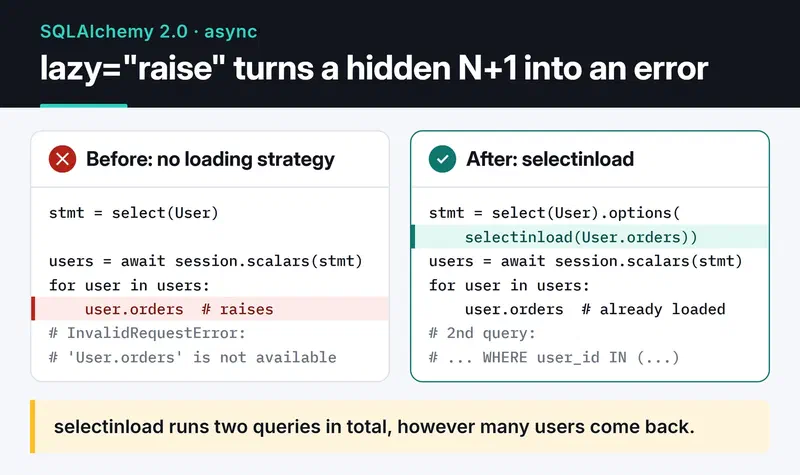
Async changes the picture. Implicit lazy loading doesn't work with AsyncSession, and touching an unloaded relationship raises MissingGreenlet. I turn that into an advantage by declaring relationships with lazy="raise". Wherever I forget to choose a loading strategy, I get a clear error instead of a confusing greenlet traceback:
InvalidRequestError: 'User.orders' is not available due to lazy='raise'The fix is to say in the query what to load:
selectinloadruns a second query,SELECT ... WHERE user_id IN (...), after the main one. It's my default for collections like a user's orders: two queries total and no duplicated rows.joinedloaddoes it in one query with aLEFT OUTER JOIN. It suits many-to-one relationships like an order's user. If the relationship is mandatory,joinedload(Order.user, innerjoin=True)gives a cheaperINNER JOIN.
The card below puts the error and the fix side by side.
Older examples often use joinedload on a collection, like joinedload(Order.items). In 2.0 that requires calling .unique() on the result or it raises, and every order comes back once per item. For collections, selectinload is simpler and moves less data.
create_async_engine(..., echo=True) in development is the cheapest way to catch N+1. The two functions above produce exactly three queries (column lists shortened):
SELECT users.* FROM users WHERE users.is_active = 1 ORDER BY users.created_at DESC
SELECT orders.* FROM orders WHERE orders.user_id IN (?)
SELECT orders.*, users_1.* FROM orders LEFT OUTER JOIN users AS users_1 ON users_1.id = orders.user_id ORDER BY orders.id DESC LIMIT ?
Writes and transactions#
async with session.begin() commits when the block succeeds and rolls back on an exception, so there's no commit() to forget:
engine = create_async_engine("sqlite+aiosqlite:///./shop.db", echo=True)
SessionLocal = async_sessionmaker(engine, expire_on_commit=False)


async def main() -> None:
    async with engine.begin() as conn:
        await conn.run_sync(Base.metadata.drop_all)
        await conn.run_sync(Base.metadata.create_all)

    async with SessionLocal() as session, session.begin():
        ada = User(email="ada@example.com", full_name="Ada Lovelace")
        ada.orders = [Order(total=Decimal("120.50")), Order(total=Decimal("75.00"))]
        session.add(ada)

    async with SessionLocal() as session:
        for user in await active_users_with_orders(session):
            print(user.full_name, [str(o.total) for o in user.orders])
        for order in await recent_orders(session):
            print(order.id, order.user.email)

    await engine.dispose()


asyncio.run(main())
I also ran this file against SQLite. The first command is a small script that reads user.orders without selectinload, and lazy="raise" stops it right away. The second turns on the same engine logging as echo=True and filters out everything but the SQL: one query for users, a single IN (?) query for all their orders, and the LEFT OUTER JOIN listing.
expire_on_commit=False is close to mandatory with async. By default, a commit expires every attribute and the next access tries to reload it, which again means MissingGreenlet. create_all is only here to keep the demo self-contained; in a real project Alembic owns the schema.
Migrations with Alembic#
You add a column, deploy, and the app crashes because the column doesn't exist in the database. Instead of connecting to production and typing ALTER TABLE by hand, I use Alembic. It ships an async template:
uv add alembic
uv run alembic init -t async migrations
Set target_metadata = Base.metadata in migrations/env.py and sqlalchemy.url in alembic.ini, then:
uv run alembic revision --autogenerate -m "add phone to users"
# read the generated file in migrations/versions/ before applying it
uv run alembic upgrade head
uv run alembic downgrade -1   # roll back if needed
Treat autogenerate as a first draft. It sees a column rename as "drop old column, add new one", which loses data, so write that by hand with op.alter_column(..., new_column_name=...). Adding a column to a large MySQL table can also lock it, so I run those migrations when traffic is low.
Connection pool settings#
Opening a TCP connection and authenticating on every request is expensive. The engine keeps a pool and reuses connections. Requests borrow a connection and return it, and when the pool is full a new request waits.
engine = create_async_engine(
    "mysql+asyncmy://app:secret@db:3306/shop?charset=utf8mb4",
    pool_size=10,        # connections kept open
    max_overflow=5,      # temporary extra connections under load
    pool_timeout=30,     # seconds to wait when the pool is exhausted
    pool_recycle=1800,   # replace connections older than 30 minutes
    pool_pre_ping=True,  # check a connection is alive before using it
)
pool_recycle matters a lot on MySQL. The server closes connections idle longer than wait_timeout (8 hours by default), and firewalls in between often cut them much sooner. When the app picks up a dead connection you get "MySQL server has gone away". pool_pre_ping catches that, and pool_recycle usually prevents it.
For sizing, I check that (pool_size + max_overflow) × number of processes stays under the database's max_connections. Three replicas with four workers each and the settings above already add up to 180. If you see "QueuePool limit reached", don't grow the pool first. The usual cause is a session that never gets closed or a blocking call inside async code. I cover the details in database connection pool optimization.
What's next#
Start by turning on echo=True in development, loading your busiest page once and counting the queries. To expose these models over HTTP, use the SessionDep pattern from building a REST API with FastAPI. To cache hot queries, see cache-aside in Redis caching and session management. The SQLAlchemy 2.0 asyncio docs and the Alembic docs are the references I keep open.


