

I run a Freqtrade bot. Like most people with a trading bot, I tell myself I don't check it all the time, and then I check it all the time: open FreqUI, click through tabs, look at one number, close the tab, open it again fifteen minutes later.
Claude was already open, and the bot already had a perfectly good REST API. So I wrote freqtrade-mcp, a TypeScript MCP server that exposes Freqtrade's REST API as MCP tools. It works with Claude Desktop, Claude Code, Cursor, Cline and anything else that speaks the Model Context Protocol. Version 1.0.0 went to npm on April 4, 2026.
What it does#
The questions I actually ask look like this:
"Am I up this month?"
"Are any open trades in the red?"
"What do the last 50 BTC/USDT candles on the 4h look like?"
Claude maps each question to a tool, reads the JSON that comes back from Freqtrade and summarizes it, so I don't have to parse numbers at 11pm. The tools fall into six groups:
| Group | Tools |
|---|---|
| Account | get_profit_stats, get_balance, get_performance |
| Trades | get_open_trades, get_trade, get_trade_history |
| Market data | get_market_data |
| Pair lists | get_whitelist, get_blacklist, add_to_blacklist, remove_from_blacklist |
| Execution | execute_trade, force_exit_trade |
| Lifecycle | start_bot, stop_bot, reload_config, get_bot_info, get_locks, delete_lock |
That's 19 tools in the code. The README still says 15, which is on my list to fix.
A few practical notes:
get_market_datauses Freqtrade's/pair_candlesendpoint, which returns the candle data the bot has analyzed. In practice that means pairs the bot is tracking, not any pair on the exchange.get_trade_historyandget_market_datareturn at most 500 rows.get_bot_inforeturns the bot version together with the time of the last strategy cycle. That answers "is the bot running, or has it been silently stuck?"
Architecture#
The server is a single Node.js process that talks stdio to the client and HTTP Basic Auth to Freqtrade under /api/v1:
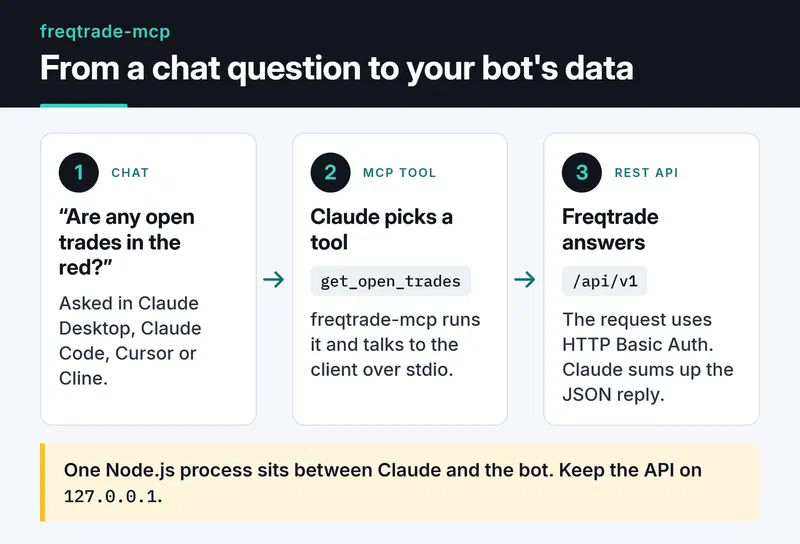
The code has three layers:
src/client.tsis a typed HTTP client for the Freqtrade API. It uses thefetchbuilt into Node 18+, aborts each request after 10 seconds with anAbortController, and puts Freqtrade'sdetailfield into the error message on non-2xx responses.src/tools/*.tshas one file per group, and each tool declares its parameters with a zod schema.src/index.tsbuilds the client from environment variables, registers the tools and connects aStdioServerTransport.
That keeps the repo small: the code under src/, a .env.example, and a .github/ folder for CI and the npm release.
A complete tool is this short:
server.tool(
  'get_trade',
  'Retrieve detailed information about a specific trade by its ID, including full history, fees, and profit/loss.',
  {
    trade_id: z.number().int().positive().describe('The numeric trade ID to look up.'),
  },
  async ({ trade_id }) => {
    try {
      const data = await client.getTrade(trade_id);
      return { content: [{ type: 'text', text: JSON.stringify(data, null, 2) }] };
    } catch (err) {
      return {
        content: [{ type: 'text', text: `Error fetching trade ${trade_id}: ${(err as Error).message}` }],
        isError: true,
      };
    }
  },
);
I return errors with isError: true instead of throwing them. The model sees "trade 42 not found", can tell the user something sensible, and the session stays up. The descriptions matter too, because they decide when the model picks a tool. For execute_trade I put natural-language examples like "buy 100 USDT of BTC" in the description, along with the parameters each one maps to.
If I started it today I'd change one thing: newer releases of the MCP TypeScript SDK recommend registerTool() over server.tool(). The server works fine on the 1.x SDK, but a new project should start with registerTool().
Setup#
First, turn on Freqtrade's REST API, which is off by default. In config.json:
"api_server": {
  "enabled": true,
  "listen_ip_address": "127.0.0.1",
  "listen_port": 8080,
  "verbosity": "error",
  "enable_openapi": false,
  "jwt_secret_key": "some-long-random-value",
  "username": "Freqtrader",
  "password": "YourStrongPassword"
}
Keep listen_ip_address at 127.0.0.1. Exposing the API to the internet puts your bot and your exchange account behind a single password. The Freqtrade docs say the same:

Then add the server to Claude Desktop's claude_desktop_config.json:
{
  "mcpServers": {
    "freqtrade": {
      "command": "npx",
      "args": ["-y", "@furkankoykiran/freqtrade-mcp"],
      "env": {
        "FREQTRADE_API_URL": "http://127.0.0.1:8080",
        "FREQTRADE_USERNAME": "Freqtrader",
        "FREQTRADE_PASSWORD": "YourStrongPassword"
      }
    }
  }
}
Restart Claude Desktop and the tools show up. With Claude Code it's one command:
claude mcp add freqtrade \
  -e FREQTRADE_API_URL=http://127.0.0.1:8080 \
  -e FREQTRADE_USERNAME=Freqtrader \
  -e FREQTRADE_PASSWORD=YourStrongPassword \
  -- npx -y @furkankoykiran/freqtrade-mcp
To poke at the tools before wiring them into a client, use the MCP Inspector: npx @modelcontextprotocol/inspector npx -y @furkankoykiran/freqtrade-mcp.
Live trading caveats#
execute_trade and force_exit_trade skip the strategy and call Freqtrade's /forceenter and /forceexit endpoints directly. The server has no confirmation step.
If the bot is live, these tools place a real order on a real exchange, and you can't take it back.
Things to know before you rely on it:
- Freqtrade only accepts
/forceenterwhen the config hasforce_entry_enable: true. Without it,execute_tradereturns an error. Turning that on should be a deliberate choice. side: "short"only makes sense for bots running in futures or margin mode. You can't short in spot mode.- Try everything with
dry_run: truefirst. Freqtrade simulates the orders, so you can see how the tools behave without risk. - Claude Desktop and Claude Code ask for permission before tool calls. I never pick "always allow" for the tools that place orders.
Where the code is#
What I wanted was simple: check the bot without opening FreqUI. The REST API was already there; the MCP server moved it into the chat. I still wonder whether something changed while I wasn't looking, but now finding out takes one sentence.
The code is MIT licensed and on GitHub, with a summary on my project page. Before you point it at your own bot, run it for a week with dry_run: true and compare what get_profit_stats and get_open_trades report with FreqUI. To see a different MCP integration, where I wrapped someone else's MCP server as a CLI, read my CLI-Anything contribution. If your Python services lean on async I/O the way trading bots do, the asyncio guide is a good next read.


