

In March 2026 I sent a pull request that added browser automation to CLI-Anything. PR #118 became the project's first harness that talks to an MCP server instead of calling an application directly. This post covers how the harness is built, what came up in review, and the bugs that only showed up after it was merged.
CLI-Anything's premise is that if you wrap software in a clean command-line interface, AI agents can drive it. The repo has "harnesses" for GIMP, Blender, LibreOffice and dozens of other tools. Browsers were missing.
Issue #90: browsing a page like a filesystem#
On March 16, @apireno, the author of DOMShell, opened issue #90. DOMShell is a Chrome extension plus MCP server that exposes Chrome's Accessibility Tree as a virtual filesystem, so an agent moves through a page with ls, cd, grep and click. In apireno's benchmarks with Claude, this cut API calls by half compared with screenshot-based browsing. That number is his; I didn't measure it myself.
The Accessibility Tree is the simplified tree the browser derives from the DOM for screen readers. Each node has a role such as button, link or textbox, and the CSS classes and wrapper divs are gone. That makes it less brittle than CSS selectors when a site's markup changes, and the page → section → element hierarchy maps cleanly onto directories.
In the issue thread, @omerarslan0 sketched an integration: DOMShell's MCP server as the backend, command groups like page on the CLI side, and state (URL, working directory) kept by the CLI. apireno asked to keep the filesystem-style commands rather than switch to selectors, and recommended the official mcp Python SDK over stdio. I built on that discussion and opened the PR on March 21.
How the harness is built#
Most harnesses shell out to an application or call its API. This one puts an MCP client in the middle:
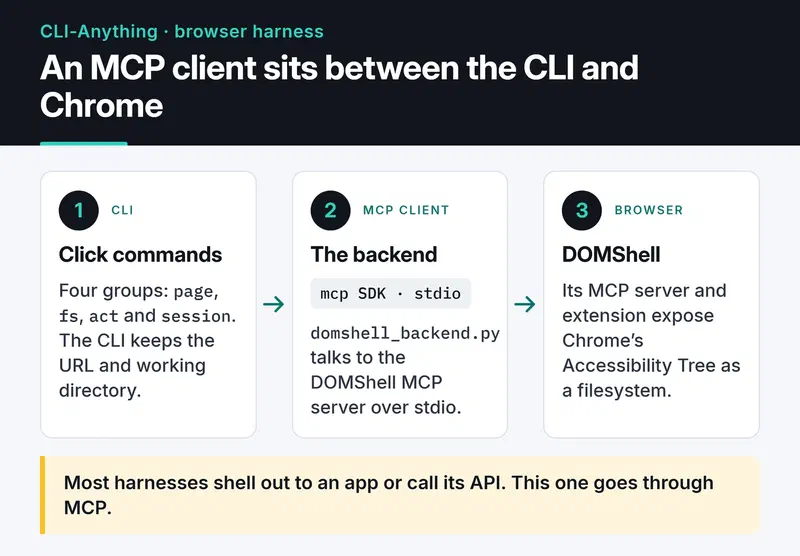
There are four command groups:
page: open, reload, back, forward, infofs: ls, cd, cat, grep, pwdact: click, typesession: status, daemon-start, daemon-stop
In use:
cli-anything-browser page open https://example.com
cli-anything-browser fs ls /
cli-anything-browser fs grep "Login"
cli-anything-browser act click /main/button[0]
cli-anything-browser --json fs ls /
Every one-shot command starts a fresh session. Stateful flows, like cd followed by a bare ls, belong in the REPL, which opens when you run cli-anything-browser with no arguments.
The MCP call in Python#
When I wrote the PR, DOMShell exposed one MCP tool per command (domshell_ls, domshell_click and so on). DOMShell 2.0 collapsed those into a single domshell_execute tool, and the harness was updated for it. A minimal client for DOMShell 2.x looks like this:
import asyncio
import os

from mcp import ClientSession, StdioServerParameters
from mcp.client.stdio import stdio_client

params = StdioServerParameters(
    command="npx",
    args=[
        "-p", "@apireno/domshell", "domshell-proxy",
        "--port", os.environ.get("DOMSHELL_PORT", "3001"),
        "--token", os.environ["DOMSHELL_TOKEN"],
    ],
)


async def main() -> None:
    async with stdio_client(params) as (read, write):
        async with ClientSession(read, write) as session:
            await session.initialize()
            result = await session.call_tool(
                "domshell_execute", {"command": "ls", "group_id": "new"}
            )
            print(result.content[0].text)


asyncio.run(main())
domshell-proxy is a stdio bridge to a DOMShell server that is already running, and DOMSHELL_TOKEN is the token that server prints at startup. group_id: "new" asks DOMShell 2.x for an isolated tab group for the agent. None of this was in my original PR, and the section after the review explains why.
A sync CLI on top of an async SDK#
The MCP Python SDK is fully async and Click commands are sync, so each command opens a short session inside asyncio.run() and closes it. The cost is spawning an npx subprocess on every command. To avoid that during interactive use I added a daemon mode: while the REPL runs, one MCP connection stays open and every command reuses it. It only works inside a single process. Separate CLI invocations don't share it, and the README says so.
Tests#
Two layers. The 31 unit tests in test_core.py mock MCP responses and cover path resolution and session state, with no Chrome needed. The end-to-end tests in test_full_e2e.py drive a real Chrome with the DOMShell extension and only run when you ask for them:
pytest cli_anything/browser/tests/test_core.py -v
DOMSHELL_E2E=1 pytest cli_anything/browser/tests/test_full_e2e.py -v
The DOMSHELL_E2E gate came out of a Copilot comment. Before it, pytest could try to run npx during test collection.
Review#
Copilot reviewed the PR twice, with 10 comments and then 9. The ones that mattered most:
- A context manager leak in daemon mode.
_start_daemon()called__aenter__onstdio_client(...)without keeping a reference, and_stop_daemon()called__aexit__on a brand-new client, so the original subprocess never shut down. I now keep the reference in a module-level_daemon_client_context. page backandpage forwardreplayed navigation from a local history list, which is always empty in one-shot mode. They now call DOMShell's own back and forward tools.- The REPL split quoted arguments.
act type /path "Hello, World!"now goes throughshlex.split(). act typeechoed the typed text, which leaves passwords in terminal scrollback. It no longer does.fs cdonly updates the working directory when the backend reports success.
omerarslan0 listed 8 issues in his first review, all of which earlier commits had already fixed. I replied with the commit for each one, and he checked and approved. @yuh-yang asked me to fix the contributor field in registry.json, then approved and merged on March 22. Final size: 15 commits, 21 files, 3,095 lines added:

cli-anything-plugin/HARNESS.md so the next MCP integration has something to follow.
What broke after the merge#
I learned the most from this PR after it was merged. Right after the merge, apireno tested the harness against a real DOMShell server. All 31 unit tests passed and 9 of 10 end-to-end tests passed, but several commands failed when he used them by hand:
- In one-shot mode every command started a new
npx @apireno/domshellprocess, which tried to bind ports 9876 and 3001. If another client such as Claude Desktop was already running DOMShell, every command failed. - I was sending the wrong parameter names to some tools (
ls,cat,click). - DOMShell didn't support
--version, which my availability check relied on. apireno fixed that on the DOMShell side.
apireno fixed the port and parameter problems in PR #135, merged on March 24, which moved the connection to the domshell-proxy bridge with token auth. My unit tests passed because they mocked a server interface that didn't match the real one. Pulling the tool schemas from the server with list_tools and building the mocks from them would have caught this before review.
Security hardening in PR #156#
After I shared the contribution on LinkedIn, Ilhan Goktas pointed out several attack surfaces: SSRF through arbitrary navigation, prompt injection hidden in ARIA labels, and escaping the virtual filesystem. I followed up with PR #156, which omerarslan0 merged on April 7.
It added:
- URL validation that blocks
file://,javascript:,data:andvbscript:schemes - Optional blocking of private network addresses, switched on with an environment variable
- A basic sanitizer for known prompt injection patterns in page content
- 42 security tests, plus security notes for agents in
SKILL.md
The sanitizer catches obvious patterns and nothing more. If you give an agent a browser, treat every piece of page text as untrusted input.
Where the code went next#
I wrote the harness, and most of the code that runs now has been through other hands since. apireno did the DOMShell 2.0 migration and the fixes after it, and other contributors followed. That's normal for open source, and it's a good reason to write code that's easy for the next person to change.
What I took away from this PR:
- When you wrap an MCP server, run at least one end-to-end test against the real server before asking for a merge.
- When you bridge an async SDK into a sync CLI, keep the connection lifecycle in one place. That's where the leaks come from. I go deeper into the asyncio side in my asyncio guide.
- Answer review comments with the commit hash for each fix. It makes the reviewer's job much easier.
Where to go next#
The code is in browser/agent-harness. For an MCP server I built from scratch, read the freqtrade-mcp post. For another open source contribution, with a very different codebase, see my Keploy contribution.


