

If sending the welcome email takes three seconds after someone hits "sign up", the user waits three seconds. If the mail server is down at that moment, the signup fails too. The fix hasn't changed in years: an async task queue. The HTTP request finishes fast, and the heavy work (emails, reports, image processing) goes to background workers.
In Python, the classic tool for this is Celery. For asyncio projects, Arq stood out for a while as a lightweight alternative. This post compares the two, but most of it is about the distributed systems problems you hit with either one: tasks that run twice, tasks that disappear, and transaction boundaries.
How a task queue fits together#
Both tools have the same moving parts, shown in the diagram below.
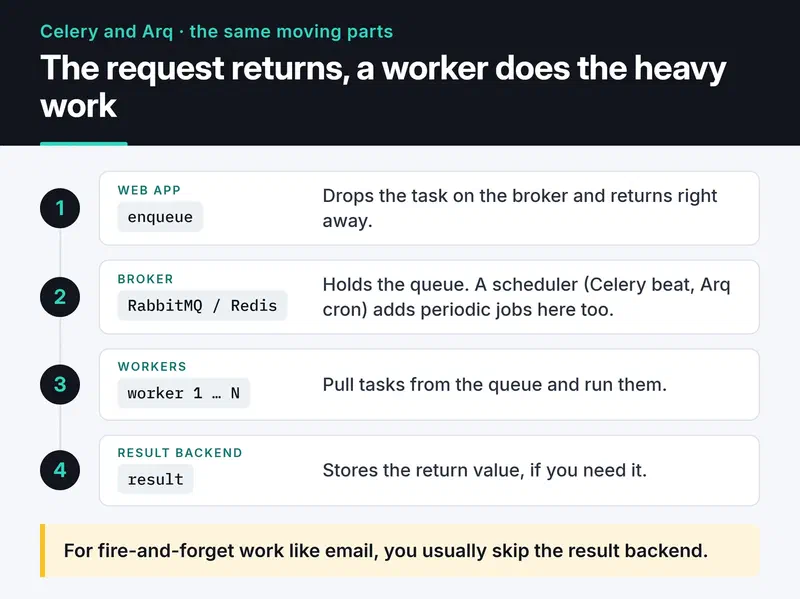
The web app drops a task on the broker and returns right away. Workers pull tasks from the queue. If you need the return value, it goes to a result backend; for fire-and-forget work like email you usually don't.
Celery: powerful, with dangerous defaults#
Celery works with RabbitMQ, Redis, SQS and other brokers. With chains, groups and chords for workflows, beat for scheduling and Flower for monitoring, it's still the most complete option.
The price is that a lot of settings have to be right. By default Celery acknowledges a task as soon as a worker receives it. If the worker dies halfway through, the task is gone. My starting point in every project:
# celery_app.py
from celery import Celery

app = Celery(
    "proj",
    broker="amqp://guest:guest@localhost:5672//",
    include=["tasks"],
)
app.conf.update(
    task_acks_late=True,  # ack when the task finishes, not when it starts
    task_reject_on_worker_lost=True,  # requeue if the worker process dies
    worker_prefetch_multiplier=1,  # fair distribution for long tasks
    task_soft_time_limit=240,
    task_time_limit=300,
    result_expires=3600,
)
With task_acks_late, tasks run "at least once". The same task can run twice, and your code has to survive that (see the idempotency section below). Without worker_prefetch_multiplier=1, a slow worker hoards ten tasks while a fast one sits idle. For short jobs like email, 4 or 8 is fine.
Time limits come in two levels. When the soft limit hits, SoftTimeLimitExceeded is raised inside the task, so you get a chance to clean up. When the hard limit hits, the worker process is killed and replaced. Both work with the prefork pool and not on Windows.
Choosing a broker#
RabbitMQ is still the most solid broker for Celery: strong acknowledgements and flexible routing. Celery 5.5 added quorum queue support, and on a new RabbitMQ setup quorum queues make sense over classic ones, but ETA tasks behave differently with them, so read the notes in the Celery docs first.
If you use Redis as the broker, know one setting: visibility_timeout. With the Redis broker, an unacknowledged task that hasn't finished within this window (one hour by default) gets handed to another worker. Combined with acks_late, a three-hour report task ends up running on two, then three workers at once. Set it longer than your longest task:
app.conf.broker_transport_options = {"visibility_timeout": 4 * 3600}If Redis persistence is off, queued tasks vanish when Redis restarts.
Celery and async code#
Celery tasks are synchronous functions; there's no built-in support for async def tasks. Calling .delay() from an async app like FastAPI works (publishing a message is quick), but if the task itself needs asyncio libraries, you either wrap it in asyncio.run() or pick an async queue.
Arq: a lightweight option for asyncio#
Arq is built on asyncio and Redis. Workers run coroutines, so one process can handle many I/O-bound jobs (HTTP calls, database queries) concurrently. In Celery you'd need the gevent or eventlet pool for that.
Arq's README marks the project as "maintenance only mode" and points to issue #510 for the reasoning.
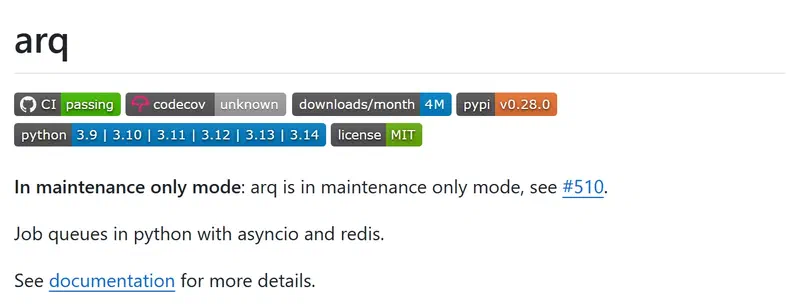
Bug fixes and releases still happen, but don't expect new features. That's no reason to tear out a working Arq setup; for a new project, choose it knowingly. If you want an actively developed async alternative, Taskiq and SAQ are worth a look.
An Arq worker:
# tasks.py
import httpx
from arq import Retry
from arq.connections import RedisSettings


async def startup(ctx):
    ctx["http"] = httpx.AsyncClient(timeout=10)


async def shutdown(ctx):
    await ctx["http"].aclose()


async def send_welcome_email(ctx, user_id: int, email: str) -> None:
    resp = await ctx["http"].post(
        "https://mail.example.com/send",
        json={"to": email, "template": "welcome"},
        headers={"Idempotency-Key": f"welcome-{user_id}"},
    )
    if resp.status_code >= 500:
        # retry after 10, 20, 30... seconds
        raise Retry(defer=ctx["job_try"] * 10)
    resp.raise_for_status()


class WorkerSettings:
    functions = [send_welcome_email]
    on_startup = startup
    on_shutdown = shutdown
    redis_settings = RedisSettings(host="localhost")
    job_timeout = 60
    max_tries = 5
Start the worker with arq tasks.WorkerSettings. The producer side:
import asyncio

from arq import create_pool
from arq.connections import RedisSettings


async def main():
    redis = await create_pool(RedisSettings())
    job = await redis.enqueue_job(
        "send_welcome_email", 42, "ali@example.com", _job_id="welcome:42"
    )
    if job is None:
        print("Already queued, running, or its result is still stored")


asyncio.run(main())
Passing _job_id stops the same job from being enqueued twice: if a job with that ID is queued, running, or still has a stored result, enqueue_job returns None. Creating the HTTP client once in startup and sharing it through ctx is also much cheaper than opening a new connection per job.
Distributed systems traps#
Idempotency: your task will run twice#
A network blip means the ack never reaches the broker, so the broker hands the task to another worker. Or the worker dies right after finishing the task but before acking it. Any system with at-least-once delivery can run the same task twice. Two welcome emails are annoying; charging a balance twice is a serious bug.
Make tasks idempotent: running them once or five times should give the same result. A simple Redis guard with Celery:
# tasks.py
import httpx
import redis

from celery_app import app

r = redis.Redis()


@app.task(
    autoretry_for=(httpx.TransportError, httpx.HTTPStatusError),
    retry_backoff=True,
    retry_jitter=True,
    max_retries=5,
)
def send_welcome_email(user_id: int, email: str) -> None:
    key = f"email:welcome:{user_id}"
    if not r.set(key, "sending", nx=True, ex=3600):
        return  # another run claimed or finished this job
    try:
        resp = httpx.post(
            "https://mail.example.com/send",
            json={"to": email, "template": "welcome"},
            headers={"Idempotency-Key": f"welcome-{user_id}"},
            timeout=10,
        )
        resp.raise_for_status()
    except Exception:
        r.delete(key)  # failed, let the retry try again
        raise
    r.set(key, "sent", ex=7 * 24 * 3600)
This has a gap: if the email goes out but the worker dies before writing sent, the guard expires after an hour and the job can run again. That's why sending an Idempotency-Key header, when the other service supports one, is the most reliable option; the receiver catches the duplicate. For money, use a unique constraint in your database, not a Redis lock.
Transaction boundaries#
You insert the user, then enqueue a task. If the transaction rolls back, the queue holds a task for a user that doesn't exist. The reverse happens too: the task runs before the transaction commits and can't find the user.
Enqueue only after the transaction commits. In Django, transaction.on_commit(lambda: send_welcome_email.delay(user.id, user.email)) does that, and since Celery 5.4 Django tasks have the shortcut send_welcome_email.delay_on_commit(...). Outside Django, use the outbox pattern for tasks you can't afford to lose: write the task to an outbox table in the same transaction and have a separate process read it and publish to the queue.
Cap your retries#
Infinite retries turn a permanent error into permanent load. Use max_retries with retry_backoff in Celery and max_tries with Retry(defer=...) in Arq. Tasks that run out of attempts should be logged and visible somewhere. Retrying permanent errors like a 4xx is pointless too; the example above retries every HTTPStatusError for brevity, but real code should limit retries to 5xx. Structured logs with the task ID bound to every line make those failures much easier to trace; my Python logging post shows how.
Monitoring#
For Celery, Flower shows tasks and worker state live. I also like exporting metrics to Prometheus and watching them in Grafana. Three metrics matter most:
- Queue depth: if pending tasks keep growing, you need more workers.
- Wait time: how long a task sits in the queue before it starts.
- Failure rate: failed tasks and tasks that exhausted their retries.
I cover alert rules and PromQL in my Prometheus and Grafana post.
Circular imports in Celery#
A classic beginner error: tasks.py imports models.py, and models.py imports tasks.py to trigger a task after save. Result: ImportError. Fixes:
- Define tasks with
@shared_taskand callapp.autodiscover_tasks()on the Celery app, so task modules don't have to import the app object. - Trigger tasks from a service layer or from
on_commitinstead of from inside the model. - As a last resort, move the import inside the function.
Which one to pick when#
Pick Celery if:
- you need RabbitMQ's delivery guarantees,
- you have complex workflows (chains, chords, routing to separate queues),
- the project is a synchronous Django or Flask app.
Pick Arq or another async queue if:
- the app is asyncio-based, like FastAPI, and tasks mostly wait on I/O,
- Redis is already in your stack and you don't want to run another broker,
- you accept depending on a project in maintenance mode (for Arq), or you look at actively developed options like Taskiq or SAQ.
If you run RabbitMQ yourself, my RabbitMQ post covers the broker side. Whichever tool you choose, the day-one checklist is the same: set time limits, cap retries, write tasks that survive running twice, and watch queue depth.


